Defining the system
Select/Open the storage system to update or select the
Add Product to define another storage system, shown in
Figure 322 on page 376. The Storage Portfolio Selector is displayed.

Figure 322 Updating or adding a storage system to a project model
To select a product, follow these steps:
1. Click the IBM Storage Virtualize Family from the Filtering Options within
the left margin.
2. Select the tile of the storage model that you need.
IBM Storage Virtualize product options:
– SAN Volume Controller options
– FlashSystem 5300 options
– FlashSystem 5200 options
– FlashSystem 5100 options1
– FlashSystem 5045 options
– FlashSystem 5035 options2
– FlashSystem 5015 options
– Storwize V5000 options3
– Storwize V5000E options4
– FlashSystem 5100 options5
– FlashSystem 7300 options
– FlashSystem 7200 options6
– Storwize V7000 options7
– FlashSystem 9500 options
– FlashSystem 9200 options8
3. The New Storage System dialog box is displayed.
4. Name the new system, and click Submit.
For more details about adding a product, see “Hosts tab (configure the hosts in a project)” on page 48.
For more details about adding a product, see “Hosts tab (configure the hosts in a project)” on page 48.
Projects / project_name / Products list
When you are updating or adding a system, you reach the System tab. This tab is the first in a set of four tabs:
|
Tabs of the Projects / project_name / Products view
|
|||
|
System
|
Adapters
|
Capacity
|
Report
|
|
Note: Click any of the following links to learn about the other tabs in this view:
|
The System tab is where the Storage System type, I/O groups and System Memory/ I/O Group are defined. The pair of nodes within any single control enclosures is what is known as an
Input/Output (I/O) group,
Figure 323 on page 378.
A disk array (defined in the next step) must be assigned to one dedicated I/O group. At this point, you can define and update the configuration as follows:
▪Update the project or storage device name at any time. Select the edit icon to the right of the project/device name, as shown in
Figure 323 on page 378. Type in the new name, then click
Submit.
▪Version
▪Site Assignment: A Default site is assigned. By selecting the add icon “+” you can add additional sites. Refer to section
“Sites tab (display details on project sites)”
for details.
▪I/O groups: Specify the quantity of I/O groups you want to model. Number of I/O groups available will vary by device.
▪System Memory / I/O Group: Specifies the amount of system memory per I/O group. The system memory will vary by device.
See
“Capacity units (overview of decimal multiplier prefixes)”
for information on GiB. This parameter has no impact on the capacity configuration itself.
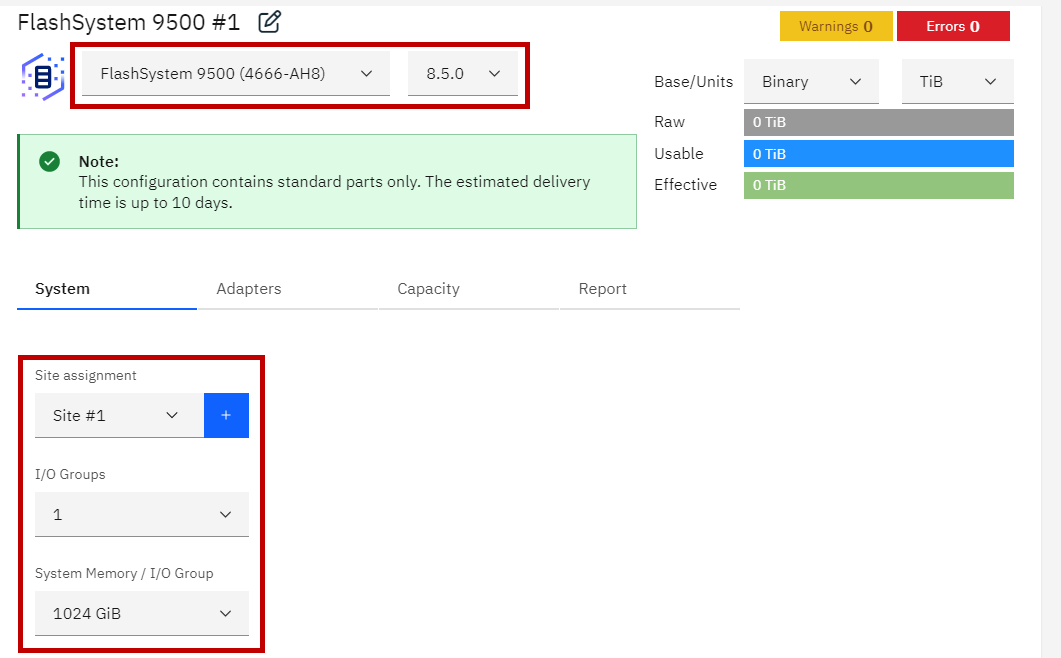
Figure 323 System tab
|
Note: If you attempt to change a storage product model after it is defined, Storage Modeller displays information and error messages as shown in
Figure 324
and
Figure 325.
|
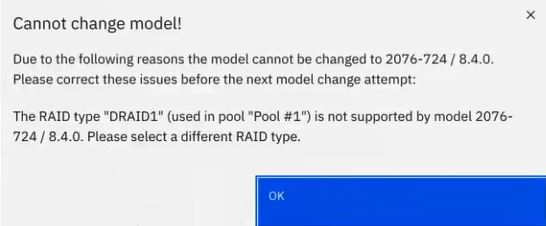
Figure 324 Model change error message

Figure 325 Model change informational message
|
Note: When you add or modify a storage product for a project, select the Project name to access the Products view. From the Products view, you can add
additional storage products to the project.
|
1 Withdrawn from Marketing
2 Withdrawn from Marketing
3 Withdrawn from Marketing
4 Withdrawn from Marketing
5 Withdrawn from Marketing
6 Withdrawn from Marketing
7 Withdrawn from Marketing
8 Withdrawn from Marketing