News
Abstract
IBM i 7.5 - TR8 Software Enhancements
Content
| IBM i 7.5 - Enhancements timed with Technology Refresh 8 (TR8) |
Note: The announcement materials for IBM i 7.5 TR8 can be found here.
The remainder of this landing page intends to make it easy to see the supporting detail for these enhancements.
Db2 for i Enhancements Note: The following Db2 for i enhancements are delivered by Db2 for i PTF Group SF99950 Level 12 |  |
Db2 for i - Database Engineer (DBE) enhancement
IBM i Services (new)
- QSYS2.CREATE_DATA_JOURNAL_READER()
- QSYS2.GEOGRAPHIC_MIRRORING_INFO
- SYSTOOLS.AUDIT_JOURNAL_JD()
- SYSTOOLS.AUDIT_JOURNAL_RU()
- SYSTOOLS.CHECK_COMMAND_SYNTAX()
- SYSTOOLS.CVE_INFO()
- SYSTOOLS.GROUP_PTF_CURRENCY_LOCAL()
- SYSTOOLS.JOB_NAME
- SYSTOOLS.JOB_NUMBER
- SYSTOOLS.JOB_USER
- SYSTOOLS.JOB_NAME_DETAILS
- SYSTOOLS.OVERRIDE_INFO_ALL
IBM i Services (enhanced)
- QSYS2.JOBLOG_INFO
- QSYS2.QCMDEXC()
- QSYS2.SCHEDULED_JOB_INFO
- QSYS2.SYSDISKSTAT()
- QSYS2.SYSDISKSTAT
- QSYS2.SYSTEM_STATUS()
- QSYS2.SYSTEM_STATUS_INFO
- QSYS2.SYSTEM_STATUS_INFO_BASIC
- SYSTOOLS.GENERATE_SPREADSHEET()
IBM i Migrate While Active
- IBM i continues to enhance high‑availability and planned maintenance capabilities with new enhancements to IBM i Migrate While Active, helping clients significantly reduce planned downtime during system maintenance and upgrades.
- Migrate While Active enables customers to create and maintain a synchronized target copy of a production IBM i system while applications continue to run and changes continue to occur on the source system. Customers can perform maintenance activities, including operating system upgrade, on the target system while production workloads remain active. When maintenance is complete, a controlled role swap can be performed with minimal outage.
- To increase flexibility and deployment choice, IBM i Migrate While Active now supports additional methods for creating the target system copy. In addition to existing save/restore and manual methods, customers can now leverage external storage-based replication technologies, including FlashCopy® and Global Copy, where available.
- New estimation and user experience enhancements allow the user to more easily plan and navigate through the migration phases.
- These enhancements provide customers with greater flexibility, improved availability, and additional options for performing planned maintenance and system migrations with reduced business disruption.
IBM i Platform Support Details
IBM i 7.5 TR 8 PTF Group includes support for the new Entry level Power11 server for IBM i Software Tier P05 customers:
- IBM Power S1112
- #EC7W, #EC7Y - 800GB SSD PCIe4 NVMe U.2 module
- #ECT0, #ECT4 - Enterprise 1.6TB SSD PCIe4 NVMe U.2 module
- #ECT1, ECT5 - Enterprise 3.2TB SSD PCIe4 NVMe U.2 module
- #ECT2, ECT6 - Enterprise 6.4TB SSD PCIe4 NVMe U.2 module
- #ECT3, ECT7 - Mainstream 15.3TB SSD PCIe4 NVMe U.2 module
- #EAPE, #EAPF - PCIe5 x16 2-port 200 GbE RoCE adapter
- #EAPC, #EAPD - PCIe4 x16 4-port 25/10/1 GbE RoCE SFP28 adapter
- Both native and VIOS client support for the IBM TS7785 Virtual Tape library
The support for these Functional Enhancements is included in the IBM i 7.5 TR8 PTF Group:
- Virtual Ethernet Multi-Queue support
- Configurable Secure Access for Linux Remote Virtual Consoles
IBM Backup, Recovery and Media Services for i (BRMS) (5770-BR2)
What’s New in BRMS GUI Version: 2026.2.0
- BRMS Log —
- Filter by severe messages, highlighting message IDs considered critical and capable of causing a control group to fail.
- Filter by messages that contain "objects not saved" text.
- Backup History Management —
- New views showing object-level and file-level details.
- Ability to restore from an object level when object detail was included in the save
- Ability to restore Link data from a file level when object detail was included in the save
- Backup List Management —
- Ability to add, copy and remove Backup Lists
- Ability to edit Backup List entries
- SQL View Documentation —
- Added documentation link on the SQL Views
- Administration —
- Added a new role-based usage type: *SYSOPR
- Allows read/view access to media and backup information
- Allows capability to perform backup and restore operations
- Restrict change, copy, and remove actions unless the user owns the BRMS item
These and other enhancements are described in the Enhancements to BRMS landing page.
Rational Development Studio (5770-WDS)
Rational Development Studio 5770-WDS continues to respond to the requirements from the user community to meet the needs of our RPG applications. The following new features have been added:
Assertion operations ASSERT-F and ASSERT-T
Assertion operations provide a self-documenting way to verify correctness.
 assert-f cust_id = 0 %msg('Customer ID cannot be zero');
 assert-t %upper(name) = name %msg('The name should already be upper case');
The ASSERT Control keyword sets the mode for processing assertion statements.
- The assertion operation codes allow you to do assertion-based coding.
- During development of your application, you operate in ASSERT(*EXCP) mode so your application fails immediately with an exception if an assertion fails.
- After your application is deployed, if you don't want your application to fail immediately:
- Use *WARN mode if you want the information about the failed assertion to appear in the joblog to aid in problem determination later.
- Use *NONE to completely disable the assertion statements.
- Assertion statements in ASSERT(*CALL:prototype-name) mode may be useful in a unit-testing environment since the specified program or procedure is called for every assertion statement indicating whether the assertion succeeded or failed.
- The assertion operation codes allow you to do assertion-based coding.
You can specify a generic message ID for ON-EXCP
The generic message ID can end with an asterisk. For example, 'ABC*' monitors for any message ID beginning with 'ABC'.
 MONITOR;
    ...
 ON-EXCP 'ABC*';
    ...
 ENDMON;
You can define an item like a single field in an external file
Use the LIKE(*EXT) keyword. Either the short name or the alternate name can be specified for the external field name.
 DCL-S salary1 LIKE(*EXT : 'EMPSALARY' : 'MYFILE');
 DCL-S salary2 LIKE(*EXT : 'EMPLOYEE_SALARY' : 'MYFILE');
You can search an array or table for the first element that is not equal to the search argument
Use the %LOOKUPNE built-in function to search an array and use %TLOOKUPNE to search a table.
- You can search an array or table for the first element that is not equal to the search argument
The latest details can be found at the RPG Cafe.
System Management The Access Client Solutions and the web-based Navigator continue to be enhanced as we strive to help the IBM i Administrator manage and update their IBM i systems. |  |
The following enhancements to Navigator are included in the Q2 2026 PTFs which released in the HTTP group updates 6/29/2026. See Navigator for i PTF update details for more information.
This release has the following new features and enhancements:
- Framework
- Navigator for i on IBM i 7.6 or 7.5 will run with Java 21 if available.
- New left-side launch with overlay
- Login - improved messages for certificate or login errors.
Dashboard
- Dashboard is now optional per user
- Improvements to single system and authority handling
- Home > User Properties page allows all Navigator users to select the "Manage GUI node" option, regardless of their authority.

- Dashboard is now optional per user
- Multi System
- New CVE Information table to display CVE counts for each system. From here you can launch to specific CVE table for one system.
- Performance
- Support for Notebooks in Navigator.
- Performance Data Investigator (PDI) - new charting
- New function: Save PDI as favorites
- Database *FILEs support restored in package "Database Files". There are two perspectives for each with multiple views (charts) - combination of bar and pie charts.
- Plan Cache Event Monitor & Plan Cache Snapshot has:
- SQL Overview - 11 views
- SQL Attribute Mix - 9 views
- SQL Performance Monitor has:
- SQL Overview - 11 views
- SQL Attribute Mix - 9 views
- Plan Cache Event Monitor & Plan Cache Snapshot has:
- Manage Collections - Added support for setting column-level field for library name. Now handles move and copy in batch.
- Export for PDI now includes the context panel information for all formats.
- Network
- Web Administration
- Allow LPAR to be enabled and disabled on Navigator GUI - Idea delivered
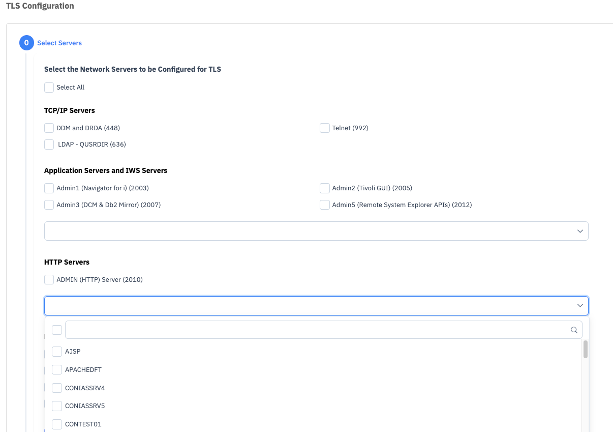
- Will see all ports configured for server, along with TLS setting, all IAS/IWS/HTTP servers TLS Wizard:
- Upgrade ports properties dialog for IAS/IWS.
- HTTP Apache configuration validation added
- Websphere Liberty Express Start/Stop multiple instances at once
- Certificate Table > open certificate store
- Network TLS Wizard - support for TCP/IP servers
- TLS Configuration - Added LDAP support
- Add ADMIN servers to Network TLS configuration
- HTTP config changes. Config file selection.
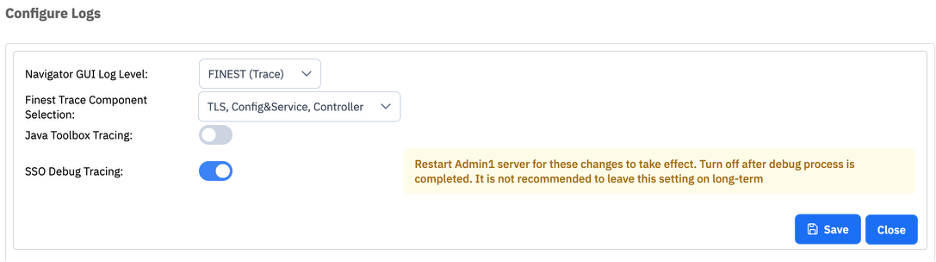
- EIM debug toggle - SSO Debug Tracing:
- SMTP support for OAuth - phase 1: Use Navigator to configure - see SMTP - Open Authentication.
- Web Administration
- Work Management
- Active Jobs - added filter for query specifics and multiple filters performed with SQL on server side
- Security
- Check status of the Save/Restore Master Key and load parts in Connection Properties > Cryptographic Services
- New requirement for Save/Restore Master Key to be set to a user-chosen value (on IBM i 7.6 with PTF installed)
- New Remote Key Agent Configuration Wizard (Cryptographic Services > Manage Master Keys)
- New Manage External Key Manager Descriptions (EKMD) Files
- Create, include, change, and delete EKMD files for external key management operations
- CVE Information table added using the SQL table SYSTOOLS.CVE_INFO()
- Support for new SQL Services for AUDIT_JOURNAL_JD and AUDIT_JOURNAL_RU
- Check status of the Save/Restore Master Key and load parts in Connection Properties > Cryptographic Services
- File Systems
- IFS - New functions to Copy, Move, Rename, & Send files
- ARE - Administration Runtime Expert
- Move to using file '/qibm/userdata/OS400/TCPIP/QTOCHOSTS'
- New PTFs - server side
- AJS
- GUI side version 7.2.26.149
- Scheduled Jobs > Properties - The Commands list now has a Move Up and Move Down option. You can also change the sequence number of specific commands to adjust their placement in the list.

ACS has been updated to provide significant value for the every day users, the database engineer, as well as the general user that is leveraging SQL for their daily use.
- Run SQL Scripts
- Support for SELF utility
- Save to Source Physical File without inserting x25 line endings
- Enforce record length rather than wrapping lines when saving to Source Physical File
- Many new Insert from Examples
- IFS
- Favorites menu for keeping track of favorite directories
The list can be updated using the new star icon next to the parent icon
- Favorites menu for keeping track of favorite directories
- Visual Explain
- Enhanced the numeric values in attributes to be formatted based on user locale
- Enhanced the "Indexes Considered" dialog to show SQL schema and name when available
- SQL Performance Center
- Added columns to Index Advisor that display the related MTI info
For the latest details - https://www.ibm.com/support/pages/ibm-i-access-acs-updates
To obtain the latest version of ACS click on the ‘Downloads’ link on the Access Client Solutions Home Page
VS Code - Code for IBM i The Code for IBM i project has been making rapid improvements to help address the needs of the IBM i developer. Helping them leverage modern development methodologies and techniques. |  |
The Code for IBM i ecosystem continues to thrive with new enhancements and fixes that enable modern development on IBM i. A huge thanks to the open source community for their contributions, ideas, and collaboration that continue to drive the project forward, and to the Code for IBM i team for helping to steer the project and implement many of these enhancements!
- Code for IBM i
- Introduced a new "Environment" view to easily manage actions, custom variables, and profiles

- Added MFA support for IBM i 7.6

- Switched from a legacy SQL runner to Mapepire for improved performance
- Added support for checking password expiry dates and changing passwords

- Added support for authentication using an SSH key passphrase
- Added Spanish language locale
- Improved general security
- Prefixed CL system commands
- Introduced a remote signature check on dependent components installed on the IBM i
- Improved the clean up process of temporary objects and stream files
- Added checks to ensure home directory permissions are set appropriately
- Moved default temporary IFS directory from being shared (/tmp) to developer specific (/home/USER/.vscode/tmp)
- Introduced a new "Environment" view to easily manage actions, custom variables, and profiles
- Db2 for i
- Added new SQL prefixes
- udtf: Generates a user-defined table function based on result set columns

- md: Generates a result set in markdown table format

- udtf: Generates a user-defined table function based on result set columns
- Added statements run with prefixes to the "Statement History" view
- Added support for setting default saved configurations

- Added more database object types to the "Schema Browser" view (column masks, constraints, journal recievers, journals, row permissions, sequences, SQL packages)
- Added a button to retrieve more / all rows or refresh a result set
- Added several new SQL examples
- Db2 for i Services: 7 new examples
- IBM i Services: 62 new examples
- SYSTOOLS: 15 new examples
- Added new SQL prefixes
- RPGLE
- Added outline view support for OPM RPG
- Introduced highlighting of the start and end of functional blocks (if/endif, do/enddo, dcl-proc/end-proc, etc.)
- Added fixes for displaying the fixed-format ruler, handling of continuation lines, and caching of include files
- CL
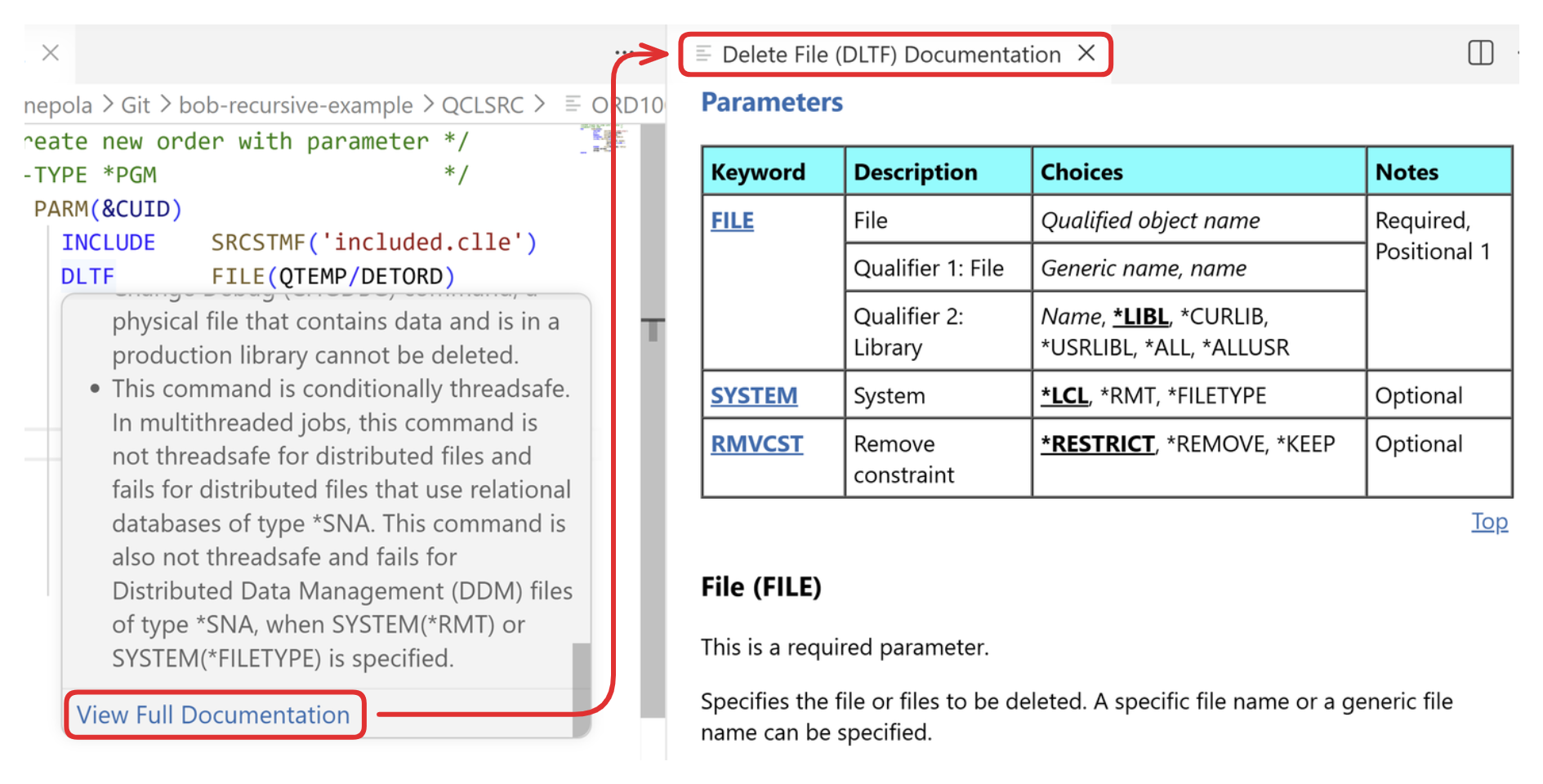
- Added hover support for CL commands and parameters

- Added support for viewing full CL command documentation
- Improved the CL syntax checker to run on CL pseudo-source, BND, and CMD files
- Improved content assist to show a "Required parameters" option when prompting for CL command parameters
- Added hover support for CL commands and parameters
- IBM i Testing
- Added support for cancelling test compilation and execution
- Added support for viewing actual/expected values

- Improved rendering of procedure-level code coverage results
- Revamped the RPGUnit installation process by installing via an RPGUnit save file bundled directly in the extension rather than fetching from GitHub
- Added support for new ONFAILURE parameter on the RUCALLTST command which specifies test execution behavior after encountering a failing assertion. Options are:
- *ABORT: Test case aborts execution after a failing assertion.
- *CONTINUE: Test case continues execution after a failing assertion.
- IBM i FileSystem
- Released a new extension that adds support for viewing and managing QSYS objects via the "Object Browser"

- Added support for viewing detailed object information, locks, authorizations, and usage statistics as well as object specific information (e.g. all modules and service programs bound into a program, all messages on a message queue, entries in a binding directory, etc.)
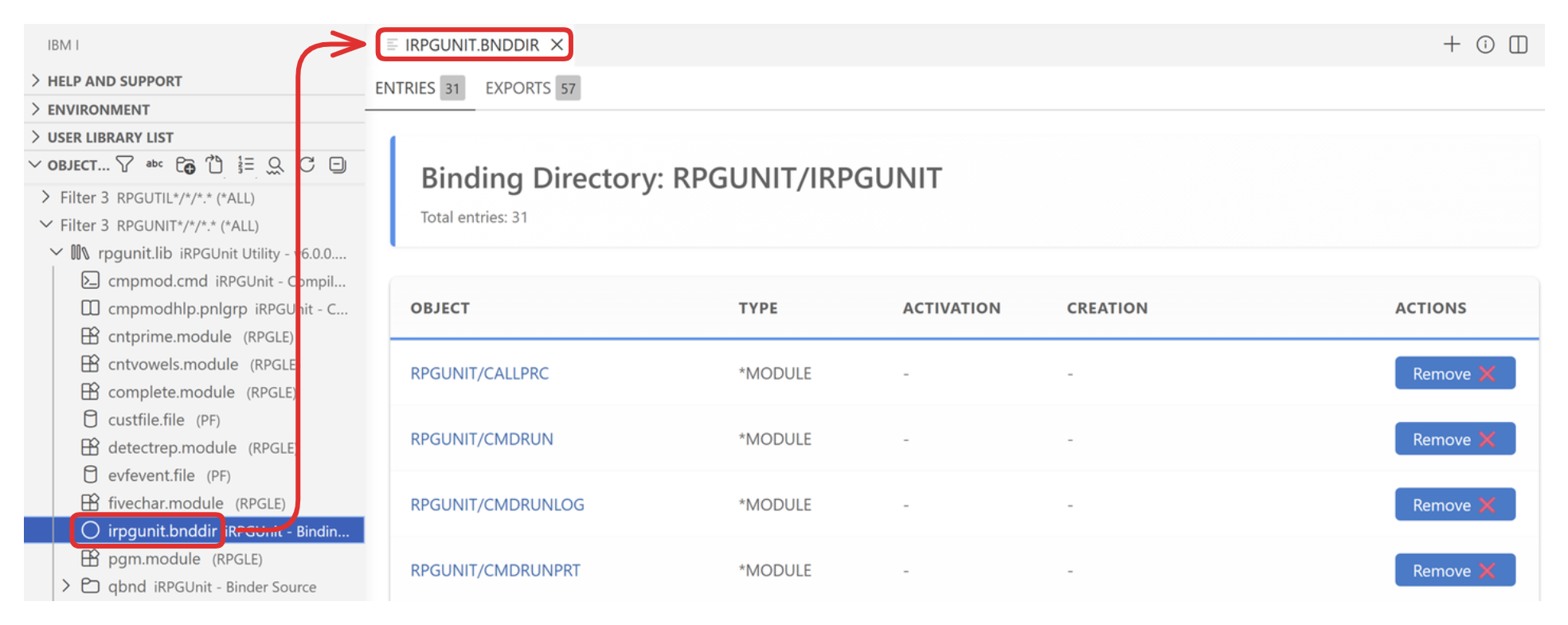
- Added support for performing object specific actions (e.g. restore a save file, send messages to a message queue, generate a PDF from a spooled file, hold/release/end a job, add new entries to a binding directory, etc.)
- Released a new extension that adds support for viewing and managing QSYS objects via the "Object Browser"
- IBM i Debug
- Fixed self-signed certificate error during debug connection
- Fixed debug startup issue for batch programs with on_exit tracking
Additional details can be found in the Code for IBM i docs.
IBM Bob - Premium Package for i IBM Bob Premium Package for i extends IBM Bob with AI capabilities tailored for IBM i application development. By providing Bob with access to your IBM i, it enables you to work more effectively across the entire application lifecycle. Bob can help generate & explain code, build and test projects, create documentation, and even modernize legacy applications. |  |
Key features
- Specialized IBM i modes: Personas purpose-built for IBM i.
- IBM i Developer — Focused on writing, editing, compiling, and modernizing IBM i code across RPG, CL, DDS, and SQL. Understands IBM i development concepts, file systems, source members, and the full ILE development lifecycle. Your expert coding partner for everything from legacy RPG analysis to modern free-format development.
- IBM i Database - Focused on database design, query writing, performance analysis, SQL services, and data management on IBM i. Understands IBM i database concepts including physical and logical files, SQL views, stored procedures, indexes, and the rich library of IBM i SQL services in QSYS2 and SYSTOOLS.
- Work with source on IBM i: Read, write, and search source code in QSYS or the IFS, and run CL commands, SQL statements, and PASE commands directly against an IBM i.
- Retrieve IBM i documentation: Search and retrieve official IBM i documentation using semantic search to ground responses in accurate, up-to-date content.
- Utilize IBM i skills: A built-in library of specialized knowledge — automatically activated by Bob based on context — to produce consistent, accurate results for specialized IBM i tasks.
- Execute structured IBM i workflows: Guided multi-step workflows for RPG modernization, business rule extraction, unit test plan creation, SQL index strategy advising, and much more.
For more details on Premium Package for i - See Premium Package for i product page
Was this topic helpful?
Document Information
Modified date:
14 July 2026
UID
ibm17271858