Security
Learn about the security features provided with IBM® MQ as a Service.
Default security features
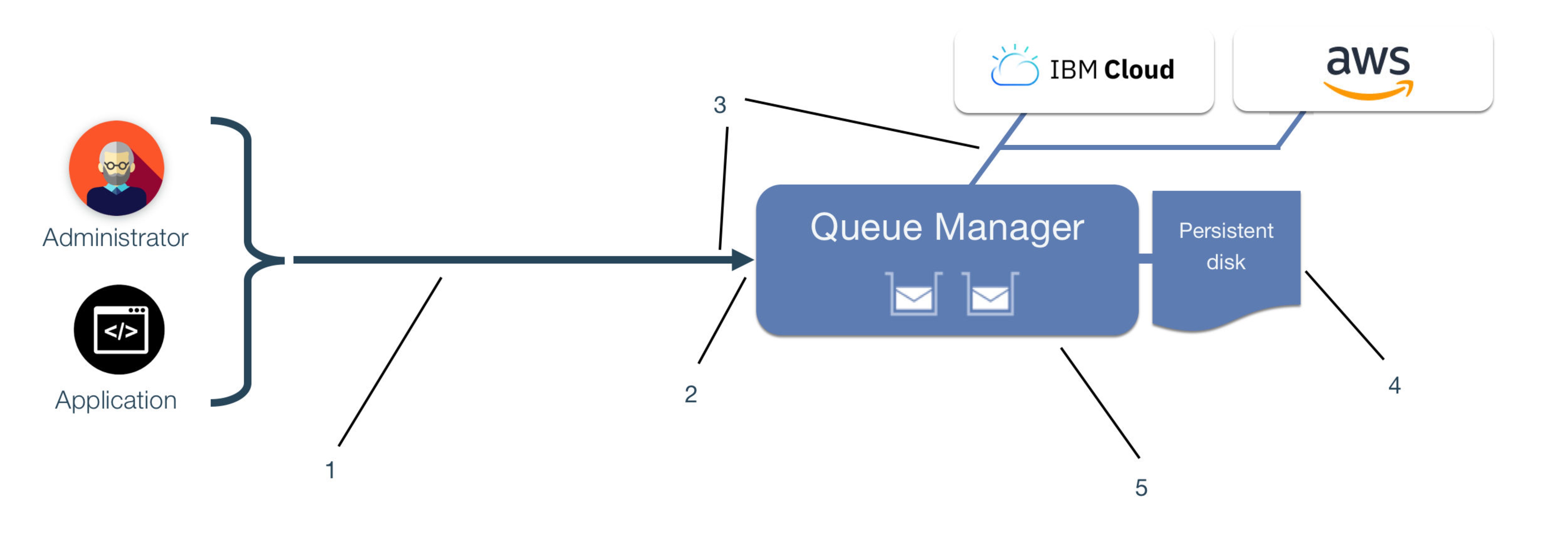
- IBM MQ channels encrypt data in transit from applications and administrators using TLS connections. There might be some configuration for you to apply to the TLS capability.
- A default TLS server certificate is configured for the queue manager signed by a public Certificate Authority such as Let's Encrypt.
- Queue manager channels are configured by default with username/password authentication, which is backed by the IBM Cloud® Identity and Access Management (IAM) service or the IBM SaaS Console in AWS for user and application management.
- All persisted queue manager data including messages, configuration and logs, is encrypted at rest using full disk encryption on storage volumes.
- IBM MQ provides extensive features for providing fine-grained access control to specific resources such as queues/topics within the queue manager, which can be leveraged in the same way as for on-premises customer deployments.
Default IBM MQ security configuration
Users
To provide administrative access to queue managers in a service instance, a user must be added to the "User permissions" list by following the steps provided in Configuring administrator access for a queue manager.
Any user with administrative access has the capability to view and modify any IBM MQ configuration and to write and access message data. For these reasons, administrative access should be limited wherever possible.
By giving a user permissions they become a member of the
mqm group for each queue manager in that service instance.
By default,
IBM MQ "BLOCKUSER" rules are defined so members of the
mqm group can only connect to the queue manager by using the
CLOUD.ADMIN.SVRCONN channel. To connect using other channels an authentication
record needs to be added as described in Channel authentication records in the main IBM MQ documentation.
Applications
To enable an application to connect and interact with any of the queue managers in a service instance, an application must first be added to the "Application permissions" list by following the steps provided in Configuring administrator access for a queue manager.
The IBM MQ username and API key that are generated when creating the application permission are to be used as the username and password when connecting applications to IBM MQ. By default, each application that you add has the following authorization:
- To connect to a queue manager (with Connect or Inquire authority)
- Put, get, and browse messages on any queues and topics that start with "DEV.", for example the pre-defined ones you'll find on the queue managers.
By default, IBM MQ "BLOCKUSER" rules are defined so
applications can only connect to the queue manager by using the CLOUD.APP.SVRCONN
channel. To connect using other channels, an authentication record needs to be added as described in
Channel authentication records in the main IBM MQ documentation.
Creating New Queues and Topics
When defining new queues or topics to be used by applications, by default no application has authority to access them. First you must create an authority record to grant an application access to any new resources. To do this, use the IBM MQ username generated when the application permission was defined when creating the authority record.

See the Working with queue manager authority records in the main IBM MQ documentation for details on creating authority records.
Connecting Client Applications
Client applications connecting using IBM MQ client libraries below version 8.0.0.0 will be unable to supply user credentials to the queue manager and so will be unable to connect.
Java and JMS
applications have two different methods of supplying credentials to a queue manager that is
controlled by a switch called compatibility mode. You must ensure that when the
Java or JMS application is connecting it is supplying user credentials with compatibility mode
disabled. For details on configuring your client application see steps provided here.
IBM MQ details
A deployed queue manager has TLS enabled by default on the predefined channels.
Two channels are provided by default:
CLOUD.ADMIN.SVRCONNfor use by Administrator users, for example connecting using IBM MQ Explorer or runmqsc.CLOUD.APP.SVRCONNfor applications connecting to send and receive messages.
Both channels are also configured to use TLS by default. Additional configuration must be carried out to enable IBM MQ client applications and administration tools (runmqsc, IBM MQ explorer) to connect to the queue manager.
It is recommended that any user-defined channels are configured to use TLS, which is achieved by
setting the SSLCAUTH property to Optional and the
SSLCIPH property to a valid IBM MQ cipher
specification, for example. ANY_TLS12_OR_HIGHER.
Here are two examples using MQSC that shows both defining and altering a channel to be configured to use TLS:
DEFINE CHANNEL('EXAMPLE.APP.SVRCONN') CHLTYPE(SVRCONN) SSLCAUTH(OPTIONAL) SSLCIPH(ANY_TLS12_OR_HIGHER)  SSLCAUTH(OPTIONAL) SSLCIPH(ANY_TLS12_OR_HIGHER)
...
ALTER CHL('EXAMPLE.ADMIN.SVRCONN') CHLTYPE(SVRCONN) SSLCIPH(ANY_TLS12_OR_HIGHER) SSLCAUTH(REQUIRED)`
Incoming connections to the two pre-defined channels are blocked by default. To enable access, follow the steps described for Users or Applications.
Incoming connection requests for channels other than the two names defined above are blocked by a default "ADDRESSMAP" rule. This means that if you define your own IBM MQ channel (for example, to accept incoming connections from another queue manager) then connection to that new channel is blocked by default and you need to define a rule to permit the specific connection to that new channel.
For details on configuring IBM MQ fine-grained authorization, see Controlling access to objects by using the OAM on AIX®, Linux, and Windows in the main documentation.
Recommendations
You should use TLS channels for administration and application connectivity to protect credentials and business data, as it flows between the application and the queue manager. For details on configuring TLS for channels, see the TLS security for IBM MQ channels in IBM MQ as a Service.
The Advanced Message Security (AMS) feature, which provides a higher level of protection for sensitive data, is available for use at the application or queue manager. It is strongly recommended that sensitive data should be encrypted by the application using AMS, to ensure that it is fully protected as it flows between the application and the queue manager and through the system. For details on configuring AMS for client applications see Enabling application Advanced Message Security (AMS).
The queue manager source IP address is dynamic and will change if a queue manager is restarted or fails over to another host. The source IP address is shared by multiple queue managers and therefore should not be used as the only mechanism for authenticating an incoming connection on a receiver channel.
Securing data in transit
The predefined administration and application channels in your IBM MQ as a Service queue manager are configured by default with TLS security. Enabling TLS causes the administration or application connections to encrypt the conversation thus protecting sensitive data and credentials. The following documents explain how to enable TLS should a channel not have it, along with securing remote administration and application connections.
Enabling TLS security for IBM MQ channels in IBM MQ as a Service
As mentioned previously, a queue manager has TLS enabled on its predefined channels by default. TLS security for IBM MQ channels in IBM MQ as a Service explains the process of how you can enable TLS on a channel which does not have it set, along with how to create a trusted keystore file.
- Queue Manager Administration Options
- The following links provide a handy reference for information on how to configure and administer
an IBM MQ as a Service queue manager using the standard
administration tools. You may choose your preferred tool and follow the instructions in this document.
You can administer queue managers through the IBM MQ Web Console, IBM MQ Explorer, or runmqsc from an IBM MQ client.Note: The IBM MQ Web Console is provided 'out of the box' with your queue manager, whereas using the IBM MQ Explorer or IBM MQ client requires further setup.
Securing remote administration
After configuring TLS security on the required channels, you will need to properly establish a connection. This can be done in two ways:
Application connections in C MQI and JMS programs
To securely connect to an IBM MQ as a Service queue manager using "C MQI" and "JMS" applications, please see:
Advanced Message Security (AMS)
The following documents explains queue manager advanced message security, and how to enable it, along with application advanced message security.
- Enabling queue manager Advanced Message Security (AMS)
- Enabling application Advanced Message Security (AMS)
Refreshing the queue manager TLS security
A TLS security refresh is needed if a change has been made to the queue manager key store or trust store, otherwise the change does not take effect. The following document explains this process: