This document lists the recommended and available upgrades and updates for the Hardware Management Consoles (HMC) that manage IBM Power Systems hosting IBM i, AIX, and Power linux partitions. Recommendations for HMC update, upgrade, install paths are provided for the latest and any other specific versions.
A HMC upgrade is changing the release level on the HMC. Example - V9R1 to V9R2, V10R2 to V10R3 or V11R1 .
A HMC update is installing a service pack or fix to a current release.
IBM support recommends installing the latest HMC version release and fix level that is supported for the target environment. Upgrade images and the latest fixes are available in IBM Fix Central at https://www-945.ibm.com/support/fixcentral/
HMC Upgrades Target Version | Upgrade
From | Upgrade
Instructions | Updates | Date
Available | End of
Service | Models
supported | POWER
Support | V11 R2 | V10 R3
and later | link | | 07/24/2026 | | 7063-CR2 | P11, P10, P9 | | V11 R1 | V10 R2 and later | | link | 07/25/2025 | | 7063-CR2 | P11, P10, P9 | V10 R3 | V10 R1 and later | | | 11/17/2023 | 09/30/2026 | 7063-CR1 7063-CR2 | P10, P9, P8 | V10 R2 | V9 R2 and later | | | 12/08/2022 | 04/30/2025 | 7063-CR1 7063-CR2 | P10, P9, P8 | V10 R1 | V9 R1 and later | | | 09/17/2021 | 04/30/2024 | 7063-CR1 7063-CR2 | P10, P9, P8 | V9 R2 | V9 R1 | | | 11/20/2020 | 04/30/2023 | 7063-CR1 7063-CR2
7042-CR9 | P9, P8, P7 | V9 R1 M9xx | V8R8.6 and later | | | 3/20/2018 | 09/30/2021 | 7042-CR7, CR8, CR9, OE1, and OE2
7063-CR1 | P9, P8, P7 | V8.8.7 | V8R8.5 and later | | | 09/15/2017 | 08/31/2019 | 7042-CR7, CR8, CR9, OE1, and OE2
7063-CR1 | P8, P7, P6 | V8.8.6 | V8.8.4 and later | | | 11/18/2016 | 10/31/2018 | CR5-CR9
C08 | P8, P7
P6 | V8.8.5 | V8.8.3 and later | | | 05/27/2016 | 05/31/2018 | CR5-CR9
C08 | P8, P7
P6 | V8.8.4 | V8.8.2 and later | | | 11/20/2015 | 11/30/2017 | CR5-CR9
C08 | P8, P7
P6 | V8.8.3 | V8.8.1 and later | | | 6/05/2015 | 7/31/2017 | CR5-CR8
C08 | P8, P7
P6 | V8.8.2 | V7.7.9 and later | | | 11/18/2014 | 10/31/2016 | CR5-CR8
C08 | P8, P7
P6 | V8.8.1 | V7.7.8 and later | | | 6/10/2014 | 6/30/2016 | CR5-CR8
C08 | P8, P7
P6 | V7.7.9 | V7.7.6 and later | | | 04/25/2014 | *12/30/2016 | CR3-CR7
C05-C08 | P7, P6
P5 | V7.7.8 | V7.3.x or 7.7.x | | | 12/06/2013 | 10/31/2015 | CR3-CR7
C05-C08 | P7, P6
P5 | V7.7.7 | V7.3.x or 7.7.x | | | 02/20/2013 | 2/28/2015 | CR3-CR7
C05-C08 | P7, P6
P5 | V7.7.7 | V6.1.3 and earlier | | | 02/20/2013 | 2/28/2015 | CR3-CR7
C05-C08 | P7, P6
P5 | V7.7.6 | V7.3.x or 7.7.x | | | 10/19/2012 | 10/31/2014 | CR2-CR7
C04-C08 | P7, P6
P5 | V7.7.6 | V6.1.3 and earlier | | | 10/19/2012 | 10/31/2014 | CR2-CR7
C04-C08 | P7, P6
P5 | V7.7.5 | V7.3.x or 7.7.x | | | 05/25/2012 | 05/31/2014 | CR2-CR6
C04-C08 | P7, P6
P5 | V7.7.5 | V6.1.3 and earlier | | | 05/25/2012 | 05/31/2014 | CR2-CR6
C04-C08 | P7, P6
P5 | V7.7.4 | V7.3.x or 7.7.x | | | 10/21/2011 | 10/31/2013 | CR2-CR6
C04-C08 | P7, P6
P5 | V7.7.4 | V6.1.3 and earlier | | | 10/21/2011 | 10/31/2013 | CR2-CR6
C04-C08 | P7, P6
P5 | V7.7.3 | V7.3.x or 7.7.x | | | 05/20/2011 | 05/31/2013 | CR2-CR6
C04-C08 | P7, P6
P5 | V7.7.3 | V6.1.3 and earlier | | | 05/20/2011 | 05/31/2013 | CR2-CR6
C04-C08 | P7, P6
P5 | V7.7.2 | V7.3.x or 7.7.1 | | | 09/17/2010 | 09/30/2012 | CR2-CR6
C04-C08 | P7, P6
P5 | V7.7.2 | V6.1.3 and earlier | | | 09/17/2010 | 09/30/2012 | CR2-CR6
C04-C08 | P7, P6
P5 | V7.7.1 | V7.3.x | | | 02/19/2010 | 02/29/2012 | CR2-CR5
C04-C08 | P7, P6
P5 | V7.3.5 | V7.3.x | | | 10/30/2009 | 10/31/2011 | CR2-CR5
C03-C07 | P6, P5 | V7.3.5 | V6.1.3 and earlier | | | 10/30/2009 | 10/31/2011 | CR2-CR4
C03-C07 | P6, P5 | V7.3.4 | V6.1.3 or later | | | 11/21/2008 | 11/30/2010 | CR2-CR4
C03-C07 | P6, P5 | V7.3.3 | V7.3.1 or V7.3.2 | | | 08/25/2008 | 05/31/2010 | CR2-CR4
C03-C07 | P6, P5 | V7.3.2 | V7.3.1 | | | 11/16/2007 | 10/31/2009 | CR2-CR4
C03-C06 | P6, P5 | V7.3.1 | V6.1.2 or 6.1.3 | | | 06/12/2007 | 05/31/2009 | CR2-CR4
C03-C06 | P6, P5 | V6.1.3 | V6.1.2 and earlier | | | 09/21/2007 | 09/30/2010 | CR2-CR3
C03-C05 | P5 |
Target Version:
The version of HMC to upgrade to.
Upgrading From:
The versions of HMC that can directly upgrade to the target release in one step. Versions older then those listed require a multi-step upgrade.
Upgrade Instructions:
Link to the instructions on how to obtain the upgrade images and perform the upgrade.
Updates:
Link to the instructions on how to obtain and install fixes for the current release.
Date Available:
Approximate date the version/release was first made generally available for use.
End of Service:
The date that fix support ends for the target release.
Models supported:
List of HMC models that support the target release. Entries in bold indicate a change in support; the first release to support a new model or the last release to support a model whose support has ended. Machine type 7315 supported ended in 6.1.3. Model 7042-OE1 requires minimum of V8.8.3.0.1; 7042-OE2 requires a minimum of V8.8.6.0. For further information on HMC hardware support, see POWER Code Matrix - Supported HMC Hardware
Power Support:
Indicates the family of IBM POWER servers this HMC can manage: P9 is POWER9; P8 is POWER 8; P7 POWER7, P6 POWER6 and P5 POWER5. Specific server model/types, hardware feature codes or firmware features included in that family may place additional constraints on the minimum HMC release or service pack required.
|
HMC Model-specific Firmware Updates
For certain HMC Machine Type/Models (MTMs), IBM recommends updating the HMC firmware with the latest BoMC images to ensure critical fixes are installed. See: https://www.ibm.com/support/pages/bomc-images-available-fixcentral-models-cr7-cr8-cr9 |
HMC Code Levels and Server Firmware Compatibility
The design goal is that an HMC can, at a minimum, connect to and perform a server firmware upgrade or update on any supported server model that has a server firmware level that is at an equivalent or earlier level than the HMC. In general, upgrade the HMC first, then upgrade the server firmware to a recommended level soon after the HMC upgrade. Always check the HMC and server firmware release notes for any release-specific exceptions or special instructions. Click here for a complete list of supported combinations of HMC V7 and V8 code levels and server firmware levels. |
HMC Code Levels and IBM i OS compatibility
IBM i upgrades have no direct dependency on the version of the HMC however a new IBM i release may require a minimum server firmware level which, in turn, will specify a minimum HMC release. For a list of IBM i server firmware dependencies see the table Minimum firmware levels supported by IBM i release at http://www-01.ibm.com/support/docview.wss?uid=nas8N1021577
HMC upgrades have no minimum IBM i OS requirement. New HMC functions specific to IBM i, for example IBM i network install or the OS shutdown option, may require a minimum IBM i release or PTF level to use. Check the HMC release notes or the IBM Documentation for feature-specific requirements. |
Related Links and References
POWER Code Matrix - Supported HMC Hardware: https://www.ibm.com/support/pages/node/6554904
IBM Power code Matrix: https://www.ibm.com/support/fixcentral/main/transform?xml=https://download.boulder.ibm.com/ibmdl/pub/software/server/firmware/sfw_fixSupportedCombos.xml&title=HMC+/+Firmware+Supported+Combinations
IBM Fix Recommendation Tool: https://www14.software.ibm.com/webapp/set2/flrt/
IBM Fix Central: https://www-945.ibm.com/support/fixcentral/
Software Lifecycle: https://www.ibm.com/support/pages/lifecycle/
Checking for the current HMC Code level
At all versions of the HMC, the command "lshmc -V" can be used to display the current version, release and fix level.
- Version 8 "enhanced" login
Click the help icon ("?") in the upper right corner then select About

- Version 7 and Version 8 "classic" login.
From the HMC or remote GUI session login to the HMC, Select the Welcome option in the navigation area, then mouseover "HMC Version."
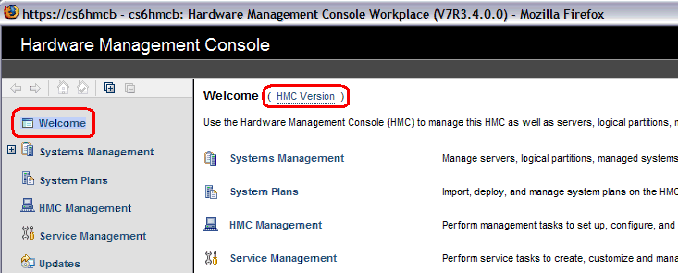
The HMC code version is displayed in a hover box as illustrated in the following image:

[{"Type":"MASTER","Line of Business":{"code":"LOB66","label":"Technology Lifecycle Services"},"Business Unit":{"code":"BU070","label":"IBM Infrastructure"},"Product":{"code":"SSRUTI","label":"HMC FOR POWER"},"ARM Category":[{"code":"a8m0z000000bowEAAQ","label":"Hardware Management Console"}],"ARM Case Number":"","Platform":[{"code":"PF025","label":"Platform Independent"}],"Version":""},{"Type":"MASTER","Line of Business":{"code":"LOB08","label":"Cognitive Systems"},"Business Unit":{"code":"BU054","label":"Systems w\/TPS"},"Product":{"code":"SSOQ2E","label":"Hardware Management Console V10"},"ARM Category":[{"code":"a8m0z000000cw1DAAQ","label":"Hardware Management Console-\u003EHMC Upgrade\/Update"}],"Platform":[{"code":"PF025","label":"Platform Independent"}],"Version":"All Versions"}]