Resolving array configuration errors
This section will cover error messages where invalid values are entered when defining an array, and an error message is displayed. The message that you receive gives you an indication of
how to fix the problem. To resolve this issue, you must either reduce the number of drives to the accepted limit, or fix accordingly through other parameters of the configuration, for
instance the drive technology, or capacity of the selected drives, or the number of enclosures.
To find the acceptable values for the different characteristics of arrays, refer to the
IBM Offering Information.

Figure 347 Product Offering search
In the search field (Figure 347), enter the model
of the device you are configuring. Then from the search result, select the appropriate document for the device, which gives you the information about the supported configurations
Use the following links respectively, for models:
Error - Drive limit exceeded
During configuration of an array for a V5010E device, we specify 392 drives, which is listed as the maximum available drives on a V5010E. But Storage Modeller displays a “Drive limit
exceeded” error message, as shown in
Figure 348. To resolve this error, we must define
two arrays. This section explains why this error exists and how to resolve it.
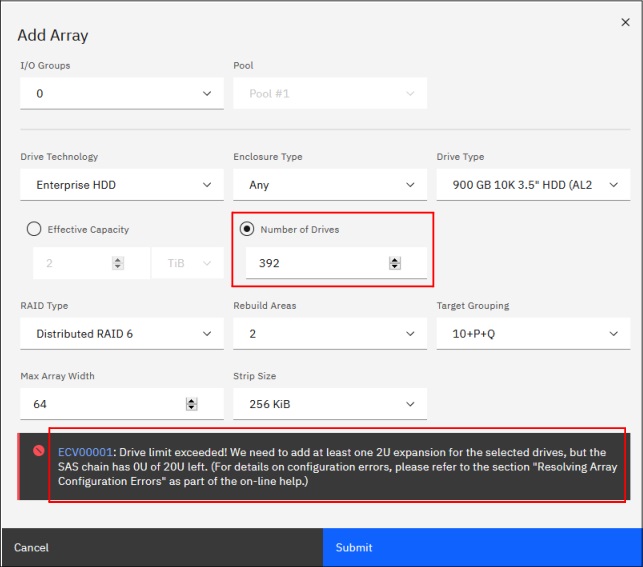
Figure 348 V5010E array configuration error
392 is the maximum total number of drives for a V5010E. That number can only be achieved if you configure a SFF model (such as 2072-224) with 368 HD-supported 3.5" drives, plus 24 2.5"
drives that will be placed in the control enclosure (368 + 24 = 392).
If you choose an LFF model (2072-212), there is only space for 12 (3.5") drives in the control enclosure. Therefore the maximum number of drives would be 380. But only in the combination
of 12 drives in the control enclosure plus 368 drives in the expansion enclosures.
The
”Family 2072+04 IBM Storwize V5000E” sales manual, show the expansion enclosure rules, including the data in red boxes that tell us how to resolve this error.
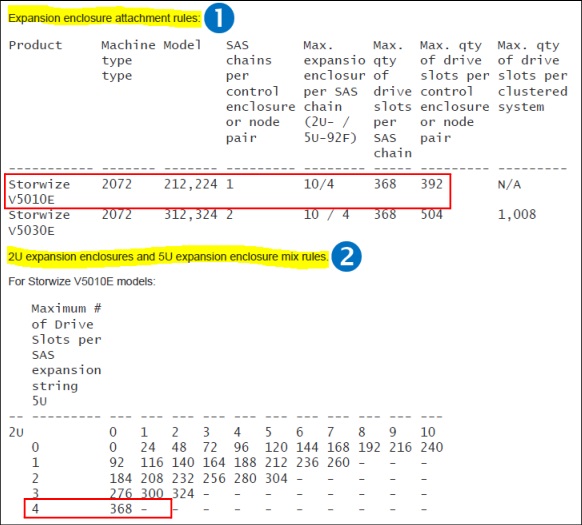
Figure 349 Expansion enclosure attachment rules in the sales manual:
(1) Maximum quantities (Max qty) and (2) 2U and 5U mix rules
The solution would be, 4x92(LFF) = 368 + 24 (Internal) = 392. A single array does not work. You must create two arrays, as shown in
Figure 350:
▪One for the internal 24 SFF
▪One external for the 368 LFF drives
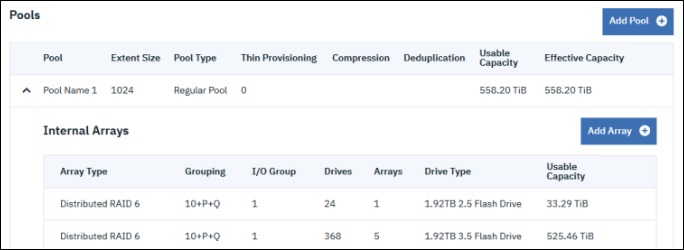
Figure 350 Configuration to fix the error
Error - The maximum number of Extents has been reached or exceeded
In a single data reduction pool, the maximum usable capacity for volumes with data reduction (thin provisioned, compressed, or deduplicated) is limited to 217= 131,072 extents per I/O group. Therefore, depending on the extent size of this pool, an I/O group can exploit only a usable capacity up to 128, 256, 512, or 1024 TiB. This limit does
not apply to fully allocated volumes. Fully allocated volumes can exploit the entire usable capacity.
Possible solutions would be create a pool with a bigger extent size or choose a smaller capacity array. To find the acceptable values for the different characteristics of the array, refer
to the
IBM Offering Information.
In the search field (Figure 347 on page 396), enter the model of the device you are configuring,