Download
Downloadable File
| File link | File size | File description |
|---|---|---|
Abstract
OIDC v1.5.5 IBM WebSphere Application Server is affected by cross-site scripting and deserialization vulnerabilities (CVE-2026-14974, CVE-2026-14515)
Download Description
THE FOLLOWING FIXES ARE PROVIDED:
Interim fix file | Fix pack range | Editions |
| 9.0.0.0-WS-WASProd-IFDT496118.zip | 9.0.0.0 through 9.0.5.28 | WASProd |
| 8.5.5.10-WS-WASProd-IFDT496118.zip | 8.5.5.10 through 8.5.5.30 | WASProd |
 You can install these fixes from the IBM live service repository instead of downloading them. For information and step-by-step instructions, see the LIVE SERVICE REPOSITORY INSTALLATION section of this document.
 AVOID TROUBLE:
When you are administering a cluster, the fix for this APAR must be applied to each cluster member. Failure to update all cluster members produces unpredictable results on both the updated and non-updated cluster members.
DT496118 resolves the following problem:
ERROR DESCRIPTION:
IBM WebSphere Application Server is affected by cross-site scripting and deserialization vulnerabilities (CVE-2026-14974, CVE-2026-14515)
The fix for DT496118 is targeted for inclusion in fix pack 8.5.5.31 and 9.0.5.29. Refer to the Recommended Updates page for delivery information.
 WHAT'S NEW IN VERSION 1.5.5
- Fixes for CVE-2026-14974 and CVE-2026-14515
- Bug fixes
- WHAT'S NEW IN VERSION 1.5.4
- The jose4j open source component is upgraded to 0.9.6
- Bug fixes
WHAT'S NEW IN VERSION 1.5.3- The jose4j open source component is upgraded to the latest level: 0.9.5
- Bug fixes
WHAT'S NEW IN VERSION 1.5.1Support introspection by using the UserInfo endpoint
To use the UserInfo endpoint for introspection, set the provider_<id>.introspectMethod property to userinfo. When the provider_<id>.introspectMethod property is set to introspect (the default), the introspect endpoint is used for introspection. This new function is delivered in APAR PH55077.
- Bug fixes
- WHAT'S NEW IN VERSION 1.5.0
Add OIDC PKCE
The OIDC TAI is updated to support PKCE when authenticating by using the code authorization flow. This new feature is delivered in APAR PH55042. You can configure the TAI to use PKCE by setting the provider_<id>.usePkce property to true.
- The jose4j open source component is upgraded to the latest level: 0.9.3
- Serviceability enhancements
- Bug fixes
- VERSION 1.4.0
Add regex and logical OR to the provider_<id>.filter property
Two new operators are added to the provider_<id>.filter property: regular expression (~=) and logical OR (||). These new operators are delivered in APAR PH49279.
A new keyword is added to the values for the provider_<id>.useRealm property
To use the default WebShpere realm name, set the provider_<id>.useRealm custom property to WAS_DEFAULT. This new value is delivered in APAR PH47482.
The default value for the provider_<id>.signatureAlgorithm property is changed to HEADER
A new keyword called HEADER is added to the list of supported values for the When the provider_<id>.signatureAlgorithm property. When the signatureAlgorithm property is set to HEADER, the value is obtained from the header of each inbound token. Two new properties are added to support this new behavior delivered in APAR PH47272:
- provider_<id>.signatureAllowList
Specifies a comma-separated list of signature algorithms that are allowed to secure messages from the OpenID Connect provider. If the signatureAlgorithm property is set to a value other than HEADER, this property is ignored. This list can include any value that is supported by the jose4j open source project except HS256. - provider_<id>.signatureDenyList
Specifies a comma separated list of signature algorithms that are not allowed to secure messages from the OpenID Connect provider. If the signatureAlgorithm property is set to a value other than HEADER, this property is ignored. This list can include any value that is supported by the jose4j open source project and the values are not validated by the OIDC TAI. If the configured list does not include HS256, HS256 might be added to the list.
- provider_<id>.signatureAllowList
Add ability to filter requests based on the issuer in the JWT
Starting in OIDC 1.4.0, the OIDC TAI can filter inbound JWT authentication requests based on the issuer of the JWT. The following OIDC TAI custom properties are added to support this feature delivered in APAR PH44467:
- provider_<id>.allowJwtIssuerSelection
Set this property to true if want to allow the runtime to filter requests based on the iss claim in the JWT in the Authorization header of the HTTP request. The filter will match if the iss claim in the JWT matches this provider's issuer.
- provider_<id>.allowJwtIssuerSelection
Add support for encrypted JWT (JWE) and idTokens
Starting in OIDC version 1.4.0, the OpenID Connect Trust Association Interceptor can process an encrypted JWT. An encrypted JWT can be used with both the traditional OpenID Connect Relying Party and JWT Authentication. Using the OIDC RP allows an encrypted JWT to be the ID token, access token, or both. The following OIDC TAI custom properties are added to support the encrypted JWT feature delivered in APAR PH36335:
- provider_<id>.keyStore
Specifies the keystore from which to obtain the decrypting key. - provider_<id>.decryptAlias
Specifies the alias of the keyEntry in the keystore that is used to decrypt an encrypted JWT or ID token. - provider_<id>.decryptKeyPassword
Specifies the password for the decrypting key.
- provider_<id>.keyStore
Add support for OIDC RP-Initiated logout
The OIDC RP is updated so that it can perform an RP-Initiated logout. If configured to do so, an RP-Initiated logout is performed when HttpServeletRequest.logout() or ibm_security_logout (form logout) is invoked. Note: A fix for APAR PH48145 is required for the OIDC TAI to log out when ibm_security_logout is invoked. The following OIDC TAI custom properties are added to support this feature delivered in APAR PH48083:
- provider_<id>.endSessionEndpointEnabled
Set this property to true if you want to enable RP-Initiated logout with the URL specified on the provider_<id>.endSessionEndpoint property. - provider_<id>.endSessionRedirectUrl
Set this property to the value for the post_logout_redirect_uri parameter on the request to the end session endpoint on the OP. The OP redirects to this URL after logout is complete. - provider_<id>.endSessionUseLogoutExitPage
Set this property to true if you want to use the value for the logoutExitPage parameter on an ibm_security_logout request as the value for the post_logout_redirect_uri parameter on the end session request to the OP. This requires 8.5.5.23 or 9.0.5.14. The following OidcClientHelper APIs are added:
logout(HttpServletRequest req, HttpServletResponse rsp)
logout(HttpServletRequest req, HttpServletResponse rsp, String endSessionRedirectUrl)
opLogout(HttpServletRequest req, HttpServletResponse rsp, String endSessionRedirectUrl)
- provider_<id>.endSessionEndpointEnabled
Add OidcClientHelper APIs to validate JWTs
Starting in OIDC 1.4.0, the OIDC TAI can filter inbound JWT authentication requests based on the issuer of the JWT.The following OIDC TAI custom properties are added to support this feature delivered in APAR PH44692:
- provider_<id>.useIssuer
When this property is set to true, the runtime can use the provider entry to service JSON Web Token (JWT) verification requests by API. The following OidcClientHelper APIs are added:
verifyJwt(String jwtString)
verifyJwt(String jwtString, String defaultIssuer)
verifyJwtUsingDiscovery(String jwtString)
verifyJwtUsingDiscovery(String jwtString, String discoveryUrl)
verifyJwtUsingTAIConfig(String jwtString)
verifyJwtUsingTAIConfig(String jwtString, String defaultIssuer)
- provider_<id>.useIssuer
- APARS INCLUDED IN THIS VERSION This fix is for the OpenID Connect (OIDC) Relying Party and JWT authentication features in WebSphere Application Server traditional, both of which are delivered in the OIDC trust association interceptor (TAI) JAR file. This fix is cumulative and contains all fixes that were in the code repository at the time the fix was created.
PI23430: Security Integrity fix for OpenID and OpenID connect
PI25298: OIDC on full profile can't authenticate with Liberty profile OP with an access token
PI25681: Remove export packages of the org.apache.commons.codec from com.ibm.ws.security.client.jar
PI33449: Full profile OpenID connect RP does not work with google OP
PI37687: IBM embedded WebSphere Application Server is missing the JAR files for OpenID and OpenID connect
PI47460: Add multi-provider support to OpenID connect relying party in the full profile
PI52604: OpenID connect SSO with active directory fails with 403 forbidden
PI55697: OpenID connect relying party: no entry in cache for stateid
PI56331: User might not be able to access web page that is protected with OIDC after initial login
PI59831: Support for using local x.509 public certificate for signature verification in OIDC
PI63906: OIDC: Allow config of contentType
PI64573: OIDC: A 403 error might occur when the OP URL encodes the state parameter
PI64924: OpenID connect RP cannot locate key in JWK set
PI65751: Do not require the interceptedPathFilter OIDC custom property
PI73318: OIDC: Unique cookie names can accumulate on the browser PI74857: Privilege escalation in full profile OIDC RP (CVE-2017-1151)
PI75095: OIDC: ClassCastException java.util.ArrayList
PI78336: OIDC jndiCacheName property does not work
PI80317: OIDC RP might store incorrect data in DynaCache
PI80543: OIDC RP cannot dynamically build callback URL
PI80549: OIDC RP does not support POST introspection endpoints
PI82308: OIDC RP loses URL fragments during the login process
PI84244: OIDC RP does not restore single quotation mark characters in POST data
PI86752: OIDC RP is requiring optional iat claim in introspected access token
PI87354: OIDC RP cannot log out when OIDC session cookie is not present
PI88253: OIDC RP secure flag not set on the oidcrequrl cookie
PI88896: OIDC RP refreshed access_token is not put into subject
PI90373: OIDC RP authorizationEndpointURL does not handle query parameters correctly
PI92210: OIDC RP configuration of location of sign verify certificate is not customizable
PI92332: OIDC RP does not support op userinfo endpoint
PI94538: OIDC RP does not call the revocation endpoint on the OP on logout
PI96508: OIDC RP might not connect to token endpoint due to SSL handshake failure
PI96403: OIDC RP: support implicit login flow for initial requests
PH00569: OIDC RP handling of id_token expiry is not configurable
PH02192: OIDC RP extra <br/> tag added in saved post body
PH03525: OIDC RP might not intercept requests to http:// endpoints PH07297: Denial of Service vulnerability in Guava (CVE-2018-10237)
PH08804: OIDC RP default identifiers are not available when customs are configured
PH10503: OIDC RP: sessionCacheTimeoutMinutes value is in seconds instead of minutes
PH10892: OIDC RP: There is no API for obtaining tokens or manually triggering access token refresh
PH11107: OIDC RP: port number is always included on redirect_uri parameter
PH11684: OIDC RP: failed to validate ID token, error that is emitted during verify [UnsupportedOperationException]
PH12520: OIDC TAI: Enable JWT authentication
PH13175: OIDC RP: Tokens are not revoked when sessions are evicted from the cache
PH14676: OIDC RP: omit client_secret OAuth 2.0 parameter when the client_secret is an empty string
PH15248: OidcClientHelper methods might return null unexpectedly
PH15626: OIDC RP: enable configuration of a login error url
PH17304: OIDC RP: cannot send a Content-Security-Policy header to the OpenID Connect provider
PH18150: OIDC RP: does not check the idtoken for an acr value when auth endpoint includes "acr_values"
PH19189: OIDC RP: cannot send a nonce parameter to an OP
PH19333: OIDC RP: unable to override the realm name in an idtoken
PH19907: OIDC RP: login fails when createSession=true and http sessions are exhausted
PH20118: OIDC RP: do require scope claim on response from OP
PH21008: The TAI is not enabled when any provider config fails to initialize
PH21178: OIDC RP: access token refresh might be erroneously attempted
PH21611: OIDC RP: might attempt to refresh access tokens that are not expired
PH21827: OIDC RP: NotSerializableException for JwtClaims error might occur
PH22038: OIDC RP: session cookie name is related to provider_<id>.clientId instead of provider_<id>.identifier
PH22195: OIDC RP: enable use OpenID provider's well-known configuration url (discovery)
PH22621: OIDC RP: add programmatic support for grant_type = client_credentials
PH23572: OIDC RP: code flow cannot be used when JavaScript is not enabled
PH23614: OIDC API: add programmatic support for some OAuth functions
PH23697: OIDC RP: add rs512 signature algorithm
PH24737: OIDC RP: make the introspection response available with an API
PH25547: OIDC RP: incorrect behavior when opaque token is in authorization header and useJwtFromRequest=ifPresent
PH25697: OIDC RP: sessionCacheTimeoutMinutes=0 is not overriding idtoken exp claim
PH25774: OIDC RP: session cookie value is too short
PH26523: OIDC RP: allow call to userinfo endpoint to be not active
PH26925: OIDC RP: generates JavaScript with extra 'end-script' to send to OP
PH27173: OIDC RP: login might fail when nonce is enabled
PH27213: OIDC RP: provide an option to not write an LTPA cookie in the OIDC path
PH27514: OIDC RP: add basic auth support for the JWK endpoint
PH27827: OIDC RP: support unique clientId and clientSecret for introspection endpoint
PH27971: OIDC RP: make end session endpoint available with an API
PH28253: OIDC RP: intercept callback from OP without special filter config
PH28386: OIDC RP: provide an option to validate a JWT access token
PH28534: OIDC RP: do not load config entry when there is no filter defined
PH29099: OIDC RP: ClassNotFoundException for JsonUtil$DupeKeyDisallowingLinkedHashMap
PH30368: OIDC RP might not delete session cookie when SameSite cookie policy=lax
PH30911: OIDC RP: allow a resource parameter to be sent to the token and authorize endpoints
PH31682: OIDC RP might not load config from a nondefault security domain
PH32257: NotSerializableException when accessTokenIsJwt=true
PH33170: JWT authentication that uses custom cache key might be slow
PH34227: OIDC RP: support the basic_start_authorization scope
PH34840: OIDC RP: make the state parameter alphanumeric
PH35185: OIDC RP: authentication might fail with CWTAI2007e saying a nonce claim is required when the nonce is present
PH35481: OIDC APIs might not find an idToken token on the runAs subject
PH36335: OIDC: Add support for encrypted JWT (JWE) and idTokens
PH39666: OIDC RP: Initial login might fail when the OIDC stateId contains special characters
PH39847: OIDC RP: entry is never removed from cache when initial login is through introspection
PH40532: OIDC TAI might not remove OAuth access token cache entries
PH40533: OIDC TAI might encounter a thread hang when sessions are removed from the local cache
PH43169: OidcClientHelper.getAccessTokenFromSubject() might return null when using JWT Authentication
PH44467: OIDC TAI: add ability to filter requests based on the iss claim in the JWT
PH44692: OIDC: add methods to the OidcClientHelper api to verify JWTs
PH45044: OIDC add ability to turn off revoke endpoint
PH45297: OIDC: introspection requests might fail after access token is refreshed
PH45740: OIDC: setting signatureAlgorithm to none results in error
PH46324: OIDC: CWTAI2047E error occurs when no kid claim in the JWT header
PH46408: OIDC: getValidAccessToken might fail with IllegalArgumentException
PH47272: OIDC: add ability to not require setting the signatureAlgorithm property
PH47482: OIDC: add value to the useRealm property to mean `default realm name`
PH48083: OIDC RP: update the OIDC RP to log out from an OP with RP-Initiated logout
PH49279: OIDC: add regex and logical OR support to the filter property
PH49566: OIDC: CWTAI2047E when more than one key without alg claim in JWK in 9.0.5.13
PH51485: OIDC TAI: update JWK cache to associate with discovered OP
PH52459: OIDC emits a CWTAI2086E error when a JWT is signed with a PS256 key
PH52683: OIDC an NPE might occur when evaluating a filter value
PH55042: OIDC PKCE
PH55077: OIDC enable introspection to use UserInfo endpoint
PH58024: OIDC getJwtClaimsAsMap API might return null although JWT is valid PH60195: IBM WebSphere Application Server is vulnerable to a denial of service due to jose4j (CVE-2023-51775)
PH62934: OIDC: Increase nonce characters to 22 or more
PH62980: OIDC TAI cannot modify authorize endpoint when using discovery
PH65119: OIDC might emit an error when userinfo is validPH69515: OIDC might get a state cookie error when the clientSecret parameter is not set PH69757 IBM WebSphere Application Server is affected by a denial of service due to jose4j (CVE-2024-29371)
PH71703: OIDC TAI signature validation failure when there is no use claim in the JWK DT496118: IBM WebSphere Application Server is affected by cross-site scripting and deserialization vulnerabilities (CVE-2026-14974, CVE-2026-14515) CUSTOM PROPERTIES AND JAVADOC
The OpenID Connect TAI custom properties are documented in the IBM Documentation, for example: WebSphere OpenID Connect Relying Party custom properties for v9.0.5. These custom properties pages are updated when fix packs are published. The OIDC javadocs can be found at OidcClientHelper and OauthClientHelper.
- JAVA™ 7 OR LATER IS REQUIRED
The OIDC v1.5.4 runtime on this page requires the use of Java version 7 or later:
- The DT496118 interim fix for WebSphere traditional v8.5.5 installs on any fix pack to which it applies.
- When an application server is running Java 6 or earlier:
- The OpenID Connect (OIDC) Relying Party (RP) TAI is not initialized when the server is started.
- When the OIDC TAI was configured to intercept requests previous to installing DT496118, after installing DT496118, your previously intercepted requests will be redirected to the default form login.
- PREREQ APARS APAR PH48145 is required for the OIDC TAI to complete the logout when the logout is initiated from a form logout (ibm_security_logout). APAR PH48145 is delivered in fix packs 8.5.5.23 and 9.0.5.14. There are no interim fixes available for APAR PH48145.What this means is, when an application that is protected by OIDC logs out by using a form logout, OIDC cookies aren't deleted and, if configured, RP-Initiated logout is not performed. If your application uses form logout and you care about these two issues, you must install 8.5.5.23 or 9.0.5.14 or later to ensure that the OIDC TAI logs the user out properly.
LIVE SERVICE REPOSITORY INSTALLATION
If you are installing by using the IBM Installation Manager GUI, you can install an interim fix for DT496118 from the IBM live service repository instead of downloading it. Do the following actions in the Installation Manager:
- Select File > Preferences
- Click 'Repositories' from the list on the left
- Make sure that ' Search service repositories during installation and updates' is selected:

- Click 'Apply and Close'
- Click Update
- Make sure that 'Update all packages with recommended updates and recommended fixes' is not selected:

- Choose the WebSphere instance that you want to update.
- Click Next
- If prompted, enter your IBMid and password
- If you are not at the most recent fix pack level, the Update Packages window displays with the most recent fix pack preselected, for example:

- Do the following steps:
If you are at the most recent fix pack level, do the following:
- Select 'Show recommended only'.
- Clear any recommended update that you do not want to install.
- Make sure that you do not clear the update for DT496118.
- Click Next
- Click Update
If you are not at the most recent fix pack level, do the following:
- Do the following actions based on whether you want to also update your fix pack level:
If you want to update to the most recent fix pack level, do the following:
- Click Next
- Go back and complete the previous steps as if you are at the most recent fix pack level.
If you want to update your fix pack to a level that is not the most recent, do the following:
- Clear 'Show recommended only'.
- Select the fix pack level that you want to install.
- Click Next
- If you do not want to update your fix pack level, do the following:
- Clear 'Show recommended only'.
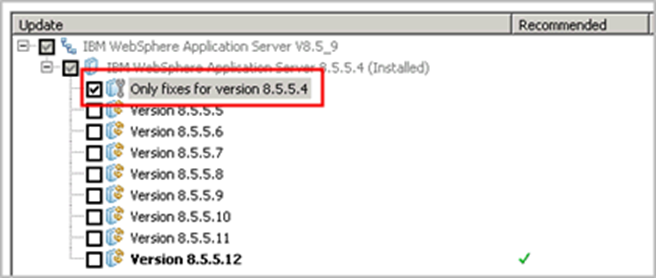
- Select 'Only fixes for version x.x.x.x', where x.x.x.x is your version and fix pack, for example:
- Click Next
- Clear any recommended update that you do not want to install.
- Make sure that you do not clear the update for DT496118.
- Click Next
- Click Update
- Do the following actions based on whether you want to also update your fix pack level:
COMMAND LINE INSTALLATION
The fixes for DT496118 are installed by using the IBM Installation Manager. You can use the Installation Manager imcl command to install an interim fix from the command prompt.
When you install an interim fix from the command prompt, you need to know the name of the fix that is contained within the interim fix file. The following table lists the fixes that are contained in each interim fix file for DT496118.Interim fix fileFix namesFix packs8.5.5.10-WS-WASProd-IFDT496118.zip 8.5.5.10-WS-WASProd-IFDT496118_8.5.5010.20260722_0658 8.5.5.10 through
8.5.5.309.0.0.0-WS-WASProd-IFDT496118.zip 9.0.0.0-WS-WASProd-IFDT496118_9.0.0.20260721_1129 9.0.0.0 through
9.0.5.28
Example command:
The following example shows how to install a fix for DT496118 from the command line by using the imcl command:./imcl install 9.0.0.0-WS-WASProd-IFDT496118_9.0.0.20260721_1129 -installationDirectory /opt/IBM/WebSphere/AppServer -repositories /tmp/ifixes/9.0.0.0-WS-WASProd-IFDT496118.zip
IBM Documentation references:
Installing interim fixes on distributed operating systems by using the command line
Command line arguments for the imcl command
SUPERSEDED APAR FIXES
The fixes for PH69757 on this page supersede the fixes published for PI47460, PI55697, PI64573, PI65751, PI74857, PI80317, PI82308, PI96508, PI82308, PH08804, PH13175, PH21827, PH29099, PH39666, PH49566, PH52459, PH58024, PH60195, and PH69757. Those fixes are removed from their pages and are replaced by these fixes for DT496118.
Since the fixes for PH69757 included on this page supersede the fixes for PI47460, PI55697, PI64573, PI65751, PI74857, PI80317, PI82308, PI96508, PH08804, PH13175, PH21827, PH29099, PH39666, PH49566, PH52459, PH50824, PH60195, and PH69757 the Installation Manager allows it to be installed on top of any of those fixes. It is up to you to decide to uninstall or any or all of those fixes before you install a fix for DT496118.APPLICABLE FIX PACKS
The OpenID Connect feature of WebSphere Application Server v855 is supported starting in fix pack 8.5.5.3. Therefore, this APAR does not apply to, nor are interim fixes available for fix packs 8.5.5.0 through 8.5.5.2. Also, no interim fixes are provided for 8.5.5.3 through 8.5.5.9 due to the age of the fix packs.
Keywords: IBMWL3WSS, OIDC, INTERIMFIX
Download Package
| DOWNLOAD | RELEASE DATE | DOWNLOAD Options |
|---|---|---|
| 9.0.0.0-WS-WASProd-IFDT496118 | 07-27-2026 | FC |
| 8.5.5.10-WS-WASProd-IFDT496118 | 07-27-2026 | FC |
Problems Solved
DT496118
Change History
Document Location
Worldwide
 Problems (APARS) fixed
 Problems (APARS) fixed
Was this topic helpful?
Document Information
Modified date:
28 July 2026
UID
ibm17280369