Define the workload
After the hardware is defined, the Workload for the performance prediction can be defined.

Figure 376 Performance view to Add Workload
For details on defining a Workload, see
“Performance tab (assess project performance)”
section.
2. Enter the Workload Name.
3. Select the Storage system from the drop-down menu.
4. Select a host if one has been defined. Otherwise select (+) to
Add a host. See Figure 377. Define the host parameters, then select
Submit. See
“Hosts tab (configure the hosts in a project)”
for details.

Figure 377 Defining a host
The Interface Protocol must match an adapter defined to the Host selected or an error message is displayed.

Figure 378 Error message
5. Select the pool from the drop-down menu.
6. Select the Workload Source.
Figure 379 on page 417
shows the workload configuration this example used.
Figure 380 on page 417
shows an example of the replication options for System 9500.
Figure 381 on page 417
shows an example of the replication options for System 5200. After the workload parameters are defined, select
Save and Solve.
|
Replication Value
|
Requirement
|
|---|---|
|
None
|
Always selectable
|
|
Policy-based HA(Fibre Channel)
|
At least 1 Fibre adapter with a port marked for replication
|
|
Policy-based Async(Fibre Channel)
|
At least 1 Fibre adapter with a port marked for replication
|
|
Policy-based Async(Long distance TCP)
|
At least 1 (RoCE or iWarp) adapter with a port marked for replication
|
|
Policy-based Async(Short distance RDMA)
|
At least 1 (RoCE or iWarp) adapter with a port marked for replication
|
|
Metro Mirror (Fibre Channel
|
At least 1 Fibre adapter port with a port marked for replication
|
|
Metro Mirror (Short distance RDMA)
|
At least 1 (RoCE or iWarp) adapter with a port marked for replication
|

Figure 379 Workload summary
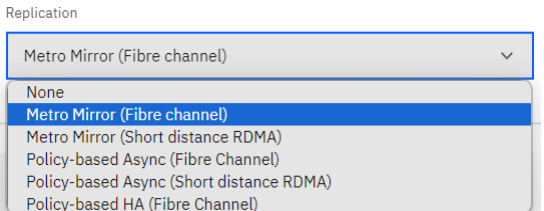
Figure 380 System 9500 - Workload replication

Figure 381 System 5200 - Workload Replication
|
Note: Currently Policy Based Replication (PBR) is supported in 8.5.2 and higher releases for FS9500, FS7300, SV3 (not only to FS5200).
In addition, FS5200 only supports PBR modeling with a host connected through Fibre Channel Adapters and using iSCSI ports for IP Replication.
|
7. The Utilization Report page is displayed, as shown in
Figure 382.

Figure 382 Utilization Report