What's new in IBM Software Hub

See what new features and improvements are available in the latest release of IBM® Software Hub.

Version 5.2.2

Released: October 2025

This release of IBM Software Hub is focused primarily on defect fixes. However, this release also includes new features for services such as IBM Manta Data Lineage, IBM Match 360, IBM StreamSets, OpenPages, watsonx.ai™, watsonx™ BI, and watsonx Orchestrate.

Software Version What does it mean for me?
IBM Software Hub platform 5.2.2

Version 5.2.2 of IBM Software Hub includes various fixes.

For details, see What's new and changed in the platform.

Related documentation:
IBM Software Hub command-line interface (cpd-cli) 14.2.2

Version 14.2.2 of the IBM Software Hub command-line interface includes various fixes.

For details, see What's new and changed in the IBM Software Hub command-line interface.

Related documentation:
IBM/cpd-cli repository on GitHub
Common core services 11.2.0
This release of common core services includes the following features:
Access more data with new connectors
You can connect to the following additional data sources to expand your data access and integration capabilities:
  • Apache Spark SQL
  • Microsoft SharePoint Lists
  • Trino
Use access control lists with data sources
You can now apply access control lists to the following data sources to manage permissions and enhance data security:
  • Dropbox
  • FileNet P8
  • Microsoft OneDrive
  • Microsoft SharePoint
  • Slack
Access new versions of your data sources
You can now connect to updated versions of the following data sources to take advantage of the latest features and improvements:
  • Denodo version 9.0
Microsoft Sharepoint is now IBM watsonx.data Sharepoint
The Microsoft SharePoint data source name has changed to IBM watsonx.data™ SharePoint to reflect its integration with IBM watsonx.data.

Version 11.2.0 of the common core services includes various fixes.

For details, see What's new and changed in the common core services.

If you install or upgrade a service that requires the common core services, the common core services will also be installed or upgraded.

Scheduling service 1.53.0

Version 1.53.0 of the scheduling service includes various fixes.

For details, see What's new and changed in the scheduling service.

Related documentation:
AI Factsheets 5.2.2

Version 5.2.2 of the AI Factsheets service includes various fixes.

For details, see What's new and changed in AI Factsheets.

Related documentation:
AI Factsheets
Analytics Engine powered by Apache Spark 5.2.2

Version 5.2.2 of the Analytics Engine powered by Apache Spark service includes various fixes.

For details, see What's new and changed in Analytics Engine powered by Apache Spark.

Related documentation:
Analytics Engine powered by Apache Spark
Cognos Analytics 28.2.0
This release of Cognos Analytics includes the following features:
Updated software version for Cognos Analytics
This release of the service provides Version 12.1.0 IF2 of the Cognos Analytics. For details, see Release 12.1.0 in the Cognos Analytics documentation.

Version 28.2.0 of the Cognos Analytics service includes various fixes.

Related documentation:
Cognos Analytics
Cognos Dashboards 5.2.2
This release of Cognos Dashboards includes the following features:
Updated software version
This release of the service provides Version 12.1.0 IF2 of the Cognos Analytics dashboards software. For details, see Release 12.1.0 - Dashboards in the Cognos Analytics documentation.

Version 5.2.2 of the Cognos Dashboards service includes various fixes.

Related documentation:
Cognos Dashboards
Data Gate 8.2.0

Version 8.2.0 of the Data Gate service includes various fixes.

For details, see What's new and changed in Data Gate.

Related documentation:
Data Gate
Data Privacy 5.2.2

Version 5.2.2 of the Data Privacy service includes various fixes.

For details, see What's new and changed in Data Privacy.

Related documentation:
Data Privacy
Data Product Hub 5.2.2

Version 5.2.2 of the Data Product Hub service includes various fixes.

For details, see What's new and changed in Data Product Hub.

Related documentation:
Data Product Hub
Data Refinery 11.2.0

Version 11.2.0 of the Data Refinery service includes various fixes.

For details, see What's new and changed in Data Refinery.

Related documentation:
Data Refinery
Data Replication 5.2.2
This release of Data Replication includes the following features:
Force stop replication jobs from the UI
You can now forcefully stop replication jobs that are stuck in the "Stopping" state. Jobs stuck in this transitional state might block new replication jobs. The force stop capability cleans up replication-related system resources.

Version 5.2.2 of the Data Replication service includes various fixes.

For details, see What's new and changed in Data Replication.

Related documentation:
Data Replication
DataStage 5.2.2
This release of DataStage includes the following features:
Secure your Teradata connections with SSL
You can now use the SSL protocol to enable encrypted communication across your Teradata connections, helping you meet enterprise security standards.
Use proxy settings with Microsoft Azure Blob Storage
You can now configure the Microsoft Azure Blob Storage connector to use a proxy, giving you more flexibility in secure network environments.
Unified job management in Orchestration Pipelines
You can now manage standard and optimized runner jobs using a single job object in Orchestration Pipelines. Unifying job objects streamlines job handling and provides a consistent experience across the API, CLI, and UI.

Version 5.2.2 of the DataStage service includes various fixes.

For details, see What's new and changed in DataStage.

Related documentation:
DataStage
Data Virtualization 3.2.2

Version 3.2.2 of the Data Virtualization service includes various security fixes.

Related documentation:
Data Virtualization
Db2 5.2.2

Version 5.2.2 of the Db2 service includes various fixes.

For details, see What's new and changed in Db2.

Related documentation:
Db2
Db2 Big SQL 8.2.2

Version 8.2.2 of the Db2 Big SQL service includes various fixes.

For details, see What's new and changed in Db2 Big SQL.

Related documentation:
Db2 Big SQL
Db2 Data Management Console 5.2.2

Version 5.2.2 of the Db2 Data Management Console service includes various fixes.

For details, see What's new and changed in Db2 Data Management Console.

Related documentation:
Db2 Data Management Console
Db2 Warehouse 5.2.2

Version 5.2.2 of the Db2 Warehouse service includes various fixes.

For details, see What's new and changed in Db2 Warehouse.

Related documentation:
Db2 Warehouse
Decision Optimization 11.2.0

Version 11.2.0 of the Decision Optimization service includes various fixes.

For details, see What's new and changed in Decision Optimization.

Related documentation:
Decision Optimization
EDB Postgres 13.22, 14.19, 15.14, 16.10, 17.6

This release of the EDB Postgres service includes various fixes.

For details, see What's new and changed in EDB Postgres.

Related documentation:
EDB Postgres
Execution Engine for Apache Hadoop 5.2.2

Version 5.2.2 of the Execution Engine for Apache Hadoop service includes various fixes.

For details, see What's new and changed in Execution Engine for Apache Hadoop.

Related documentation:
Execution Engine for Apache Hadoop
IBM Knowledge Catalog 5.2.2
This release of IBM Knowledge Catalog includes the following features:
Import, enrich, and assess the quality of data from additional data sources
You can now import metadata from DataStax Enterprise data sources, enrich that data, and assess its quality.

In addition, you can now run advanced analysis on data from IBM Db2 Warehouse data sources, create SQL-based assets from those such sources, and write analysis output to tables in IBM Db2 Warehouse.

View all data protection rule connections in relationship explorer
You can now view all items that are connected to data protection rules in the relationship explorer view to better understand how the rules are applied.
Try the new interface for building reporting queries to gather insights into metadata
You can now use the Reporting queries UI to create complex queries about your assets and artifacts without the need to use SQL. You can save your queries and share them with other users.

Version 5.2.2 of the IBM Knowledge Catalog service includes various fixes.

For details, see What's new and changed in IBM Knowledge Catalog.

Related documentation:
IBM Knowledge Catalog
IBM Manta Data Lineage 5.2.2
This release of IBM Manta Data Lineage includes the following features:
Create mapping rules for advanced interpretation of OpenLineage events for lineage generation
You can now creating mapping rules to define how your custom technologies are interpreted and then represented in lineage. As a result, more accurate lineage is generated.
Export lineage to PDF and CSV formats by using new output options
You can now export lineage to PDF and CSV files by using new output options. Use the Assets connections option to include all starting assets and connections to unique assets. Use the Lineage paths option to include all unique paths that originate from the starting assets.
Connect to IBM DataStage for IBM Cloud Pak for Data by using the Manta agent
You can now import lineage metadata from IBM DataStage for IBM Cloud Pak for Data by using an external agent.
Delete lineage for multiple data source definitions at the same time
You can now select more than one data source definition and delete the lineage that is associated with these data source definitions. After the deletion process is complete, a notification is displayed, regardless of your current location in the product.

Version 5.2.2 of the IBM Manta Data Lineage service includes various fixes.

For details, see What's new and changed in IBM Manta Data Lineage.

Related documentation:
IBM Manta Data Lineage
IBM Match 360 4.9.18
This release of IBM Match 360 includes the following features:
Run composite API transactions on your master data
You can now run composite transactions on master data by using the IBM Match 360 composite_service API endpoint. Composite transactions bundle multiple dependent API calls into a single request to reduce network overhead, centralize error handling, and produce a consolidated response for the entire sequence of operations.

For details, see Running composite transactions in the IBM Match 360 API Reference documentation.

Create and maintain groups from the user interface
You can now create group types and maintain group instances from the IBM Match 360 data types page. Use groups to organize your master data records into categories based on shared characteristics or business needs. Data engineers can start by defining one or more group types, then data stewards can create group instances and manage group attributes and membership.
Track the source system of each record that makes up an entity
You can now configure IBM Match 360 to store the source system identifiers of each of its member records when it matches those records to form master data entities. With the source system information, you can now trace each data value in an entity back to its originating record and source, which is necessary for maintaining data lineage. In addition, tracking source system information improves integration with data from existing MDM systems such as IBM InfoSphere Master Data Management.
Create and manage relationships between entities
You can now directly manage relationships that involve master data entities (entity-to-entity or entity-to-record) instead of only between records (record-to-record).

Version 4.9.18 of the IBM Match 360 service includes various fixes.

For details, see What's new and changed in IBM Match 360.

Related documentation:
IBM Match 360
IBM StreamSets 6.2.2
This release of IBM StreamSets includes the following features:
Write data to IBM Cloud Object Storage

When you deploy a Data Collector engine version 6.4.0, you can use the new IBM Cloud Object Storage destination to write data to IBM Cloud Object Storage.

For a full list of the new features that are available with Data Collector 6.4.0, see the 6.4.x Release Notes in the IBM StreamSets documentation.

Version 6.2.2 of the IBM StreamSets service includes various fixes.

For details, see What's new and changed in IBM StreamSets.

Related documentation:
IBM StreamSets
Informix 9.2.0

Version 9.2.0 of the Informix service includes various fixes.

For details, see Fix list for Informix Server 14.10.xC6 release.

Related documentation:
Informix
MANTA Automated Data Lineage 42.14.0

Version 42.14.0 of the MANTA Automated Data Lineage service includes various fixes.

For details, see What's new and changed in MANTA Automated Data Lineage.

Related documentation:
MANTA Automated Data Lineage
MongoDB 7.0.18-ent, 8.0.6-ent

This release of the MongoDB service include various fixes.

For details, see What's new and changed in MongoDB.

Related documentation:
MongoDB
OpenPages 9.5.2
This release of OpenPages includes the following features:
Create child object from generative AI output

Users can now generate child objects, such as action items or controls, based on generative AI output. This feature streamlines content creation and helps users act on AI-generated insights more efficiently.

For more information, see Configuring model outputs in the IBM OpenPages documentation.

Customize task views with compact, editable table layouts

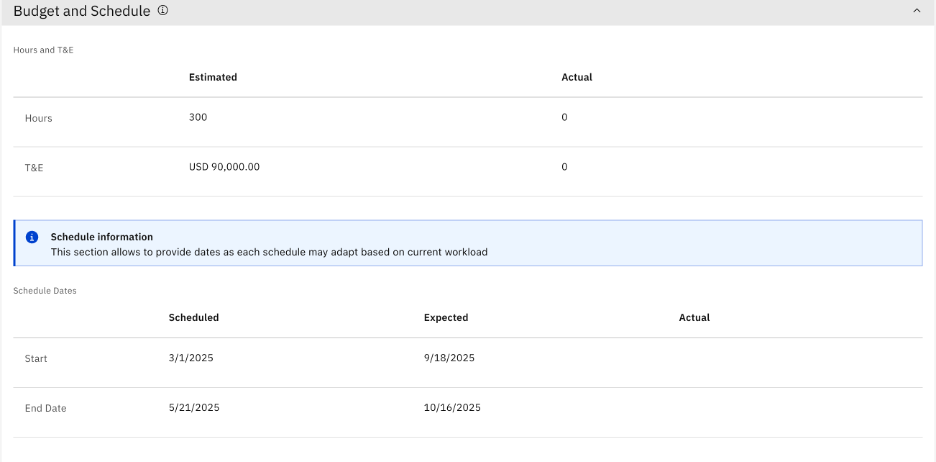
You can now use a compact layout option to organize fields in a table format within task views. Related information is easier to read and interact with, especially when you use multiple fields. You can define column and row headers, and fields remain editable based on access controls. The following figure is an example of a table layout for Budget and Schedule fields:

Figure 1. Compact table layout for Budget and Schedule fields
Compact table layout example with columns for date and estimated values
View grid data as cards for better readability

Users can now switch between grid and card layouts for data presentation. The card layout is especially useful on smaller screens and enhances readability for more consumable data. Admins can configure default and allowed layouts.

Figure 2. Card layout in a grid view
Card layout in a grid view for Business Entitities

For more information, see Defining default layouts on Grid Views and Using Grid Views to find, open, and work with objects in the IBM OpenPages documentation.

Run calculations on selected objects from a grid view

Admins can now select specific objects from a grid view and run calculations on them. You save time and resources when you run targeted calculations.

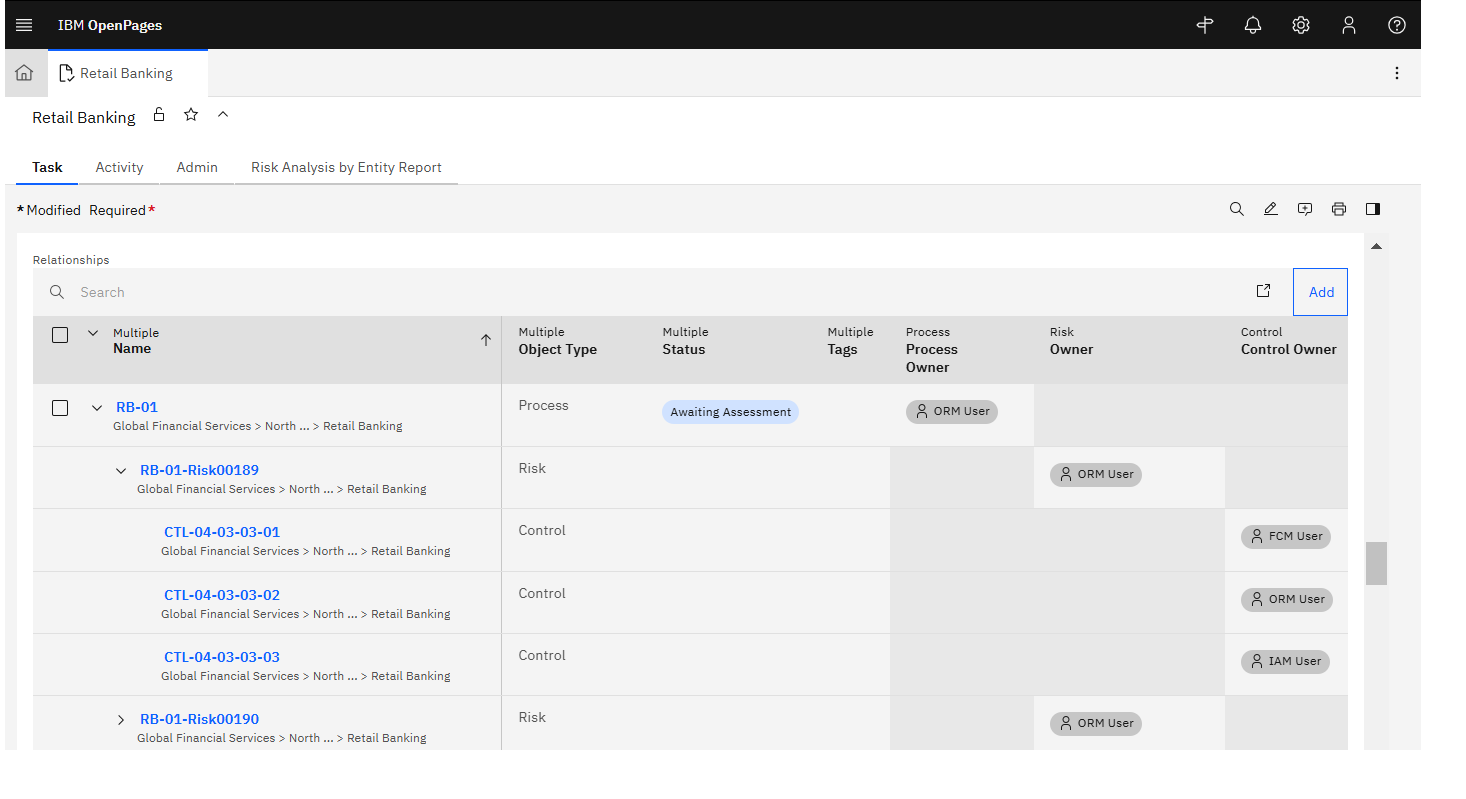
Configure multiple relationships in object creation workflows

You can now configure multiple relationships in the workflow operations for creating objects. This enhancement simplifies complex object creation scenarios and improves data linkage.

For more information, see Defining a workflow action that creates objects in the IBM OpenPages documentation.

Use Restricted V2 SCC with new Db2 installations

You can now enable a Db2 deployment instance to use Restricted V2 Security Context Constraints (SCC) to provide a robust and secure SCC for your deployments. Use an internal database for enabling Restricted V2 SCC.

Version 9.5.2 of the OpenPages service includes various fixes.

Related documentation:
OpenPages
Orchestration Pipelines 5.2.2
This release of Orchestration Pipelines includes the following features:
Enhanced control over creating duplicate pipelines within the UI
You can now define the name of the duplicated pipeline flow when you create it by using the new interface. You can also use the new interface to pick the specific folders you want duplicated within the pipeline flow.
Enable the Send Email node functionality
You will need to update the configuration in order to display the Send Email node in the node palette and use it in new pipelines. Existing pipelines that already use Send Email nodes will continue to work even when the configuration changes controlling visibility in the node palette are not applied.

For more information about enabling the Send Email node, see Enable the Send Email node.

Version 5.2.2 of the Orchestration Pipelines service includes various fixes.

For details, see What's new and changed in Orchestration Pipelines.

Related documentation:
Orchestration Pipelines
Planning Analytics 5.2.2
This release of Planning Analytics includes the following features:
Updated versions of Planning Analytics software
This release of the service provides the following software versions:
  • Planning Analytics Workspace Version 2.0.107

    For details, see 2.0.107 - What's new in the Planning Analytics Workspace documentation.

  • Planning Analytics Spreadsheet Services Version 2.0.107

    For details, see 2.0.107 - Feature updates in the TM1 Web documentation.

  • Planning Analytics for Microsoft Excel Version 2.0.107

    For details, see 2.0.107 - Feature updates in the Planning Analytics for Microsoft Excel documentation.

  • TM1 Database Version 12.5.3.

    For details, see New capabilities in TM1 Database 12 in the TM1 Database Version 12 documentation.

Version 5.2.2 of the Planning Analytics service includes various fixes.

For details, see What's new and changed in Planning Analytics.

Related documentation:
Planning Analytics
Product Master 8.2.0
This release of Product Master includes the following features:
Design your dashboard
  • Customize your dashboard by editing criteria, charts, and dashboards.
  • Share the designed dashboard with multiple roles for analysis.
  • Clone shared dashboards to use to build new dashboards.
Extract data from text in images by integrating with IBM watsonx Generative AI
  • Upload images and trigger the image-to-text gen AI feature to extract attribute data from the images.
  • Configure only certain attributes to be extracted by using gen AI.
Translate data for locale-specific attributes by integrating with IBM watsonx Generative AI
  • Use the gen AI translation feature to translate data from any locale to a specified locale.
Enter data for multiple sources in the Source tab
  • Now you can enter data for multiple sources with distinct indicators for the Winner and Source values. This method is more convenient than the previous method of updating the spec for each attribute through the Data model manager > Spec console and Attribute collection > Primary page.
View the progress of the containerized deployment process
  • Now, when you deploy the Product Master custom resource (CR), an indicator shows you the status of the deployment process.

Version 8.2.0 of the Product Master service includes various fixes.

For details, see What's new and changed in Product Master.

Related documentation:
Product Master
RStudio® Server Runtimes 11.2.0

Version 11.2.0 of the RStudio Server Runtimes service includes various fixes.

For details, see What's new and changed in RStudio Server Runtimes.

Related documentation:
RStudio Server Runtimes
SPSS Modeler 11.2.0

Version 11.2.0 of the SPSS Modeler service includes various fixes.

For details, see What's new and changed in SPSS Modeler.

Related documentation:
SPSS Modeler
Synthetic Data Generator 11.2.0

Version 11.2.0 of the Synthetic Data Generator service includes various fixes.

For details, see What's new and changed in Synthetic Data Generator.

Related documentation:
Synthetic Data Generator
Unstructured Data Integration 5.2.2

Version 5.2.2 of the IBM Unstructured Data Integration service includes various fixes.

For details, see What's new and changed in IBM Unstructured Data Integration.

Voice Gateway 1.11.0

Version 1.11.0 of the Voice Gateway service includes various fixes.

Related documentation:
Voice Gateway
Watson Discovery 5.2.2
This release of Watson Discovery includes the following features:
Index fields without including them in search results
You can now index a field in your collection, but exclude the field from search results. Use this feature to optimize indexing and control the search results that are displayed to users. To exclude a field from search, open the Manage fields tab for your collection, and set the Include in search switch to No.

Version 5.2.2 of the Watson Discovery service includes various fixes.

For details, see What's new and changed in Watson Discovery.

Related documentation:
Watson Discovery
Watson Machine Learning 5.2.2

Version 5.2.2 of the Watson Machine Learning service includes various fixes.

For details, see What's new and changed in Watson Machine Learning.

Related documentation:
Watson Machine Learning
Watson OpenScale 5.2.2

Version 5.2.2 of the Watson OpenScale service includes various fixes.

For details, see What's new and changed in Watson OpenScale.

Related documentation:
Watson OpenScale
Watson Speech services 5.2.2

Version 5.2.2 of the Watson Speech to Text service includes various fixes.

For details, see What's new and changed in Watson Speech to Text.

Related documentation:
Watson Speech services
Watson Studio 11.2.0
This release of Watson Studio includes the following features:
Include project documentation when importing or exporting a project
When you import a project, you can now import its associated documentation. When you export a project, documentation created in the Document Editor can now be included in the export file. These enhancements help you to keep documentation and project data together when moving projects or sharing them with others.
Turn on project activity logging after project creation
If you didn’t enable activity logging when creating a project, you can now turn it on at any time. Activity logging tracks detailed project activity and generates a full log that you can download to maintain a complete record of project actions. To turn activity logging on or off, go to the Manage tab in your project and click Manage activity logging.

Version 11.2.0 of the Watson Studio service includes various fixes.

For details, see What's new and changed in Watson Studio.

Related documentation:
Watson Studio
Watson Studio Runtimes 11.2.0

Version 11.2.0 of the Watson Studio Runtimes service includes various fixes.

For details, see What's new and changed in Watson Studio Runtimes.

Related documentation:
Watson Studio Runtimes
watsonx.ai 11.2.0
This release of watsonx.ai includes the following features:
Work with new foundation models in watsonx.ai

You can now use the following foundation models for inferencing from the Prompt Lab and the API:

  • codestral-2508
  • devstral-medium-2507
  • gpt-oss-20b
  • gpt-oss-120b
  • granite-4-h-micro
  • granite-4-h-small
  • granite-embedding-english-reranker-r2
  • mistral-medium-2508
  • mistral-small-3-2-24b-instruct-2506
  • voxtral-small-2507

For details, see Foundation models in watsonx.ai.

Faster inferencing and lower token usage with custom foundation models

Prefix caching is now set by default for custom foundation models that are based on the vLLM image. In repeated inference scenarios, prefix caching means lower token consumption and increased inferencing speed.

For details, see Global parameters for custom foundation models .

Version 11.2.0 of the watsonx.ai service includes various fixes.

For details, see What's new and changed in watsonx.ai.

Related documentation:
watsonx.ai
watsonx Assistant 5.2.2

Version 5.2.2 of the watsonx Assistant service includes various security fixes.

Related documentation:
watsonx Assistant
watsonx BI 3.2.0
This release of watsonx BI includes the following features:
Integrate with the IBM Cognos® Analytics FM package
Tech preview
You can now import metadata from relational FM packages into watsonx BI for use in conversations. By integrating Cognos Analytics with watsonx BI, the rich metadata from Cognos Analytics becomes accessible to AI, making it easier for you to get insights from your data.
For more information, see IBM Cognos Analytics.
Import and export projects
Get started quickly by importing projects to watsonx BI to create projects that already contain data and metrics. To import a project, you must have a local .zip file of a previously exported project.
For more information, see Importing a project.
Use sample data to explore watsonx BI
You can now use sample data in watsonx BI. Use the Customer experience sample data to explore the natural language interface, the types of questions you can ask, the structure of a metric definition, and the ways that sample data is modeled and optimized for AI.
For more information, see Installing samples in watsonx BI.
Choose the large language model (LLM)
If you have the watsonx BI administrator role, you can now choose which LLM to use in your organization. You can choose from the following options:
A combination of the new OpenAI gpt-oss-120b model + IBM Granite-3-8b-instruct
Recommended for complex, multi-step queries.
IBM Granite 3-8b-instruct
Recommended for working with simple queries, such as data retrieval and summarization.
For more information, see Choosing the large language model (LLM).

Version 3.2.0 of the watsonx BI service includes various fixes.

For details, see What's new and changed in watsonx BI.

Related documentation:
watsonx BI
watsonx Code Assistant™ 5.2.2

Version 5.2.2 of the watsonx Code Assistant service includes various fixes.

For details, see What's new and changed in watsonx Code Assistant.

Related documentation:
watsonx Code Assistant
watsonx Code Assistant for Red Hat® Ansible® Lightspeed 5.2.2

Version 5.2.2 of the watsonx Code Assistant for Red Hat Ansible Lightspeed service includes various fixes.

For details, see What's new and changed in watsonx Code Assistant for Red Hat Ansible Lightspeed.

Related documentation:
watsonx Code Assistant for Red Hat Ansible Lightspeed
watsonx Code Assistant for Z 5.2.2

Version 5.2.2 of the watsonx Code Assistant for Z service includes various fixes.

For details, see What's new and changed in watsonx Code Assistant for Z.

Related documentation:
watsonx Code Assistant for Z
watsonx Code Assistant for Z Agentic 2.6.11

Version 2.6.11 of the watsonx Code Assistant for Z Agentic service includes various fixes.

For details, see What's new and changed in watsonx Code Assistant for Z Agentic.

Related documentation:
watsonx Code Assistant for Z Agentic
watsonx Code Assistant for Z Code Explanation 2.7.20

Version 2.7.20 of the watsonx Code Assistant for Z Code Explanation service includes various fixes.

For details, see What's new and changed in watsonx Code Assistant for Z Code Explanation.

Related documentation:
watsonx Code Assistant for Z Code Explanation
watsonx Code Assistant for Z Code Generation 2.7.20

Version 2.7.20 of the watsonx Code Assistant for Z Code Generation service includes various fixes.

For details, see What's new and changed in watsonx Code Assistant for Z Code Generation.

Related documentation:
watsonx Code Assistant for Z Code Generation
watsonx.data 2.2.2
For a complete list of new and updated features in this release, see the Release notes in the watsonx.data documentation.

Version 2.2.2 of the watsonx.data service includes various fixes.

For details, see What's new and changed in watsonx.data.

Related documentation:
watsonx.data
watsonx.data Premium 2.2.2
For a complete list of new and updated features in this release, see the Release notes in the watsonx.data Premium documentation.

Version 2.2.2 of the watsonx.data Premium service includes various fixes.

For details, see What's new and changed in watsonx.data Premium.

Related documentation:
watsonx.data Premium
watsonx.data intelligence 2.2.2
This release of watsonx.data intelligence includes the following features:
Import, enrich, and assess the quality of data from additional data sources
You can now import metadata from DataStax Enterprise data sources, enrich that data, and assess its quality.

In addition, you can now run advanced analysis on data from IBM Db2 Warehouse data sources, create SQL-based assets from those such sources, and write analysis output to tables in IBM Db2 Warehouse.

View all data protection rule connections in relationship explorer
You can now view all items that are connected to data protection rules in the relationship explorer view to better understand how the rules are applied.
Try the new interface for building reporting queries to gather insights into metadata
You can now use the Reporting queries UI to create complex queries about your assets and artifacts without the need to use SQL. You can save your queries and share them with other users.
Create mapping rules for advanced interpretation of OpenLineage events for lineage generation
You can now creating mapping rules to define how your custom technologies are interpreted and then represented in lineage. As a result, more accurate lineage is generated.
Export lineage to PDF and CSV formats by using new output options
You can now export lineage to PDF and CSV files by using new output options. Use the Assets connections option to include all starting assets and connections to unique assets. Use the Lineage paths option to include all unique paths that originate from the starting assets.
Connect to IBM DataStage for IBM Cloud Pak for Data by using the Manta agent
You can now import lineage metadata from IBM DataStage for IBM Cloud Pak for Data by using an external agent.
Delete lineage for multiple data source definitions at the same time
You can now select more than one data source definition and delete the lineage that is associated with these data source definitions. After the deletion process is complete, a notification is displayed, regardless of your current location in the product.

Version 2.2.2 of the watsonx.data intelligence service includes various fixes.

For details, see What's new and changed in watsonx.data intelligence.

Related documentation:
watsonx.data intelligence
watsonx.governance™ 2.2.2
This release of watsonx.governance includes the following features:
New query parameter for flagging historical records in the Datasets API and Python SDK

You can now use the is_historical_data query parameter to identify records as historical when uploading data through the Datasets API or Python SDK.

When you upload records using the POST /v2/data_sets/{data_set_id}/records REST endpoint or the store_records method in the Python SDK, set is_historical_data=true if your records include values in the scoring_timestamp or record_timestamp fields and are intended for historical evaluation. If you omit the parameter or set it to false, the records are used in current evaluations, even if the timestamps are in the past.

This enhancement improves clarity and control when managing timestamped data for model evaluation workflows.

Enhancements to Governance Console
Create child object from generative AI output

Users can now generate child objects, such as action items or controls, based on generative AI output. This feature streamlines content creation and helps users act on AI-generated insights more efficiently.

For more information, see Configuring model outputs in the IBM OpenPages documentation.

Customize task views with compact, editable table layouts

You can now use a compact layout option to organize fields in a table format within task views. Related information is easier to read and interact with, especially when you use multiple fields. You can define column and row headers, and fields remain editable based on access controls. The following figure is an example of a table layout for Budget and Schedule fields:

Figure 3. Compact table layout for Budget and Schedule fields
Compact table layout example with columns for date and estimated values
View grid data as cards for better readability

Users can now switch between grid and card layouts for data presentation. The card layout is especially useful on smaller screens and enhances readability for more consumable data. Admins can configure default and allowed layouts.

Figure 4. Card layout in a grid view
Card layout in a grid view for Business Entitities

For more information, see Defining default layouts on Grid Views and Using Grid Views to find, open, and work with objects in the IBM OpenPages documentation.

Run calculations on selected objects from a grid view

Admins can now select specific objects from a grid view and run calculations on them. You save time and resources when you run targeted calculations.

Configure multiple relationships in object creation workflows

You can now configure multiple relationships in the workflow operations for creating objects. This enhancement simplifies complex object creation scenarios and improves data linkage.

For more information, see Defining a workflow action that creates objects in the IBM OpenPages documentation.

For more information about new features and other updates in Governance console, see New features in version 9.1.2 in the OpenPages documentation.

Version 2.2.2 of the watsonx.governance service includes various fixes.

For details, see What's new and changed in watsonx.governance.

Related documentation:
watsonx.governance
watsonx Orchestrate 6.2.0
This release of watsonx Orchestrate includes the following features:
Test your draft agents - Preview
You can now test the behavior of your draft agent with real-world prompts before the agent goes live. This preview feature in the watsonx Orchestrate interface supports bulk testing with CSV files, targeted test cases, and full test suites. You can review pass or fail results and key metrics such as relevance and correctness to validate agent quality and catch errors early. For details, see Testing your draft agent.
Customize welcome message and starter prompts in chat
You can now customize the welcome message and starter prompts that appear when users open an agent in Orchestrate Chat. Add a branded greeting and clickable suggestions to guide users, improve onboarding, and encourage quick actions. For details, see Customizing the starter prompts.
Add rules to guide agent behavior
You can now add context-aware rules in IBM watsonx Orchestrate to control how your agent responds in specific situations. You can set conditions, trigger actions, assign tools, and update or remove rules anytime. Use these guidelines to make your agents smarter, safer, and more responsive. For detail, see Adding guidelines to agents.
Integrate with Astra DB for agent knowledge
You can now connect to an Astra DB content repository to enable high-performance vector and hybrid search in your agent workflows. Configure embedding and search modes, map fields to agent responses, and apply advanced filters to improve retrieval accuracy for structured and unstructured data. For details, see Connecting to an Astra DB content repository.
Build smarter agentic workflows
You have more ways to automate, organize, and reuse logic in your agentic workflows, formerly referred to as flows, with the latest updates.
Run actions on every item in a list
You can now use the For each control to run actions on every item in a list within your agentic workflow. Add the control between nodes to loop through data such as records, selections, or inputs. Use the iterator variable to access each item. The index variable tracks its position. For details, see Add a For each control.
Improve data collection by using forms in activity nodes
You can now use forms in user activities to collect and present information in a structured, interactive format. Forms can use a wide range of input types, including text, numbers, dates, single or multiple choices, radio buttons, and checkboxes, and output types such as messages, lists, and downloadable files. You can design the guided workflows to simplify data collection and improve the user experience. For details, see Forms in user activities.
Reuse data with flow variables
You can now use flow variables to store and reuse values across steps in an agentic workflow to avoid duplication and simplify logic. Define the flow variables early in the agentic workflow so they’re easy to access and maintain throughout. You can also configure variables as lists to collect multiple values dynamically. This approach keeps your automation consistent, scalable, and easy to manage. For details, see Flow variables in an agentic workflow.
Configure human review in document classifiers and document extractors
You can now configure a human review for document classifiers and document extractors within agentic workflows.
  • For document classification, documents that are classified as Other automatically trigger a human review. Only the user who initiated the workflow can review.
  • For document extraction, you can set an extraction confidence threshold for all fields or specific fields to trigger a human review.
For details, see Adding document classifiers and Adding document extractors.
Have more natural and responsive conversations with Voice AI agents
You can now interrupt Voice AI agents in real time by making conversations to feel more natural and responsive. You can redirect, clarify, or stop an agent response without waiting for the agent to finish speaking. The agent detects meaningful interruptions and stops speaking within 200 milliseconds, improving the overall interaction.
Rebind tools without reimporting the tools
You can now rebind an imported tool to a different connection directly without needing to re-create the tool. This enhancement reduces rework, prevents broken flows, and supports seamless environment transitions.
Present responses in an interactive and visually engaging form by using carousels
You can now use carousel-rich responses in agent chats in the AI assistant builder. A carousel displays multiple cards side by side in a scrollable format carousel, where you can:
  • Present multiple options, items, or steps in a compact layout.
  • Swipe through cards and select what they need quickly.
  • Make your chat clearer and streamline workflows.
For details on how to enable rich responses, see Enabling rich responses from AI assistant builder.
Manage credentials in the watsonx Orchestrate interface
To integrate external applications with watsonx Orchestrate, you need to provide credentials. These credentials authorize watsonx Orchestrate to use the selected authentication method and establish secure communication with the external application. You can manage credentials in connections and by user. For details, see Adding credentials and Managing credentials.
Improve security and the login experience by using the SSO connection
You can now configure single sign-on (SSO) for your connections directly within the watsonx Orchestrate platform interface. With the SSO connection, you can access multiple applications with a single set of login credentials, improving security and simplifying the login experience. For details, see Single Sign-On support for applications.
Use Slack as a communication channel
You can integrate the Slack app and use it as a communication channel for interactions to streamline workflows, and enhance collaboration. For details, see Integrate Slack as a communication channel.
Customize embedded web chats
The script for embedding the agent into chats on other platforms is now available in the Channels section of the agent builder. You can customize embedded web chats to design a distinctive and engaging chat interface that aligns with your brand and enhances the user experience on your webpage. Use the script for embedding the agent into chats on other platforms is in the Channels section of the agent builder. For details, see Using an agent in embedded chat.
Upload and download file in User activity
You can now add File upload and File download interactions to the User activity node in your flows. You can share or receive files directly in the chat, supporting seamless, document-driven workflows like submitting forms, uploading receipts, or receiving reports. For details, see User activity.

Version 6.2.0 of the watsonx Orchestrate service includes various fixes.

For details, see What's new and changed in watsonx Orchestrate.

Related documentation:
watsonx Orchestrate

Version 5.2.1

Released: August 2025

This release of IBM Software Hub includes new features for numerous services, including Data Product Hub, IBM Knowledge Catalog, IBM StreamSets, watsonx.ai, and watsonx.data.

The release also includes support for Orchestration Pipelines on IBM Power®, IBM Z, and LinuxONE hardware.

Version 5.2.1 also includes two new services:
  • IBM watsonx Code Assistant™ for Z Agentic
  • IBM watsonx Code Assistant for Z Code Generation
Software Version What does it mean for me?
IBM Software Hub platform 5.2.1

Version 5.2.1 of IBM Software Hub includes various fixes.

For details, see What's new and changed in the platform.

Related documentation:
IBM Software Hub command-line interface (cpd-cli) 14.2.1
This release of the IBM Software Hub command-line interface includes the following features:
Run health checks for Data Refinery

You can now run service functionality checks for the Data Refinery service by specifying --services=rshaper when you run the cpd-cli health service-functionality command.

For more information on running health checks, see the cpd-cli health service-functionality command reference.

Version 14.2.1 of the IBM Software Hub command-line interface includes various fixes.

Related documentation:
IBM/cpd-cli repository on GitHub
Common core services 11.1.0
This release of common core services includes the following features:
Access more data with new connectors
  • Collibra
  • Hive metastore
  • Microsoft Azure Fabric Warehouse
Access new versions of your data sources
  • MongoDB version 7.x
  • Informix version 15

Version 11.1.0 of the common core services includes various fixes.

For details, see What's new and changed in the common core services.

If you install or upgrade a service that requires the common core services, the common core services will also be installed or upgraded.

Scheduling service 1.51.0

Version 1.51.0 of the scheduling service includes various fixes.

For details, see What's new and changed in the scheduling service.

Related documentation:
AI Factsheets 5.2.1
This release of AI Factsheets includes the following features:
Add user groups as collaborators on AI assets

When you add collaborators to an asset that is in an inventory, you can now select user groups as well as users. You can also assign roles to the users and groups.

For more information, see Adding collaborators to an AI use case.

Version 5.2.1 of the AI Factsheets service includes various fixes.

Related documentation:
AI Factsheets
Analytics Engine powered by Apache Spark 5.2.1
This release of Analytics Engine powered by Apache Spark includes the following features:
Run applications on Spark 4.0

You can now use Spark version 4.0 to run your applications in Analytics Engine powered by Apache Spark. For more information, see Submitting Spark jobs via API.

Version 5.2.1 of the Analytics Engine powered by Apache Spark service includes various fixes.

Related documentation:
Analytics Engine powered by Apache Spark
Cognos Analytics 28.1.0
This release of Cognos Analytics includes the following features:
Embed Cognos Analytics into other websites
You can now embed the Cognos Analytics service on the IBM Software Hub. To enable this capability, you can apply a fix to the Cognos Analytics software. For details, see Setting Content-Security-Policy header for Cognos Analytics.

Version 28.1.0 of the Cognos Analytics service includes various fixes.

Related documentation:
Cognos Analytics
Cognos Dashboards 5.2.1

Version 5.2.1 of the Cognos Dashboards service includes various fixes.

For details, see What's new and changed in Cognos Dashboards.

Related documentation:
Cognos Dashboards
Data Gate 8.1.0
This release of Data Gate includes the following features:
Connect to Db2 for z/OS by using client certificates
Data Gate is now able to connect to Db2 for z/OS with a client certificate instead of using basic authorization credentials. For more information see:

Version 8.1.0 of the Data Gate service includes various fixes.

For details, see What's new and changed in Data Gate.

Related documentation:
Data Gate
Data Privacy 5.2.1

Version 5.2.1 of the Data Privacy service includes various fixes.

For details, see What's new and changed in Data Privacy.

Related documentation:
Data Privacy
Data Product Hub 5.2.1
This release of Data Product Hub includes the following features:
Create text queries to SQL queries in projects

You can now add SQL assets to your projects by converting your text query to SQL.

Use data lineage to track data and visualize the flow of data

Data providers can now use data lineage to track and visualize the complete flow of data from its origin, through each transformation, to its final use. Data lineage provides end-to-end transparency so that providers can track how data assets evolve and perform faster root cause analysis for data quality issues.

Semantic search enhancements for your data product search

Global search for data products is now integrated with the semantic search service. Semantic search enhances search accuracy by understanding the context and intent behind search terms, rather than just matching keywords. You can search text in the query to provide relevant search results. For example, if you search "automobile", the data products search will automatically be expanded to return similar terms, such as the word "car".

Version 5.2.1 of the Data Product Hub service includes various fixes.

For details, see What's new and changed in Data Product Hub.

Related documentation:
Data Product Hub
Data Refinery 11.1.0

Version 11.1.0 of the Data Refinery service includes various fixes.

For details, see What's new and changed in Data Refinery.

Related documentation:
Data Refinery
Data Replication 5.2.1

Version 5.2.1 of the Data Replication service includes various fixes.

Related documentation:
Data Replication
DataStage 5.2.1
This release of DataStage includes the following features:
Use a Microsoft Fabric Warehouse connector
You can now access your data with the Microsoft Fabric Warehouse connector.
Use a Stored Procedure stage
You can now use the Stored Procedure stage to run your Teradata stored procedures.
Browse your assets with the advanced find search feature

You can now use the advanced find feature to search for project assets by selecting the assets types, specifying properties or keywords that the assets contain.

Browse your subflows through the asset browser

Now you can use the asset browser to search through existing data rule subflows, add them to the DataStage canvas, and build a data quality flow.

Version 5.2.1 of the DataStage service includes various fixes.

For details, see What's new and changed in DataStage.

Related documentation:
DataStage
Data Virtualization 3.2.1
This release of Data Virtualization includes the following features:
Capture the schema name of objects audited in Db2 audit events
Db2 auditing events now capture schema names in addition to object names, allowing you to more precisely identify objects impacted by Data Virtualization operations as “SCHEMA_NAME”.“OBJECT_NAME”.

Version 3.2.1 of the Data Virtualization service includes various fixes.

Related documentation:
Data Virtualization
Db2 5.2.1

Version 5.2.1 of the Db2 service includes various fixes.

For details, see What's new and changed in Db2.

Related documentation:
Db2
Db2 Big SQL 8.2.1

Version 8.2.1 of the Db2 Big SQL service includes various fixes.

For details, see What's new and changed in Db2 Big SQL.

Related documentation:
Db2 Big SQL
Db2 Data Management Console 5.2.1

Version 5.2.1 of the Db2 Data Management Console service includes various fixes.

For details, see What's new and changed in Db2 Data Management Console.

Related documentation:
Db2 Data Management Console
Db2 Warehouse 5.2.1

Version 5.2.1 of the Db2 Warehouse service includes various fixes.

For details, see What's new and changed in Db2 Warehouse.

Related documentation:
Db2 Warehouse
Decision Optimization 11.1.0

Version 11.1.0 of the Decision Optimization service includes various fixes.

For details, see What's new and changed in Decision Optimization.

Related documentation:
Decision Optimization
EDB Postgres 13.21, 14.18, 15.13, 16.9, 17.5

This release of the EDB Postgres service includes various fixes.

For details, see What's new and changed in EDB Postgres.

Related documentation:
EDB Postgres
Execution Engine for Apache Hadoop 5.2.1
This release of Execution Engine for Apache Hadoop includes the following features:

Support for Runtime 25.1 with Livy and Jupyter Enterprise Gateway (JEG)

You can now use Execution Engine for Apache Hadoop with Runtime 25.1, which includes support for Livy and Jupyter Enterprise Gateway (JEG). This update improves compatibility with modern notebook workflows and enhances performance for distributed computing tasks.

Refer to System requirements in Installing Execution Engine for Apache Hadoop on Apache Hadoop clusters.

Version 5.2.1 of the Execution Engine for Apache Hadoop service includes various fixes.

For details, see What's new and changed in Execution Engine for Apache Hadoop.

Related documentation:
Execution Engine for Apache Hadoop
IBM Knowledge Catalog 5.2.1
This release of IBM Knowledge Catalog includes the following features:
Relationship explorer shows all SLA rules and reference data sets relationships
The Relationship explorer now shows more relationships:
  • All items that are connected to SLA rules are displayed.
  • Relationships between reference data values in the same or various reference data sets are displayed. One-to-one and one-to-many relationships are shown. 
These enhanced relationship visualizations provide a more complete governance view and improve impact analysis and compliance tracking.
Select models for use with the gen AI capabilities
If your deployment is set up to run the models for the gen AI capabilities on a remote instance of watsonx.ai, you can now choose to work with other supported foundation models instead of the default ones. 
Use definition-based data quality rules with external bindings multiple times in your DataStage flows
Tech preview You can now create data quality rules that you can use any number of times in one or more DataStage flows. Create a definition-based rule with external bindings in the project. Then, add the rule to a DataStage flow by selecting it from the Asset Browser stage as many times as needed. When you update the respective data quality rule asset, the changes are automatically reflected in any flow that contains the rule. For each rule that you run, you can decide which associated DataStage flows are run.
Import sample predefined business terms with the Knowledge Accelerators UI

You can now install a sample of 100 predefined business terms by using the Knowledge Accelerators importing UI. Use the sample business terms to classify personal data across key concepts such as Person, Organization, Employment Record, Contact Information, and Finance Information.

Version 5.2.1 of the IBM Knowledge Catalog service includes various fixes.

For details, see What's new and changed in IBM Knowledge Catalog.

Related documentation:
IBM Knowledge Catalog
IBM Manta Data Lineage 5.2.1
This release of IBM Manta Data Lineage includes the following features:
Customize lineage visualization with enhanced filters

You can now adjust the initial view of your lineage by using advanced filters. Decide on the scope of data and type of assets that you want to see on your lineage.

Connect to new data sources by using the Manta agent

You can now import lineage metadata from the following data sources by using an agent:

  • Amazon RDS for PostgreSQL
  • Amazon Redshift
  • Greenplum
  • IBM Cloud Databases for PostgreSQL
  • PostgreSQL

You can install a Manta agent on a system with direct access to a data source if connecting directly from IBM Cloud Pak for Data is not possible.

Connect to Google BigQuery with Workload Identity Federation authentication methods

When you import lineage metadata from a Google BigQuery data source, you can now use a connection with these authentication methods:

  • Workload Identity Federation with an access token

  • Workload Identity Federation with a token URL.

These methods are used when authentication is solved by an external service.

New data sources for lineage metadata import
You can now import lineage metadata from the following additional data sources:
  • Qlik Sense
  • Teradata

After the data is imported, you can visualize it on a lineage graph.

Manta agents can now be used in FIPS-enabled clusters

You can now use external Manta agents to import lineage metadata from FIPS-enabled environments.

Version 5.2.1 of the IBM Manta Data Lineage service includes various fixes.

For details, see What's new and changed in IBM Manta Data Lineage.

Related documentation:
IBM Manta Data Lineage
IBM Match 360 4.8.32
This release of IBM Match 360 includes the following features:
Configure potential overlay task workflows
You can now configure workflows for potential overlay tasks from the new Task types page. You can configure the conditions and scenarios that generate potential overlay tasks by choosing which data sources and attributes are monitored, and then defining the degree of change that results in the creation of a potential overlay task. Configure as many workflow types as you need to cover all of your organization's potential overlay handling scenarios.

Version 4.8.32 of the IBM Match 360 service includes various fixes.

For details, see What's new and changed in IBM Match 360.

Related documentation:
IBM Match 360
IBM StreamSets 6.2.1
This release of IBM StreamSets includes the following features:
Write data to IBM watsonx.data
When you deploy a Data Collector engine version 6.3.1, you can use the new IBM watsonx.data destination to write data to IBM watsonx.data.
For a full list of the new features, see 6.3.x Release Notes in the IBM StreamSets documentation.
Run data processing pipelines on Apache Spark
If you have the IBM StreamSets Cartridge for Apache Spark Add On license, you can deploy a Transformer engine.

With a Transformer engine, you can run data processing pipelines on Apache Spark. Because the pipelines run on Spark deployed on a cluster, the pipelines can complete set-based transformations such as joins, aggregates, and sorts on the entire data set.

For more information about enabling the Transformer engine, see Post-installation tasks in the IBM StreamSets documentation.

Version 6.2.1 of the IBM StreamSets service includes various fixes.

For details, see What's new and changed in IBM StreamSets.

Related documentation:
IBM StreamSets
Informix 9.1.0

Version 9.1.0 of the Informix service includes various fixes.

Related documentation:
Informix
MANTA Automated Data Lineage 42.13.0

Version 42.13.0 of the MANTA Automated Data Lineage service includes various fixes.

For details, see What's new and changed in MANTA Automated Data Lineage.

Related documentation:
MANTA Automated Data Lineage
MongoDB 7.0.18-ent, 8.0.6-ent

This release of the MongoDB service include various fixes.

For details, see What's new and changed in MongoDB.

Related documentation:
MongoDB
OpenPages 9.5.1
This release of OpenPages includes the following features:
Format simple and long string display types in Markdown

You can now use Markdown as a Display Type for simple and long string data types. The display type allows you to both edit and preview your Markdown code before saving, making it easy for AI integration because Markdown is the main format for AI model output.

For information, see Data types in the OpenPages documentation.

Navigate quickly to referenced fields in the comments within a task view

Streamline collaboration and reduce search time by referencing fields in comments by using a # sign that enables recipients to navigate directly to the referenced field within the task view.

Automatically trigger AI models from workflows

Workflow actions can now directly trigger auto actions on Set fields and Set tags custom machine learning models. This automated triggering streamlines automation tasks such as automatically categorizing issues.

Export questionnaire assessment responses to a Microsoft Excel spreadsheet

Get an overview of Questionnaire Assessment responses by exporting them to an Excel spreadsheet file in any stage of the assessment.

For information, see Exporting questionnaire assessments and questionnaire templates in the OpenPages documentation.

Move or rename business entities directly through the UI

Improve operational efficiency by batch moving and renaming business entities directly through the UI in the Administration menu.

For more information, see Business entity move/rename using the UI in the OpenPages documentation.

Automatically set relationships leveraging AI models

Automate the setting of relationships in grids by using custom machine learning models that run automatically on input changes. Users can simply review and update related objects or activities.

For information, see Configuring model inputs in the OpenPages documentation.

Integrate with external Oracle RDS on AWS

You can now integrate OpenPages on IBM Software Hub with an external Oracle RDS on AWS.

For more information, see Setting up an external AWS RDS Oracle database for OpenPages.

Version 9.5.1 of the OpenPages service includes various fixes.

Related documentation:
OpenPages
Orchestration Pipelines 5.2.1
This release of Orchestration Pipelines includes the following features:
Embedded runtime option for Orchestration Pipelines
You can now use a new, embedded runtime option for Orchestration Pipelines to eliminate the dependency on the Tekton runtime. Using the new runtime resolves known compatibility issues with Red Hat OpenShift® Pipelines and achieves significant performance improvements.
To activate the new runtime, enable the feature using a simple configuration change in the Custom Resource (CR).

For more information, see Installing Orchestration Pipelines.

Easily replace one pipeline with another within a project
You can now replace the pipeline for your project with another pipeline by using the new Replace pipeline option on the toolbar. The replacement action is tracked in the undo and redo history so that you can quickly reverse the changes if needed.
You can also now disable the autosave feature so that you can review your pipeline replacement changes.
After you replace a pipeline, you can click a link to view any associated jobs that reference the pipeline.
Orchestration Pipelines is now available on IBM Power hardware
You can now install the Orchestration Pipelines service if you have a Red Hat OpenShift Container Platform on IBM Power (ppc64le) hardware.
Orchestration Pipelines is now available on IBM Z and LinuxONE hardware
You can now install the Orchestration Pipelines service on Red Hat OpenShift Container Platform on IBM Z and LinuxONE (s390x) hardware.

Version 5.2.1 of the Orchestration Pipelines service includes various fixes.

For details, see What's new and changed in Orchestration Pipelines.

Related documentation:
Orchestration Pipelines
Planning Analytics 5.2.1
This release of Planning Analytics includes the following features:
Updated versions of Planning Analytics software
This release of the service provides the following software versions:
  • Planning Analytics Workspace Version 2.0.106

    For details, see 2.0.106 - What's new in the Planning Analytics Workspace documentation.

  • Planning Analytics Spreadsheet Services Version 2.0.106

    For details, see 2.0.106 - Feature updates in the TM1 Web documentation.

  • Planning Analytics for Microsoft Excel Version 2.0.106

    For details, see 2.0.106 - Feature updates in the Planning Analytics for Microsoft Excel documentation.

  • TM1 Database Version 12.5.1.

    For details, see New capabilities in TM1 Database 12 in the TM1 Database 12 documentation.

Version 5.2.1 of the Planning Analytics service includes various fixes.

Related documentation:
Planning Analytics
Product Master 8.1.0

Version 8.1.0 of the Product Master service includes various fixes.

For details, see What's new and changed in Product Master.

Related documentation:
Product Master
RStudio Server Runtimes 11.1.0

Version 11.1.0 of the RStudio Server Runtimes service includes various fixes.

Related documentation:
RStudio Server Runtimes
SPSS Modeler 11.1.0
This release of SPSS Modeler includes the following features:
Use SQL pushback with more connectors

You can now use SQL optimization, also known as SQL pushback, with the following connectors:

  • Exasol
  • SAP HANA
  • Vertica

The SQL optimization feature improves performance by compiling SQL operations into code that can run in the database and then pushing these operations back to the database to run.

Use SQL optimization with Kerberos SSO for Oracle

You can now use SQL optimization when Kerberos SSO is enabled for authentication with an Oracle connector.

To read more about these features, see:

Version 11.1.0 of the SPSS Modeler service includes various fixes.

For details, see What's new and changed in SPSS Modeler.

Related documentation:
SPSS Modeler
Synthetic Data Generator 11.1.0
This release of Synthetic Data Generator includes the following features:
Use PDFs with the knowledge data builder pipeline

You can now use PDFs as reference documents for the knowledge builder pipeline. The knowledge builder pipeline uses the PDFs as background information when making its question and answer pairs.

Use Synthetic Data Generator within projects with Git integration

You can now use Synthetic Data Generator within projects that are integrated with Git. You can use the Git repository to track changes, collaborate with others, and manage your data assets for Synthetic Data Generator.

To read more about these features, see What's new and changed in Synthetic Data Generator in the IBM watsonx documentation.

Version 11.1.0 of the Synthetic Data Generator service includes various fixes.

For details, see What's new and changed in Synthetic Data Generator.

Related documentation:
Synthetic Data Generator
Unstructured Data Integration 5.2.1

Version 5.2.1 of the IBM Unstructured Data Integration service includes various fixes.

For details, see What's new and changed in IBM Unstructured Data Integration.

Voice Gateway 1.10.0

Version 1.10.0 of the Voice Gateway service includes various fixes.

Related documentation:
Voice Gateway
Watson Discovery 5.2.1

Version 5.2.1 of the Watson Discovery service includes various fixes.

Related documentation:
Watson Discovery
Watson Machine Learning 5.2.1

Version 5.2.1 of the Watson Machine Learning service includes various fixes.

Related documentation:
Watson Machine Learning
Watson OpenScale 5.2.1

Version 5.2.1 of the Watson OpenScale service includes various fixes.

For details, see What's new and changed in Watson OpenScale.

Related documentation:
Watson OpenScale
Watson Speech services 5.2.1
This release of Watson Speech services includes the following features:
Configure the HPA to adjust gateway resources
You can now run a command to adjust the Horizontal Pod Autoscaler (HPA) settings for the Watson Speech service. You can modify the HPA settings for the maximum number of replicas and the target CPU utilization percentage for gateway resources. For details see, Configure autoscaling (HPA) for gateway resource.

Version 5.2.1 of the Watson Speech to Text service includes various fixes.

For details, see What's new and changed in Watson Speech to Text.

Related documentation:
Watson Speech services
Watson Studio 11.1.0
This release of Watson Studio includes the following features:
View failed-to-start jobs in the jobs dashboard

In the Jobs dashboard, you can now view and filter scheduled job runs that failed to start due to configuration issues such as expired credentials or missing assets. Jobs that did not start as scheduled are now marked with the Failed to start status.

Version 11.1.0 of the Watson Studio service includes various fixes.

For details, see What's new and changed in Watson Studio.

Related documentation:
Watson Studio
Watson Studio Runtimes 11.1.0
This release of Watson Studio Runtimes includes the following features:
Run NLP code by using the latest 25.1 runtime

You can now use Runtime 25.1 on Python 3.12 to run NLP code.

Version 11.1.0 of the Watson Studio Runtimes service includes various fixes.

For details, see What's new and changed in Watson Studio Runtimes.

Related documentation:
Watson Studio Runtimes
watsonx.ai 11.1.0
This release of watsonx.ai includes the following features:
Work with new foundation models in watsonx.ai

You can now use the following foundation models for inferencing from the Prompt Lab and the API:

  • granite-guardian-3-2-5b
  • granite-vision-3-3-2b
  • mistral-medium-2505
  • llama-4-maverick-17b-128e-instruct-int4
  • llama-4-scout-17b-16e-instruct-int4

For details, see Foundation models in watsonx.ai.

Use NVIDIA H20 GPUs to work with foundation models in watsonx.ai
You can now use NVIDIA H20 GPUs to run your foundation models. The following models are supported with NVIDIA H20 GPUs:
  • granite-3-3-8b-instruct
  • granite-3-2-8b-instruct
  • granite-guardian-3-2b
  • granite-guardian-3-8b
  • granite-vision-3-2-2b
  • codestral-2501
  • llama-3-3-70b-instruct
  • llama-3-2-1b-instruct
  • llama-3-2-3b-instruct
  • llama-3-2-11b-vision-instruct
  • llama-3-2-90b-vision-instruct
  • mistral-small-24b-instruct-2501
  • mistral-large-instruct-2411
  • pixtral-large-instruct-2411
  • pixtral-12b
  • granite-embedding-107m-multilingual
  • granite-embedding-278m-multilingual
  • slate-125m-english-rtrvr

For details, see Foundation models in watsonx.ai.

Amazon S3 data connection added in AutoAI for RAG experiments

You can now use the Amazon S3 data connection for document collections and test data in AutoAI for RAG experiments.

Use an LLM to generate evaluation data for an AutoAI for RAG experiment

If you have a mistral or llama large language model installed in your environment, uploading evaluation data for AutoAI for RAG experiments is now optional. You can use an LLM to generate 10 sample questions and correct answers pairs to evaluate RAG patterns to simplify experiment setup and save time.

Use Large Language Model as a Judge optimization metrics in AutoAI for RAG experiments
You can now use these Large Language Model as a Judge (LLMaaJ) optimization metrics in AutoAI for RAG experiments:
  • Answer faithfulness (LLMaaJ)
  • Answer correctness (LLMaaJ)

LLMaaJ metrics use a large language model to assess the quality of the generated output to provide more accurate and nuanced assessments.

Enable tool calling for global custom foundation models

You can now define the parameters of the interaction with your deployed custom foundation models by defining the list of tools that the foundation model can use. If needed, allow the foundation model to decide on the tool to use based on the current state of the interaction.

For details, see Global parameters for custom foundation models.

Custom runtime images for global deployments

If you want deploy a custom foundation model globally (available from any project or space) but the model that you want to use is not yet supported by the standard inference servers, you can override the standard ConfigMap settings and use a custom inference runtime image.

For details, see Registering custom foundation models for global deployment.

Work with the new IBM Defense Model in watsonx.ai

As of September 15, you can now use the ibm-defense-3-3-8b-instruct foundation model for inferencing from the Prompt Lab and the API. The Defense Model is a fine-tuned version of the granite-3-3-8b-instruct model, trained on general defense industry knowledge and the Janes API. The model can be used to make API calls through Janes trusted open-source defense data.

For details, see Foundation models in watsonx.ai.

Version 11.1.0 of the watsonx.ai service includes various fixes.

For details, see What's new and changed in watsonx.ai.

Related documentation:
watsonx.ai
watsonx Assistant 5.2.1
This release of watsonx Assistant includes the following features:
Automate the clean up of zombie records by using the CLU scheduler
When you create an assistant, the Conversational Language Understanding (CLU) scheduler logs a corresponding entry in its database. If the entry is not properly removed during a requested assistant deletion, the entry becomes a zombie record. The CLU cleanup scheduler identifies and cleans up the zombie records. For more information, see Configuring CLU cleanup scheduler.
Integrate your watsonx Assistant with your customers' preferred messaging tool
You can now set up your assistant to integrate with WhatsApp (by using Twilio for the integration), Facebook Messenger, and Microsoft Teams. Your customers' experiences are enhanced because they can exchange messages with your assistant in their tool of choice. For more information, see the following integration instructions:

Version 5.2.1 of the watsonx Assistant service includes various security fixes.

For details, see What's new and changed in watsonx Assistant.

Related documentation:
watsonx Assistant
watsonx BI 3.1.0
This release of watsonx BI includes the following features:
New way to navigate to watsonx BI
Watsonx BI is now part of a new experience called Business Intelligence.

You can now open watsonx BI by selecting Business Intelligence in the IBM Software Hub experience switcher menu.

When you open the Business Intelligence experience, the navigation menu displays options that are specific to watsonx BI.

Version 3.1.0 of the watsonx BI service includes various fixes.

For details, see What's new and changed in watsonx BI.

Related documentation:
watsonx BI
watsonx Code Assistant 5.2.1

Version 5.2.1 of the watsonx Code Assistant service includes various fixes.

For details, see What's new and changed in watsonx Code Assistant.

Related documentation:
watsonx Code Assistant
watsonx Code Assistant for Red Hat Ansible Lightspeed 5.2.1

Version 5.2.1 of the watsonx Code Assistant for Red Hat Ansible Lightspeed service includes various fixes.

For details, see What's new and changed in watsonx Code Assistant for Red Hat Ansible Lightspeed.

Related documentation:
watsonx Code Assistant for Red Hat Ansible Lightspeed
watsonx Code Assistant for Z 5.2.1

Version 5.2.1 of the watsonx Code Assistant for Z service includes various fixes.

Related documentation:
watsonx Code Assistant for Z
watsonx Code Assistant for Z Agentic 2.6.10

watsonx Code Assistant for Z Agentic is a new service that is available on IBM Software Hub.

The watsonx Code Assistant for Z Agentic service provides chat capabilities in VS Code for your mainframe development environment. With this service, you can work with multiple specialized agents to:
Generate code
Create new code from natural language prompts or modify existing code directly from the chat interface.
Explain code with application insights
Get detailed, AI-generated explanations enriched with additional application-level insights to help you understand programs or code segments.
Related documentation:
watsonx Code Assistant for Z Agentic
watsonx Code Assistant for Z Code Explanation 2.7.0

Version 2.7.0 of the watsonx Code Assistant for Z Code Explanation service includes various fixes.

Related documentation:
watsonx Code Assistant for Z Code Explanation
watsonx Code Assistant for Z Code Generation 2.6.10

watsonx Code Assistant for Z Code Generation is a new service that is available on IBM Software Hub.

With watsonx Code Assistant for Z Code Generation, you can generate and modify COBOL code using generative AI powered by IBM Granite™ foundation models.

You use a chat interface to engage with AI agents to:

Generate new code
Use the chat assistant to describe in plain English the code you want to generate or modify. The chat assistant understands your intent and responds with accurate code suggestions. You can easily insert the generated code in the editor.
Receive real-time code suggestions for existing code
The code assistant can make suggestions to improve existing code based on the surrounding code in the current file or by using code from available files in the workspace.
Related documentation:
watsonx Code Assistant for Z Code Generation
watsonx.data 2.2.1
This release of watsonx.data includes the following features:
Engine and service enhancements
This release of watsonx.data includes the following engine related enhancement:
  • Introduced version v3 of the watsonx.data API. You can continue to use version v2 until watsonx.data version 2.3.
  • The Gluten accelerated Spark engine in watsonx.data can now run applications by using Spark version 3.5.
  • Spark engines can now access Amazon S3 storage by using IAM roles, improving flexibility and security.
  • You can now provision watsonx.data Spark engine with the Spark runtime set to Spark 4.0, which enables you to run Spark applications on Spark 4.0.
  • The Milvus service in watsonx.data is now upgraded to version 2.5.12.
  • You can now use the open-source Milvus backup tool to back up and restore data from Milvus within watsonx.data.
  • The GET /instance_configuration now returns internal host URLs for key services such as Meta Data Service (MDS), Common Policy Gateway (CPG), and Data Access Service (DAS) when watsonx.data is deployed on the same cluster as IBM Software Hub.
  • You can now use the Vector Transport Service (VTS) with Milvus in watsonx.data to migrate or manage vector data across systems.
Query Optimizer enhancement
You can now monitor query performance improvements through the optimizer dashboard. The optimizer is actively managing query plans for the associated catalogs and improving performance for Presto (C++) engines.
Spark enhancement
Customize your Spark application payload: When you submit a Spark application in watsonx.data, you can customize the application payload to include the following features:
  • Idempotency keys: Ensures that application submissions are processed only once, even in cases of client-server communication failures.

  • Retry feature: Controls how many times your Spark application should automatically retry submission in case of failure.

  • Maximum runtime controls: Defines a maximum execution time for Spark applications. If the timeout is not specified, jobs continue to run until completion, regardless of how long they take.

CPDCTL CLI Enhancements
This release of watsonx.data introduces the following enhancements to IBM Cloud Pak for Data Command Line Interface (IBM cpdctl):
  • Starting with version 2.2.1, you can use HashiCorp Vault through cpdctl for secure secrets management and streamlined automation workflows.
  • A new option under the service command wx-data service generate-engine-dump allows you to generate dumps for Presto worker and coordinator nodes in watsonx.data.
  • Use the new component command to retrieve configuration details and status of various components in watsonx.data.
  • Starting from CPDCTL version 1.8.5, users no longer need to set the instance ID as an environment variable. This method is deprecated and will be removed in a future release. Instead, set the instance ID directly using the profile command.
Data sources and storage enhancements
You can now import catalogs and projects from the data platform for the following data sources:
  • IBM Db2
  • IBM Netezza
  • MySQL
  • Oracle
  • PostgreSQL
  • Snowflake
  • SQL Server
Privilege management
  • Privilege management for a Milvus service in watsonx.data now includes the following global privileges:
    • DescribeDatabase – Provides detailed information about the specified database.
    • AlterDatabase - Modifies the properties of an existing database.
  • IBM and third-party products or services can now use a new external Thrift endpoint to seamlessly consume the metadata service through the Thrift over HTTP protocol.
Ingestion enhancement
You can now upload files in the .txt file format for ingestion in addition to other supported formats.
OpenTelemetry enhancement
  • Expanded OpenTelemetry feature

    OpenTelemetry is now available for the Presto (C++) engine, in addition to the existing Presto (Java) engine and the Milvus service. This expanded capability provides a unified way to collect and export telemetry data (traces, metrics, and logs) from all three services, giving you a more complete picture of your system's performance.

  • Easier UI configuration for OpenTelemetry

    It is now easier to use the OpenTelemetry configuration UI to streamline the management of diagnostic metrics because you can access, review, enable, disable, edit, view details, and disassociate metrics from the diagnostics list.

  • New Instana dashboards

    The Instana integration now includes four additional dashboards, bringing the total to eight dashboards. These additions provide a more comprehensive view of system health and performance. The four new dashboards are Query latency health, Query lifecycle health, Anomaly and trend insights, and Log and error health.

  • New Grafana dashboards

    You can now use Granada dashboards to monitor the performance of your Prometheus data sources. The four dashboards are System health, Query performance health, Data and metadata health, and Workload health.

Semantic automation for data enrichment
watsonx.data now supports semantic search capabilities that allow users to query data using natural language, making data exploration more intuitive and efficient.

Version 2.2.1 of the watsonx.data service includes various fixes.

For details, see What's new and changed in watsonx.data.

Related documentation:
watsonx.data
watsonx.data Premium 2.2.1
This release of watsonx.data Premium includes the following features:
Spark enhancement
You can now import JAR and Python files required by your Spark application directly from your project's connections and data assets when creating or editing a Spark job.

Version 2.2.1 of the watsonx.data Premium service includes various fixes.

For details, see What's new and changed in watsonx.data Premium.

Related documentation:
watsonx.data Premium
watsonx.data intelligence 2.2.1
This release of watsonx.data intelligence includes the following features:
Relationship explorer shows all SLA rules and reference data sets relationships
The Relationship explorer now shows more relationships:
  • All items that are connected to SLA rules are displayed.
  • Relationships between reference data values in the same or various reference data sets are displayed. One-to-one and one-to-many relationships are shown. 
These enhanced relationship visualizations provide a more complete governance view and improve impact analysis and compliance tracking.
Select models for use with the gen AI capabilities
If your deployment is set up to run the models for the gen AI capabilities on a remote instance of watsonx.ai, you can now choose to work with other supported foundation models instead of the default ones. 
Use definition-based data quality rules with external bindings multiple times in your DataStage flows
Tech preview You can now create data quality rules that you can use any number of times in one or more DataStage flows. Create a definition-based rule with external bindings in the project. Then, add the rule to a DataStage flow by selecting it from the Asset Browser stage as many times as needed. When you update the respective data quality rule asset, the changes are automatically reflected in any flow that contains the rule. For each rule that you run, you can decide which associated DataStage flows are run.
Import sample predefined business terms with the Knowledge Accelerators UI

You can now install a sample of 100 predefined business terms by using the Knowledge Accelerators importing UI. Use the sample business terms to classify personal data across key concepts such as Person, Organization, Employment Record, Contact Information, and Finance Information.

Customize lineage visualization with enhanced filters

You can now adjust the initial view of your lineage by using advanced filters. Decide on the scope of data and type of assets that you want to see on your lineage.

Connect to new data sources by using the Manta agent

You can now import lineage metadata from the following data sources by using an agent:

  • Amazon RDS for PostgreSQL
  • Amazon Redshift
  • Greenplum
  • IBM Cloud Databases for PostgreSQL
  • PostgreSQL

You can install a Manta agent on a system with direct access to a data source if connecting directly from IBM Cloud Pak for Data is not possible.

Connect to Google BigQuery with Workload Identity Federation authentication methods

When you import lineage metadata from a Google BigQuery data source, you can now use a connection with these authentication methods:

  • Workload Identity Federation with an access token

  • Workload Identity Federation with a token URL.

These methods are used when authentication is solved by an external service.

New data sources for lineage metadata import
You can now import lineage metadata from the following additional data sources:
  • Qlik Sense
  • Teradata

After the data is imported, you can visualize it on a lineage graph.

Manta agents can now be used in FIPS-enabled clusters

You can now use external Manta agents to import lineage metadata from FIPS-enabled environments.

Create text queries to SQL queries in projects
You can now add SQL assets to your projects by converting your text query to SQL.
Use data lineage to track data and visualize the flow of data

Data providers can now use data lineage to track and visualize the complete flow of data from its origin, through each transformation, to its final use. Data lineage provides end-to-end transparency so that providers can track how data assets evolve and perform faster root cause analysis for data quality issues.

Semantic search enhancements for your data product search

Global search for data products is now integrated with the semantic search service. Semantic search enhances search accuracy by understanding the context and intent behind search terms, rather than just matching keywords. You can search text in the query to provide relevant search results. For example, if you search "automobile", the data products search will automatically be expanded to return similar terms, such as the word "car".

Version 2.2.1 of the watsonx.data intelligence service includes various fixes.

For details, see What's new and changed in watsonx.data intelligence.

Related documentation:
watsonx.data intelligence
watsonx.governance 2.2.1
This release of watsonx.governance includes the following features:
Create detached prompts in the UI

You can now create detached prompts directly in the user interface in both projects and deployment spaces. Previously, you could create detached prompts only by using notebooks. This enhancement simplifies detached prompt creation and improves accessibility for users.

Govern AI agents and tools

You can now find, add, and compare AI tools and agents in the governed agentic catalog. You can find tools that are provided by IBM, add endpoints for agents and tools that you deployed elsewhere, or add code for your custom agents and tools. You load and invoke agents and tools from the catalog in your solution by using the watsonx.governance Python SDK.

For more information, see Governed agentic catalog.

Evaluate agentic applications in Evaluation Studio

In the Evaluation Studio, you can now create an AI evaluation asset for AI experiment runs of an agentic AI application. You can then compare the results of the evaluations to identify the version of the application that performs best according to key criteria.

For more information, see Evaluation Studio for Agentic AI applications.

Govern Python functions to ensure transparency, traceability, and compliance for custom logic that is used in production workflows
You can now govern Python functions so that you can apply the same governance policies and metadata tracking to Python functions as you apply to models, datasets, and notebooks. This ensures transparency, traceability, and compliance for custom logic that is used in production workflows.
  • You can now include Python functions in use cases, along with models and datasets, to provide context around which business problems they serve.
  • You can include Python functions under different use case approaches—for example major or minor versions for evolving preprocessing logic.
  • When tracked in a use case, the metadata of the Python function (such as owner, inputs and outputs, creation date, and associated compliance requirements) is captured.
Add user groups as collaborators on AI assets

When you add collaborators to an asset that is in an inventory, you can now select user groups as well as users. You can also assign roles to the users and groups.

For more information, see Adding collaborators to an AI use case.

This release also includes the following enhancements to Governance console:
Format simple and long string display types in Markdown

You can now use Markdown as a Display Type for simple and long string data types. The display type allows you to both edit and preview your Markdown code before saving, making it easy for AI integration because Markdown is the main format for AI model output.

For information, see Data types in the OpenPages documentation.

Navigate quickly to referenced fields in the comments within a task view

Streamline collaboration and reduce search time by referencing fields in comments by using a # sign that enables recipients to navigate directly to the referenced field within the task view.

Automatically trigger AI models from workflows

Workflow actions can now directly trigger auto actions on Set fields and Set tags custom machine learning models. This automated triggering streamlines automation tasks such as automatically categorizing issues.

Export questionnaire assessment responses to a Microsoft Excel spreadsheet

Get an overview of Questionnaire Assessment responses by exporting them to an Excel spreadsheet file in any stage of the assessment.

For information, see Exporting questionnaire assessments and questionnaire templates in the OpenPages documentation.

Move or rename business entities directly through the UI

Improve operational efficiency by batch moving and renaming business entities directly through the UI in the Administration menu.

Automatically set relationships leveraging AI models

Automate the setting of relationships in grids by using custom machine learning models that run automatically on input changes. Users can simply review and update related objects or activities.

For information, see Configuring model inputs in the OpenPages documentation.

For more information about these new features and other updates in Governance console, see New features in version 9.1.1 in the OpenPages documentation.

Version 2.2.1 of the watsonx.governance service includes various fixes.

For details, see What's new and changed in watsonx.governance.

Related documentation:
watsonx.governance
watsonx Orchestrate 6.1.0
This release of watsonx Orchestrate includes the following features:
Avoid downtime by using an alias to connect to Milvus
You can now connect to Milvus by using an alias instead of a specific collection name. By using the alias, you can avoid downtime when you update collections, indexes, or changes to your client configuration, and you can maintain consistent behavior during back-end changes. For details, see Using an alias for collection management.
Build dynamic and conversational flows by using chat-based interactions
You can now use chat-based interactions to build more dynamic and conversational flows for your user activities. By using chat-based interactions, you can improve the user experience in the following ways:
  • Streamline user engagement by keeping all interactions within a single interface.
  • Provide help for decision making and data collection during flows.
  • Deliver real-time feedback and guidance to users.
  • Personalize the experience by using flow variables to customize prompts and messages.
  • Create flows that are faster, clearer, and more user friendly.

For details, see User activities.

Integrate your assistant with your customers' preferred messaging tool
You can now set up your assistant to integrate with WhatsApp (by using Twilio for the integration), Facebook Messenger, and Microsoft Teams. Your customers' experiences are enhanced because they can exchange messages with your assistant in their tool of choice. See the following integration instructions:
Connect to channels
You can connect your agents to communication channels such as WhatsApp (through Twilit), Microsoft Teams, Facebook Messenger, Genesys Bot Connector, and Phone. By connecting to channels, your customers' experiences are enhanced because they can interact directly with agents from tools that they already use. You can also connect your agent to phone to make your team interact with agents directly by voice, improving collaboration and supporting efficiency. For details, see Connecting to channels.
Configure voice
You can enable voice interactions, allowing for verbal communication with users. On watsonx Orchestrate, you can configure voices that are powered by IBM Watson Speech to Text and Text to Speech services. Key benefits include:
  • Creating voice configurations
  • Managing voice configurations
  • Enabling voice modality

You can create more dynamic and human-like interactions, making your agents more engaging and accessible. For details, see Configuring a voice (Preview).

Version 6.1.0 of the watsonx Orchestrate service includes various fixes.

For details, see What's new and changed in watsonx Orchestrate.

Related documentation:
watsonx Orchestrate

What's new in Version 5.2

IBM Software Hub Version 5.2 introduces the new IBM Software Hub AI assistant, which helps retrieve metrics about your environment and learn about the platform. The release also includes features to help you secure and manage your environment, such as automatic API key expiration and internal certificate management.

Version 5.2 includes several new services:
  • Unstructured Data Integration
  • watsonx.data intelligence
  • watsonx.data Premium
  • watsonx BI

The release also includes updates for numerous services, such as Data Product Hub, IBM Match 360, Synthetic Data Generator, watsonx.ai, and watsonx.governance.

For more information, review the information in the following sections:

In addition, review the following topics:

Platform enhancements

The following table lists the new features that were introduced in IBM Software Hub Version 5.2.

What's new What does it mean for me?
Configure API keys to expire automatically

IBM Software Hub API keys do not expire by default. If you want to improve application security, you can configure API keys to automatically expire. You can choose how long API keys are valid after they are created based on your company's security policies.

For more information, see Configuring API key expiration.

Monitor and manage internal certificate renewal

IBM Software Hub uses internal certificates to manage the communication between pods. In most cases, the certificates are renewed automatically. However, if the renewal occurs during peak business hours, it might cause service disruptions. To minimize the impact of certificate renewals, you can:

  • Monitor upcoming certificate renewals
  • Change the renewal date for certificates
Scale, shut down, and restart services from the web client

Do you prefer a user interface to a command-line interface? You can now complete the following administrative tasks from the IBM Software Hub web client:

IBM Software Hub Premium

The following features are available in IBM Software Hub Premium:

What's new What does it mean for me?
Introducing the IBM Software Hub AI assistant

Premium The IBM Software Hub AI assistant is a specialized assistant that can help you use the platform more efficiently. The assistant can query your environment to answer questions such as:

  • What is the current vCPU quota for the platform?
  • Which pods are using the most memory?

In addition, the AI assistant is trained on the product documentation and can help you learn how to configure and manage your environment. For example, you can ask the assistant how to:

  • Make your environment more secure
  • Get notified when a service exceeds its quota
  • Automatically scale resources based on your workload

For more information, see Setting up the IBM Software Hub AI assistant.

Connect to multiple clusters from Control Center

Premium Do you have IBM Software Hub installed on multiple clusters? You can now register each cluster with a single instance of IBM Software Hub Control Center so that you can manage and monitor all of your instances in one place.

Schedule GPUs on remote physical locations

Premium If you use remote physical locations to expand your IBM Software Hub deployment to remote clusters, you can now use the scheduling service to schedule NVIDIA GPUs on the remote physical locations.

If the remote cluster has a cluster autoscaler, you can use the --max_gpu option to allow the scheduling service to schedule additional GPUs if the workload exceeds the current available GPU.

For more information, see Registering a remote physical location with an instance of IBM Software Hub.

Restriction: You cannot schedule GPU on existing remote physical locations. If you want to schedule GPUs, you must either:

Service enhancements

The following table lists the new features that are introduced for existing services in IBM Software Hub Version 5.2:

Software Version What does it mean for me?
Cloud Pak for Data common core services 11.0.0
This release of common core services includes the following features:
Access more data with new connectors
  • IBM FileNet P8
  • Microsoft OneDrive
  • Microsoft SharePoint
New table format for the IBM watsonx.data Presto connector
You can now write to the Delta Lake table format in the watsonx.data Presto connector.

Version 11.0.0 of the common core services includes various fixes.

For details, see What's new and changed in the common core services.

If you install or upgrade a service that requires the common core services, the common core services will also be installed or upgraded.

Cloud Pak for Data scheduling service 1.50.0
This release of the scheduling service includes the following features:
Audit logging

The scheduling service now integrates with the IBM Software Hub audit logging service. Auditable events for the scheduling service are forwarded to the security information and event management (SIEM) solution that you integrate with.

Schedule GPUs on remote physical locations

Premium If you use remote physical locations to expand your IBM Software Hub deployment to remote clusters, you can now use the scheduling service to schedule NVIDIA GPUs on the remote physical locations.

If the remote cluster has a cluster autoscaler, you can use the --max_gpu option to allow the scheduling service to schedule additional GPUs if the workload exceeds the current available GPU.

For more information, see Registering a remote physical location with an instance of IBM Software Hub.

Restriction: You cannot schedule GPU on existing remote physical locations. If you want to schedule GPUs, you must either:

Remote physical locations available only in IBM Software Hub Premium.

Version 1.50.0 of the scheduling service includes various fixes.

For details, see What's new and changed in the scheduling service.

Related documentation:
AI Factsheets 5.2.0
This release of AI Factsheets includes the following features:
Default inventory replaces Platform assets catalog
Now you can use a default inventory to store artifacts including AI use cases, third-party models, attachments, and reports. The default inventory replaces any previous dependency on the Platform assets catalog or IBM Knowledge Catalog for storing governance artifacts.

Version 5.2.0 of the AI Factsheets service includes various fixes.

For details, see What's new and changed in AI Factsheets.

Related documentation:
AI Factsheets
Analytics Engine powered by Apache Spark 5.2.0
This release of Analytics Engine powered by Apache Spark includes the following features:
Using a Custom Container Image to Run Spark Runtimes on IBM Analytics Engine
You can now use the custom Spark images to include specialized system libraries, Python or Scala dependencies, or other runtime configurations.

Version 5.2.0 of the Analytics Engine powered by Apache Spark service includes various fixes.

Related documentation:
Analytics Engine powered by Apache Spark
Cognos Analytics 28.0.0
This release of Cognos Analytics includes the following features:
Use the provisioning pages in any supported language
You can switch the language in the provisioning pages of the Cognos Analytics service to any language that is available in the UI of IBM Software Hub. For details, see Supported languages for the user interface.
Updated software version for Cognos Analytics
This release of the service provides Version 12.1.0 IF1 of the Cognos Analytics. For details, see Release 12.1.0 in the Cognos Analytics documentation.

Version 28.0.0 of the Cognos Analytics service includes various fixes.

Related documentation:
Cognos Analytics
Cognos Dashboards 5.2.0
This release of Cognos Dashboards includes the following features:
Updated software version
This release of the service provides Version 12.1.0 IF1 of the Cognos Analytics dashboards software. For details, see Release 12.1.0 - Dashboards in the Cognos Analytics documentation.
Issues fixed in this release
This release of the service includes various fixes.

Version 5.2.0 of the Cognos Dashboards service includes various fixes.

Related documentation:
Cognos Dashboards
Data Gate 8.0.0
This release of Data Gate includes the following features:
Authenticate by using client certificates
It is now possible to configure a certificate for opening connections to z/OS and Red Hat® OpenShift® instead of using username and password based authentication. For more information see:

Version 8.0.0 of the Data Gate service includes various fixes.

For details, see What's new and changed in Data Gate.

Related documentation:
Data Gate
Data Privacy 5.2.0

Version 5.2.0 of the Data Privacy service includes various fixes.

For details, see What's new and changed in Data Privacy.

Related documentation:
Data Privacy
Data Product Hub 5.2.0
This release of Data Product Hub includes the following features:
New delivery method: Deliver as a table in watsonx.data

Data products using supported data sources can now be delivered to your instance of watsonx.data tables by using the data ingest delivery method. This method allows users with the appropriate permissions to create new tables or append to existing ones.

New delivery method: Access in watsonx.data

You can now subscribe to a data product created from the watsonx.data instance by using the direct access delivery method. This method lets consumers directly access watsonx.data resources through Data Product Hub. After delivery, consumers will see details on how to access the watsonx.data instance and the specific resources they have access to.

Manage your business domains by assigning domain ownership

Administrators can now assign data product producers as business domain owners. The domain owner privilege allows users to manage their assigned domains and receive alerts for incoming new data product requests specific to those domains.

Enhanced insight dashboard with advanced metrics

You can now use the insights dashboard to get deeper visibility into your data community. In addition to tracking tasks and data products metrics, users can now view top-performing data products, monitor subscription delivery statuses, and analyze subscription trends through intuitive line graphs. These enhancements empower the community with richer insights and better-informed decision-making.

Version 5.2.0 of the Data Product Hub service includes various fixes.

For details, see What's new and changed in Data Product Hub.

Related documentation:
Data Product Hub
Data Refinery 11.0.0

Version 11.0.0 of the Data Refinery service includes various fixes.

For details, see What's new and changed in Data Refinery.

Related documentation:
Data Refinery
Data Replication 5.2.0

Version 5.2.0 of the Data Replication service includes various fixes.

For details, see What's new and changed in Data Replication.

Related documentation:
Data Replication
DataStage 5.2.0
This release of DataStage includes the following features:
DataStage is now available on Power hardware

You can now move and transform data between operational, transactional and analytical target systems using DataStage for the Red Hat OpenShift Container Platform on Power (ppc64le) hardware.

Access more data with a new connector
  • Microsoft OneDrive

Version 5.2.0 of the DataStage service includes various fixes.

For details, see What's new and changed in DataStage.

Related documentation:
DataStage
Data Virtualization 3.2.0
This release of Data Virtualization includes the following features:
Optimize processing and use of system resources with query banding in Teradata
You can now apply query banding when connecting to Teradata sources by attaching name-value pairs to your queries. Query bands help identify query context, such as task priority, which enables Teradata to optimize processing by adjusting the use of system resources when workload management policies are in place. To use query banding, create a new Teradata connection in the Data Virtualization web client and specify the query band expression.
Track the lineage of your data by using MANTA Automated Data Lineage
You can now track the linage of your data assets, including where your data comes from and goes to, by importing your metadata using MANTA Automated Data Lineage.

For more information, see Configuring Data Virtualization connections for lineage imports (MANTA Automated Data Lineage).

New "Mask at read" semantics for enhanced data protection
You can now configure Data Virtualization to mask data before evaluating query predicates, JOINs, GROUP BY, and ORDER BY clauses. By default, Data Virtualization applies masking data protection rules to the result set.

Version 3.2.0 of the Data Virtualization service includes various fixes.

Related documentation:
Data Virtualization
Db2 5.2.0
This release of Db2 includes the following features:
Take advantage of the improved efficiency, simplicity, and reliability of IBM Db2 12.1
Now when you install the Db2 service on IBM Software Hub, you are installing IBM Db2 12.1.
Db2 12.1 is a major release of IBM's Db2 database management system that focuses on AI-powered query optimization, security and manageability enhancements, and cloud object storage capabilities. Db2 12.1 includes a number of new and improved capabilities, including the following highlights:
  • You can now use the AI-enhanced query optimizer to gain key improvements to functions of the optimizer that are suited to using AI techniques, such as estimating the number of rows that are processed by an access plan operator, known as the cardinality estimate. Use the improved estimate to more accurately determine the cost of that operator.
  • You can now use a simplified edition of Db2 called IBM Db2 Starter Edition to get easier access to core data management capabilities for new applications and services.
  • You can now improve the performance of insert operations by running bulk insert operations for Snowflake data sources in a Db2 Federation ODBC wrapper.
  • You can now insert large object (LOB) values from optimized data sources into same-type columns in Db2 federated database tables.
For more information about these features and other enhancements in Db2 12.1, see What's new in Db2 12.1 in the IBM Db2 documentation.
Use the Db2uInstance custom resource (CR) to deploy new databases
You can now use the new Db2uInstance custom resource to deploy your Db2 databases. It provides a significant performance increase on cloud platforms such as Amazon Web Services (AWS) and Azure. All new deployments will be on the new CRD, Db2uInstance. Existing deployments will stay on Db2uCluster.
Configure Db2 to use Cloud Pak for Data backup and restore by using a custom Velero plugin
You must now use the custom Velero plugin, db2u-velero-plugin, in the DataProtectionApplication (DPA) to enable Cloud Pak for Data Backup and Restore (CPDBR) for Db2 service instances. The plugin simplifies the backup and restore operation for all Kubernetes resources belonging to a Db2 instance.

Version 5.2.0 of the Db2 service includes various fixes.

For details, see What's new and changed in Db2.

Related documentation:
Db2
Db2 Big SQL 8.2.0

Version 8.2.0 of the Db2 Big SQL service includes various fixes.

For details, see What's new and changed in Db2 Big SQL.

Related documentation:
Db2 Big SQL
Db2 Data Management Console 5.2.0

Version 5.2.0 of the Db2 Data Management Console service includes various fixes.

For details, see What's new and changed in Db2 Data Management Console.

Related documentation:
Db2 Data Management Console
Db2 Warehouse 5.2.0
This release of Db2 Warehouse includes the following features:
Take advantage of the improved efficiency, simplicity, and reliability of IBM Db2 12.1
Now when you install the Db2 Warehouse service on IBM Software Hub, you are installing IBM Db2 12.1.
Db2 12.1 is a major release of IBM's Db2 database management system that focuses on AI-powered query optimization, security and manageability enhancements, and cloud object storage capabilities. Db2 12.1 includes a number of new and improved capabilities, including the following highlights:
  • You can now use the AI-enhanced query optimizer to gain key improvements to functions of the optimizer that are suited to using AI techniques, such as estimating the number of rows that are processed by an access plan operator, known as the cardinality estimate. Use the improved estimate to more accurately determine the cost of that operator.
  • You can now use a simplified edition of Db2 called IBM Db2 Starter Edition to get easier access to core data management capabilities for new applications and services.
  • You can now improve the performance of insert operations by running bulk insert operations for Snowflake data sources in a Db2 Federation ODBC wrapper.
  • You can now insert large object (LOB) values from optimized data sources into same-type columns in Db2 federated database tables.
For more information about these features and other enhancements in Db2 12.1, see What's new in Db2 12.1 in the IBM Db2 documentation.
Use the Db2uInstance custom resource (CR) to deploy new databases
You can now use the new Db2uInstance custom resource to deploy your Db2 Warehouse databases. The new CR has dedicated multiple logical node (MLN) volume support that aligns with the shared-nothing architecture of Db2 Warehouse. It also provides a significant performance increase on cloud platforms such as Amazon Web Services (AWS) and Azure. All new deployments will be on the new CRD, Db2uInstance. Existing deployments will stay on Db2uCluster.
Configure Db2 Warehouse to use Cloud Pak for Data backup and restore by using a custom Velero plugin
You must now use the custom Velero plugin, db2u-velero-plugin, in the DataProtectionApplication (DPA) to enable Cloud Pak for Data Backup and Restore (CPDBR) for Db2 Warehouse service instances. The plugin simplifies the backup and restore operation for all Kubernetes resources belonging to a Db2 Warehouse instance.

Version 5.2.0 of the Db2 Warehouse service includes various fixes.

For details, see What's new and changed in Db2 Warehouse.

Related documentation:
Db2 Warehouse
Decision Optimization 11.0.0
This release of Decision Optimization includes the following features:
Use code snippets to build Decision Optimization experiments faster
When you build Decision Optimization models in the experiment UI, you can now use code snippets for Python DOcplex or OPL models. Using code snippets can make model building faster, because you can add and edit code without having to create all the lines of code.
Include Python packages in Decision Optimization experiments
You can now use PIP requirements.txt files to define custom packages in Python DOcplex models in Decision Optimization experiments. Add library files and packages to your DOcplex model by creating a Python extension in the Decision Optimization experiment UI, and then adding the packages to your PIP requirements.txt file. The packages that are listed in the requirements.txt file are also used when you deploy your model.

Version 11.0.0 of the Decision Optimization service includes various fixes and updates.

For details, see What's new and changed in Decision Optimization.

Related documentation:
Decision Optimization
EDB Postgres 13.20, 14.17, 15.12, 16.8, 17.4

This release of the EDB Postgres service includes various fixes.

For details, see What's new and changed in EDB Postgres.

Related documentation:
EDB Postgres
Execution Engine for Apache Hadoop 5.2.0

Version 5.2.0 of the Execution Engine for Apache Hadoop service includes various fixes.

For details, see What's new and changed in Execution Engine for Apache Hadoop.

Related documentation:
Execution Engine for Apache Hadoop
IBM Knowledge Catalog 5.2.0
This release of IBM Knowledge Catalog, IBM Knowledge Catalog Premium, and IBM Knowledge Catalog Standard includes the following features:
IBM Knowledge Catalog is now available on Power hardware
You can now install the IBM Knowledge Catalog service on a Red Hat OpenShift Container Platform on Power (ppc64le) hardware.
Manage identical data assets consistently
Govern connected data assets that represent the same physical resource (identical data assets) across multiple governed catalogs and specific projects. Now, connected data assets reference the same set of asset properties (shared properties), so when shared properties and their values are updated, the changes are immediately visible on all identical data assets across the specified workspaces. 
Generate business terms with gen AI-powered glossary generation

In IBM Knowledge Catalog Premium, facilitate data governance by automatically generating business terms and reducing the time that is needed to establish glossaries. Business terms are generated based on specific business need. Business terms have defined names and descriptions. The terms are already linked to specific data with automatically assigned relationships to other business terms in the glossary.

Publish SQL query assets to catalogs
You can now publish SQL query asset types to catalogs. In governed catalogs, previews of SQL query data assets with data protection rules enforced are also available.
Define execution windows for metadata import jobs
With execution windows, you can set your metadata import jobs to run only in the specified time ranges on selected days as needed. Your job runs will pause automatically if not complete within the configured execution window, and the jobs will resume when the next execution window starts.
Enhanced setup options for gen AI capabilities
You can now enable the generative AI capabilities in IBM Knowledge Catalog Premium with one of these model options:
  • Use a Granite model that is started on the internal containers with CPUs for LLM-based enrichment.
  • Use local watsonx.ai inference foundation models (watsonx_ai_ifm) that require GPU for LLM-based enrichment, and term generation and assignment.
  • Work with external watsonx.ai models in an existing IBM watsonx.ai instance on a remote IBM Cloud Pak for Datacluster or in IBM watsonx as a Service for LLM-based enrichment, and term generation and assignment.
Automate data quality analysis
Instead of running a basic data quality analysis with a fixed set of predefined checks in metadata enrichment, you can now have data quality checks automatically generated for your data. You can immediately run these suggested checks as another step in the enrichment . Or, you can review and adjust the checks, and then add the run step to the enrichment before you re-enrich your data.

Data quality checks can be generated based on profiling results, generated based on constraints that are defined in assigned business terms, or you can manually add them to check an entire data asset or specific columns. Users can decide whether these checks should be applied without further review, or review and then have the reviewed ones applied. Available types of data quality checks include the checks that were available in earlier releases and a set of new checks, for example, checks for historical stability and referential integrity.

Provide additional context for name generation in metadata enrichment
In IBM Knowledge Catalog Premium, you can now configure default enrichment settings to provide additional context to the model when you run metadata enrichment with the option to generate display names by using generative AI:
  • Use data from the sample that is generated by profiling
  • Use a custom set of abbreviations
  • Use assets with assigned display names
Rule-based term assignment
You can now set up rules and rule groups for how you want terms to be assigned to data assets and columns. Upload the rules to a project as a CSV file for consumption by the term assignment service.
Import, enrich, and assess data quality of data from additional data sources
You can now import metadata from remote file systems by using an FTP connection, enrich that data, and assess its quality.
Add governance artifacts with View permission on the target
You can now create a custom relationship type for governance artifacts that have only a Viewer permission on the target of the relationship. If you create this kind of relationship type, more people within the organization will be able to create necessary relationships.
View indirect relationships on the relationship explorer canvas
You can now see indirect relationships between items on the canvas. Indirect relationship appears when some items were hidden on the canvas and other items connects through them. Those relationships are indicated by a dashed line.
Use AI search to find assets and artifacts

The search experience is enhanced with LLM-based technology. You can now use AI search when searching for artifacts and assets. By extracting and rewriting your search queries with semantically equivalent terms, intelligent search provides more relevant and comprehensive results, even if your exact words are not present in the indexed content. Such results are marked with the AI icon. With AI search you can navigate through complex data catalogs effortlessly, improving data discovery by surfacing assets that would otherwise remain hidden due to mismatched terminology.

Import Knowledge Accelerators with the new user interface
You can now import Knowledge Accelerators with the end-to-end setup interface offering a guided experience that requires no advanced technical skills. The import tool simplifies installation, so you can quickly adopt Knowledge Accelerators and drive value from data governance tools.

Version 5.2.0 of the IBM Knowledge Catalog service includes various fixes.

For details, see What's new and changed in IBM Knowledge Catalog.

Related documentation:
IBM Knowledge Catalog
IBM Manta Data Lineage 5.2.0
This release of IBM Manta Data Lineage includes the following features:
Connect to Microsoft Azure Databricks by using the Manta agent
You can now import lineage metadata from the Microsoft Azure Databricks data source by using an agent. You can install the Manta agent on the external data source if connecting directly from IBM Cloud Pak for Data is not possible or optimal.
New Apache Hive data source for lineage metadata import
You can now import lineage metadata from the Apache Hive data source. After the data is imported, you can visualize it on a lineage graph.
Select the type of display name for items on the lineage graph
You can select a different type of display name for items. You can choose the current name, original name, or the AI-generated name that is suggested by metadata enrichment as the display name for lineage assets.

Version 5.2.0 of the IBM Manta Data Lineage service includes various fixes.

For details, see What's new and changed in IBM Manta Data Lineage.

Related documentation:
IBM Manta Data Lineage
IBM Match 360 4.7.21
This release of IBM Match 360 includes the following features:
Improved tools for remediating potential overlay tasks
When resolving potential overlay issues in your organization's master data, data stewards can now take advantage of a number of enhancements that help to ensure that only the right record updates get published:
  • An enhanced comparison table helps you to view and compare incoming record updates.
  • Easier controls on the task remediation screens simplify how you select or reject each potential overlay update.
Create and manage all of your data types in one place
You can now configure all of the data types within your IBM Match 360 data model from a central location so that data engineers get a complete understanding of all available data types, including attribute types, record types, entity types, hierarchy types, group types, and relationship types. From the Data types screen, data engineers can define new data types or update existing data types when configuring and maintaining a master data instance. You can also define the matching configurations for each entity type from the Data types screen.
Create and maintain hierarchies in the IBM Match 360 user interface
Tech preview This is a technology preview and is not supported for use in production environments.

You can now create, manage, and view hierarchy relationships in a more visual manner from within the IBM Match 360 service interface. By viewing and interacting with the graphical representations of parent and child relationships within your hierarchies, you can better visualize the hierarchy structures to gain a deeper understanding of your master data. You can directly interact with the graph nodes to form new hierarchy relationships or modify existing relationships.

Figure 5. Exploring hierarchies in IBM Match 360
You can visually explore and work with hierarchy trees by using IBM Match 360

To read more about these features, see What's new and changed in IBM Match 360 in the IBM Cloud Pak for Data documentation.

Version 4.7.21 of the IBM Match 360 service includes various fixes.

For details, see What's new and changed in IBM Match 360.

Related documentation:
IBM Match 360
IBM StreamSets 6.2.0
This release of IBM StreamSets includes the following features:
Read data from and write data to IBM Db2
When you deploy a Data Collector engine version 6.2.1, you can use the new IBM Db2 origin and destination to read data from and write data to Db2 databases. The origin and destination are technology previews and are not meant for use in production environments.
For a full list of the new features that are available with Data Collector engine version 6.2.1, see 6.2.x Release Notes in the IBM StreamSets documentation.

Version 6.2.0 of the IBM StreamSets service includes various fixes.

For details, see What's new and changed in IBM StreamSets.

Related documentation:
IBM StreamSets
Informix 9.0.0

Version 9.0.0 of the Informix service includes various fixes.

For details, see Fix list for Informix Server 15.0.0.1 release.

Related documentation:
Informix
MANTA Automated Data Lineage 42.12.0
This release of MANTA Automated Data Lineage includes the following features:
Import lineage metadata from Data Virtualization connections
You can now import lineage metadata from Data Virtualization connections.

Version 42.12.0 of the MANTA Automated Data Lineage service includes various fixes.

For details, see What's new and changed in MANTA Automated Data Lineage.

Related documentation:
MANTA Automated Data Lineage
MongoDB 7.0.16-ent, 8.0.4-ent

This release of the MongoDB service include various fixes.

For details, see What's new and changed in MongoDB.

Related documentation:
MongoDB
OpenPages 9.5.0
This release of OpenPages includes the following features:
Integrate with Cognos Analytics on a different namespace

You can now integrate OpenPages with Cognos Analytics on a different namespace other than the IBM Software Hub namespace. You must create a Cognos Analytics instance before integrating, but you can have the instance on any namespace. You configure additional parameters to apply this integration.

For details about configuration, see Integrated reporting with Cognos Analytics.

Deploy an OpenPages instance with an internal database on a tethered namespace

You can now create OpenPages instances by using an internal database on a tethered namespace.

For details about using internal databases on tethered namespaces, see Preparing to install OpenPages.

Migrating instance data with the cpd-cli export-import feature with internal databases

Users can now use the IBM Software Hub data export and import utility (cpd-cli export-import command) to export and import instances.

For more information, see Migrating to another instance with an internal database.

Using views to send input fields to custom models

In previous versions of OpenPages, an administrator could specify object fields to use as input to a custom model. Administrators can now configure a Task or Report View that specifies fields to use as input to a custom model. Except for chart relationship fields, all object fields and relationship fields in the view are sent as input to the model. Users can access the insights from a model from the View AI insights button that the administrators can add to a view in View Designer.

For more information about creating a model that uses a view as input, see Configuring model inputs in the OpenPages documentation.

Exporting data

You can export data from OpenPages to be used outside of OpenPages in dashboarding and reporting applications, for retrieval-augmented generation (RAG), and for other AI-based models. You must have the All Permissions/SOX/Administration/Data Export permission to run data exports.

For more information, see Exporting OpenPages data to be used by other applications in the OpenPages documentation.

Nested grids

An administrator can set up a nested grid for a Grid View or as a relationship field in a Task or Admin View. A nested grid displays the children of a specified object type and descendants of specified object types for each child. Each level of objects is indented to provide a visual representation of the relationships between the objects.

The following figure shows a nested Grid View with the structure of a Business Entity, its child Processes, and its grandchild Risks.

Figure 6. A nested grid
A nested grid in the relationship field of a Task View that shows the child Processes and their descendants.

For more information about configuring a nested Grid View, see Defining a Grid View in the OpenPages documentation.

For more information about configuring a nested grid for a relationship field in a Task View, see Adding a grid layout in the OpenPages documentation.

Integrating with Amazon SageMaker

You can now use the OpenPages for Amazon SageMaker models. With this integration, you can bring the advanced AI governance capabilities of the Model Risk Governance solution to your Amazon SageMaker predictive machine learning and generative AI models.

For more information, see Integrating with Amazon SageMaker in the OpenPages documentation.

Arabic (Saudi Arabia) and Arabic (United Arab Emirates) locales are available

Administrators can now add Arabic (Saudi Arabia) and Arabic (United Arab Emirates) as new locales. However, all numeric data such as currency, decimals, and time, use Western Arabic numerals, regardless of the regional preference.

For more information about adding locales, see Adding locales in the OpenPages documentation.

Version 9.5.0 of the OpenPages service includes various fixes.

For details, see What's new and changed in OpenPages.

Related documentation:
OpenPages
Orchestration Pipelines 5.2.0
This release of Orchestration Pipelines includes the following features:
Secure your projects by using the secure proxy setting
You can now secure your projects by turning on the secure proxy setting. When secure proxy is enabled, users can only select assets or job-related inputs from the current project. This is a project-level setting.
New pipeline nodes
You can now use the following new nodes in your pipelines:
  • Run Spark Application Job: Use this new node to run Spark applications.
  • Run Structured Ingestion Job: Use this new node to run structured ingestion jobs.

Both of the new pipeline nodes require IBM watsonx.data to be installed. Without watsonx.data, the new nodes will not be visible in the node palette.

Quickly move pipelines between folders for easier pipeline management
You can now quickly and easily move a pipeline to a different folder within the same project by editing its location from the Pipeline information panel.
Track the status of pipelines that use the DataStage optimized runner
You can now see the compile status of pipelines that use the DataStage optimized runner by viewing the Project assets tab. Pipelines are only compiled after you start a pipeline run. Possible statuses include stale, not compiled, or successfully compiled.

Version 5.2.0 of the Orchestration Pipelines service includes various fixes.

For details, see What's new and changed in Orchestration Pipelines.

Related documentation:
Orchestration Pipelines
Planning Analytics 5.2.0
This release of Planning Analytics includes the following features:
Updated versions of Planning Analytics software
This release of the service provides the following software versions:
  • Planning Analytics Workspace Version 2.0.104

    For details, see 2.0.104 - What's new in the Planning Analytics Workspace documentation.

  • Planning Analytics Spreadsheet Services Version 2.0.104

    For details, see 2.0.104 - Feature updates in the TM1 Web documentation.

  • Planning Analytics for Microsoft Excel Version 2.0.104

    For details, see 2.0.104 - Feature updates in the Planning Analytics for Microsoft Excel documentation.

  • TM1 Database Version 12.4.10.

    For details, see New capabilities in TM1 Database 12 in the TM1 Database 12 documentation.

Version 5.2.0 of the Planning Analytics service includes various fixes.

Related documentation:
Planning Analytics
Product Master 8.0.0

Version 8.0.0 of the Product Master service includes various fixes.

For details, see What's new and changed in Product Master.

Related documentation:
Product Master
RStudio Server Runtimes 11.0.0

Version 11.0.0 of the RStudio Server Runtimes service includes various fixes.

For details, see What's new and changed in RStudio Server Runtimes.

Related documentation:
RStudio Server Runtimes
SPSS Modeler 11.0.0
This release of SPSS Modeler includes the following features:
Give users a viewer role

An administrator can now add users with the viewer role so that they can see the output of SPSS Modeler flows. Viewers can open a flow in a read-only mode, where they can view the models and model nuggets.

Use SQL pushback with more connectors

You can now use SQL optimization, also known as SQL pushback, with the following connectors:

  • Amazon RDS for MySQL
  • Amazon RDS for Oracle
  • IBM Cloud Databases for MySQL
  • IBM watsonx.data Presto
  • Microsoft Azure Databricks
  • MySQL
  • Presto
  • Teradata

The SQL optimization feature improves performance by compiling SQL operations into code that can run in the database and then pushing these operations back to the database to run.

To read more about these features, see:

Version 11.0.0 of the SPSS Modeler service includes various fixes.

For details, see What's new and changed in SPSS Modeler.

Related documentation:
SPSS Modeler
Synthetic Data Generator 11.0.0
This release of Synthetic Data Generator includes the following features:
Generate unstructured text datasets by using the API

You can now create unstructured text datasets that mimic your organization's data. The synthetic data generation API creates synthetic data by using one of the data builder pipelines. You can pick the builder pipelines to use with your unstructured data to tune and evaluate foundation models for your specific use cases.

Anonymized data is more realistic

Now when you use the Anonymize node to mask real data, the replacement values look more realistic while still replacing the real data. For example, first names, last names, and email addresses look more believable, and zip codes follow patterns like real region codes.

Configure how categorical fields are identified

You can now set how many categorical values can be detected before the field is identified as Typeless. Previously, if a Categorical field had more than 250 categories, it would often be identified as a Typeless field. You can adjust this setting in the "Flow Properties" dialog.

To read more about these features, see What's new and changed in Synthetic Data Generator in the IBM watsonx documentation.

Version 11.0.0 of the Synthetic Data Generator service includes various fixes.

For details, see What's new and changed in Synthetic Data Generator.

Related documentation:
Synthetic Data Generator
Voice Gateway 1.9.0

Version 1.9.0 of the Voice Gateway service includes various fixes.

For details, see What's new and changed in Voice Gateway.

Related documentation:
Voice Gateway
Watson Discovery 5.2.0

Version 5.2.0 of the Watson Discovery service includes various fixes.

Related documentation:
Watson Discovery
Watson Machine Learning 5.2.0
This release of Watson Machine Learning includes the following features:
Deploy your machine learning assets with new software specifications that are based on runtime 25.1
You can now deploy machine learning assets by using the new software specifications that are based on the latest 25.1 runtime.
Deploy models that are trained with Spark 3.5
You can now deploy machine learning models that were trained with Spark 3.5.
Add the discontinued Spark 3.3 software specification back to the list of available software specifications.
It is possible to add the discontinued Spark 3.3 software specification back to the list of available software specifications.

Version 5.2.0 of the Watson Machine Learning service includes various fixes.

For details, see What's new and changed in Watson Machine Learning.

Related documentation:
Watson Machine Learning
Watson OpenScale 5.2.0

Version 5.2.0 of the Watson OpenScale service includes various fixes.

For details, see What's new and changed in Watson OpenScale.

Related documentation:
Watson OpenScale
Watson Speech services 5.2.0
This release of Watson Speech services includes the following features:
Image group for mirroring
For deployments that use a private container registry, such as those on disconnected (air-gapped) clusters, you can now choose to mirror only the image groups that contain models or voices you plan to use. You do not need to transfer any images to your internal registry that you don't plan to use.
See the list of image groups for Watson Speech to Text and Watson Text to Speech in Determining which models and optional images to mirror to your private container registry topic.

Version 5.2.0 of the Watson Speech to Text service includes various fixes.

For details, see What's new and changed in Watson Speech to Text.

Related documentation:
Watson Speech services
Watson Studio 11.0.0
This release of Watson Studio includes the following features:
Document the lifecycle of a project by using the Document editor
You can now use the new Document editor to create, edit, and store project documentation, including a project Readme file. This dedicated tool helps you keep track of important details, improve collaboration, and maintain organized records of the project in a simple way. You can find the Document editor on the Overview page of a project.
Import and publish watsonx assets in projects that use default Git integration
You can now import and publish watsonx prompt templates and vector indexes assets directly within projects that use default Git integration in Cloud Pak for Data.
Easily navigate through and view all job runs by using the updated jobs dashboard
You can now use the jobs dashboard to view job runs across projects in more detail and with more flexibility. You can use the dashboard in the following ways:
  • To view job runs grouped by folders
  • To filter runs by job type, run status, time range, and project or folder
  • To access job definitions, run details, and associated assets

Version 11.0.0 of the Watson Studio service includes various fixes.

For details, see What's new and changed in Watson Studio.

Related documentation:
Watson Studio
Watson Studio Runtimes 11.0.0
This release of Watson Studio Runtimes includes the following features:
Write your Python notebook code and R Scripts in the new 25.1 runtime

You can now write your Python notebook code and R scripts in the new 25.1 runtime:

  • In the notebook editor, you can use the Runtime 25.1 on Python 3.12 environment on a limited number of platforms.
  • In RStudio, you can write your scripts in the RStudio with Runtime 25.1 on R 4.4 environment.
  • In JupyterLab, you can write your scripts in the JupyterLab with Runtime 25.1 on Python 3.12 environment.

You must install Python software packages by using pip because conda is not available in the new runtime.

Version 11.0.0 of the Watson Studio Runtimes service includes various fixes.

For details, see What's new and changed in Watson Studio Runtimes.

Related documentation:
Watson Studio Runtimes
watsonx.ai 11.0.0
This release of watsonx.ai includes the following features:
Simplify business documents by using the new version of the watsonx.ai text extraction API
You can now use an updated version of the text extraction method in the watsonx.ai REST API to simplify complex business documents. The latest version of the document-understanding technology developed by IBM includes the following enhancements:
  • Support for a wide range of input and output file formats including Microsoft Word documents, Microsoft PowerPoint presentations, HTML, and various image formats
  • Improved image processing and diagram verbalization for accessibility and interpretation
  • Optical character recognition to extract text from English handwriting, and from machine-printed documents in over 100 languages in multiple scripts
  • Structured data extraction in a key-value pair format from specific document types such as invoices and utility bills
  • Code snippet detection and extraction

For details, see Adding foundation models to watsonx.ai.

Work with new foundation models in watsonx.ai

You can now use the following foundation models for inferencing from the Prompt Lab and the API

  • granite-3-3-8b-instruct
  • llama-4-maverick-17b-128e-instruct
  • llama-4-scout-17b-16e-instruct
  • mistral-small-3-1-24b-instruct-2503

For details, see Foundation models in watsonx.ai.

Use Intel Gaudi 3 AI Accelerator GPUs to work with foundation models in watsonx.ai
You can now use Intel Gaudi 3 AI Accelerator GPUs to run your foundation models. The following models are supported with Intel Gaudi 3 AI Accelerator GPUs:
  • codestral-22b
  • granite-3-2-8b-instruct
  • granite-34b-code-instruct
  • granite-20b-code-instruct
  • granite-8b-code-instruct
  • granite-3b-code-instruct
  • granite-3-8b-instruct
  • granite-guardian-3-2b
  • llama-3-2-3b-instruct
  • llama-3-2-1b-instruct
  • llama-3-1-8b-instruct

For details, see Installing models on Intel Gaudi 3 AI Accelerator GPUs.

Use NVIDIA H200 GPUs to work with foundation models in watsonx.ai
You can now use NVIDIA H200 GPUs to run your foundation models.

For details, see Foundation models in watsonx.ai.

Configure custom size limits for files stored in vector data stores
You can now use custom values to override the default size limits for various file types stored in external vector data stores such as Elasticsearch and watsonx.data Milvus. For details, see Setting size limits for files in external vector stores.
Review the setting importance in AutoAI for RAG experiments
After running an AutoAI RAG experiment, you can now review the importance of each setting for creating and ranking the optimized patterns to better understand the pattern ratings.
Match input language for AutoAI for RAG experiments
AutoAI for RAG now automatically detects the language that is used in prompts and instruct models to respond in the same language. Models that do not support the input language are given lower priority in the search for the RAG pattern. You can turn off this experiment setting if you want AutoAI to consider all available models and generate responses in English only.
Add multiple correct answers to evaluation data in AutoAI for RAG experiments
You can now add multiple correct answers for each question in an evaluation data asset for improved flexibility and accuracy in RAG pattern evaluation.
Use Elasticsearch vector store with AutoAI for RAG experiments
You can now use the Elasticsearch vector store database to store and retrieve data in an AutoAI for RAG experiment.
Use custom foundation models to run AutoAI for RAG experiments
You can now use custom foundation models to generate RAG patterns in an AutoAI for RAG experiment for more accurate results tailored to your use case. The custom foundation models must be deployed in the project where you are running the AutoAI for RAG experiment and in spaces where you are a member.
Provide more accurate answers by using hybrid search in AutoAI for RAG experiments
You can now use a hybrid search strategy to retrieve content from indexed documents in an AutoAI for RAG experiment for improved answer accuracy. You can choose between the weighted average method and the reciprocal rank fusion (RRF) method.
Deploy custom foundation models with custom inference server runtimes
You can now use custom inference server runtimes to deploy custom foundation models that don't work with the standard vLLM and TGIS inference servers.

For details, see Building a custom inference runtime image for your custom foundation model.

Deploy custom foundation models that belong to the TTM family of time series models
You can now deploy custom time series models that belong to the Tiny Time Mixer (TTM) family and then use them to run time series forecasting in both the full service and lightweight engine installation in watsonx.ai.
Deploy and test your AI service templates and apps locally with ibm-watsonx-ai-cli
Install ibm-watsonx-ai-cli to deploy your AI service templates and apps to Watson Machine Learning and then test them from your local environment. Using CLI commands significantly speeds up the testing process compared to manual testing.

Version 11.0.0 of the watsonx.ai service includes various fixes.

For details, see What's new and changed in watsonx.ai.

Related documentation:
watsonx.ai
watsonx Assistant 5.2.0
This release of watsonx Assistant includes the following features:
Integrate watsonx Assistant with Genesys Audio Connector
You can now integrate Genesys Audio Connector with your assistant to stream conversation audio between the assistant and Genesys Cloud. For more information, see Integrating with Genesys Audio Connector.
Secure watsonx Assistant with webhook authentication
Use webhooks in your assistant to communicate with external systems while ensuring security. Define authentication methods to authorize only trusted sources to trigger webhooks. For more information, see Defining the authentication method for pre-message and post-message webhooks.

Version 5.2.0 of the watsonx Assistant service includes various security fixes.

For details, see What's new and changed in watsonx Assistant.

Related documentation:
watsonx Assistant
watsonx Code Assistant 5.2.0
This release of watsonx Code Assistant includes the following features:
Improve your AI responses by using IBM Granite™ model 3.3
You can now use IBM Granite model 3.3 with watsonx Code Assistant on IBM Software Hub to experience enhanced chat responses and code generation quality.
Fix Java unit tests
You can now start a unit test fix for any Java file that is in an application test folder of a Java project. For more information, see Generating unit tests.

Version 5.2.0 of the watsonx Code Assistant service includes various security fixes.

For details, see What's new and changed in watsonx Code Assistant.

Related documentation:
watsonx Code Assistant
watsonx Code Assistant for Red Hat Ansible Lightspeed 5.2.0

Version 5.2.0 of the watsonx Code Assistant for Red Hat Ansible Lightspeed service includes various fixes.

For details, see What's new and changed in watsonx Code Assistant for Red Hat Ansible Lightspeed.

Related documentation:
watsonx Code Assistant for Red Hat Ansible Lightspeed
watsonx Code Assistant for Z 5.2.0

Version 5.2.0 of the watsonx Code Assistant for Z service includes various fixes.

For details, see What's new and changed in watsonx Code Assistant for Z.

Related documentation:
watsonx Code Assistant for Z
watsonx Code Assistant for Z Code Explanation 2.6.0

Version TBD of the watsonx Code Assistant for Z Code Explanation service includes various fixes.

For details, see What's new and changed in watsonx Code Assistant for Z Code Explanation.

Related documentation:
watsonx Code Assistant for Z Code Explanation
watsonx.data 2.2.0
This release of watsonx.data includes the following features:
Engine and service enhancements
  • For the Presto C++ engines, the Hive and Iceberg catalogs are now enabled with region configuration.

  • You can now connect to Presto C ++ engines by using a proxy server, when the HTTP_PROXY environment variable is enabled in watsonx.data.
  • New Gluten accelerated Spark engine: You can now provision Gluten accelerated Spark engine and use it to run complex analytical workloads by leveraging high scalability of Spark SQL framework and high performance of native libraries.
  • Run faster workspace queries by using a Spark job to transform Iceberg table data : To speed up the reading of Iceberg tables, you can now use a Spark job to transform Iceberg table data from Merge-on-Read (MOR) format to Copy-on-Write (COW) format.
  • Introduced Lightweight engine mode for installing the watsonx.data software. You can now choose the lightweight engine installation mode to install only the Milvus service, without Presto or Spark.
  • Introduced custom size T-shirt configuration for provisioning a Milvus service. You can also scale the Milvus service between the predefined T-shirt sizes (small, medium, and large) or custom sizes.
  • You can use the Spark API functionality to configure the limit of applications that can be listed and the filter criteria that you can use to filter the applications.
CPDCTL CLI enhancements
This release of watsonx.data introduces the following enhancements to IBM Cloud Pak for Data Command Line Interface (IBM cpdctl):
  • You can use the tablemaint command to execute different Iceberg table maintenance operations in watsonx.data.
  • You can use the wx-data service command to perform various serviceability related operations, such as listing tables, retrieving the list of QHMM enabled buckets, and monitoring QHMM related statistics and queries. For more information, see IBM cpdctl.
Integration enhancements
This release of watsonx.data introduces the following enhanced integration with other services:
  • New delivery method: Deliver as a table in watsonx.data

    Data products using supported data sources can now be delivered to your instance of watsonx.data tables by using the deliver as a table in watsonx.data method. This method allows users with the appropriate permissions to create new tables or append to existing ones.

  • New delivery method: Access in watsonx.data

    You can now subscribe to a data product created from the watsonx.data instance by using the access in watsonx.data delivery method. This method lets consumers directly access watsonx.data resources through Data Product Hub. After delivery, consumers will see details on how to access the watsonx.data instance and the specific resources they have access to.

  • You can now connect to the Spark query server in the following ways and execute queries to analyze your data.
    • Using DBeaver (JDBC clients)
    • Using Java (JDBC Client) code
    • Using Python (PyHive JDBC Client)
  • Now, you can test connection for the IBM Knowledge Catalog.
Data sources and storage enhancements
This release of watsonx.data includes the following storage enhancement:
  • You can now use the SQL Server with Microsoft Entra authentication.
  • IBM watsonx.data now supports HashiCorp vault for credential and secret management for Db2 data sources. Users can now access and use the HashiCorp secrets as credentials for registering the Db2 data source in watsonx.data.

Version 2.2.0 of the watsonx.data service includes various fixes.

For details, see What's new and changed in watsonx.data.

Related documentation:
watsonx.data
watsonx.governance 2.2.0
This release of watsonx.governance includes the following features:
Compliance Accelerators for AI risk management

You can now subscribe to the Compliance Accelerators add-on to gain access to Policy Packs from Credo AI. The Policy Packs are a set of specialized, easy-to-use content bundles that provide clear, actionable insights aligned with global regulations and AI standards, including the EU AI Act, ISO/IEC 42001, and the NIST AI Risk Management Framework.

Default inventory replaces Platform assets catalog

Now you can use a default inventory to store artifacts including AI use cases, third-party models, attachments, and reports. The default inventory replaces any previous dependency on the Platform assets catalog or IBM Knowledge Catalog for storing governance artifacts.

Multilingual Metrics Support in Generative AI Quality Monitor

You can now evaluate Generative AI outputs in multiple languages by using the Generative AI Quality monitor inwatsonx.governance. With this new feature, you can create both design-time and runtime evaluations using certain selected metrics for summarization, generation, extraction, question answering (QA), and retrieval-augmented generation (RAG) tasks. The languages include: English (en), Japanese (ja), German (de), French (fr), Spanish (es), Arabic (ar), Italian (it), Portuguese (pt), Korean (ko), and Danish (DA). For more information, see Evaluating generative AI output in multiple languages.

Extended Character Limit Support in Prompt Template Assets

You can now work with significantly larger text data in Prompt Template Assets (PTAs) by using a new column configuration option in the UI to increase the character limit value to more than 32k (excluding meta fields and label column in classification task type). This enhancement is ideal for use cases like large context for RAG, long-form summarization, transcript processing, and other large text scenarios in Generative AI workflow. For more information, see Evaluating prompt templates in projects and Evaluating prompt templates in spaces.

Drift v2 Batch Subscriptions support

You can now configure Drift v2 evaluations for batch subscriptions across all supported databases in IBM Cloud Pak for Data. This enhancement enables you to monitor model performance over time, ensuring consistent outcomes and data integrity in batch processing environments.

Evaluate global custom foundation models

You can now evaluate custom foundation models that are registered globally. With this enhancement, you can monitor and manage globally registered custom models that are accessed across multiple projects and deployment spaces. Inference operations use the Global Model ID, to ensure consistent model usage and streamlined governance across your enterprise environments.

For more information, see Registering custom foundation models for global deployment.

This release also includes the following enhancements to Governance console:
Integrating with Amazon SageMaker

You can now use the Governance console capabilities for Amazon SageMaker models. With this integration, you can bring the advanced AI governance capabilities of the Model Risk Governance solution to your Amazon SageMaker predictive machine learning and generative AI models.

For more information, see Integrating with Amazon SageMaker in the OpenPages documentation.

Using views to send input fields to custom models

In previous versions of the Governance console, an administrator could specify object fields to use as input to a custom model. Administrators can now configure a Task or Report View as input to the custom model. Except for chart relationship fields, all object fields and relationship fields in the view are sent as input to the model. Users can access the insights from a model from the View AI insights button that the administrators can add to a view in View Designer.

For more information, see Configuring model inputs in the OpenPages documentation.

Exporting data

You can export data from the Governance console to be used outside of the Governance console in dashboarding and reporting applications, for retrieval-augmented generation (RAG), and for other AI-based models. You must have the Data Export permission to run data exports.

For more information, see Exporting OpenPages data to be used by other applications in the OpenPages documentation.

Nested grids

An administrator can set up a nested grid for a Grid View or as a relationship field in a Task or Admin View. A nested grid displays the children of a specified object type and descendants of specified object types for each child. Each level of objects is indented to provide a visual representation of the relationships between the objects.

For more information, see the following topics in the OpenPages documentation: Defining a grid view and Adding a grid layout.

Arabic (Saudi Arabia) and Arabic (United Arab Emirates) locales are available

Administrators can now add Arabic (Saudi Arabia) and Arabic (United Arab Emirates) as new locales. However, all numeric data such as currency, decimals, and time, use Western Arabic numerals, regardless of the regional preference.

For more information, see Adding locales in the OpenPages documentation.

For more information about these new features and other updates in Governance console, see New features in version 9.1.0 in the OpenPages documentation.

Version 2.2.0 of the watsonx.governance service includes various fixes.

Related documentation:
watsonx.governance
watsonx Orchestrate 6.0.0
This release of watsonx Orchestrate includes the following features:
Features available in the 5.2 (30 July 2025 release)
Upgrade from 5.2 (30 June 2025 release) to 5.2 (30 July 2025 release)
To deliver new agentic experience on-premises to all watsonx Orchestrate customers 5.2 (30 July 2025 release) is released outside of the normal on-premises schedule. If you have already installed 5.2 (30 June 2025 release) and need to upgrade to 5.2 (30 July 2025 release), open a support ticket for assistance.
No need for a support ticket:
  • For a fresh installation of 5.2 (30 July 2025 release), follow the procedures in install topic.
  • If you upgrade from 5.0.x to 5.2.0, or 5.1.x to 5.2.0 follow the procedures mentioned in respective upgrade topics.
Connect live agents from Orchestrate Chat
As admin you can connect users to live agents directly from the chat and connect immediate to human support if the chat cannot resolve your issue.

For human support, you can integrate with a service desk or contact center. You need to use planned escalation for known situations that require human assistance and implement fallback escalation for questions or tasks that the chat cannot handle.

Key benefits
  • Control when and how the chat escalates to a live agent.
  • Can ensure that users receive the necessary answers when automation is insufficient.
For details, see Connecting to a live agent in agentic experience.
Enable document-based responses for your agent
You can now decide whether your agent uses documents to answer user questions. Use the Chat with documents by using ADK to turn this feature on or off for each agent and help to customize its behavior. You can enable document-based responses when needed for a specific use case. For details, see Enabling the user to interact with documents in the chat.
Connect to external apps
You can connect to external applications on watsonx Orchestrate, can ensure, secure, and integrate with the tools your team depends on.
Key features
  • Authentication methods: Establish connections by using various authentication methods, such as API Keys, Basic Auth, Bearer Tokens, Key-Value Tokens, and OAuth2 (Authorization Code & Client Credential). These connections serve as secure bridges, enabling your agents to interact with external systems and services.
  • Manage Connections page: From the Manage > Connections page, you can:
    • View all existing connections
    • Add new connections with custom IDs, display names, and authentication settings
    • Filter connections by environment, status, or authentication type
    • Edit connection details for both draft and live environments
    • Environments: Configure connections in both draft and live environments. With this setup, you can test the integrations before you deploy them in production.
  • Credential types: Choose between member credentials and team credentials to match your app's requirements. Each credential type supports specific parameters based on the selected authentication method.
You have control, security, and flexibility when you integrate external applications, making it easy to extend your agent's capabilities. For details, see Managing connections.
Customize agent styles
In the agent builder, you can now customize the style of your AI agent. This style determines how your agent interprets and responds to user inputs, chooses suitable actions, and interacts with other agents to accomplish tasks. You can select either the default or ReAct style, depending on your wanted output quality, speed, and task complexity, which is tailored to your specific use cases. For details, see Choosing an agent style.
Add watsonx Orchestrate assistants as collaborator agents
In the agent builder, you can now integrate watsonx Orchestrate as collaborator agents directly. With this feature, you can develop domain-specific agents that are focused on specific industries or tasks. By delegating tasks to these assistants, you can use their structured and deterministic logic. This setup facilitates the reuse and repurposing of existing assistants, enhancing task accuracy and modularity. For details, see Adding IBM watsonx Orchestrate assistants as collaborator agents.
Import tools from Model Context Protocol servers
In the agent builder, you can now connect watsonx Orchestrate with Model Context Protocol (MCP) servers, simplifying the import of external tools and expanding your agents' capabilities. MCP is a standard that enables secure and flexible communication between AI agents and external tools or data sources. With this integration, you no longer need to build custom APIs or manage manual configurations, saving you time and effort.

After you connect to the servers, you can import tools and add them to your agents directly from the MCP tools list. Use filters to quickly locate the required tools and set the Added to agent switch for the tool to Yes.

Manage MCP connections by editing connection details, removing unused servers, and monitoring all imported tools from the Connections page.

With this update, you can instantly enhance your agents' capabilities by sharing tools across platforms. For details, see Importing tools from an MCP server.

Upload files into Orchestrate Chat threads for context-aware responses
In the agent builder, you can now upload documents directly into chat threads, allowing agents to generate responses based on the content of your files. Supported file formats include .txt, .pdf, .csv, .docx, .xlsx, .pptx, and .htmlx. After you upload a file, the system validates the file and provides clear error messages for any issues, such as failed loading, exceeded upload limits, or invalid files.

This feature can ensure your agents respond with precision and context, by using the documents that you provide, making your conversations more productive and informed. To learn how to upload a file in the chat, see Uploading files during a conversation.

Map data in flows
In the agent builder, you can now use enhanced data-mapping options that simplify configuring data flows between nodes. With auto-mapping, you can effortlessly achieve seamless transfers. If you prefer more control, you can customize parameters by using blank values, Python expressions, variables, literal values, or defaults tailored to your flow's needs.

These improvements provide you with greater control and precision over node input parameters, can ensure that your flows are exactly as you want. To learn how to use data mapping in flows by checking out, see Data mapping.

Add custom logic with code blocks
In the agent builder, you can now use code block nodes to run Python code directly within your flow. With these nodes you can insert custom logic as Python code, offering flexibility for data transformation, complex logic implementation, or message formatting.

Code block nodes are ideal for scenarios where standard nodes cannot meet your data processing, intricate logic, or message formatting requirements. Access flow variables, write Python by using built-in libraries like datetime, math, or JSON, and pass outputs to the next node. To learn how to use code blocks to create flows, see Code block examples.

Upload and download documents in tools
In the agent builder, you can now upload and download documents by using tools in both Orchestrate Chat and its preview chat. You can:
  • Upload files into tools that are configured to receive them.
  • Download files generated by tools during a session.

Builders can configure these tools by using the watsonx Orchestrate Agent Development Kit (ADK) to support file uploads and downloads. ADK provides a smoother experience when you work with document-based tools, and allows builders to handle files.

Select a model for your AI agent
In the agent builder, you can select the foundation model for your AI agent. You have control and customization options for your AI agent's capabilities. For details, see Choosing a foundation model.
Connect to Content repository with Custom service
You can now connect to Content repository with Custom service by using your existing custom service instances on the server or client side. You can integrate your search functions for better flexibility, customize for integrating custom services with watsonx Orchestrate, provide access, and use content from your preferred repositories. For details, see Connecting to a content repository on a custom service.
Features available in the 5.2 (30 June 2025 release)
Use AI agents to assist you with your business tasks
The LLM powered AI agents are your automated assistants that can run actions on your behalf, or with minimal supervision. Now, you can get the agents to assist you with tasks such as scheduling events, sending messages, or even overseeing your digital footprint. For details, see AI agents and Agent builder.
Create flows from Agent builder
You can now create flows from the Agent builder to design agents to do the following tasks:
  • Visually connect tools and define logic in the Tool builder screen.
  • Add tools, set conditional branches with Python expressions.
  • Define inputs and outputs without writing any code.
  • Create faster tools for agents, which add more flexibility for agents efficiency.
For details, see Creating flows.
Use prebuilt agents
The prebuilt agents on watsonx Orchestrate are pre-configured, reusable components that do the specific tasks by integrating with various systems and applications. Reuse these agents to maintain consistency in workflow execution. By using the prebuilt agents, you can focus on higher-level tasks, reduce errors, and increase productivity. For detail prebuilt agents, see List of prebuilt agents.
Connect prebuilt agents to third-party apps
You can connect prebuilt agents to external applications by using CLI commands from the Agent Development Kit. This integration enables agents to interact with agents and third-party applications, enhancing their capabilities and efficiency. For details, see Connecting to apps.
Build AI agents by using the IBM watsonx Orchestrate ADK
You can use the Agent development kit (ADK) that is now available for watsonx Orchestrate. You can build, deploy, and integrate agents within watsonx Orchestrate and can integrate with other agent frameworks, build tools and for multi-agent collaboration. For details, see Building agents by using IBM watsonx Orchestrate ADK.
Stream audio between watsonx.assistant and Genesys Cloud
You can now integrate Genesys Audio Connector with your assistant to stream the conversation audio between the assistant and Genesys Cloud. For details, see Integrating with Genesys Audio Connector.
Secure Assistant builder with webhook authentication
Use webhooks in your Assistant to communicate with external systems while can ensure security. Define authentication methods to authorize only trusted sources to trigger webhooks. For details, see Defining the authentication method for pre-message and post-message webhooks.

Version 6.0.0 of the watsonx Orchestrate service includes various fixes.

For details, see What's new and changed in watsonx Orchestrate.

Related documentation:
watsonx Orchestrate

New services

Service Category What does it mean for me?
Unstructured Data Integration Data management

IBM Unstructured Data Integration (Unstructured Data Integration) is a new service that can be installed on IBM Software Hub Version 5.2.

Use Unstructured Data Integration to ingest, cleanse, transform, and enrich unstructured data. You can then use the transformed data for Retrieval-Augmented Generation (RAG) and agentic workflows.
  • Use the intuitive, drag-and-drop user interface with pre-built modules for tasks such as text data extraction, filtering, or PII and HAP redaction to process your data.
  • Ingest data from various sources: connected data from S3 or Box, local files, document sets.
  • Generate entities and embeddings for easier retrieval of data.
You can build repeatable visual data flows that help to continuously process new changes and updates in the source and ensure the latest available data is used in your projects.
Related documentation:
IBM Unstructured Data Integration
watsonx BI AI services IBM watsonx BI is a new service that can be installed on IBM Software Hub Version 5.2.

Watsonx BI is a generative AI-powered business intelligence partner that uses natural language to analyze complex data, providing personalized insights and data-driven recommendations that are actionable and easy to understand. The watsonx BI service makes it easier and faster for you to make data-driven decisions by tracking key metrics and analyzing your data.

Use watsonx BI to:
Get faster insights
Ask questions using natural language and receive answers through a simple, intuitive interface.
Understand data more deeply
Uncover trends, understand causes, predict future outcomes, and gain actionable strategies.
Act with greater confidence
Governed data and artificial intelligence (AI) ensure trusted models, transparency for AI workflows (powered by IBM watsonx), and security with insights that derive from a single source of truth via a centralized metrics catalog.
Perform advanced data visualizations
Customize the look and feel of data visualizations with conversational and graphical interactions.
Semantic automation
Automate data profiling, business term matching, and data modeling.
watsonx.data intelligence Analytics

IBM watsonx.data intelligence is a new service that can be installed on IBM Software Hub Version 5.2.

IBM watsonx.data intelligence delivers all the tools that you need to:
  • Deliver trusted, high-quality data
  • Visualize the end-to-end flow of data
  • Share data across your entire organization
Data governance and catalog
Effective data governance is crucial for maintaining data integrity, privacy, and security. With the data governance solutions that watsonx.data intelligence provides, you can establish policies and procedures for managing your structured and unstructured data. These tools help enforce compliance with regulatory requirements like GDPR and CCPA, manage metadata, and track data usage across the organization. By implementing a robust data governance framework, you can ensure that your data is handled responsibly and ethically.
Data quality
Watsonx.data intelligence provides robust solutions to enhance data quality. These tools help you ensure that your data is accurate, consistent, and trustworthy. By implementing data quality best practices, you can improve the reliability of your analytics, leading to better decision-making. The data quality tools include automated data profiling, cleansing, and validation capabilities that help you to identify and rectify data issues promptly.
Data lineage
Understanding the origin and transformation of data is essential for maintaining data quality and compliance. The data lineage tools in watsonx.data intelligence provide detailed insights into the data lifecycle, showing how data moves and changes over time. This transparency is critical for auditing purposes and quickly helps you identify the source of data issues. Data lineage capabilities also support impact analysis, which helps you to understand the potential effects of changes to data processes.
Data Product Hub
Watsonx.data intelligence facilitates secure and efficient data sharing within and outside of your organization. The data sharing tools make the right data accessible to the right people while protecting sensitive information. You can streamline data sharing with automated delivery of data products to data consumers across the organization. By using the data sharing tools, you can break down silos by connecting to disparate source systems to simplify the onboarding of reusable data products, no matter where the data resides. You also gain data lifecycle management capabilities to manage data-as-a-product and cost-effectively deliver fit-for-purpose data and analytics products to data consumers. By promoting a culture of data sharing, you can foster collaboration, drive innovation, and accelerate decision-making in your organization.
Related documentation:
watsonx.data intelligence
watsonx.data Premium Data management

IBM watsonx.data Premium is a new service that can be installed on IBM Software Hub Version 5.2.

IBM watsonx.data Premium is a hybrid, gen AI data lakehouse designed to power AI and analytics across complex, distributed data environments. It is powered with capabilities to unlock insights from both structured and unstructured data from diverse sources. It supports a variety of workloads and integrates seamlessly with IBM’s AI ecosystem, making it ideal for enterprises aiming to scale AI and analytics initiatives.

Related documentation:
watsonx.data Premium

Installation enhancements

What's new What does it mean for me?
Red Hat OpenShift
You can install IBM Software Hub Version 5.2 on the following versions of Red Hat OpenShift Container Platform:
  • Version 4.12.0 or later fixes
  • Version 4.14.0 or later fixes
  • Version 4.15.0 or later fixes
  • Version 4.16.4 or later fixes
  • Version 4.17.0 or later fixes
  • Version 4.18.6 or later fixes
  • Version 4.19.0 or later fixes
Simplified process for mirroring models and optional images

Previously, if you wanted to mirror models or optional images to a private container registry, you needed to mirror each image separately. Starting in IBM Software Hub Version 5.2.0, you can specify a comma-separated list of group names when you run the cpd-cli manage mirror-images command. With this change, you can mirror images in fewer steps.

For more information, see Mirroring IBM Software Hub images to a private container registry.

Removals and deprecations

What's changed What does it mean for me?
The IBM Certificate manager is deprecated

If you are upgrading to IBM Software Hub Version 5.2, you can continue to use the IBM Certificate manager, provided by IBM Cloud Pak foundational services.

If you are installing IBM Software Hub Version 5.2, use the Red Hat OpenShift Container Platform cert-manager Operator. For more information, see:
The setup-instance-topology is deprecated
The cpd-cli manage setup-instance-topology command is deprecated and replaced by the cpd-cli manage setup-instance command.

Use the cpd-cli manage setup-instance command to install and upgrade an instance of IBM Software Hub.

Online backup and restore with NetApp Astra Control Center is not supported You can no longer back up and restore IBM Software Hub with NetApp Astra Control Center. Instead, you can use NetApp Trident protect.
Watson Machine Learning Accelerator is not available on IBM Software Hub Version 5.2

Watson Machine Learning Accelerator is not available on IBM Software Hub Version 5.2. To run deep learning experiments, use Watson Machine Learning.

If you previously installed Watson Machine Learning Accelerator, you can recreate any assets before moving to Watson Machine Learning. If you were using the Watson Machine Learning Accelerator API or CLI, you will now need to use the Watson Machine Learning API for deep learning training. For more information, see: Preparing to upgrade Watson Machine Learning.

Prompt tuning for IBM watsonx Code Assistant for Red Hat Ansible Lightspeed is deprecated.

The ability to tune a model's behavior is deprecated for the watsonx Code Assistant for Red Hat Ansible Lightspeed service and will be removed in a future release.

Previous releases

Looking for information about previous releases? See the following topics in IBM Documentation: