Configuring your IBM Storage Fusion software solution
This section describes how a client can configure an IBM Storage Fusion entitlements with the StorM application. Guidance is provided on licensing the IBM Storage Fusion and its
components, such as Storage Fusion Software, Red Hat OpenShift Container Platform, Advanced Cluster Management, and Additional Capacity.
When you add an IBM Storage Fusion Software product to your solution, the following two tabs are used to configure or summarize information:
System tab
The system tab allows UI controls to modify the whole Fusion software entitlement configuration on the left-hand side, which is separated into 5 sections:
▪General
▪Storage Fusion software
▪Red Hat OpenShift
▪Advanced Cluster Management (ACM)
▪Additional Capacity.
The left-hand side of
Figure 167
currently shows the first 2 of the 5 sections, the General section and Storage Fusion license section, where the results of the current configuration is displayed on the right-hand side.
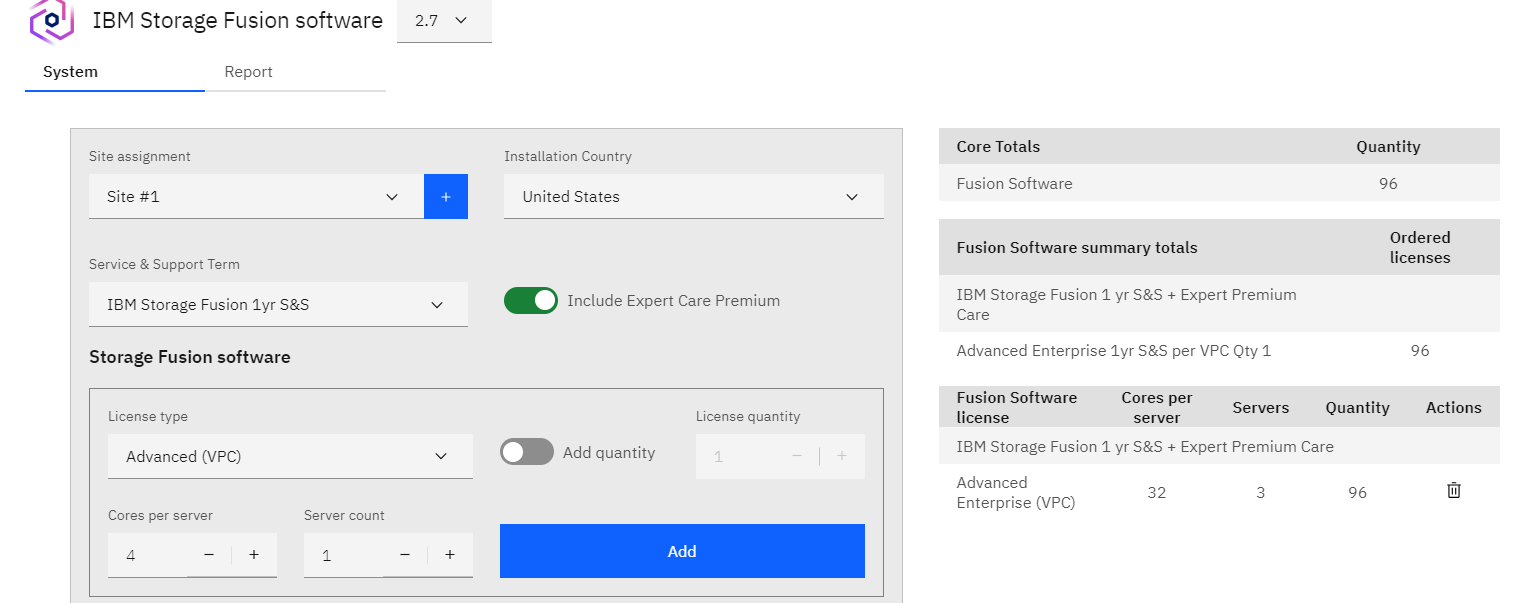
Figure 167 IBM Storage Fusion software system - System Results
General Section
Figure 168
shows the configuration options for an instance of IBM Storage Fusion software. You can modify the values(Installation Country, Service & Support Term, and Include Expert Care Premium)
in the configuration dialog box on the left. The configuration settings on the left are then used to populate the fields on the right, shown in
Figure 167.
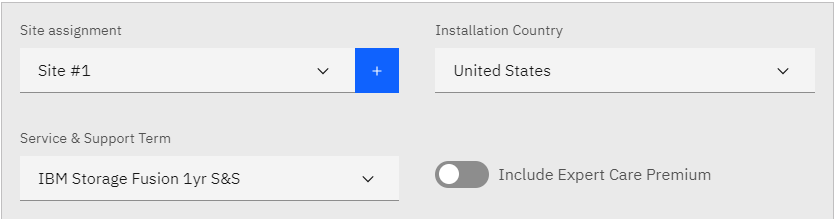
Figure 168 IBM Storage Fusion software system configuration - General section in Storage Modeller
The following configuration options define your IBM Storage Fusion software solution.
▪Site assignment: This field is prefilled with the site assignment from the Add Product process.
▪Installation Country: This field allows you to choose from a list of valid countries.
▪Service & Support Term: The Service & Support Term indicates the Expert Care basic software maintenance agreement, which ranges
from one to five years.
Click on the pull-down menu to choose the level of Expert Care:
• IBM Storage Fusion 1yr S&S
• IBM Storage Fusion 2yr S&S
• IBM Storage Fusion 3yr S&S
• IBM Storage Fusion 4yr S&S
• IBM Storage Fusion 5yr S&S
▪Include Expert Care Premium
option adds an extra level of support.
IBM Storage Fusion software
The Storage Fusion software section allows users to configure the number of licenses depending on the license type and the quantity, the number of servers, and cores per server.

Figure 169 IBM Storage Fusion software - IBM Storage Fusion software section in Storage Modeller
You can modify the values(Installation Country, Service & Support Term, and Include Expert Care Premium) in the configuration dialog box on the left, shown in
Figure 169.
▪License type allows you to choose one of the following types of licenses:
– Advanced (VPC)
– Manager Server
– Advanced Enterprise (VPC)
▪Add quantity allows you to toggle between modifying:
– License quantiy is active when Add quantity is enabled
– Cores per server is active when
Add quantity is disabled
• Set to multiples of 2
• Values range from 2 to 128
– Server count is active when
Add quantity is disabled
Based on the configuration settings entered in the Storage Fusion software UI on the left-hand side, the values are populated in the Core Totals, Fusion Software summary totals, and Fusion
Software license tables on the right-hand side, as described below.
The Core Totals table, shown in
Figure 170, shows
the total number of cores entitled for Fusion software, Red Hat OpenShift, and Advanced Cluster Management.

Figure 170 IBM Storage Fusion software system coinfiguration - Core Totals table
The Fusion Software summary totals, shown in
Figure 171, provides
the total number of licenses for each license type for Fusion Software.

Figure 171 IBM Storage Fusion software system coinfiguration - Fusion Software summary totals table
The
Fusion Software license
table, shown in
Figure 173, provides
information about all of the license types in chronological order with the specific number of servers and cores per server, which were selected.

Figure 172 IBM Storage Fusion software system coinfiguration - Fusion Software license table
Red Hat OpenShift
The Red Hat OpenShift section is used to manage Red Hat OpenShift sizing and subscription. The Red Hat OpenShift section is disabled if the support term is 2 or 4 years, where the Red
Hat will also be removed.
Figure 173 IBM Storage Fusion software - Red Hat OpenShift section in Storage Modeller
The following Red Hat OpenShift options define your Red Hat OpenShift settings:
▪Subscription offering:
– OpenShift Container Platform (OCP)
– OpenShift Platform Plus (OPP)
▪Synchronize OpenShift license with Fusion software licenses -This is a toggle field that keeps the quantity of OpenShift entitlements synchronized with the
Fusion Software entitlements. After completing the Storage Fusion software configuration, users can toggle toggle off synchronization and modify their Red Hat OpenShift licenses to their
specifications.
▪License type
– Per server
– Per core pair
▪License quantity - Users should
– Use the “+” or “-” buttons to increase or descrease the number of licenses, respectively.
The
Red Hat OpenShift license
table, shown in
Figure 174, shows
the which Red Hat OpenShift entitlements that were specified for the project.

Figure 174 IBM Storage Fusion software - Red Hat OpenShift license table
Advanced Cluster Management (ACM)
The Advanced Capacity Management section provides the interface to configure Red Hat Advanced Cluster Management for Kubernetes. ACM is only available for terms of 1 or 3 years and only on
a per core basis.

Figure 175 IBM Storage Fusion software - Advanced Cluster management (ACM) section
The Advanced Cluster Management section has the following features:
▪Synchronize ACM licenses with Fusion software licenses
– This works similiar to the Red Hat OpenShift toggle option, where users can toggle off the synchronization option and perform final modifications to the Red Hat ACM licenses for their
needs.
▪License quantity per core pairs
– ACM can be allocated only on a per core basis.
– ACM is available for term selections of 1 or 3 years
The Advanced Cluster Management output is shown in the table on the right-hand side, shown in
Figure 176.

Figure 176 IBM Storage Fusion software - Advanced Cluster management (ACM) table
For more information, refer to
Red Hat Advanced Cluster Management for Kubernetes.
Additional Capacity
The Additional Capacity section provides the interface to configure entitlement for additional Primary and Backup capacity.
– Primary (TiB): The Primary value affects the calculation of
Additional Capacity for Protection. At the time of this writing, the maximum for Primary (TiB) is set to 62500 TiB.
– Backup (TiB): The Backup value affects the calculation of
Additional Capacity for Protection. At the time of this writing, the maximum for Backup (TiB) is set to 62500 TiB.
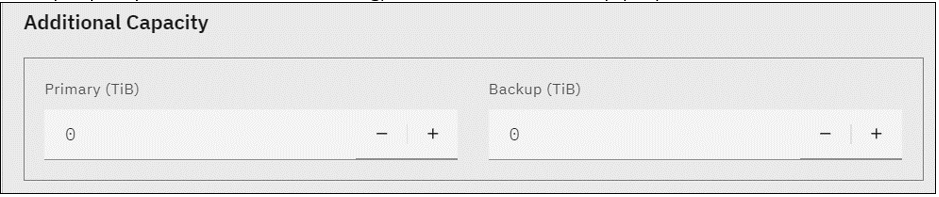
Figure 177 IBM Storage Fusion software - Additional Capacity section in Storage Modeller
The
Additional Capacity table, shown in
Figure 178, shows
information about additional capacity for the primary storage and the backup storage.

Figure 178 IBM Storage Fusion software - Additional Capacity table
Make sure that you review the tables (on the right side) that share the window with the configuration dialog box (on the left side).
Figure 168
shows the details of the sample product:
▪The IBM Storage Fusion Capacity section contains info about the Primary, Protection, and Metadata functions. Entitled Capacity, Additional Capacity. and Total
Capacity are also displayed.
▪The IBM Storage Fusion software section contains the feature codes that are associated with each component of IBM Storage Fusion software and the Expert Care
maintenance agreement. If RH OCP licenses are included (that is, Per Core pair selected in the Red Hat License field), this section also
contains RHOCP or RHOPP for Fusion subscription and support information.
Report tab
The Report tab includes selectable spreadsheets that summarize details of the product’s configuration and a list of the parts.
The following spreadsheets are displayed in the Report tab.
▪Summary: The summary spreadsheet contains IBM Storage Fusion software configuration details.

Figure 179 IBM Storage Fusion software Red Hat OCP - Summary report

Figure 180 IBM Storage Fusion software Red Hat OPP - Summary report
▪Parts List: The Parts List spreadsheet shows a detailed list of the quantity, product identifiers (PIDs), Feature Codes, and a description of the parts that are
configured in Storage Modeller. This list shows what will be included in the CFR file that is then imported into e-config. See
Figure 181.

Figure 181 IBM Storage Fusion software - Parts List report