Capacity / Safeguarded Copy tab
If the client intends to use the Safeguarded Copy (SGC) feature of the DS8000 storage system, the additional capacity requirements for SGC can be modeled on this tab. Otherwise, this tab
can be left blank.
Modeling for Safeguarded Copy usage entails the determination of the change-rate of the safeguarded volumes because the amount of change between backups for each volume will directly
affect the capacity that is required to store those backups. The best way to estimate the change-rate is to use the special DS8000 ESESizer tool. This is the preferred method of sizing the
additional capacity needs for an SGC implementation. However, in many cases use of ESESizer is not feasible for a variety of reasons. In those cases, the Storage Modeller tool provides an
alternative method that uses the destage rate (Cache to Disk Transfer Rate) captured in the performance statistics of the subject storage system. This is currently supported only for IBM Z
(mainframe) environments, via the capture, import, and analysis of IBM Z RMF statistics. Note that the destage rate is only an approximation of the change-rate per volume, so this
alternative method will result in much less accurate predictions than using ESESizer.
To obtain IBM Z RMF statistics, coordinate with the client according to the instructions in
“Getting IBM Z data to import” on page 104
To import the client-provided RMF statistics file, go to the Imported Data perspective (Perspectives -> Imported Data) in the Storage Modeller tool, and start an import operation
according to the instructions in
“Importing a data record” on page 99. Be sure to select import type
"IBM Z RMF statistics".
The process of configuring volumes in the Safeguarded Copy tab includes importing data and modifying the retention policy. The Safeguarded Copy tab shows the summary of the volume
configuration of the system and gives the following configuration options:
To perform the DS8000 Safeguarded Copy (SGC) capacity sizing, follow these steps:
Select source imported data
▪Click the Select source imported data button as shown in
Figure 214 on page 262, which will display a selection
dialog, listing all previously imported data entries that are eligible for SGC capacity sizing, as shown in
Figure 215 on page 263.

Figure 214 Safeguarded Copy - Import data
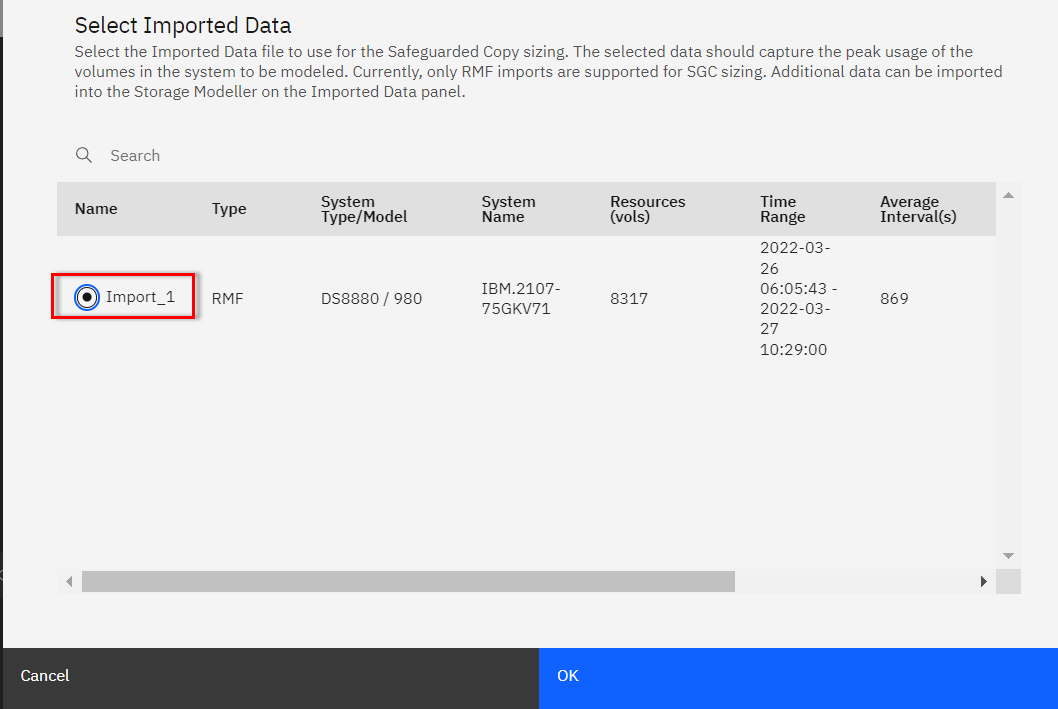
Figure 215 Safeguarded Copy - Select Imported Data
▪After selecting the appropriate imported data entry and selecting OK, an informational message may be displayed, as shown in
Figure 216 on page 263.
|
Note: ESESizer can only be implemented on IBM DS8000 storage systems, not on competitors’ systems.
|

Figure 216 Safeguarded Copy - Import Data Results
Specify the anticipated SGC retention policy
▪Select the Retention Policy of the safeguarded volumes by selecting the Frequency of copies (per day) and the number of days to keep the copies in the Retention Period (days) field. The
maximum number of backups saved per volume will then be frequency * retention. Note: If the retention policy values are changed, the calculations will need to be repeated.
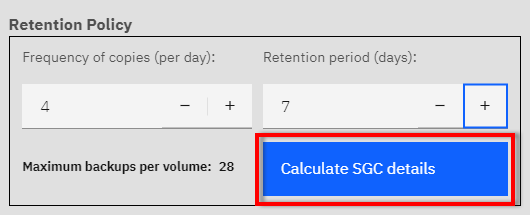
Figure 217 Safeguarded Copy - Retention Policy
Calculate the SGC details
▪The results of the calculation are displayed in
Figure 218 on page 265. where
– the minimum volume multiplier is always 1.5
– the maximim volume multiplier is calculated by multiplying the values of Frequency of copies (per day) and the
Retention period (days) and adding 1 to that result.
• max volume multiplier = (copies per day x Retention period) + 1
– The vaules can be adjusted within the Adjusted vol multiplier column, as long as the values are within the
minimum and calculated maximum values.

Figure 218 Safeguarded Copy - Details
If the current DS8000 configuration can meet the additional needs of SGC as specified, green confirmation messages are displayed in the Summary Results. Otherwise, red error messages are
displayed, and either the DS8000 configuration or the SGC parameters have to be adjusted.
Optionally: adjust the volume multipliers per storage group
▪Consult with the client and decide whether the volume-multiplier should be adjusted for some or all of the storage groups. The volume multiplier is derived from the destage rate and the
volume capacity, and affects the Total SGC virtual capacity needed.
– The minimum volume multiplier is always 1.5.
– The maximum volume multiplier is calculated.
– The values can be adjusted manually in the last column of the table, per storage group..
|
Note: The adjusted multiplier value is applied to all volumes that are members of that particular storage group..
Volumes that are not members of any storage group are listed under the storage group "None". The adjusted multiplier value for the group "None" is applied to all volumes that do
not have a storage group.
|
Optionally: perform offline computations using volume details
▪In some customer situations, it may not be sufficient to generalize the SGC requirements per IBM Z storage group. In those situations, it will be necessary to see the detailed information
per volume detected in the source data.
– Click the Export volume level CSV file to download this information. The generated CSV file will contain one row
per volume, with similar columns as are displayed in the user interface per storage group. This downloaded file, when opened as a spreadsheet, can be used to sort, filter, and perform
additional computation, as needed. Any such manipulations will of course not be reflected back in the Storage Modeller project.
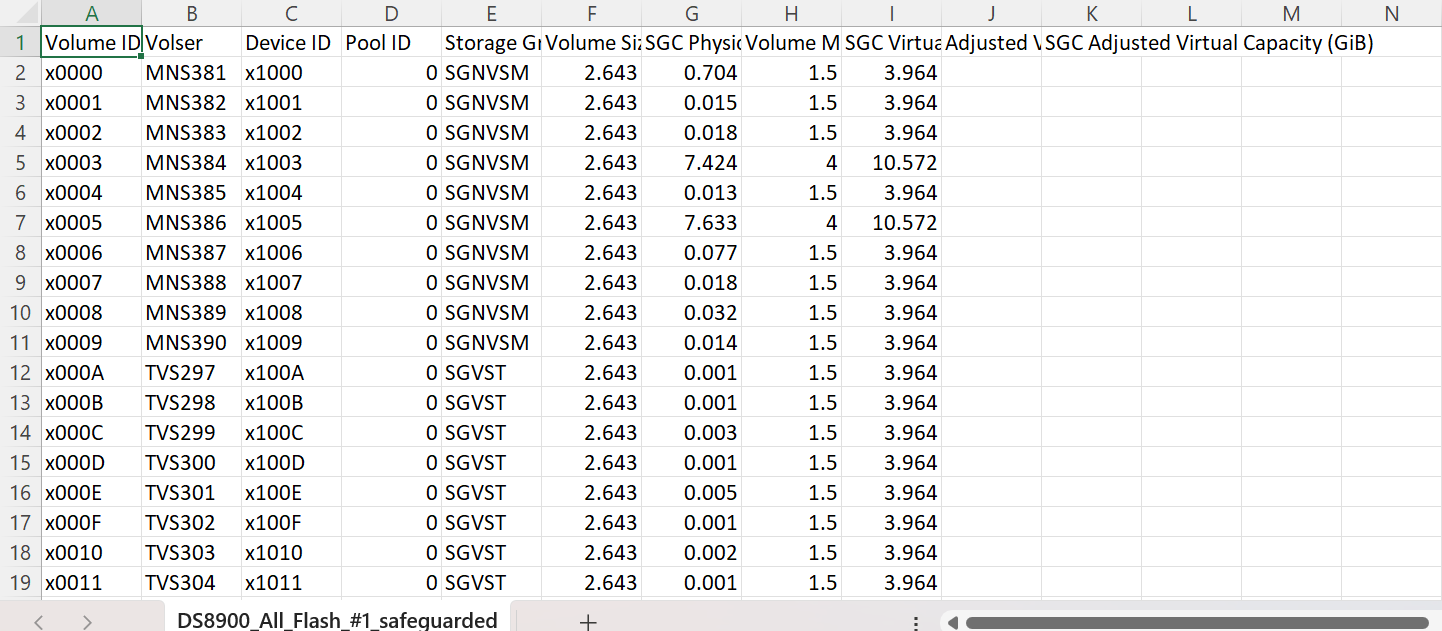
Figure 219 Safeguarded Copy - Spreadsheet