IBM® LinuxONE is a platform for the Linux® operating system built on a scalable, secure, and reliable architecture. Available in single frame, multi frame, and rack mount servers, IBM LinuxONE is used in many different industries worldwide.
Engineered to optimize data center efficiency through workload consolidation, IBM LinuxONE can reduce energy consumption and other operational costs, and lower emissions.
Use this content solution to understand how IBM LinuxONE works and to understand the experience of obtaining and installing an IBM LinuxONE system.
Leverage IBM LinuxONE to achieve your sustainability goals.
A single IBM LinuxONE 5 can run thousands of
virtual servers, keeping networking overhead low and promoting efficient sharing
of resources. This is possible because each LinuxONE 5 can have up to 200 configurable
processors dedicated to Linux workloads, called
Choose from or combine these options:
- Partitions (often referred to as logical partitions, or
LPAR s), which provide a hardware approach tovirtualization that offers superior isolation of workloads. You can define up to 85 LPARs. - Hypervisor software, which enables multiple operating systems to share physical computing resources, including
KVM (open source) andz/VM ®.
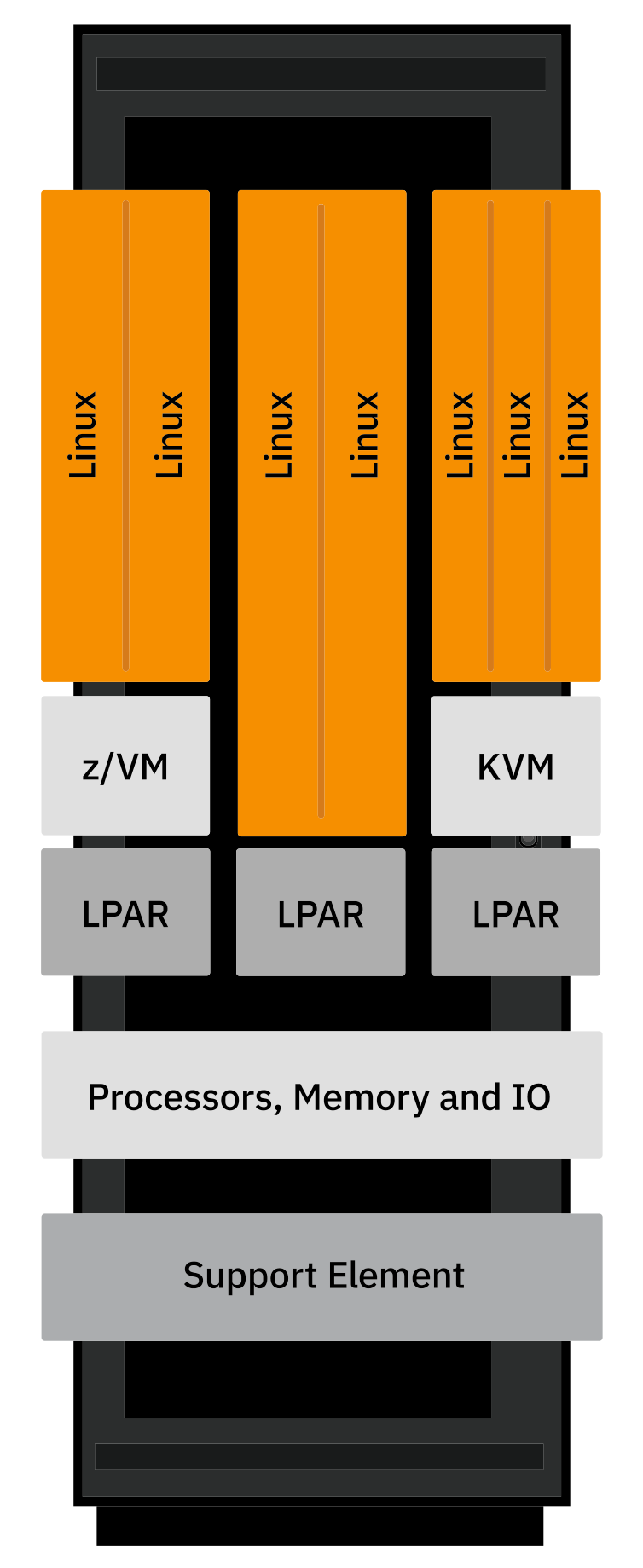
The ability to consolidate workloads onto fewer IBM LinuxONE servers, without impacting performance or availability, can reduce your IT infrastructure's power consumption, floor space, cooling requirements, and other operational costs.
IBM LinuxONE’s security, privacy, resiliency, and flexibility make it perfectly suited for hybrid cloud infrastructure.
Developers leverage cloud-native development, including
Red Hat OpenShift AI on IBM LinuxONE provides a scalable, sustainable, secure, container-based environment that allows for deploying, managing and serving AI-infused applications in the Confidential Computing environment provided by IBM LinuxONE.
Red Hat OpenShift Virtualization serves as a foundational platform providing a unified and industry-standard cloud-native operational environment for deploying and managing containerized and virtualized workloads on IBM LinuxONE holistically as part of a client's hybrid cloud.
IBM LinuxONE provides a secure, scalable, and compliant platform for managing ditital assets, extending security beyond key protection to include goverance layers, transaction logics, and third-party integration.
Protect your assets from security breaches with the
Protect Linux workloads throughout the lifecycle with IBM Hyper Protect Virtual Servers, a software solution built on the IBM Secure Service Container framework. Application developers can build in a trusted, encrypted environment. Operations personnel manages applications without access to sensitive data.
With IBM LinuxONE, you can encrypt pervasively rather than selectively, because encryption is built into every processor chip. The IBM Crypto Express adapter enables industry-leading protection of encryption keys. On-chip acceleration of compression speeds processing and makes data storage more efficient.
Protect data with end-to-end encryption which extends to built-in quantum-safe technologies.
IBM Unified Key Orchestrator for Containers (UKO for Containers) is designed to centrally manage keys on the Red Hat OpenShift Container Platform on IBM LinuxONE and hybrid, multicloud environments. IBM LinuxONE clients can use UKO for Containers to leverage the crypto hardware on the IBM LinuxONE server to manage the lifecycle of encryption keys.
IBM LinuxONE Emperor 5 systems, with
Regardless of where you are in your transformation journey, there is a LinuxONE solution, single frame, multi frame or rack mount server, that can meet your business needs. Work with IBM and possibly a business partner to understand your LinuxONE solution, including the Linux distribution and other software. Key capabilities that have been validated for LinuxONE include the following:
- Languages: Python, Pearl, Java, Node.js
- Management: IBM Terraform for Z and IBM LinuxONE, Red Hat OpenShift Container Platform, and Red Hat Ansible Automation Platform
- Database: Oracle, MariaDB, MongoDB, PostgreSQL, EDB
- Analytics tools with Hadoop, Big Insights, DB2BLU and Spark
Of course, many others are available.
Linux Distributions for IBM LinuxONE are offered by Red Hat and by Linux distribution partners Canonical (Ubuntu) and SUSE, who provide services and support. IBM also offers services for all eligible Linux distributions for IBM LinuxONE and support for the distributions from Red Hat and SUSE.
You can choose solutions from IBM software, open source software, and software from independent software vendors, such as Oracle. IBM collaborates with the Linux community and is one of the leading commercial contributors to Linux. Container images offer lightweight and self-contained software to enable deployment at scale.
Storage devices must fully conform to
For
Work with IBM and possibly a business partner to understand the total cost of ownership of IBM LinuxONE based on the solution that you have identified.
Total cost of ownership of IBM LinuxONE can be lowered significantly, when compared with other platforms, by several factors, including:
- Consolidating workloads. With IBM LinuxONE, fewer servers can mean energy and space savings, and dramatically fewer cores can result in dramatically reduced software licensing costs
for software that is priced by the core. IBM LinuxONE requires fewer cores than x86, as a result of:
- Faster processor speed
- Specialized engines that offload I/O to persistent storage
- High-speed, in-memory communication across
LPAR s, provided byHiperSockets - Design for very high utilization levels (75-80 percent) with no performance impact.
- Open source system software.
- Support in the architecture for higher utilization, which reduces the tendency found with other architectures to provision more computing resources than are needed to avoid bottlenecks caused by peaks in utilization.
The TCO and CO2e calculator helps you estimate the total cost of ownership and emissions of an IBM LinuxONE system and see a comparison to x86. Answer just a few questions about hardware, workload type and software.
Work with IBM and possibly a business partner to choose the configuration, either off-the-shelf or fully customizable, that meets your needs. IBM LinuxONE offers:
- Up to 4 19-inch frames, depending on your capacity requirements
- Both raised-floor and non-raised floor environments
- Top and bottom exit I/O and power.
The steps for obtaining a new IBM LinuxONE system vary, depending on your needs, but typically IBM:
- Prepares a proposal
- Discusses financing with you
- Works with you to place an order
- Builds and tests your system.
IBM provides detailed site planning information, including a checklist, in Installation Manual for Physical Planning. You can explore the site planning checklists for IBM LinuxONE models using the links below.
Work with IBM and possibly a business partner to set up and start your IBM LinuxONE system.
IBM ships your system to you and:
- Unloads and unboxes your system at your location
- Moves it into your data center
- Verifies that it is complete
- Cables the system
- Brings it up.
Use these resources to continue your journey to IBM LinuxONE.
Find descriptions, server specifications, testimonials, case studies, and more.
Find information to unleash your open source apps and services on the Linux platform.
Find information about IBM Hyper Protect Virtual Servers.
Find information about services to help you design and implement solutions on IBM LinuxONE.
Test drive IBM LinuxONE and access other resources on the IBM LinuxONE Community Cloud.
A course on z/VM and Linux on IBM Z and IBM LinuxONE.
Through the IBM Partner Plus portal, get access to innovative technology solutions.
Find resources to help you reduce energy consumption, cost of operations, and emissions with IBM LinuxONE.
Learn how to use the security features that make the most of and complement the IBM LinuxONE hardware security features.
Look inside IBM LinuxONE.
IBM LinuxONE videos on IBM MediaCenter
IBM LinuxONE 5: Optimized IT for energy and cost savings
Documentation for IBM LinuxONE
Documentation for Linux on IBM LinuxONE and IBM Z
Leverage IBM LinuxONE to achieve your sustainability goals.
Minor editorial changes were made.
A section on energy efficiency was added to the Learn tab of How to get started.
The page has been updated for IBM LinuxONE 5.
A new redpaper was added to the Other resources tab of the Technical resources section.
Titles were added to resources in the Technical resources section.
Several links in the How to get started section were updated.
The Learn tab of the How to get started section was updated to link to the new documentation for IBM Secure Execution.
Updates were made to all sections, including adding the related solution, Journey to sustainability with IBM LinuxONE.
Various updates on the Solutions and Total cost of ownership tabs of the How to get started section for currency.
Various updates to reflect recently announced models.
On the Plan and order tab of the How to get started section, the links to documentation now include recently announced models.
On the Learn about LinuxONE tab of the How to get started section, the sections about resiliency, availability, and sustainability have been edited for clarity.
On the Learn about LinuxONE tab of the How to get started section, the link for more information about Hyper Protect Virtual Servers now goes to the documentation. In the Technical resources section, the tile for the Hyper Protect Virtual Servers content solution has been removed, because the content solution has been removed.
Information about Hyper Protect Data Controller was removed, as it is withdrawn.
Information about sustainability was added.
Information was updated to reflect the availability of LinuxONE Emperor 4.
Links to Compass L, the technical exchange platform for Linux on Z and LinuxONE, were added.
An overview video was added to the Introduction section.
A video was added to the hybrid cloud section of the Learn about LinuxONE tab. A video, Linux on LinuxONE: Enterprise Key Management for Pervasive Encryption of Data Volumes, was added to the Technical resources section.
A video, The z15 Core of LinuxONE, was added to the Learn about LinuxONE tab of the How to get started section and to the Technical resources section.
The Total cost of ownership tab in the How to get started section links to a new TCO calculator.
- Updates for the new LinuxONE Express offering were added to the Introduction section and to the Plan and order tab of the How to get started section.
- Resources were added to the Technical resources section.
- The video in the Consolidation section of the Learn tab is new.
- Links to IBM PartnerWorld were added to the Solutions tab of the How to get started section and to the Other resources tab of the Technical resources section.
- Links to new videos were added to the Multimedia tab of the Technical resources section.
- A link to a LinuxONE channel on IBM Media Center was added to the Multimedia tab of the Technical resources section.
- A summary site planning checklist was added to the Plan and order tab of the What to expect section.
- Minor edits were made for accessibility and usability.
A link to Hybrid cloud: The best of all worlds was added to the Learn about LinuxONE tab and to the Other resources tab of the Technical resources section.
- In the What to expect section, the information on the Learn tab was expanded and reorganized, and links to Installation Manual for Physical Planning were added to the Plan and Order tab.
- New resources were added to the Technical resources section, including a new tab for product libraries.
A link to the LinuxONE Community Cloud was added to the Set Up and Start tab of the What to expect section, and to the Other resources tab of the Technical resources section.
The Learn about LinuxONE tab was updated to reflect the new air-cooled, single-frame model. On the Solutions tab, the link to information about open source software was changed.
Data Privacy Passports was added to the Other resources tab of the Technical resources section.
Some content was edited, including the section on virtualization. Links to Lab Services and to IBM Cloud Hyper Protect Services were added to the Technical resources section.
Some content was edited, including content in the section “How does LinuxONE compare to x86?” Use the link in that section for comparisons of LinuxONE to x86 servers.
1 DISCLAIMER: IBM internal data based on measurements and projections was used in calculating the expected value. Necessary components include IBM LinuxONE Emperor 5; IBM