News
Abstract
For the new Navigator Access Authorization Options, see https://www.ibm.com/support/pages/node/6483569
Content
- QNAVMNTR (new) or QINAVMNTR (heritage)
- QPMCCFCN
- QPMCCDATA - for viewing data
Monitor function access requirements
New Navigator Monitors uses QNAVMNTR and QPMCCFCN Authorization Lists:
If a user is in both QNAVMNTR and QPMCCFCN, they can perform all the available function with New Navigator System Monitors.
|
Action
|
Description of action |
New Navigator: With access through authorization lists
|
*ALLOBJ authority |
|---|---|---|---|
| View System & Message Monitors | Monitors-> System or Message | Yes with QNAVMNTR *USE | |
| Visualize System Monitor Data "Dashboard" | Display real-time monitor data with all metrics on dashboard (PDI) | Yes with *USE in QPMCCDATA authority list | Yes |
| Investigate System Monitor Data | Display the selected single metric with PDI charts | Yes with *USE in QPMCCDATA authority list | Yes |
| Event Log | Show the event log entries for this monitor | Yes with QNAVMNTR *USE | Yes |
|
Start Note: A new monitor needs to be started after creation |
Start this system monitor (conditional) |
Yes with QNAVMNTR *ALL
- system monitor also requires QPMCCFCN *USE
For proper trigger of monitors, user must be able to perform a CREATE or REPLACE ALIAS command and to visualize metrics with Performance Data Investigator (PDI)
|
Yes |
| Stop | Stop this system monitor (conditional) |
Yes with QNAVMNTR *ALL
- system monitor also requires QPMCCFCN *USE
|
Yes |
| New Based on | Create a system monitor based on selected one | Yes with QNAVMNTR *ALL | Yes |
| Delete | Delete this system monitor (available for "stopped" monitors) | Yes with QNAVMNTR *ALL | Yes |
| Properties - [Edit] | Display or change the attributes of this monitor | Yes with QNAVMNTR *ALL | Yes |
| System Monitor ->Summary | Yes with QNAVMNTR *USE | ||
| Monitor Server | Start or Stop | N/A | Yes |
| Heritage Navigator: for a monitor you do not own | |
| Visualize Monitor Data | Yes |
| Investigate Monitor Data | Yes |
| Event Log | Yes |
|
Start Note: A new monitor needs to be started after creation |
NO |
| Stop | NO |
| New Based on | Yes |
| Delete | NO |
| Properties | Yes |
| Monitor Server | N/A |
|
New Navigator Monitors - QNAVMNTR
Heritage Monitors - QINAVMNTR
|
- *ALLOBJ special authority (for example, User Class *SECOFR authority with *ALLOBJ)
- Access through the specified authorization list
For correct access needed to run System or Message Monitors task in the IBM Navigator for i GUI, add a user profile to the authorization lists.
| Authorization List | Description | Start, stop, or delete monitor (*see ownership requirements above) | To view the system monitor metrics graphs with Performance Data Investigator |
|
QNAVMNTR - New
|
Access to the new monitor data queue | Yes | Not applicable |
| QINAVMNTR - Heritage | Access to the heritage monitor data queue | NO | Not applicable |
| QPMCCFCN | Access to the performance tools function | Yes | Yes |
| QPMCCDATA | Access to the performance tools data | Not applicable | Yes |
- With New Navigator only, it is allowed for a user profile to start, stop, or delete a monitor owned by another profile if they are included in both authorization lists
- For information on the PDI authority requirements, see Authorization Requirements for PDI
Adding a User Profile
Adding a user profile to the authorization list can be done with the IBM Navigator for i GUI interface or through the green screen command line:
Navigator for i:
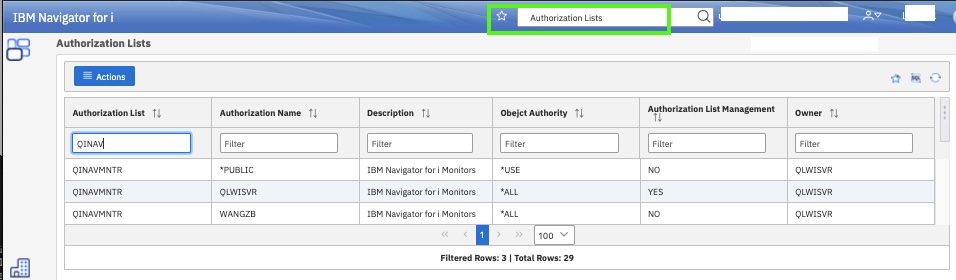
Figure 1: Open Authorization Lists under Security (or use search bar)
- Filter on "QNAVMNTR" to find the lists
- Editing is not yet available in New Navigator. This function will be added in the future
Green Screen Commands:
|
Use the EDTAUTL command on IBM i:
For one-line command use: |
Was this topic helpful?
Document Information
Modified date:
16 May 2025
UID
ibm11164610