Troubleshooting
Problem
IBM Case Foundation (Process Engine workflow) transfers or IBM Case Manager/BAW Solution deployments fail due to one of the following exceptions:
"[FNRPE2131090018E]A database update operation was attempted but another update was in progress and the database is temporarily locked.""Unable to deploy a solution that has in-basket configuration changes, the deployment fails with error FNRPA0032E Process Engine configuration document could not be imported: Failed API_TransferConfig error.""com.ibm.casemgmt.intgimpl.deploy.handlers.ContinuableStepException: FNRPA0036E The solution cannot be deployed because the following Process Engine error occurred during the deployment of the XPDL document: [FNRPE2131090448E]RPC=jpe_rpc_RemoteLockSingleRegionForModify failed, errorTuple=0, errorTxt=[Ljava.lang.StackTraceElement;@730ce01f Root cause:filenet.jpe.general.RuntimeServiceException: [FNRPE2131090146E]Operation not allowed at this time due to other activity"Symptom
Operations attempting to claim a region lock in the Process Engine database throw an exception due to active locks already in place. For example, an operation that executes a Process Engine transfer, a Case Manager Solution deployment, or Process Engine configuration change (in ACCE or PCC).
Cause
When an operation executes a Process Engine transfer, the region must be locked. When a region lock exception occurs, it means that either there is another lock in progress or in a multi-server environment the servers are unable to communicate across the internal server port.
Diagnosing The Problem
To start the troubleshooting, gather the following data:
- Process Engine server system logs from all servers in the P8 domain
- Process Engine system information ping page three times from each Content Platform Engine server 10 seconds apart (use the browser’s file > save as)
http://<cpe-server:port>/peengine/IOR/ping?systeminfo=true - An export of the VWIsolReg table and the VWServer table
- The output from
vwtool > schemastatuscommand. See this IBM Documentation page for details:
Additional information:
- Was this working before?
- If so, how long ago and were there any changes to the system that could be related?
Resolving The Problem
If you see an operation in the schema status output, try the
vwtool > unlockregion command to try cancelling the operation.After collecting the data, try recycling the Content Platform Engine JVMs. Some of the types of locks that don't show up in schema status might be cleared by a recycle.
NOTE: recycling the database application along with the Content Platform Engine JVMs could free up "ghost locks" in the database and resolve the problem.
If neither of those suggestions resolve the issue in a multi-node environment, assign an Internal Port for all communication between Content Platform Engine servers.
Relevant technotes:
Relevant technotes:
In an IBM Case Manager/BAW environment, review technote 1095814 for specific troubleshooting data:
Also, review technote 961342:
Work around the problem by eliminating the sources of the region lock that is blocking the transfer.
This is done by the following:
1. On one Content Platform Engine JVM, set the
2. Shut down all other Content Platform Engine JVMs
-DStartDaemons=false (do not recycle yet)2. Shut down all other Content Platform Engine JVMs
3. Monitor the VWServer table for the inactive state (F_State=2) **
4. Recycle the one JVM (step 1) which has
4. Recycle the one JVM (step 1) which has
-DStartDaemons=false5. Attempt the transfer
6. Remove the
6. Remove the
-DStartDaemons=false flag and recycle / restart all JVMs for the cluster.NOTE: The
-DStartDaemons=false flag should only be used temporarily to help resolve this issue and it should not be used in normal circumstances.**: the state change can take several minutes
TIP: After deploying the
-DStartDaemons=false parameter and the Content Platform Engine application is running, access the Process Engine ping page and verify the Process Engine daemons section has no background processes being logged:http://<cpe-server name>:<cpe-port #>/peengine/IOR/pingDETAILS:
The JVM arguments on WebSphere (non-container) are under:
Servers > Application servers > [servername] > Java and Process Management > Process Definition > Java Virtual Machine -> Generic JVM Arguments (box)[servername] - the application server name for the Content Platform Engine serverSet the following: -DStartDaemons=false
In a Containerized CPE, there is an equivalent way where you specify the JVM arguments in the CR YAML (config.yaml) using jvm_customize_options parameter.
Here's a sample:
Edit the spec > ecm_configuration > cpe > cpe_production_setting > jvm_customize_options key and add the following -D parameter:
ecm_configuration:
cpe:
cpe_production_setting:
jvm_customize_options: "-DStartDaemons=false"Note: add the -D argument to whatever is already there.
Documentation reference:
Other suggestion:
CP4A 20.0.2:
CP4A 20.0.2 locked down the network policies that prevent the Content Platform Engine pods from talking to each other.
Solution:
Solution:
Install CP4A 20.0.3 or higher, which sets the Process Engine internal server communication to a well-known port and exposes that port on the container and in the network policy.
Save/Commit a change in a component queue config fails:
https://www.ibm.com/support/pages/node/6473533IBM Case Manager solution administrators are unable to deploy a solution. An error is logged in Case Manager Builder information pane, solution deployment logs and in the application server logs.
Content Platform Engine Container Environment:
Workflow transfer failed in a side-by-side container and traditional Content Platform Engine deployment environment
After an upgrade to CPE 5.5.11, unable to transfer due to handshake error
FNRPE2130670002E ; Exception: Exception encountered executing RPC: "https://<cpe-hostname:internal-port>/peserverapi?name=jpe_rpc_RemoteLockSingleRegionForModify". at filenet.jpe.rpc.comm.PEServerRPCClient.InvokeRPCViaHTTP(PEServerRPCClient.java:187) ... Caused by: javax.net.ssl.SSLHandshakeException: Received fatal alert: handshake_failure at sun.security.ssl.Alert.createSSLException(Alert.java:131) In containerized CPE pods, if the “FNRPE2130670002E Failed API_TransferConfig operation” exception is happening over port 38241, the problem is likely that port 38241 is being blocked or has some other network layer connectivity problem. That port is hard coded to the CPEServerPort parameter:
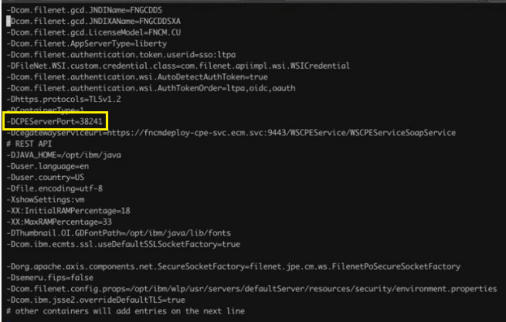
NOTE: the Internal port number (in ACCE) does not apply to a containerized CPE pod.
If nothing in this document helps you resolve the issue, open a support case with IBM Support for assistance.
Document Location
Worldwide
[{"Type":"MASTER","Line of Business":{"code":"","label":""},"Business Unit":{"code":"BU048","label":"IBM Software"},"Product":{"code":"SSCQTT4","label":"Process Engine"},"ARM Category":[],"Platform":[{"code":"PF025","label":"Platform Independent"}],"Version":"All Versions"}]
Was this topic helpful?
Document Information
Modified date:
12 November 2025
UID
ibm16587150