Returning the accessor to the Base Module
If you powered off the library and the accessor did not return to its park position in the Base Module behind the Operator Panel.
- Power on the library by pressing Power on the Base Module just below the Operator Panel.
- Return the accessor to its park position.
- Power off the library by pressing Power on the Base Module and holding for 5 seconds.
If the accessor is still not in the Base Module, use one of the procedures in the following two sections.
If the accessor is stopped in an Expansion Module that is near the Base Module or is stopped directly between two modules.
- Remove the front bezel from the Base Module, the Expansion Module containing the accessor, and modules in between as needed.
- Insert a small flat head screwdriver into the screwdriver relief on the right rear bearing block
of the accessor.
Figure 1. Inserting the screwdriver to manually operate the accessor 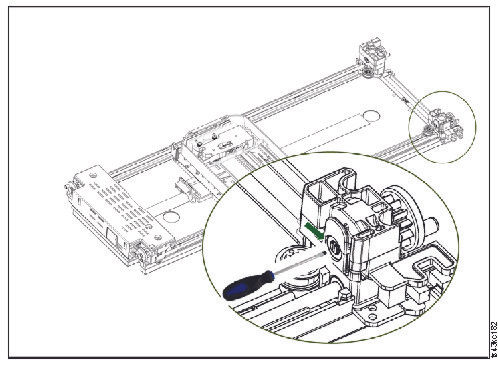
- Turn the screwdriver to manually operate the accessor gear train and move the accessor into the Base Module.
- Lock the accessor. Standing at the front of the module, move the blue lever to the left, then away from you, then to the right.
- Reinstall the bezels that were previously removed.
- Remove the accessor and spooling mechanism. See Preparing to remove the accessor and spooling mechanism from the Base Module.
- Install the new accessor and spooling mechanism. See Installing the accessor into the Base Module.
- Slide the Base Module back into the rack. See After the accessor and spooling mechanism installation.
If the accessor is stopped in an Expansion Module that is not near the Base Module or it cannot move vertically.
- Remove the left magazine of the Base Module. See Removing or replacing a magazine. The library must already be powered off. Therefore, you must unlock the magazine by using the manual release.
- Disconnect the power supply cables from all of the modules.
- Using plastic-handled scissors, reach through the left magazine opening of the Base Module and
carefully cut the spooling cable.
Figure 2. Left magazine opening 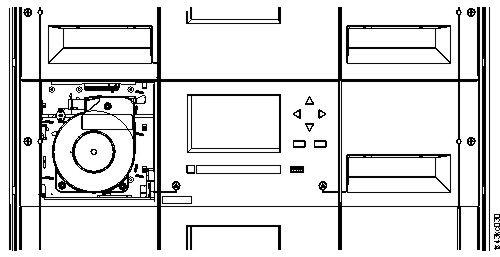
- Extend the expansion module that contains the accessor while carefully guiding the free spooling cable. See Preparing to remove the accessor and spooling mechanism from the Base Module. While minor differences might occur, these instructions for a Base Module also apply to an Expansion Module.
- Remove the accessor from the Expansion Module by using Step 1 through Step 7 in Removing the accessor and spooling mechanism from the Base Module.
- Slide the Expansion Module back into the rack. See After the accessor and spooling mechanism installation. While minor differences might occur, these instructions for a Base Module also apply to an Expansion Module.
- Extend the Base Module. See Preparing to remove the accessor and spooling mechanism from the Base Module.
- Remove the spooling mechanism from the Base Module by using Step 8 through Step 10 in Removing the accessor and spooling mechanism from the Base Module.
- Install the new accessor and spooling mechanism. See Installing the accessor into the Base Module.
- Slide the Base Module back into the rack. See After the accessor and spooling mechanism installation.