Editing or removing the username for an existing user or application
These instructions show you how to edit the IBM® MQ username for an existing user or application, or how to remove the username altogether.
Important: The user or application will no longer be able to
connect to queue managers with the original IBM MQ
username.
To complete these tasks you must be an IBM MQ as a Service service administrator (see Service roles).
For instructions on accessing the IBM MQ as a Service UI, see Getting started with IBM MQ as a Service.
Changing the username for the user or application
These instructions show you how to change the username for an existing user or application.
Note: Your user or application will no longer be able to connect to queue managers within your
IBM MQ service instance using the original name.
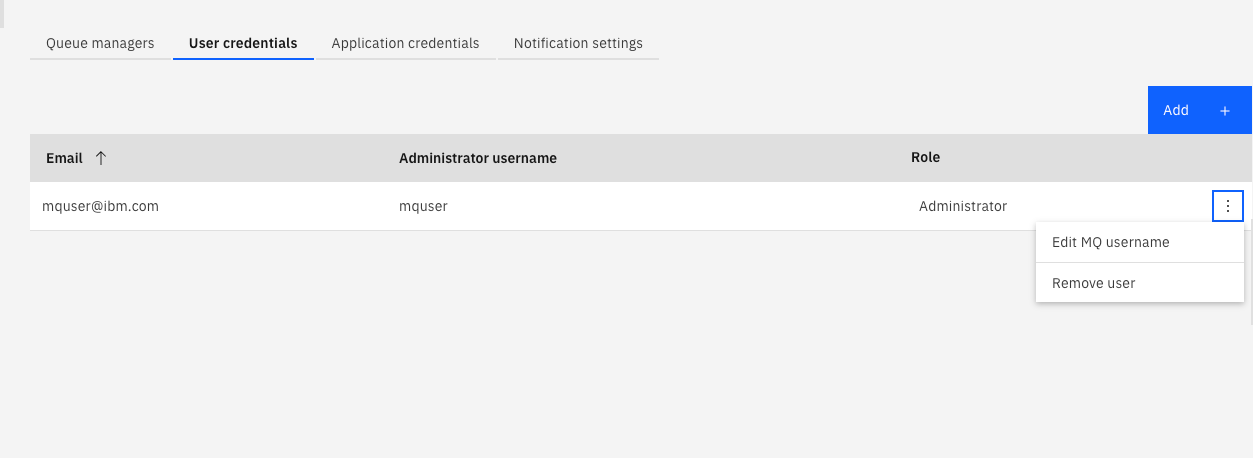
- Once in the IBM MQ as a Service service, click the appropriate tab, either User credentials or Application credentials.
- Click the Actions menu ... for the entry in the
list of User or Application permissions that is to be edited.
-
Click Edit MQ username.
-
Enter a new MQ username.
Important: The MQ username must have a maximum of 12 characters and be lower case a-z or 0-9. It must also be unique within your IBM MQ service instance. - Click Save.
Removing access for an existing user or application
These instructions show you how to remove access for an existing user or application.
Note: Your user or application will no longer be able to connect to queue managers within your
IBM MQ service instance.
- Follow steps 1 to 2 in the Changing the username for the user or application section.
- Click Remove user or Remove application.