Preventive Service Planning
Abstract
This technote provides guidance on importing and executing an end‑to‑end SAP BW Extract job in IBM Cloud Pak for Data (CPD) that has been migrated from legacy DataStage. It focuses on scenarios where the DataStage connection to SAP BW is parameterized using environment variables or parameters, and outlines the required prerequisites, configuration steps, and runtime considerations to ensure successful execution in the CPD environment.
Content
Export the Legacy DataStage job
Import the Legacy DataStage Jobin CPD
Introduction
This document outlines the procedure for executing a migrated SAP BW Extract job in CPD when the SAP BW connection is configured using environment variables or parameters.


Environment
IBM Cloud Pak for Data 5.2.0 Patch 8
Pre-requisite
- Place the DSBWConnections.config file in /px-storage/DSBWConnections of ds-px-runtime pod from legacy DataStage(/IBM/InformationServer/Server/DSBWConnections) to CPD(/px-storage/DSBWConnections)
If the DSBWConnections.config already exist in the ds-px-runtime pod, then append the connection details from the legacy DSBWConnections.config to CPD DSBWConnections.config file.

For SNC SSO cases, please update the SNCMYNAMERUNTIME parameter (based on the configured SNC name in CP4D) in /px-storage/DSBWConnections/DSBWConnections.config.

For SNC X509 cases, please update the SNCMYNAMERUNTIME and SNCXCERTRUNTIME parameter (based on the configured SNC name in CP4D) in /px-storage/DSBWConnections/DSBWConnections.config.

Steps
- Export the Legacy DataStage job: Create the ISX export package of legacy DataStage job using one of the following supported methods:
Option 1: Server Manager Tool
Use the Server Manager UI to export the required DataStage/Information Server assets as an ISX file. Reference:https://www.ibm.com/docs/en/SSZJPZ_11.7.0/com.ibm.swg.im.iis.ds.deploy.help.doc/topics/exportingobjects.html


Option 2: istool Command Line
Use the istool command to export assets into an ISX file for automation or scripting use cases. Reference:https://www.ibm.com/docs/en/SSZJPZ_11.7.0/com.ibm.swg.im.iis.iisinfsv.assetint.doc/topics/istoolexp.html
- Import the Legacy DataStage Jobin CPD: Import SAP BW Extract job and parameter set in CPD from ISX file.

- Run CPDCTL to migrate parameters values: Import DSParams file (/IBM/InformationServer/Server/Projects/dstage1) using cpdctl command (reference: https://github.com/IBM/DataStage/blob/main/dsjob/blogs/migrateConnection.md#step-2-run-cpdctl-dsjob-create-dsparams-command) into the CPD project to update environment variable or parameters values defined as PROJDEF.

- Validate values in the Parameter set after ISX and DSParams file import.

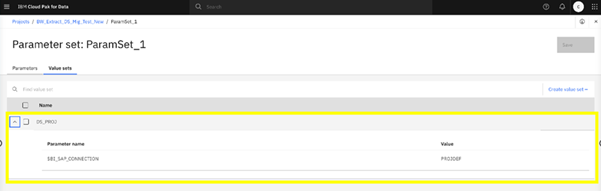

- Open the job, select the sapjco3.jar and libsapjco.so in Jar URIs and compile the job. You can validate the legacy environment variable or parameter name used for DataStage Connection to SAP BW in the OSH code(legacy_connection_name)

Note: For all connection types (Application Server, Load Balancing, etc.), the SAP connection is configured as Application Server in the UI, and all other connection properties are set to NA. At runtime, the actual connection details are resolved from the /px-storage/DSBWConnections/DSBWConnections.config file. - Run the Job: Run the imported job with #ParamSet_1.$BI_SAP_CONNECTION# parameter


Known Issues
When running SAP BW Extract using a Load Balancing Connection, if the System ID (SID) is configured as a connection parameter, the job may fail in CPD environment.
Resolution:
For Migrated Connection Name Parameter Jobs:
Update the connection configuration “USESYSTEMNUM=TRUE” and “SAPSYSNUMLB=<NN>" (e.g., 00, 01) of the corresponding CONNAME in /px-storage/DSBWConnections/DSBWConnections.config from ds-px-runtime pod.
For Migrated and Fresh Jobs (Without Connection Name Parameter):
Update the connection configuration to use the System Number instead of the System ID (SID) by enabling Use System Number and specifying the appropriate System Number (for example, 00 or 01). Apply and save the changes, then recompile and run the job.
Was this topic helpful?
Document Information
Modified date:
12 May 2026
UID
ibm17272679