General Page
This report contains the results of the performance evaluation of IBM App Connect Enterprise (certified container) running on the Red Hat OpenShift Container Linux 64-bit (amd64 architecture) platform.
Please find attached a downloadable PDF version of this report along with a browser version for your convenience.
Be sure to read the general information in the Notices section before looking at the detail in the document.
Table of Contents
- T-shirt Size Definitions
- Startup Tests
- Message Rate Tests
- Flows created using Toolkit
- Flows created using Designer
- Startup Tests
- Message Rate Tests
- Flows created using Toolkit
- HTTP XMLNSC ESQL Transformation
- HTTP JSON ESQL Transformation
- MQ Aggregation
- MQ Coordinated Request-Reply
- MQ Large Messaging
- MQ Routing Cache
- TCPIP ISO8853 XML Transformation
- Process Jira Issues
- Process Jira Issues ( Multi replica)
- Create ServiceNow Incidents
- Create ServiceNow Incidents ( Multi replica)
- Flows created using Designer
- Flows created using Toolkit
Trademarks
The information provided in the performance report pages illustrates the key processing characteristics of IBM App Connect Enterprise. It is intended for architects, systems programmers, analysts, and programmers wanting to understand the performance characteristics of IBM App Connect Enterprise. The data provided will assist the reader in understanding the performance characteristics of the product when using the App Connect certified container running in an OpenShift Container Platform environment. Please note that it is assumed that the reader is familiar with the concepts and operation of IBM App Connect Enterprise.
This information has been obtained by measuring startup times and the message throughput for a number of different types of message processing. The term ‘message’ is used in a generic sense and can mean any request or response into or out of an integration server, regardless of the transport or protocol.
The performance data presented in the reports was measured in a controlled environment and any results obtained in other environments might vary significantly. For more details on the measurement methodologies and environments used, see the "Evaluation Procedure" and "Test Environment" sections, respectively, of this document.
The performance throughput measurements focus on the throughput capabilities of the integration server using different message formats and processing flows. The aim of the measurements is to help the reader understand the rate at which messages can be processed in different situations as well as to understand the relative costs of the different approaches and styles of message processing.
You should not attempt to make any direct comparisons of the test results in this report to what may appear to be similar tests in previous performance reports. This is because the contents of the test messages are significantly different as is the processing in the tests. In many cases the hardware, operating system, and prerequisite software are also different, making any direct comparison invalid.
In many of the tests the user logic is minimal, and the results represent the best throughput that can be achieved. This should be borne in mind when using the data in this report.
References to IBM products or programs do not imply that IBM intends to make these available in all countries in which IBM operates. Information contained in this report has not been submitted to any formal IBM test and is distributed ‘as is’. The use of this information and the implementation of any of the techniques is the responsibility of the customer. Much depends on the ability of the customer to evaluate this data and project the results to their operational environment.
All tests are run in a single Red Hat OpenShift cluster using multiple namespaces. The test system comprises a number of deployments and pods which include, the App Connect Dashboard and the Integration Runtime which are deployed and managed by the IBM App Connect operator.
When the test case requires the use of IBM MQ an instance of a queue manager is run in a container in one of the namespaces on the OpenShift cluster.
Additionally, two more servers may be run on the same cluster depending on the test case. The first is an “HTTP Server” that serves requests for an HTTP Connector node if it is part of any of the tests and the second is a “Mock Server” which serves requests from any SaaS connector node if it is a part of a test. The actual requests to any SaaS endpoint are intercepted and served by this Mock Server. This is done to avoid any rate limiting that might be imposed by the SaaS provider.

Two types of tests are run:
- Startup time tests – These tests are executed to measure the startup time of the Integration Runtime pod. The time that it takes for the server to initialize and start serving is measured. There are a variety of tests that are executed each with a different number of preloaded BAR files. The details of each test are disclosed in the test description.
- Message Rate tests – These tests are executed to measure the message rates or throughput . Again, there are various tests for different scenarios that are executed to measure the number of messages that are processed by the server in a given time duration.
Two different client simulation tools are used for generating load or traffic. The “K6” tool is used to generate load for the HTTP type transport protocol. Additionally, the open source “PerfHarness” tool is used for tests using the MQ protocol. Both these tools are used to evaluate the performance of the software systems for different test types.
The K6 tool has scripts in which the number of VUs (Virtual Users) is configured. Each simulated user sends HTTP requests with prefabricated payload messages to the system. Similarly for tests involving MQ, then PerfHarness is configured to specify a number of client threads which simultaneously send prefabricated payload messages to the system.
The client threads wait for and get a response, and keep repeating this synchronous request-response interaction with the same payload for the duration of the test.
The collective of all request-response interactions that have taken place during a predefined time interval are referred to as a test run.
The “Performance Framework” is responsible for orchestrating the test runs. This involves scheduling the test runs, executing the K6 or the PerfHarness scripts as appropriate within each test run and for triggering a restart of the IBM App Connect Enterprise server pods between test runs.
Every test run has a warmup phase which is immediately followed by the actual test phase during which measurement data is collected. This ensures that results are collected for independent executions of the server with a restart of the IBM App Connect Enterprise server pods each time.
As mentioned earlier, the K6 tool is used to generate load for HTTP transport-based tests. This effectively spawns concurrent HTTP threads, emulating multiple users sending load and this is repeated for the duration of the test. The HTTP connections are “persistent” which means the same TCP connection is reused to send multiple HTTP requests to a server, instead of creating a new connection for each request, essentially enabling "keep-alive" behaviour. There is no pipelining of requests.
When using MQ, PerfHarness client threads put prefabricated MQ payload messages to a queue designated as an input to the test case, synchronously wait for and get a response from the designated output queue. This cycle of put-get is repeated for the duration of the test. As is the case with HTTP, the response to all in-flight requests is obtained before ending a test run.
The connection from the message flow in the IBM App Connect Integration runtime to the IBM MQ queue manager is done using a remote MQ client connection.
For each test run metrics are captured including but not limited to, the number of messages processed or the number of iterations (which is a complete request-response interaction between the client and the server), the throughput rate or the message rate, which is arrived at by dividing the number of iterations by the length of the test run.
Additionally, resource metrics including but not limited to, the CPU utilization and the memory utilization of the Integration Runtime pod over the period of the test are collected.
The Integration Runtime’s available CPU capacity is set according to the “T-shirt Size” and wherever possible, the client simulation load is set such that the average CPU utilization over the length of the test is greater than 80%. A T-shirt is a preconfigured amount of CPU and memory in which the integration runs.
For each throughput test the following application metrics are reported:
- The number of messages.
- Throughput rate or Message Rate.
And the resource metrics:
- Average CPU utilization.
- Average Memory utilization.
For a number of reasons (CPU cache coherence, memory locality, network collisions, etc.) that are unrelated to App Connect Enterprise there is some variation in the measurements results and for this reason tests are run multiple times to ensure that results are comparable. These test runs can be up to 300 seconds in length.
Additionally, another metric called “CPU Cost per Message“ is also calculated. This is the CPU time consumed by the Integration Runtime divided by the number of request-response interactions which yields the average CPU cost of processing a message over a test run.
The test environments were configured with the following software:
- Red Hat OpenShift Version 4.16.27 on AWS (ROSA).
- IBM App Connect Operator Version 12.5.0.
- IBM App Connect Enterprise Version 13.0.1.0.
- IBM MQ Version 9.4.1.0 (if applicable).
The container running the IBM MQ queue manager had 2 CPUs and 1000Mi memory allocated for all the tests in which MQ was used.
The mock servers each had 1 CPU and 1000Mi allocated to them.
- A custom HTTP Server.
- A custom Mock Server.
The cluster was configured as a single-zone cluster with 3 worker nodes each running AMD EPYC 7R13 Processor CPUs at 3499.371 MHz
The aim is to test the product with a default configuration wherever possible. Some items like the concurrency of execution do need to be changed in order to achieve higher utilisations and for this reason the number of message flow instances is one item that would be changed in a test. All changes that are made are documented.
The "Additional instances" property of message flows, under the Workload Management group of configuration options, is set in line with the concurrency and CPU capacity requirements of the test being executed. For each test, the number of message flow instances is based on the CPU allotted to the Integration Runtime.
Generally, as a general rule of thumb, the number of additional instances is set to 4 * the number of CPUs being used in the test configuration. So, as an example, for a T-shirt size of “small” where the CPU is 500m, the number of instances is set to 4 x 0.5 which gives a concurrency level of 2. This methodology is used in almost all the scenarios for the different T-shirt Sizes.
Using this approach increases the level of concurrency so that it should be possible to use all of the available CPU capacity in the higher-capacity configurations while at the same time not generating excessive context-switching overhead in the lower capacity setups.
All other configurations, including the one for IBM MQ are left at the default values.
There are a number of test scenarios, described in detail later, that are used to evaluate the performance of the various functional capabilities of the product.
There are startup scenarios, to measure the startup time of the Integration Runtime and message rate scenarios, which measure the throughput for the given test case.
The integration flows for the different tests are designed and coded using the IBM App Connect Enterprise Toolkit or the web based Designer tools dependent on the test case. This is detailed for each test scenario case.
Each of the tests are run in three different pre-defined capacity configurations that are collectively refer to as T-shirt sizes.
The Kubernetes “limits” and “requests” are set to the same values when defining the CPU and memory resources for the T-shirt size.
- Small - CPU 0.5 cores, Memory 512Mi, Ephemeral-Storage 100Mi.
- Medium - CPU 1 core, Memory 716Mi, Ephemeral-Storage 300Mi.
- Large - CPU 2 cores, Memory 1024Mi, Ephemeral-Storage 300Mi.
These capacity restrictions are applied to the Integration Runtime when the tests run. When a test requires the use of IBM MQ then 2 CPU cores and 1 GB of RAM is always allocated to MQ to ensure that it does not become a bottleneck at any point during a test run. This is more than sufficient capacity for IBM MQ. This allocation for IBM MQ is irrespective of the size of the configuration applied to IBM App Connect.
All the message rate tests are run with 4 different test message sizes of 2K, 20K, 200K and 2MB, in the format appropriate for the test case, XML or JSON. These message sizes represent the size of the input messages in the XML format. The JSON input messages represent the same functional data as their XML counterparts, but they can be smaller in size as the data format is less verbose. Nevertheless, for the sake of simplicity, the sizes are referred to using the XML equivalent message sizes.
Also note that different sets of XML messages are used for both MQ interactions and the HTTP-based interactions and that the exact sizes of the messages vary by use case.
In addition to the above, all test runs are subject to the following parameters:
- Each test is run multiple times, for up to 300 seconds.
- For the tests involving MQ, the client typically runs 4 times the number of client threads as the allocated CPU for the Integration Runtime (so 2 threads for small, 4 for medium and 8 threads for large).
- For the tests that use HTTP as the transport then 100 VUs across are used for all T-shirt sizes.
The HTTP load is generated using K6 scripts and this runs on a separate VM ( 2 Core ). The MQ load is generated using PerfHarness scripts which runs on the same cluster as the Integration Runtime.
This test checks the startup time for an Integration Runtime pod when there is a single BAR, representing a flow created in the Toolkit deployed to it.

This test checks the startup time for an Integration Runtime pod with 5 BAR files, each representing the same flow created in the Toolkit, deployed to it.
This test checks the startup time for an Integration Runtime pod with 20 BAR files, each representing the same flow created in the Toolkit, deployed to it.
This test checks the startup time for an Integration Runtime pod when there is a single BAR, representing a flow created in the Toolkit with a Java Compute Node, deployed to it.

This test checks the startup time for an Integration Runtime pod when there is a single BAR, representing a REST API created in the Toolkit, which contains sub flows for each operation.

This test checks the startup time for an Integration Runtime pod when there is a single BAR, representing a flow created in the Designer, deployed to it.

This test checks the startup time for an Integration Runtime pod with 5 BAR files, each representing the same flow created in the Designer, deployed to it.
This test checks the startup time for an Integration Runtime pod with 20 BAR files, each representing the same flow created in the Designer, deployed to it.
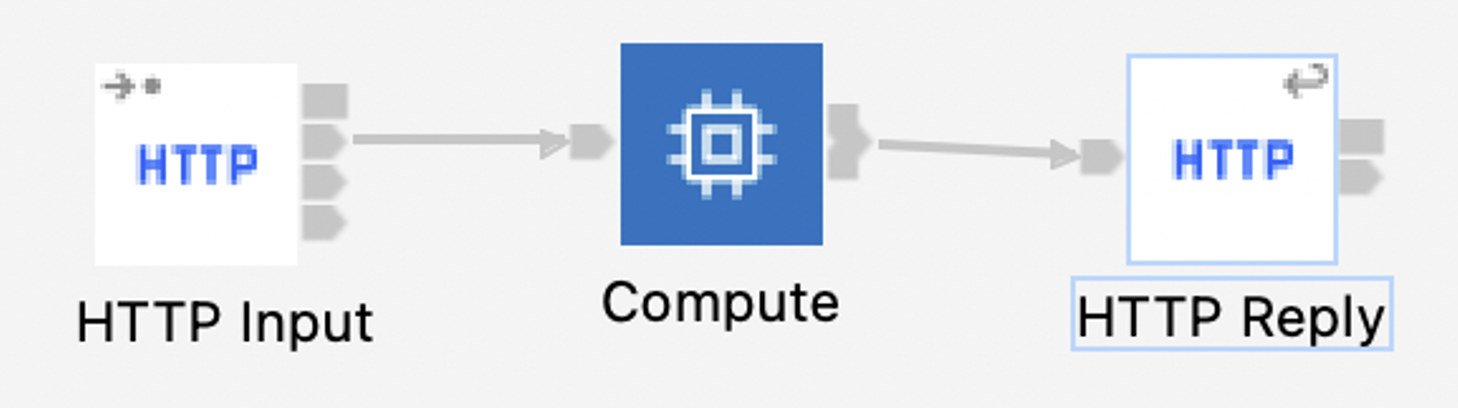
Manipulating messages in the XMLNSC domain, the HTTP XMLNSC ESQL Transformation test case used an ESQL compute node to perform a simple operation on the incoming message that requires the entire input message to be parsed, adding up numeric values scattered throughout the message and writing the sum in the XMLNSC response message. This test case evaluates the performance of a combination of HTTP transport, parsing, serialization, and ESQL transformation in the XMLNSC domain.

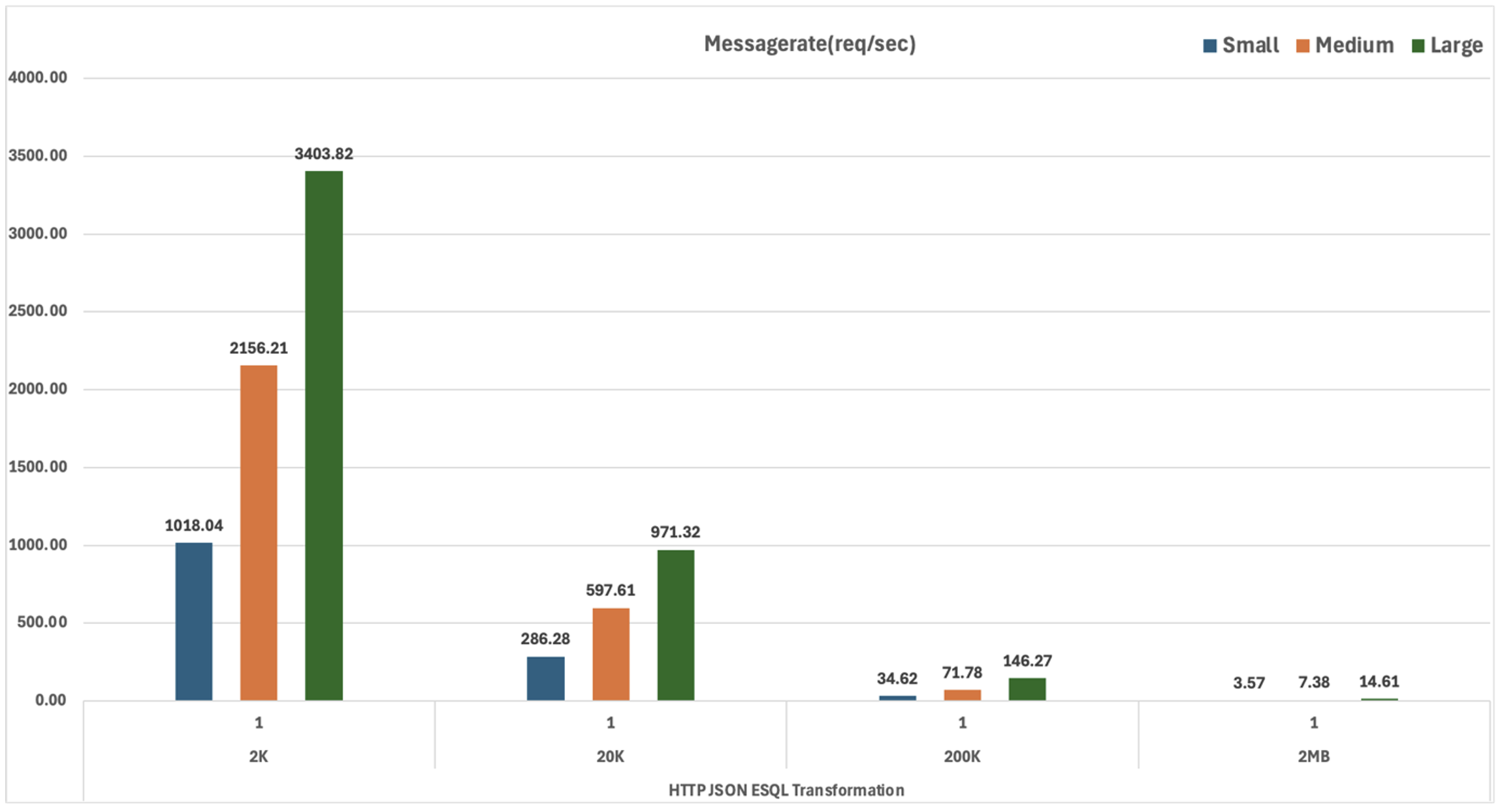
The HTTP JSON ESQL Transformation test case is similar to the HTTP XMLNSC ESQL Transformation scenario, except that it uses a JSON input message. The ESQL compute node performs a simple operation on the message body where it parses the incoming message and adds up the numeric values scattered throughout the message and writes the sum in the JSON response message. This test case evaluates the performance of a combination of HTTP transport, parsing, serialization, and ESQL transformation in the JSON domain.
The MQ Aggregation test case is based closely on the “Aggregation nodes using MQ nodes with back-end services”. This test case evaluates the performance of a message flow that receives an MQ message, and fans-out two separate MQ request messages (after simple transformations using a Mapping node). There are separate back-end message flows which read these MQ requests and reply to a common response queue. Finally, a separate fan-in message flow aggregates the two response messages.

This flow handles the incoming XML message from the input queue, transforms it and sends the resulting messages to two different queues.

The two back-end flows as shown above read the requests, transform them using a simple Mapping node and send the resulting messages to a common backend queue.

The MQ Coordinated Request-Reply test case, based closely on the Coordinated Request Reply WebSphere MQ sample, consists of three message flows; it exercises the MQ Input, MQ Output, MQ Get, and MQ Reply nodes, manipulates MQMD headers, and performs transformation and parsing in the XMLNSC and MRM domains.

The Request flow handles XML messages arriving at a designated input queue, saving the original MQMD header to a designated store queue, transforming the payload to a different representation, and changing the ReplyToQ field in the MQMD header to a designated internal back-end reply queue before forwarding the message to the internal back-end request queue.

The Back-End flow receives the message transformed by the Request flow via its internal input queue, adds a timestamp to the message body and places the result on an internal queue referred to by the now updated ReplyToQ field of the MQMD header.

Finally, the Reply flow transforms the reply generated by the Back-End flow back to its original XML-based representation, restores its original MQMD header from the internal store queue, and returns the result to the Reply-To Queue designated in the original request sent by the external client.
Note that the original sample has been slightly modified to better fit PerfHarness’s message correlation model, hence the additional SetMQMDReport compute node in the Reply flow, and an additional ESQL statement in the compute node of the Back-End flow. These additional statements update the Report field of the MQMD header to preserve both the Message Id and the Correlation Id.
The MQ Large Messaging test case is based closely on the Large Messaging sample. It performs message transformation in the XMLNSC domain using an ESQL compute node, interacting with the external world via MQ. Input messages contain a repeating XML structure, whose individual elements are extracted and are forwarded as separate MQ messages to a designated output queue.

For the purposes of performance testing, two PerfHarness instances: a primary instance to send the input message to the application’s input queue (handled by the MessageWithRepeatingElements node) and wait for an indication (placed by the MessageSlicingComplete node) on another queue that the message has been completely processed, and a secondary instance to retrieve the resulting message slices (output by the RepeatedElementSlices node) from another queue. This way the primary PerfHarness instance can maintain a one-to-one correspondence between requests and responses and produce a message throughput metric suitable for evaluating and comparing system performance.
In line with the other tests, the input messages used are the 2K, 20K, 200K and 2MB sizes and contain 2, 20, and 200, 2000 records each, respectively. This means that for example the 200K message, 200 slices will be placed on the output queue for each input message, resulting in a message throughput on the slice output queue of 200 times the throughput on the request-response queue pair. In this document, the message throughput seen by the primary PerfHarness instance is reported.
The MQ Routing Cache test case, based closely on the Message Routing sample, exercises a dynamic routing scenario where a field from the input message is extracted and used to look up the name of a destination. In this test there is a hardcoded list of all possible destinations that is cached in an ESQL SHARED ROW. A destination is then looked up in the cache to get a destination name for subsequent messages. The test exercises the MQ-based transport, XMLNSC parsing, and dynamic routing.

This flow performs the above dynamic routing scenario that is being tested for performance.
Note that the source of the destination could be an SQL Database (like IBM DB2) as well.
However, since in this test the lookup is anyways cached in memory, instead of doing a database lookup, it was decided to store the destination names in the code and data structures of the message flow for simplicity reasons.
The TCPIP ISO8853 XML Transformation test case uses the TCPIP Protocol as the transport protocol and processes message in a binary ISO8583 and XML format.
A message in a binary format (ISO8583) is received by a TCPIP Server Input node when it is then converted to an XML equivalent format. The transformed message is then written to an MQ queue where it is then read in by a second message flow. This second message flow converts the incoming message from XML to a binary (ISO8583) format and the message is sent to the original requesting client using a TCPIP Server Output node.
The first message flow which receives the incoming message in a binary format is shown below.

The second message flow which reads from an MQ queue and converts the XML message to a binary (ISO8583) format is show below.

This test is evaluated only for a single message size of around 1.3KB. The PerfHarness TCPIPRequestor module is used to send messages to and from the TCPIP Server.
The Process Jira Issues test case evaluates a flow created in the Toolkit, with the Jira Connector node. In this case, the “Jira Issues” are processed in the integration flow.

As shown in the figure above, when the flow starts, 10 Jira Issues are retrieved at a time using a Jira Request node. The following compute node loops over and processes each of these 10 issues. To initiate the message flow an HTTP request is made to the processing server. Finally when all the processing is done, a simple response is returned back.
The request to Jira from the Jira Request node is intercepted using a “Mock Server” which serves the 10 Jira Issues. Similarly, a hosted HTTP Server is used to process each Issue.
The purpose of this test is to evaluate a scenario with a retrieve action on a connector node as well as the iterating over the result set.
The Create ServiceNow Incidents test case evaluates a Toolkit flow with the ServiceNow Connector node. In this case “ServiceNow Incidents” are created in an integration flow.

As shown in the figure above, when the flow starts, an ESQL Compute node is used to loop over the incoming data and creates two ServiceNow Incidents that are posted to a ServiceNow instance.
The request to ServiceNow is intercepted using a “Mock Server” which processes the Create ServiceNow Incident action and delivers a response to the message flow.
The JSON Parse test evaluates the performance of a Designer Rest API flow with a JSON Parse node.

The JSON payload is passed to the API. A JSON Parser node, parses the complete JSON Payload, and returns the first parsed element value as the response.
Just like the Toolkit flows, this test is executed with message sizes of 2K, 20K, 200K and 2MB containing a JSON Payload.
The Process Jira Issues test case evaluates a flow created in the Designer with the Jira Connector node. In this case the “Jira Issues” are processed in the integration flow.

As shown in the figure above, when the flow starts, 10 Jira Issues are retrieved. There is a “For each” node that loops over and processes each of these 10 issues sequentially. For processing, an HTTP request is made to the processing server (represented by the “HTTP Node” in the “For each”). Finally, when all the processing is done, a simple response is returned.
The request to Jira is intercepted by a “Mock Server” which serves the 10 Jira Issues. Similarly, a hosted HTTP Server is used to handle the request to process each Issue.
The purpose of this test is to evaluate a scenario that is created in the Designer tooling, which invokes a retrieve action on a connector node and processes the results using a For each loop.
The Create ServiceNow Incidents test case evaluates a Designer flow with the ServiceNow Connector node. In this case “ServiceNow Incidents” are processed in the integration flow.

When the flow is invoked a “For each” node creates two ServiceNow incidents in a loop.
The request to ServiceNow is intercepted by a “Mock Server” which receives the ServiceNow incidents and issues a response.
Given below are the performance characteristics measured for each of the test cases described above. For the test cases that measure the startup time, we have included a chart with the measurements for each “T-shirt size” which depicts the “startup time”. For the test cases that measure the message rate, we include a chart with the measurements for each capacity setting and message size combination depicting the “message rate” achieved. We also include a table with a numerical representation of the same data along with each test case.
| Name | Capacity (T-shirt Size) | Startup Time (sec) |
|---|---|---|
| Small | 18.45 | |
| Medium | 17.45 | |
| Large | 17.46 |

| Name | Capacity (T-shirt Size) | Startup Time (sec) |
|---|---|---|
| Small | 19.04 | |
| Medium | 17.98 | |
| Large | 18.00 |

| Name | Capacity (T-shirt Size) | Startup Time (sec) |
|---|---|---|
| Small | 20.68 | |
| Medium | 19.42 | |
| Large | 19.55 |

| Name | Capacity (T-shirt Size) | Startup Time (sec) |
|---|---|---|
| Small | 19.83 | |
| Medium | 18.44 | |
| Large | 17.91 |

| Name | Capacity (T-shirt Size) | Startup Time (sec) |
|---|---|---|
| Small | 31.60 | |
| Medium | 19.26 | |
| Large | 14.86 |

| Name | Capacity (T-shirt Size) | Startup Time (sec) |
|---|---|---|
| Small | 20.66 | |
| Medium | 14.53 | |
| Large | 14.77 |

| Name | Capacity (T-shirt Size) | Startup Time (sec) |
|---|---|---|
| Small | 21.87 | |
| Medium | 15.64 | |
| Large | 15.72 |

| Name | Capacity(T-shirt Size) | Startup Time (sec) |
|---|---|---|
| Small | 27.53 | |
| Medium | 18.41 | |
| Large | 18.74 |

| Capacity (T-shirt Size) | Message Size | Replica | Message rate (req/s) | CPU Cost/Msq (ms) |
|---|---|---|---|---|
| Small | 2K | 1 | 1011.38 | 0.47 |
| Medium | 2K | 1 | 2151.33 | 0.47 |
| Large | 2K | 1 | 3398.66 | 0.58 |
| Small | 20K | 1 | 299.76 | 1.63 |
| Medium | 20K | 1 | 620.53 | 1.56 |
| Large | 20K | 1 | 1189.50 | 1.63 |
| Small | 200K | 1 | 35.39 | 13.63 |
| Medium | 200K | 1 | 73.11 | 13.19 |
| Large | 200K | 1 | 149.69 | 13.03 |
| Small | 2MB | 1 | 3.59 | 133.64 |
| Medium | 2MB | 1 | 7.50 | 129.27 |
| Large | 2MB | 1 | 15.17 | 127.03 |


| Capacity (T-shirt Size) | Message Size | Replica | Message rate (req/s) | CPU Cost/Msq (ms) |
|---|---|---|---|---|
| Small | 2K | 1 | 1018.04 | 0.45 |
| Medium | 2K | 1 | 2156.21 | 0.46 |
| Large | 2K | 1 | 3403.82 | 0.57 |
| Small | 20K | 1 | 286.28 | 1.70 |
| Medium | 20K | 1 | 597.61 | 1.63 |
| Large | 20K | 1 | 971.32 | 1.71 |
| Small | 200K | 1 | 34.62 | 13.86 |
| Medium | 200K | 1 | 71.78 | 13.61 |
| Large | 200K | 1 | 146.27 | 13.32 |
| Small | 2MB | 1 | 3.57 | 134.27 |
| Medium | 2MB | 1 | 7.38 | 131.32 |
| Large | 2MB | 1 | 14.61 | 127.43 |

| Capacity (T-shirt Size) | Message Size | Replica | Message rate (req/s) | CPU Cost/Msq (ms) |
|---|---|---|---|---|
| Small | 2K | 1 | 75.13 | 4.74 |
| Medium | 2K | 1 | 210.67 | 4.44 |
| Large | 2K | 1 | 335.49 | 4.66 |
| Small | 20K | 1 | 40.11 | 5.71 |
| Medium | 20K | 1 | 180.33 | 5.19 |
| Large | 20K | 1 | 327.03 | 5.71 |
| Small | 200K | 1 | 20.44 | 13.58 |
| Medium | 200K | 1 | 34.80 | 27.69 |
| Large | 200K | 1 | 59.22 | 33.14 |
| Small | 2MB | 1 | 4.46 | 100.60 |
| Medium | 2MB | 1 | 4.92 | 100.38 |
| Large | 2MB | 1 | 18.31 | 106.86 |


| Capacity (T-shirt Size) | Message Size | Replica | Message rate (req/s) | CPU Cost/Msq (ms) |
|---|---|---|---|---|
| Small | 2K | 1 | 166.43 | 2.97 |
| Medium | 2K | 1 | 320.05 | 3.09 |
| Large | 2K | 1 | 589.48 | 3.36 |
| Small | 20K | 1 | 52.97 | 9.37 |
| Medium | 20K | 1 | 95.52 | 10.34 |
| Large | 20K | 1 | 157.24 | 12.62 |
| Small | 200K | 1 | 7.04 | 70.44 |
| Medium | 200K | 1 | 12.20 | 81.44 |
| Large | 200K | 1 | 18.68 | 106.72 |
| Medium | 2MB | 1 | 1.68 | 568.48 |
| Large | 2MB | 1 | 3.15 | 601.86 |


| Capacity (T-shirt Size) | Message Size | Replica | Message rate (req/s) | CPU Cost/Msq (ms) |
|---|---|---|---|---|
| Small | 2K | 1 | 532.86 | 0.91 |
| Medium | 2K | 1 | 1019.62 | 0.94 |
| Large | 2K | 1 | 1927.17 | 0.96 |
| Small | 20K | 1 | 94.32 | 5.17 |
| Medium | 20K | 1 | 179.87 | 5.44 |
| Large | 20K | 1 | 302.94 | 5.56 |
| Small | 200K | 1 | 10.28 | 47.89 |
| Medium | 200K | 1 | 18.77 | 50.52 |
| Large | 200K | 1 | 28.85 | 50.69 |
| Small | 2MB | 1 | 1.17 | 421.48 |
| Medium | 2MB | 1 | 1.80 | 508.43 |
| Large | 2MB | 1 | 2.85 | 499.03 |


| Capacity (T-shirt Size) | Message Size | Replica | Message rate (req/s) | CPU Cost/Msq (ms) |
|---|---|---|---|---|
| Small | 2K | 1 | 1272.19 | 0.39 |
| Medium | 2K | 1 | 2498.51 | 0.39 |
| Large | 2K | 1 | 3929.87 | 0.44 |
| Small | 20K | 1 | 1119.28 | 0.48 |
| Medium | 20K | 1 | 2082.76 | 0.53 |
| Large | 20K | 1 | 2504.70 | 0.81 |
| Small | 200K | 1 | 670.91 | 1.58 |
| Medium | 200K | 1 | 763.79 | 2.44 |
| Large | 200K | 1 | 526.76 | 3.72 |
| Small | 2MB | 1 | 12.46 | 39.83 |
| Medium | 2MB | 1 | 22.06 | 44.49 |
| Large | 2MB | 1 | 32.04 | 61.33 |


| Capacity (T-shirt Size) | Message Size | Replica | Message rate (req/s) | CPU Cost/Msq (ms) |
|---|---|---|---|---|
| Medium | 2K | 1 | 352.92 | 4.78 |
| Large | 2K | 1 | 606.34 | 2.93 |


| Capacity (T-shirt Size) | Replica | Message rate (req/s) | CPU Cost/Msq (ms) |
|---|---|---|---|
| Small | 1 | 5.11 | 93.93 |
| Medium | 1 | 11.29 | 85.46 |
| Large | 1 | 12.65 | 85.65 |


| Capacity (T-shirt Size) | Replica | Message rate (req/s) | CPU Cost/Msq (ms) |
|---|---|---|---|
| Medium | 1 | 11.29 | 85.46 |
| Medium | 2 | 20.38 | 44.96 |
| Medium | 3 | 29.58 | 30.23 |


| Capacity (T-shirt Size) | Replica | Message rate (req/s) | CPU Cost/Msq (ms) |
|---|---|---|---|
| Small | 1 | 1.46 | 330.20 |
| Medium | 1 | 2.98 | 304.37 |
| Large | 1 | 3.72 | 290.78 |


| Capacity (T-shirt Size) | Replica | Message rate (req/s) | CPU Cost/Msq (ms) |
|---|---|---|---|
| Medium | 1 | 2.98 | 304.37 |
| Medium | 2 | 5.01 | 160.27 |
| Medium | 3 | 6.63 | 109.06 |


| Capacity (T-shirt Size) | Message Size | Replica | Message rate (req/s) | CPU Cost/Msq (ms) |
|---|---|---|---|---|
| Small | 2K | 1 | 132.42 | 3.61 |
| Medium | 2K | 1 | 268.49 | 3.60 |
| Large | 2K | 1 | 424.63 | 3.60 |
| Small | 20K | 1 | 95.11 | 5.08 |
| Small | 20K | 2 | 172.83 | 2.73 |
| Small | 20K | 3 | 254.98 | 1.76 |
| Medium | 20K | 1 | 194.92 | 4.99 |
| Medium | 20K | 2 | 362.71 | 2.55 |
| Medium | 20K | 3 | 530.46 | 1.69 |
| Large | 20K | 1 | 292.87 | 4.94 |
| Small | 200K | 1 | 20.95 | 22.72 |
| Medium | 200K | 1 | 51.41 | 18.85 |
| Large | 200K | 1 | 69.60 | 18.69 |
| Small | 2MB | 1 | 0.07 | 6411.70 |
| Medium | 2MB | 1 | 0.18 | 5268.74 |
| Large | 2MB | 1 | 0.17 | 5737.62 |


| Capacity (T-shirt Size) | Message Size | Replica | Message rate (req/s) | CPU Cost/Msq (ms) |
|---|---|---|---|---|
| Small | 2K | 1 | 95.11 | 5.08 |
| Small | 2K | 1 | 172.83 | 2.73 |
| Small | 2K | 1 | 254.98 | 1.76 |
| Medium | 20K | 1 | 194.92 | 4.99 |
| Medium | 20K | 2 | 362.71 | 2.55 |
| Medium | 20K | 3 | 530.46 | 1.69 |


| Capacity (T-shirt Size) | Replica | Message rate (req/s) | CPU Cost/Msq (ms) |
|---|---|---|---|
| Small | 1 | 12.20 | 62.17 |
| Medium | 1 | 12.27 | 79.36 |
| Large | 1 | 9.95 | 121.42 |


| Capacity (T-shirt Size) | Replica | Message rate (req/s) | CPU Cost/Msq (ms) |
|---|---|---|---|
| Medium | 1 | 12.27 | 79.36 |
| Medium | 2 | 17.16 | 55.71 |
| Medium | 3 | 24.66 | 37.40 |


| Capacity (T-shirt Size) | Replica | Message rate (req/s) | CPU Cost/Msq (ms) |
|---|---|---|---|
| Small | 1 | 1.46 | 329.35 |
| Medium | 1 | 3.05 | 305.36 |
| Large | 1 | 3.92 | 291.38 |


| Capacity (T-shirt Size) | Replica | Message rate (req/s) | CPU Cost/Msq (ms) |
|---|---|---|---|
| Medium | 1 | 3.05 | 305.36 |
| Medium | 2 | 5.22 | 158.11 |
| Medium | 3 | 6.78 | 108.12 |


IBM, the IBM logo, and ibm.com are trademarks or registered trademarks of International Business Machines Corp., registered in many jurisdictions worldwide. Other product and service names might be trademarks of IBM or other companies. A current list of IBM trademarks is available on the Web at Copyright and trademark information at https://www.ibm.com/legal/copytrade.
Linux is a registered trademark of Linus Torvalds in the United States, other countries, or both.
Microsoft and Windows are trademarks of Microsoft Corporation in the United States, other countries, or both.
Other company, product, or service names may be trademarks or service marks of others.
[{"Type":"MASTER","Line of Business":{"code":"LOB77","label":"Automation Platform"},"Business Unit":{"code":"BU048","label":"IBM Software"},"Product":{"code":"SSDR5J","label":"IBM App Connect Enterprise"},"ARM Category":[{"code":"a8mgJ00000001lhQAA","label":"ACE-\u003EACE Certified Container"}],"ARM Case Number":"","Platform":[{"code":"PF106","label":"Red Hat OpenShift Container"}],"Version":"13.0.0"}]
Was this topic helpful?
Document Information
Modified date:
08 August 2025
UID
ibm17235647