Troubleshooting
Problem
This document describes new functionality with the SystemDefault.properties file introduced at IBM i 5.4 with the IBM Technology for Java JVM. This new support is available at IBM i OS 5.4 and later.
Environment
IBM i 5.4 and later; IBM Java Development Kit
IMPORTANT!!! After April 30th, 2024, IBM i 7.1 and earlier OS versions are no longer supported by IBM. As a result, no support is provided for the IBM JDK running on IBM i 7.1 and earlier OS versions.
IBM i 7.3, 7.2 OS and earlier OS versions have reached end of program support. For the IBM i 7.3 and 7.2 OS versions, a valid service extension contract must be purchased and active for the OS in order to obtain any level of support for any IBM JDK version. IBM i 7.1 and earlier OS versions are no longer supported by IBM and thus no support is available for the IBM JDK. See the "Supported IBM Java Development Kit (JDK) Versions by IBM i Operating System Version and Release" document for more information.
Resolving The Problem
The SystemDefault.properties file can now be used to pass in JVM options to the JVM startup.
If the 1st line starts with #AllowOptions, then:
Following is an example of what the file may look like:
#AllowOptions
-Xmx200m
-verbose
user.timezone=America/New_York
-cp /myjavaclasses
NOTE: The SystemDefault.properties file does not exist on the system by default. The file may reside in two different locations, which affect the scope the JVM properties affect.
- If the file exists in the /QIBM/UserData/Java400 directory, the JVM properties in the file will apply to any newly created JVM on the IBM i OS.
- If the file exists in the user profile's home directory, the JVM properties in this file will take precedence over the /QIBM/UserData/Java400/SystemDefault.properties file for newly created JVMs running under the specific user profile.
Here is how to create the global SystemDefault.properties file:
1) Check to see if the /QIBM/UserData/Java400/SystemDefault.properties file exists.
2) If the file doesn't exist, create the file.
If the 1st line starts with #AllowOptions, then:
- Any line which starts with a dash, '-' , will be treated as a JVM option, just as though it was specified on the Java command in Qshell or qp2term.
- Any line which does not start with a dash will be treated as a JVM property. It will be treated as though there is a -D pre-pended to allow the JVM to understand that it is a property.
Following is an example of what the file may look like:
#AllowOptions
-Xmx200m
-verbose
user.timezone=America/New_York
-cp /myjavaclasses
NOTE: The SystemDefault.properties file does not exist on the system by default. The file may reside in two different locations, which affect the scope the JVM properties affect.
- If the file exists in the /QIBM/UserData/Java400 directory, the JVM properties in the file will apply to any newly created JVM on the IBM i OS.
- If the file exists in the user profile's home directory, the JVM properties in this file will take precedence over the /QIBM/UserData/Java400/SystemDefault.properties file for newly created JVMs running under the specific user profile.
Here is how to create the global SystemDefault.properties file:
- NOTE: If you wish to create the file in the user profile's home directory, follow the steps below for the user profile's specific directory path instead of the global /QIBM/UserData/Java400 path.
1) Check to see if the /QIBM/UserData/Java400/SystemDefault.properties file exists.
- WRKLNK '/QIBM/UserData/Java400/SystemDefault.properties'
If it does exist, enter option 8 next to it and confirm the Coded Character Set ID (CCSID) is set to 819 or 1252.
If the file CCSID does not match one of these, I recommend you copy the contents of the file; delete the file using option 4; and then recreate it using the next step.
If the file exists and the CCSID is 819 or 1252, proceed to step 3.
2) If the file doesn't exist, create the file.
- STRQSH
touch -C 819 /QIBM/UserData/Java400/SystemDefault.properties
- EDTF STMF('/QIBM/UserData/Java400/SystemDefault.properties')
Add the #AllowOptions property on the first line of the file and then proceed to add your JVM options on the following lines below the #AllowOptions property just like you see below.
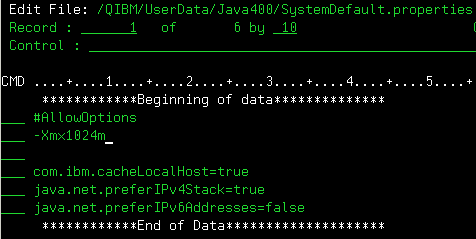
After you are finished adding the #AllowOptions property and your other JVM options, press F3 twice to save and exit. Finally, restart any JVMs you would like to pick up the new JVM options specified.
[{"Type":"MASTER","Line of Business":{"code":"LOB68","label":"Power HW"},"Business Unit":{"code":"BU070","label":"IBM Infrastructure"},"Product":{"code":"SWG60","label":"IBM i"},"ARM Category":[{"code":"a8m0z0000000CH5AAM","label":"Java Development Kit"}],"ARM Case Number":"","Platform":[{"code":"PF012","label":"IBM i"}],"Version":"All Versions"}]
Historical Number
557761746
Was this topic helpful?
Document Information
Modified date:
01 October 2024
UID
nas8N1012339