Troubleshooting
Problem
Nortel Networks Layer 2-7 Gigabit Ethernet Switch Module (GbESM) troubleshooting information.
Resolving The Problem
Note: Nortel Networks Layer 2-7 Gigabit Ethernet Switch Module (GbESM) for IBM BladeCenter
- To begin troubleshooting, check the following top issues. If your issue is listed, select the link, otherwise proceed to step 2.

Nortel Layer 2-7 GbESM fails to link BladeCenter T to HS40 
Nortel Layer 2-7 GbESM HMM and Troubleshooting Guide
- Download the latest firmware and software code updates for your system:
Download Nortel Networks Layer 2-7 GbESM firmware Download the latest BladeCenter support software
Note: Whenever you do a firmware update followed by a restart, first check to see if you have 'Preserve new IP configuration on all resets' Enabled. If this function is not enabled, an incorrect IP address could be set in the GbE Switch Module. This would stop all communication between the Management Module and the GbE Switch Module. Always backup the switch configuration before updating the switch's firmware.
- Consult the available product documentation for the Nortel Networks Layer 2-7 GbE Switch Module:
- Nortel switches use the AlteonOS Web GUI for management:

- Initial setup is performed via MM interface:
- Configure IP address
- Enable external ports (disabled by default)
- Management is performed using telnet or http directly to the switch:
- Configure the switch
- Gather the switch log
- Upgrade switch firmware (TFTP only)
- Download and upload switch configuration (TFTP or browser)
- The Nortel ESM is a layer 2-7 switch. It provides a full featured Ethernet switching and routing fabric environment with layer 4-7 functionality: Application and server based load balancing, Advanced filtering, content-aware intelligence, Embedded security services, and persistence support.
- The internal ports to blade servers are fixed at 1000Mbps. The four external ports are set for auto-sensing. The two ports to the BladeCenter MMs operate at 100Mbps. There is a serial console port on the front of the switch that can also be used to manage the switch. The switch supports a range of features for LAN configuration and management including link aggregation, VLANs, STP, and failover.
- Initial setup is performed via MM interface:
- Check the Nortel ESM LEDs and indicators for status:
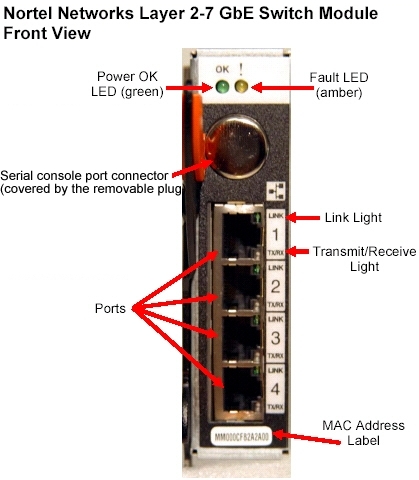
The Nortel Networks GbE Switch Module has two diagnostic LEDs. The OK LED indicates that the switch module has initialized successfully, when it is lit. The Fault LED is lit when a critical/non-critical error has occurred. If the Fault LED off and the OK LED is on then the switch module has initialized successfully. If the OK LED is on and the Fault LED is on then a non-critical error has occurred. If the OK LED is off and the Fault LED is on then a critical error has occurred.
- Power OK (green): When on, the switch module has passed the power-on self-test (POST) with no critical faults and is operating normally.
- Fault (amber): When on, an error has been detected somewhere in the switch module. If the switch module fails the POST or detects an operational fault, this LED is lit.
- Link (green): When on, there is an active connection through the port to the network.
- Transmit/receive (green): When on or flickering, there is activity through the port over the external network link.
- The serial console port connector (covered by the removable plug) is only for use by specially trained service personnel. The interface is used to retrieve dump information (traces and logs) in scenarios where other management interfaces have been rendered unusable.
- If these steps have not solved your problem:
Refer to your system's Hardware Maintenance Manual, or refer to "Need more help?"
| Support forums |
| Submit a technical question |
| Before you call IBM Service |
Document Location
Worldwide
[{"Type":"HW","Business Unit":{"code":"BU016","label":"Multiple Vendor Support"},"Product":{"code":"QU00RKF","label":"System x Hardware Options->BladeCenter Switch Module->Gigabit->73P9057"},"Platform":[{"code":"PF025","label":"Platform Independent"}],"Line of Business":{"code":"","label":""}},{"Type":"HW","Business Unit":{"code":"BU054","label":"Systems w\/TPS"},"Product":{"code":"QU01TIM","label":"System x Hardware Options->BladeCenter Switch Module->Gigabit->32R1859"},"Platform":[{"code":"PF025","label":"Platform Independent"}],"Line of Business":{"code":"","label":""}}]
Was this topic helpful?
Document Information
Modified date:
29 January 2019
UID
ibm1MIGR-59738