Creating two overlapping clusters with a gateway queue manager
Follow the instructions in the task to construct overlapping clusters with a gateway queue manager. Use the clusters as a starting point for the following examples of isolating messages to one application from messages to other applications in a cluster.
About this task
The example cluster configuration used to illustrate isolating cluster message traffic is shown in Figure 1. The example is described in Clustering: Application isolation using multiple cluster transmission queues.
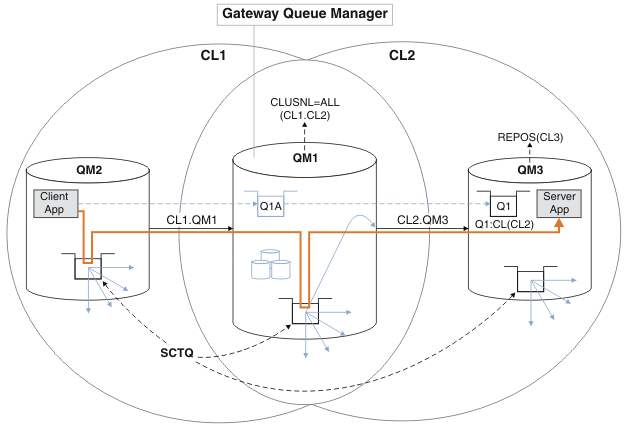
To minimize the number of steps to construct the example, the configuration is kept simple rather than realistic. The example might represent the integration of two clusters created by two separate organizations. For a more realistic scenario, see Clustering: Planning how to configure cluster transmission queues.
Follow the steps to construct the clusters. The clusters are used in the following examples of isolating the message traffic from the client application to the server application.
The instructions add a couple of additional queue managers so that each cluster has two repositories. The gateway queue manager QM1 is not used as a repository for performance reasons.
Procedure
What to do next
- Test the queue alias definition by sending a message from
QM2toQ1onQM3using the queue alias definitionQ1A.- Run the sample program amqsput on
QM2to put a message.
C:\IBM\MQ>amqsput Q1A QM2
Sample AMQSPUT0 start
target queue is Q1A
Sample request message from QM2 to Q1 using Q1A
Sample AMQSPUT0 end
- Run the sample program amqsget to get the message from
Q1onQM3
C:\IBM\MQ>amqsget Q1 QM3
Sample AMQSGET0 start
message <Sample request message from QM2 to Q1 using Q1A>
no more messages
Sample AMQSGET0 end
- Run the sample program amqsput on
- Test the queue manager alias definitions by sending a request message and receiving a reply
message on a temporary-dynamic reply queue.
The diagram shows the path taken by the reply message back to a temporary dynamic queue, which is called
RQ. The server application, connected toQM3, opens the reply queue using the queue manager nameQM2. The queue manager nameQM2is defined as a clustered queue manager alias on gateway queue managerQM1.QM3routes the reply message to gateway queue managerQM1.QM1routes the message toQM2.Figure 2. Using a queue manager alias to return the reply message to a different cluster 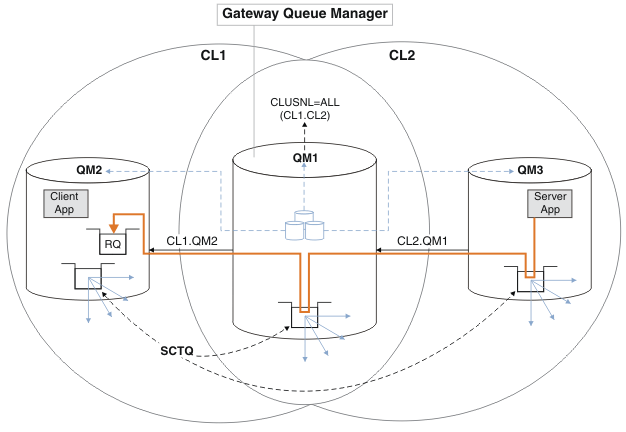
The way the routing works is as follows. Every queue manager in each cluster has a queue manager alias definition on gateway queue manager
QM1. The aliases are clustered in all the clusters. The grey dashed arrows from each of the aliases to a queue manager show that each queue manager alias is resolved to a real queue manager in at least one of the clusters. In this case, theQM2alias is clustered in both clusterCL1andCL2, and is resolved to the real queue managerQM2inCL1. The server application creates the reply message using the reply to queue nameRQ, and reply to queue manager nameQM2. The message is routed to gateway queue managerQM1because the queue manager alias definitionQM2is defined onQM1in clusterCL2and queue managerQM2is not in clusterCL2. As the message cannot be sent to the target queue manager, it is sent to the queue manager that has the alias definition.Gateway queue manager
QM1places the message on its cluster transmission queue for transfer toQM2. Gateway queue managerQM1routes the message toQM2because the queue manager alias definition onQM1forQM2definesQM2as the real target queue manager. The definition is not circular, because alias definitions can refer only to real definitions; the alias cannot point to itself. The real definition is resolved by gateway queue managerQM1, because bothQM1andQM2are in the same cluster,CL1. Gateway queue managerQM1finds out the connection information forQM2from the repository forCL1, and routes the message toQM2. For the message to be rerouted byQM1, the server application must have opened the reply queue with the option DEFBIND set toMQBND_BIND_NOT_FIXED. If the server application had opened the reply queue with the optionMQBND_BIND_ON_OPEN, the message is not rerouted and ends up on a dead letter queue.- Create a clustered request queue with a trigger on
QM3.*... On QM3 DEFINE QLOCAL(QR) CLUSTER(CL2) TRIGGER INITQ(SYSTEM.DEFAULT.INITIATION.QUEUE) PROCESS(ECHO) REPLACE - Create a clustered queue alias definition of
QRon the gateway queue managerQM1.*... On gateway queue manager QM1 DEFINE QALIAS(QRA) CLUSNL(ALL) TARGET(QR) TARGTYPE(QUEUE) DEFBIND(NOTFIXED) REPLACE - Create a process definition to start the sample echo program amqsech on
QM3.*... On QM3 DEFINE PROCESS(ECHO) APPLICID(AMQSECH) REPLACE - Create a model queue on
QM2for the sample program amqsreq to create the temporary-dynamic reply queue.*... On QM2 DEFINE QMODEL(SYSTEM.SAMPLE.REPLY) REPLACE - Test the queue manager alias definition by sending a request from
QM2toQRonQM3using the queue alias definitionQRA.- Run the trigger monitor program on
QM3.
The output isrunmqtrm -m QM3
C:\IBM\MQ>runmqtrm -m QM3
5724-H72 (C) Copyright IBM Corp. 1994, 2025. ALL RIGHTS RESERVED.
01/02/2012 16:17:15: IBM MQ trigger monitor started.
__________________________________________________
01/02/2012 16:17:15: Waiting for a trigger message
- Run the sample program amqsreq on
QM2to put a request and wait for a reply.
C:\IBM\MQ>amqsreq QRA QM2
Sample AMQSREQ0 start
server queue is QRA
replies to 4F2961C802290020
A request message from QM2 to QR on QM3
response <A request message from QM2 to QR on QM3>
no more replies
Sample AMQSREQ0 end
- Run the trigger monitor program on
- Create a clustered request queue with a trigger on