Vary proxy system in the DMZ
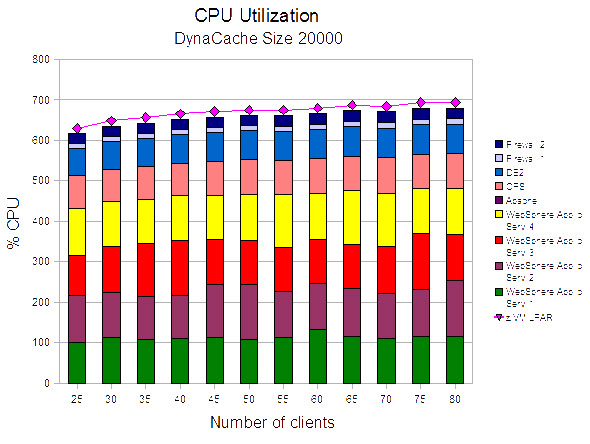
This test case compared the results of the tests run with three different environments for the proxy system.
- Trade transactions sent to the WebSphere® Edge Services Caching Proxy Server (CPS)
- Trade transactions sent to the WebSphere Proxy Server (PS)
- Trade transactions sent directly to the Apache web server (no proxy)
With no proxy server, it was necessary to move the Apache Web server into the DMZ to route the requests forward into the internal zone, and the Trade workload simulator is configured to direct all requests to the Apache Web server.
| CPS | PS | No Proxy | ||||
|---|---|---|---|---|---|---|
| System/Guest | Memory size | Number of CPUs | Memory size | Number of CPUs | Memory size | Number of CPUs |
| z/VM® | 1248 MB | 8 | 1248 MB | 8 | 1248 MB | 8 |
| Caching Proxy Server (CPS) | 512 MB | 1 | – | – | – | – |
| WebSphere Proxy Server (PS) | – | – | 750 MB | 1 | – | – |
| Apache HTTP Server | 512 MB | 1 | – | – | 512 MB | 1 |
| WebSphere Application Server 1 | 2 GB | 2 | 2 GB | 2 | 2 GB | 2 |
| WebSphere Application Server 2 | 2 GB | 2 | 2 GB | 2 | 2 GB | 2 |
| WebSphere Application Server 3 | 2 GB | 2 | 2 GB | 2 | 2 GB | 2 |
| WebSphere Application Server 4 | 2 GB | 2 | 2 GB | 2 | 2 GB | 2 |
| DB2® Server | 4 GB | 1 | 4 GB | 1 | 4 GB | 1 |
| Firewall 1 | 512 MB | 1 | 512 MB | 1 | 512 MB | 1 |
| Firewall 2 | 512 MB | 1 | 512 MB | 1 | 512 MB | 1 |
| DynaCache size | Caching mode | Servlet caching | Replication domain | Replication type |
|---|---|---|---|---|
| 20000 | Distribute map | Disabled | Entire domain | Not shared |
Observations
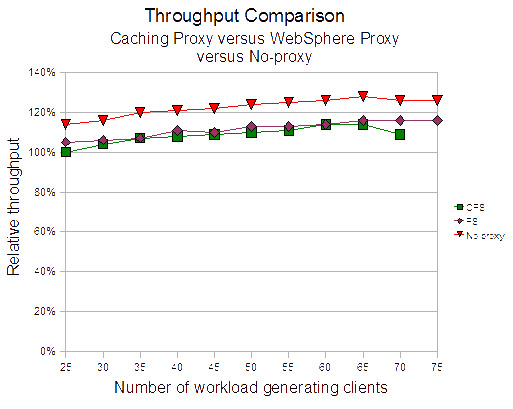
Replacing the WebSphere Edge Services Caching Proxy Server with the WebSphere Proxy Server resulted in a slight increase in throughput.
Bypassing a proxy server produced the highest throughput. In the two cases (bypassing the proxy server and the WebSphere Edge Services Caching Proxy Server), the workload balancing function (distributing transaction to the cluster members) was handled in the WebSphere Apache plugin.
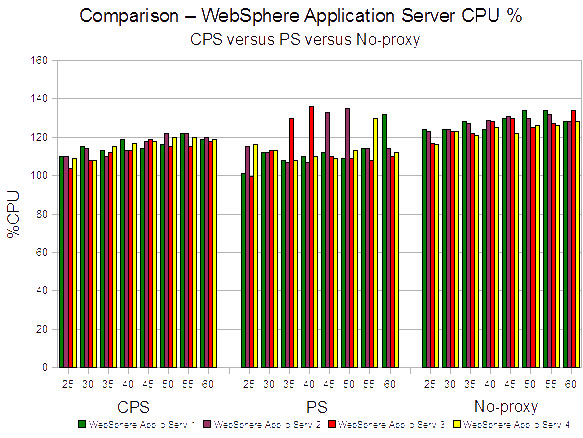
In the WebSphere Proxy Server case, the workload balancing function is performed on the proxy server. In all cases, the workload was balanced using a round robin algorithm with equal weighting to each cluster member.
In Figure 2, the WebSphere Proxy Server load balancing function appears to be scheduling the transaction unevenly. However, it does not appear to have an effect on overall throughput.
Conclusions
The best performance was achieved when a proxy server was omitted in the configuration. While this might produce more throughput, it has significant security deficiencies. The proxy functionality is missing (which interprets the TCP/IP packets) and it should be avoided to expose a functional component such as the Web server to direct access from an insecure zone. Therefore, this is not recommended for production environments. There is only a slight difference between both proxy solutions.
All subsequent tests were run using the WebSphere Proxy Server, because it is the strategic solution from WebSphere. In that environment, the Apache Web server is no longer used.