Enabling DynaCache disk offload
In these tests, the dynamic cache size was adjusted to a value that would allow the cache to offload entries from real memory to disk.
The number of workload generating clients was set to 65 and the disk offload was enabled. The eviction policy was set to random. The dynamic cache size had to be reduced to less than 2000 to obtain any observable data off-loaded. The smallest value that WebSphere® would accept for a Dynamic Cache size was 100 statements.
The environment with the WebSphere Proxy Server was used for this test. In addition to the normal workload, the modified Trade workload simulator script from the previous run was used, which had removed all transactions that resulted in a data base update for one of the runs (0% update part).
| DynaCache size | Caching mode | Servlet caching | Replication domain | Replication type |
|---|---|---|---|---|
| 2000, 1000, 500, 100 | Distributed map | Disabled | Entire domain | Not-shared |
Observations
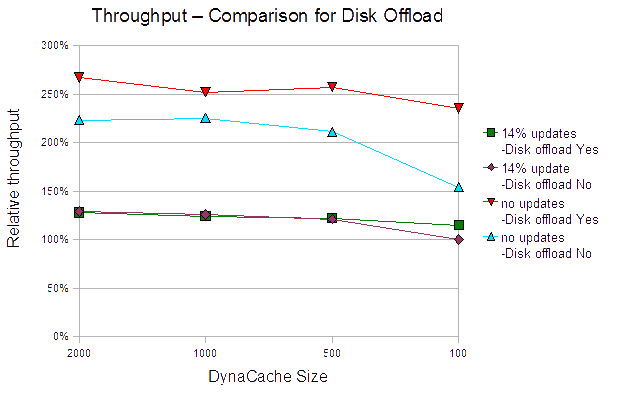
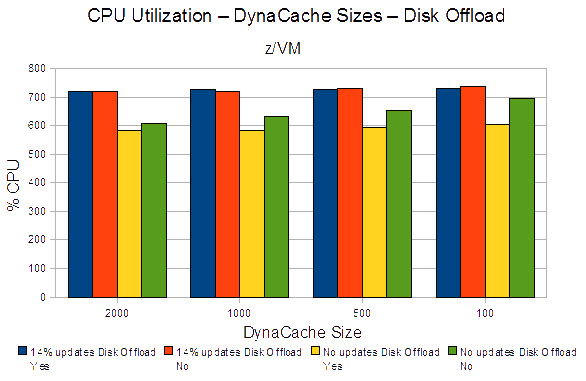
For the 14% update (normal), Trade workload disk offload produced no improvement in throughput until the dynamic cache size was set to its smallest value (100). At this value, disk offloading increased throughput by 15%. CPU utilization for these cases was almost identical.
It was noticed that the Proxy Server CPU utilization was greater than 90% for the runs with the 14% update Trade workload. For the no update Trade workload, the Proxy Server CPU utilization increases further, according to the increased throughput, and reaches the full CPU utilization. That means, it was gating the throughput. Therefore, the number of virtual CPUs assigned to the Proxy Server guest was increased to two for the no update Trade workload tests.
For the no update Trade workload, disk offloading resulted in an immediate advantage and the advantage increases as the dynamic cache size decreases.
Figure 3 shows the advantage of increasing the number of CPUs.
An interesting observation is the relationship between the no update Trade workload case in the disk offloading tests, and the results seen in DynaCache scaling section, Figure 1. At a dynamic cache size of 100 the disk offload throughput case is only 11% less than the maximum throughput seen in the no update Trade workload update case, seen above, with a dynamic cache size of 10000.
At a dynamic cache size of 100, disk offloading improved throughput by more than 50%.
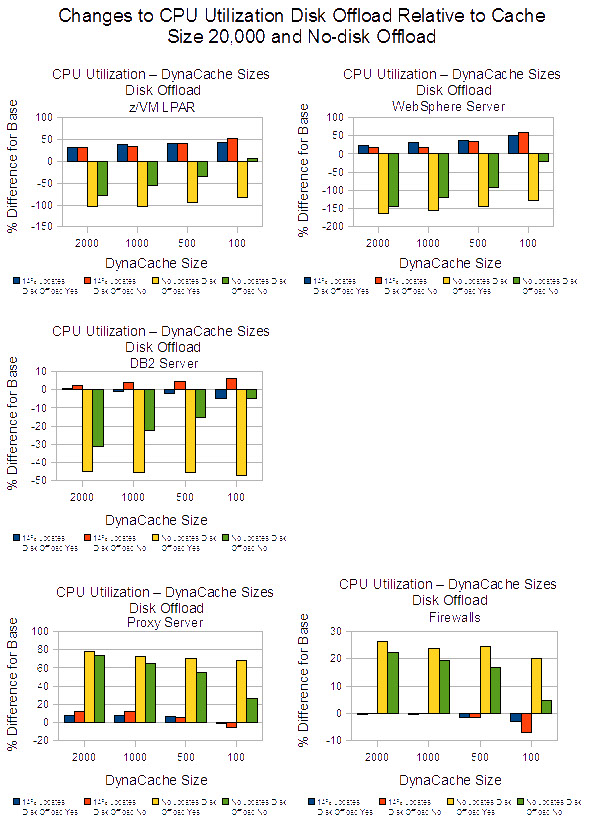
In total, there is a slight reduction of CPU utilization for the z/VM LPAR, especially in the no update case.
The CPU utilization for the proxy server and firewall increases over the base results for the no update case. This increase is related to the increased throughput obtained in the no update case.
It is interesting to notice the difference in the CPU utilization for WebSphere and DB2 for the no update case. With disk offloading set to yes and a DynaCache size of 100, there is a significant reduction in CPU utilization versus the disk offloading set to no case.