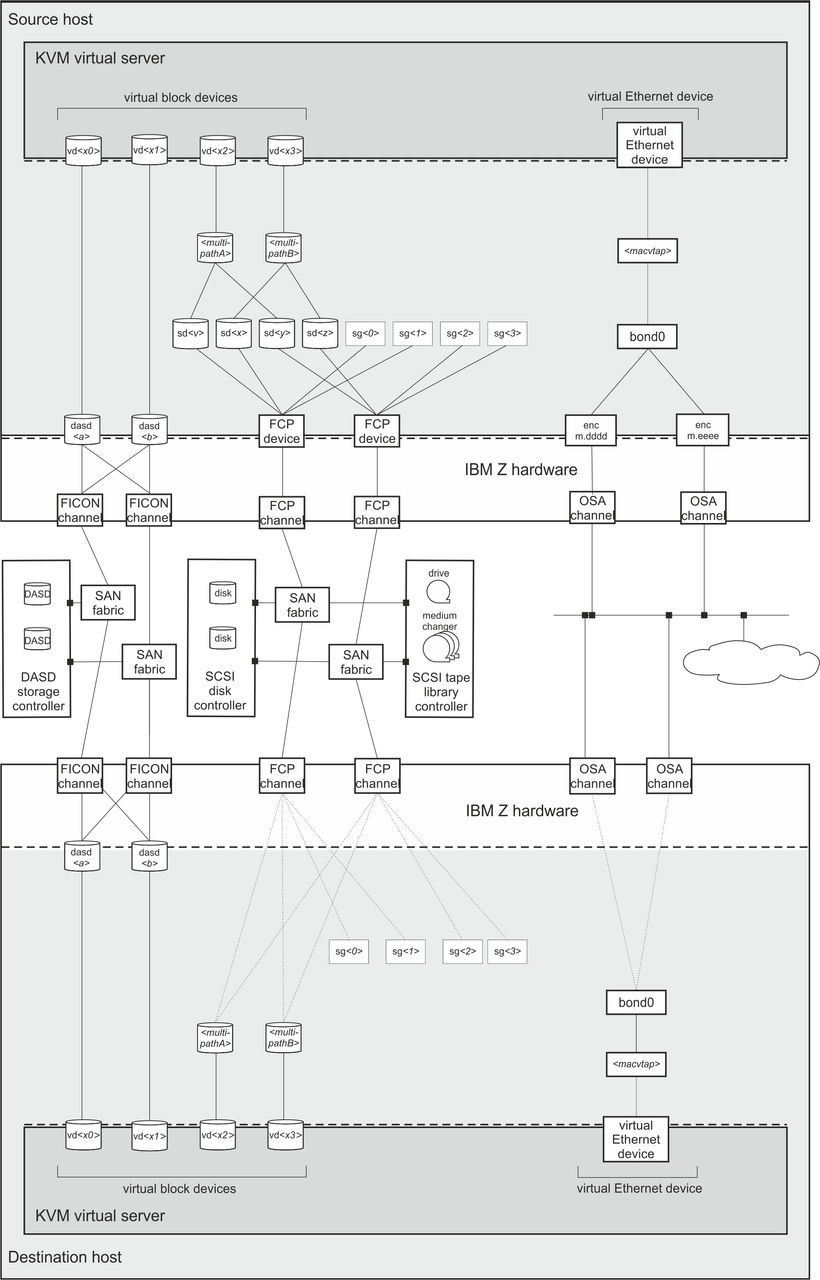
Preservation of the virtual server resources
Prepare a migration carefully to preserve the resources of the virtual server.
System resources
Provide access to the same or equivalent system resources, such as memory and CPUs, on both hosts.Storage devices that back virtual block devices
Storage devices that are configured for the virtual server must be accessible from the destination host.- DASDs:
-
- Make sure that DASDs are configured using udev-created device nodes.
- If the DASDs are configured using the device bus-ID (by-path device node), make sure that you use identical device numbers in the IOCDS of both hosts.
- Make sure that there is a migration process for setting both the base devices and the alias devices online on the destination host.
- SCSI disks:
-
- Make sure that SCSI disks are configured using device mapper-created device nodes.
- Image files residing on a network file system (NFS):
-
- Make sure that both hosts have a shared access
to the image files.If Security-Enhanced Linux™ (SELinux) is enabled on the destination host, using the following command can provide access to the NFS:
# setsebool -P virt_use_nfs 1
Please note that depending on the NFS configuration the image files could be accessible by other virtual servers.
- Make sure that both hosts have a shared access
to the image files.
- Virtual block devices that are backed by host resources:
- Use the disk migration options to migrate virtual block devices that are backed by
local resources of the source host. Image files in the host file system and PCIe-attached NVMe devices are
examples of such local resources.Live migration has the following requirements for disk migration for each resource:
- The destination host must provide an equivalent local resource. The local resources on the source and destination host must be addressed through the same configuration.
- The virtual block devices must not be configured to use an I/O thread.
- The resource must be writable. For example, to be eligible for disk migration, an image file must not be configured as a virtual DVD.
- SCSI tapes or medium changer devices:
-
- When you migrate a virtual server that uses a configured
virtual SCSI device, be aware that the SCSI device name, which is used to specify the source device,
might change on the destination host.Tip: Make sure that SCSI tapes or medium changer devices are configured in separate device configuration-XML files. Detach them before you perform a migration. After the migration, reconfigure the devices before you reattach them.
- When you migrate a virtual server that uses a configured
virtual SCSI device, be aware that the SCSI device name, which is used to specify the source device,
might change on the destination host.
Disk device identification and SCSI device identification explain various device nodes.
VFIO pass-through devices
You cannot perform a live migration while VFIO pass-through devices are attached to your virtual server.
You must detach all VFIO devices before you perform a live migration. Depending on your setup, your workload, and the type of devices you use, it might or might not be feasible to reattach the same or equivalent devices to your virtual server on the destination host.
- DASD
- DASDs can be shared between LPARs and the destination host can be set up in advance. The mediated device on the destination host must use the same UUID to map to the same DASD.
- NVMe
- NVMe device cannot be shared between the source and destination host. If the destination host has access to an equivalent NVMe device with an FID that matches the FID of the original NVMe device, disk migration might be an option.
- RoCE Express PCI functions
- RoCE Express PCI functions cannot be shared between the source and destination host. You can substitute a RoCE Express PCI function with a PCI function on the destination host that is addressed with the same interface name and provides the same network access.
- AP queues
- The virtual server configuration must not include any
vfio_apdevices, which provide access to AP queues on cryptographic adapters.
Networking
To ensure that the virtual server's network access is not interrupted by the migration:- Use identical network interface names to access identical networks on both hosts.
- OSA devices that are shared between the source and the destination host must be configured with VNIC characteristics to allow MAC takeover.
Shared file system
You cannot perform a live migration while parts of the host file system are mounted as a shared file system on the KVM guest. For information about configuring shared file systems, see Configuring a shared file system.
Example