DASDs and SCSI disks
DASDs and FC-attached SCSI disks can be virtualized as virtio block devices.
On the host, you manage various types of disk devices and their configuration topology. For production systems, DASDs and FC-attached SCSI disks are typically set up with multipathing to boost availability through path redundancy.
From the virtual server point of view, these are virtual block devices that are attached by one virtual channel path. There is no difference whether a virtual block device is implemented as a DASD, a SCSI disk, or an image file on the host.
QEMU uses the current libvirt-internal configuration to assign the virtual devices of a virtual server to the underlying host devices.
- Set up the DASDs and FC-attached SCSI disks.
Prepare multipathing, because virtual block devices cannot be multipathed on the virtual server.
It is also important that you provide unique device nodes that are persistent across host reboots. Unique device nodes ensure that your configuration remains valid after a host reboot. In addition, device nodes that are unique for a disk device on different hosts allow the live migration of a virtual server to a different host, or the migration of a disk to a different storage server or storage controller.
See Preparing DASDs and Preparing SCSI disks.
- Configure the DASDs and FC-attached SCSI disks as virtual block devices.
You configure devices that are to be defined with the virtual server in its domain configuration-XML file. You can also define devices in a separate device configuration-XML file. Such devices can be attached to an already defined virtual server.
See Configuring devices and Configuring virtual block devices.
DASD and SCSI disk configuration topology
Figure 1 shows how multipathed DASD and SCSI disks are configured as virtual block devices.
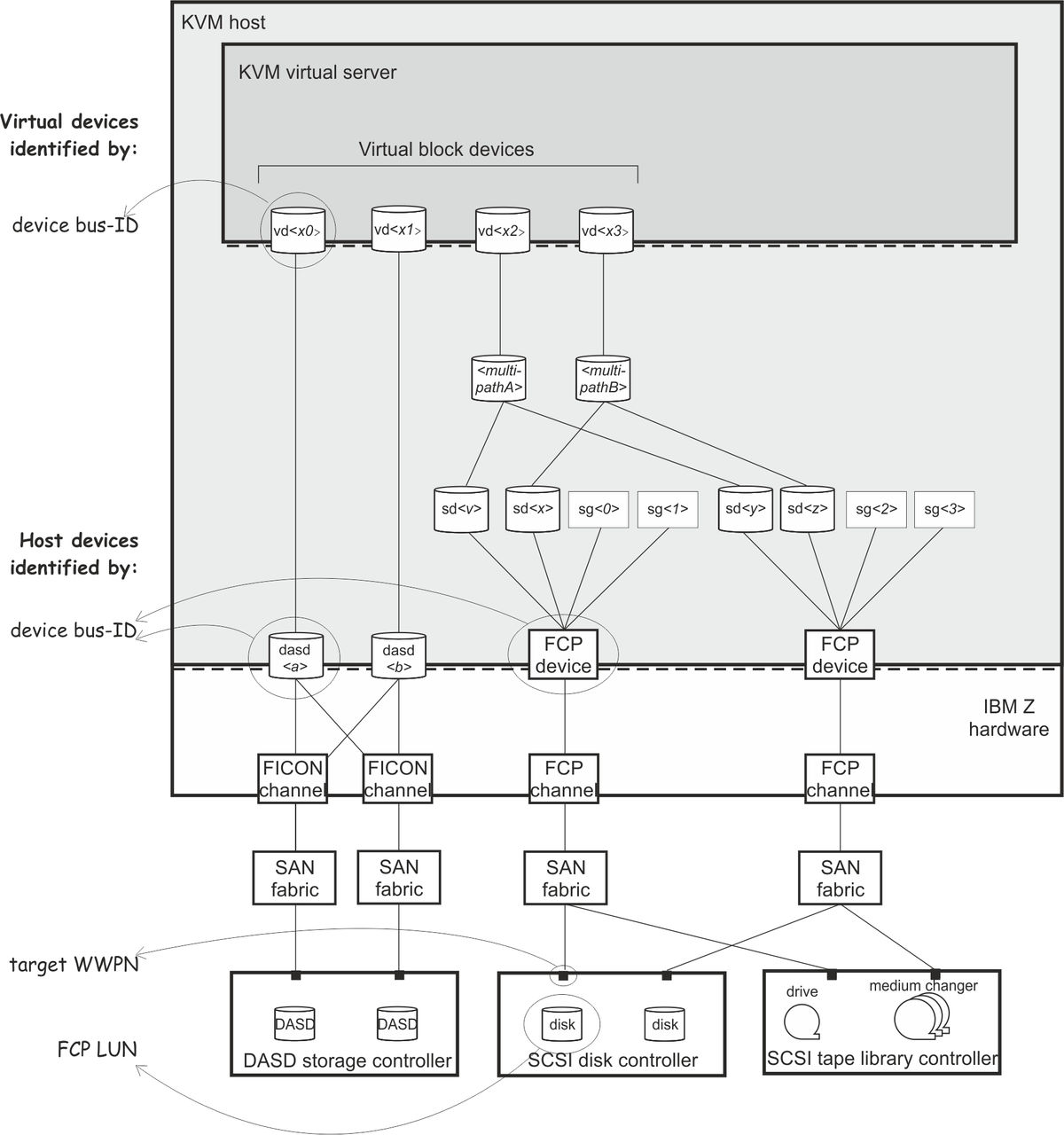
Disk device identification
- Device bus-ID and device number of an FCP device
-
On the host, a SCSI device is connected to an FCP device, which has a device bus-ID of the form:
Where:0.m.dddd0is the channel subsystem-ID. mis the subchannel set-ID. ddddis the device number of the FCP device. Example: 0.0.1700device bus-ID of the FCP device. 1700device number of the FCP device. - Device bus-ID and device number of a DASD
-
On the host, a DASD is attached to a FICON® channel. It has a device bus-ID of the form:
0.m.ddddExample: 0.0.e717device bus-ID of the DASD. e717device number of the DASD. - Unique ID (UID) of a DASD
-
PAV and HyperPAV provide means to create unique IDs to identify DASDs.
Example: IBM.75000000010671.5600.00 - Device bus-ID and device number of a virtual block device
-
On the virtual server, all virtual block devices are accessed through a single virtual channel subsystem. The virtual server directly identifies a virtual block device through its device bus-ID, which is of the form:
Where:0.m.dddd0is the channel subsystem-ID. mis the subchannel set-ID. ddddis the device number of the virtual block device. Example: 0.0.1a12device bus-ID of the virtual device. 1a12device number of the virtual device. - Standard device name
-
Standard device names are of the form:
Where <x> can be one or more letters.dasd<x>for DASDs on the host. sd<x>for SCSI disks on the host. vd<x>for virtual block devices on the virtual server. They are assigned in the order in which the devices are detected and thus can change across reboots.
Example: dasdaon the host. sdaon the host. vdaon the virtual server. If there is only one attached SCSI disk, you can be sure that host device
sdais mapped to virtual server devicevda. - Standard device node
-
User space programs access devices through device nodes. Standard device nodes are of the form:
/dev/<standard-device-name>Example: /dev/sdafor SCSI disks on the host. /dev/dasdafor DASDs on the host. /dev/vdafor virtual block devices on the virtual server. - udev-created device node
-
If udev is available with your product or distribution, it creates device nodes which are based on unique properties of a device and so identify a particular device. udev creates various device nodes for a device which are based on the following information:
- Hardware / storage server (by-uid device node)
- Device bus-ID (by-path device node)
- SCSI identifier for SCSI disks or disk label (VOLSER) for DASDs (by-ID device node)
- File system information (by-uuid device node)
Example for DASDs on the host: /dev/disk/by-path/ccw-0.0.1607/dev/disk/by-path/ccw-0.0.1607-part1where: 0.0.1607is the device bus-ID of the DASD. part1denotes the first partition of the DASD. /dev/disk/by-id/ccw-IBM.750000000R0021.1600.07/dev/disk/by-id/ccw-IBM.750000000R0021.1600.07-part1where: IBM.750000000R0021.1600.07is the UID of the DASD. part1denotes the first partition of the DASD. /dev/disk/by-uuid/a6563ff0-9a0f-4ed3-b382-c56ad4653637where: a6563ff0-9a0f-4ed3-b382-c56ad4653637is the universally unique identifier (UUID) of a file system. Example for SCSI devices on the host: /dev/disk/by-path/ccw-0.0.3c40-zfcp-0x500507630300c562:0x401040ea00000000where: 0.0.3c40is the device bus-ID of the FCP device. 0x500507630300c562is the worldwide port name (WWPN) of the storage controller port. 0x401040ea00000000is the FCP LUN. /dev/disk/by-id/scsi-36005076303ffc56200000000000010eawhere: scsi-36005076303ffc56200000000000010eais the SCSI identifier. /dev/disk/by-uuid/7eaf9c95-55ac-4e5e-8f18-065b313e63cawhere: 7eaf9c95-55ac-4e5e-8f18-065b313e63cais the universally unique identifier (UUID) of a file system. Since device-specific information is hidden from the virtual server, udev creates by-path device nodes on the virtual server. They are derived from the device number of the virtual block device, which you can specify in the domain configuration-XML or in the device configuration-XML.
The udev rules to derive by-path device nodes depend on your product or distribution.
Tip: Prepare a strategy for specifying device numbers for the virtio block devices, which you provide for virtual servers. This strategy makes it easy to identify the virtualized disk from the device bus-ID or device number of the virtual block device.Virtual server example: /dev/disk/by-path/ccw-0.0.1a12/dev/disk/by-path/ccw-0.0.1a12-part1where: 0.0.1a12is the device bus-ID. part1denotes the first partition of the device. - Device mapper-created device node
- The multipath device mapper support assigns a unique device mapper-created device node to
a SCSI disk. The device mapper-created device node can be used on different hosts to access the same SCSI disk.
Example: /dev/mapper/36005076305ffc1ae00000000000021d5/dev/mapper/36005076305ffc1ae00000000000021d5p1where p1denotes the first partition of the device.