Governing an SCA service: the provider story
This tutorial shows you how to use the governance enablement profile to govern an existing SCA service, and control its visibility and use across the organization.
What you should be able to do
- Load an SCA module, containing an SCA service, into WSRR.
- Register an existing SCA service and endpoint in WSRR.
- Identify and define the business capability that the service provides.
- Provide scoping and planning information to support this version of the service.
- Provide a complete specification of this service version, including the service level definition that can be consumed by other services.
- Complete the service lifecycle, to ensure that the service endpoints are visible and enabled in the various environments.
- Open a web browser.
- Enter the URL https://server:port/ServiceRegistryDashboardwhere:
- server
- Specifies the name of the server on which WebSphere® Application Server is installed.
- port
- Specifies the port number on which this instance of WSRR runs. In a standalone WebSphere Application Server environment, you can find the port in the AboutThisProfile.txt file in the PROFILE_ROOT directory, where PROFILE_ROOT is the path or location you chose for this file. For example: /opt/IBM/WebSphere/AppServer/profiles/WSRRSrv01/logs/AboutThisProfile.txt.Note: If you are using HTTPS, look for the HTTPS transport port line. If you do not use HTTPS, look for HTTP transport port to find the port number.
If you are using a WebSphere Application Server Network Deployment (ND) environment with managed servers or clusters, use the administrative console to find the port for a particular managed server or cluster member. For other environments, contact your system administrator.
- ServiceRegistryDashboard
- Specifies the name of the dashboard context root.Note: ServiceRegistryDashboard is the default value.
For example: https://myserver.com:9443/ServiceRegistryDashboard.
- Log in to the dashboard using your WSRR credentials.
Introduction
- JMS
- IBM® WebSphere MQ
- Web Services
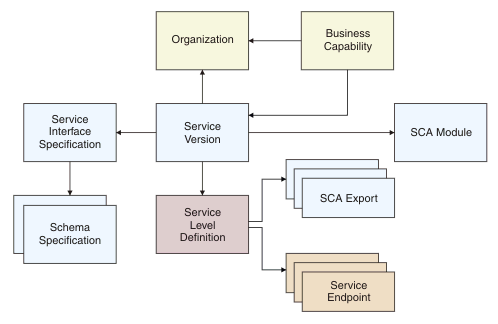
| Object type | Description |
|---|---|
| Business capability | The business analyst view of the new service. The business capability must belong to an organization. |
| Service version | The representation of the realization of the business capability. The service version must belong to an organization. The service version is realized through an SCA module. |
| Service interface specification and schema specifications | Describe the functional characteristics of the service, such as the interaction style and the message structures. |
| Service level definition | Describes the non-functional characteristics of the service; for example, the availability date, and the throughput. |
| SCA exports | The entry points into the SCA module. |
| Service endpoints | The endpoint representations of the SCA exports, so that SCA exports can be viewed and controlled in the same way as other endpoints. |
This tutorial shows you how to create the structure shown, representing all aspects of the service in the organization, from the description of the business value of the service, through its technical description, and finally placing representations of addressable endpoints online for use within a production environment. These steps are completed in a controlled and governed fashion.
In essence, the process for governing an existing SCA service is the same as governing an existing service represented by a stand-alone WSDL file. However, there are some differences in terms of the artifacts that are referenced, the registry objects that are created, and the method through which endpoints are created for the different deployment environments.
- The business plans the services it needs according to a top down service lifecycle.
- The IT department discovers and catalogs the services that it is using, introducing governance and control over existing services.
In this tutorial, you use a single existing Address Formatting service. This service formats addressing information into a single address field that is appropriate for the country in question, and is used by development, test, staging, and other lines of business. The Address Formatting service is packaged as an SCA module, which in this case is a mediation module supporting three distinct export bindings; JMS, MQSeries® and Web Services. This means that users can access the same service via the range of access bindings, and also allows for mediation functionality to be applied to all interactions with the Address Formatting service.
The tutorial uses a mediation module called AddressFormatter.ear, which was generated using WebSphere Integration Developer. Because this is an example to demonstrate SCA governance, the mediation module in fact contains no mediation functionality, and, for the purposes of the tutorial, the real Address Formatting service is represented by an embedded Java service.
If you have security enabled, you can add more realism to this tutorial by creating a separate user ID for each role (Business, SOAGovernance, Development, and Operations), and assigning each user ID to its role using WSRR security. Then, at each stage of the tutorials where you change view because the actions are performed by a different role, log out of the dashboard and log in with the appropriate user ID. You can assign users to roles using the web UI; for details, see Add and remove principals for a role.
The tasks that make up this tutorial are divided into a number of sections that form a sequence. If you want to carry out all the tasks, complete the sections strictly in the order shown; however, you can also examine a specific section for reference purposes.