Preparing the NED24 NVMe expansion drawer to remove and replace a display panel and cable
To prepare the NED24 NVMe expansion drawer to remove and replace a display panel and cable, complete the steps in this procedure.
Procedure
-
Attach the electrostatic discharge (ESD) wrist strap. Your expansion drawer has one ESD jack on the front and two ESD jacks on the rear. Plug the ESD wrist strap into the ESD
jack.
Attention:
- Attach an electrostatic discharge (ESD) wrist strap to the front ESD jack, to one of the rear ESD jacks, or to an unpainted metal surface of your hardware to prevent the electrostatic discharge from damaging your hardware.
- When you use an ESD wrist strap, follow all electrical safety procedures. An ESD wrist strap is used for static control. It does not increase or decrease your risk of receiving electric shock when using or working on electrical equipment.
- If you do not have an ESD wrist strap, just prior to removing the product from ESD packaging and installing or replacing hardware, touch an unpainted metal surface of the expansion drawer for a minimum of 5 seconds.
Figure 1. Location of ESD plugs 
-
Label and disconnect the power cords
from the drawer unit.
Note: You can use the hook-and-loop fastener to attach the power cords to the expansion drawer. If you are placing the expansion drawer in a service position after you disconnect the power cords, ensure that you unstrap the fastener.
Figure 2. Removing the power cords  (L003)or
 or
or or
or or
or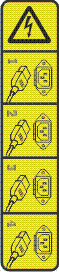


 DANGERMultiple power cords. The product might be equipped with multiple AC power cords or multiple DC power cables. To remove all hazardous voltages, disconnect all power cords and power cables. (L003)
 - Loosen the front screws that secure the expansion drawer unit to the
rack.
Figure 3. Loosening the front screws 
- Slide the expansion drawer into the service position.
- Ensure that the screws inside the latches are not secured to the rack. Then, slide the expansion drawer out of the rack until the slides click and hold the expansion drawer unit securely.
- Ensure that the cable management arm can move freely. Ensure that the cables at the rear of the expansion drawer do not catch or bind as you pull the expansion drawer unit into the service position.
Note: The rack stabilizer brackets must be attached to the rack before any drawer is installed or pulled out from the rack. Do not pull out more than one drawer at a time. The rack might become unstable when more than one drawer at a time is pulled out from the rack.Figure 4. Sliding the expansion drawer into the service position 