Use cases and scenarios for IBM Content Assistant
The section outlines how IBM® Content Assistant uses generative AI to help users interact with and extract insights from documents that are stored in the FileNet Content Manager repository.
.
The primary uses cases for IBM Content Assistant are as follows:
- Content summarizationYou can configure the Content Assistant to generate content summaries for a subset of document content. The feature provides the following content summarization capabilities:
- Watsonx summary for a single document - Create a document class subscription for watsonx summary. A watsonx document summary is automatically generated for any new documents that are added to the object store, which belong to the subscribed document class. For more information, see the topic Accessing the watsonx summary for a document.
- Watsonx ad hoc summary for multiple documents - Select a set of documents in a sub-folder for which you want the Content Assistant to create an ad hoc summary. For more information, see the topic Accessing the watsonx ad hoc summary for your document selection.
- Comparing documents and versionsUse Content Assistant to compare any two documents or track changes across two versions of the same document. This is useful when you review similar contracts, reports, or policy drafts.
- Comparing two documents - Compare the content between any two documents in the repository. For more information, see the topic Comparing two documents.
- Comparing document versions - Review the changes between two versions of the same document. For more information, see the topic Comparing document versions.
- Asking questions about content from an individual document
Use the Content Assistant to ask questions about a document in your repository.
Consider a scenario where a customer service representative receives a long email from a customer about a fee-related complaint. The representative asks the following question to the Content Assistant to quickly understand the nature of the complaint to address the customer issue:

The scope of the Content Assistant response is based on the email document that the customer service representative selected before they asked the question. The response contains important information about the fee amount and about the loyalty of the customer, which helps the representative derive a quick resolution plan.
- Asking questions about content across multiple documents
You can select a subset of documents in your repository and ask questions to the Content Assistant about the content in the documents. This feature helps to quickly find the answers along with the document excerpts that contain the answers to your question.
Consider a scenario where a caseworker needs to find information across multiple legal documents about a mortgage-related late fee that their customer is subject to be charged with. The caseworker asks the question to the Content Assistant specific to the geography and situation.
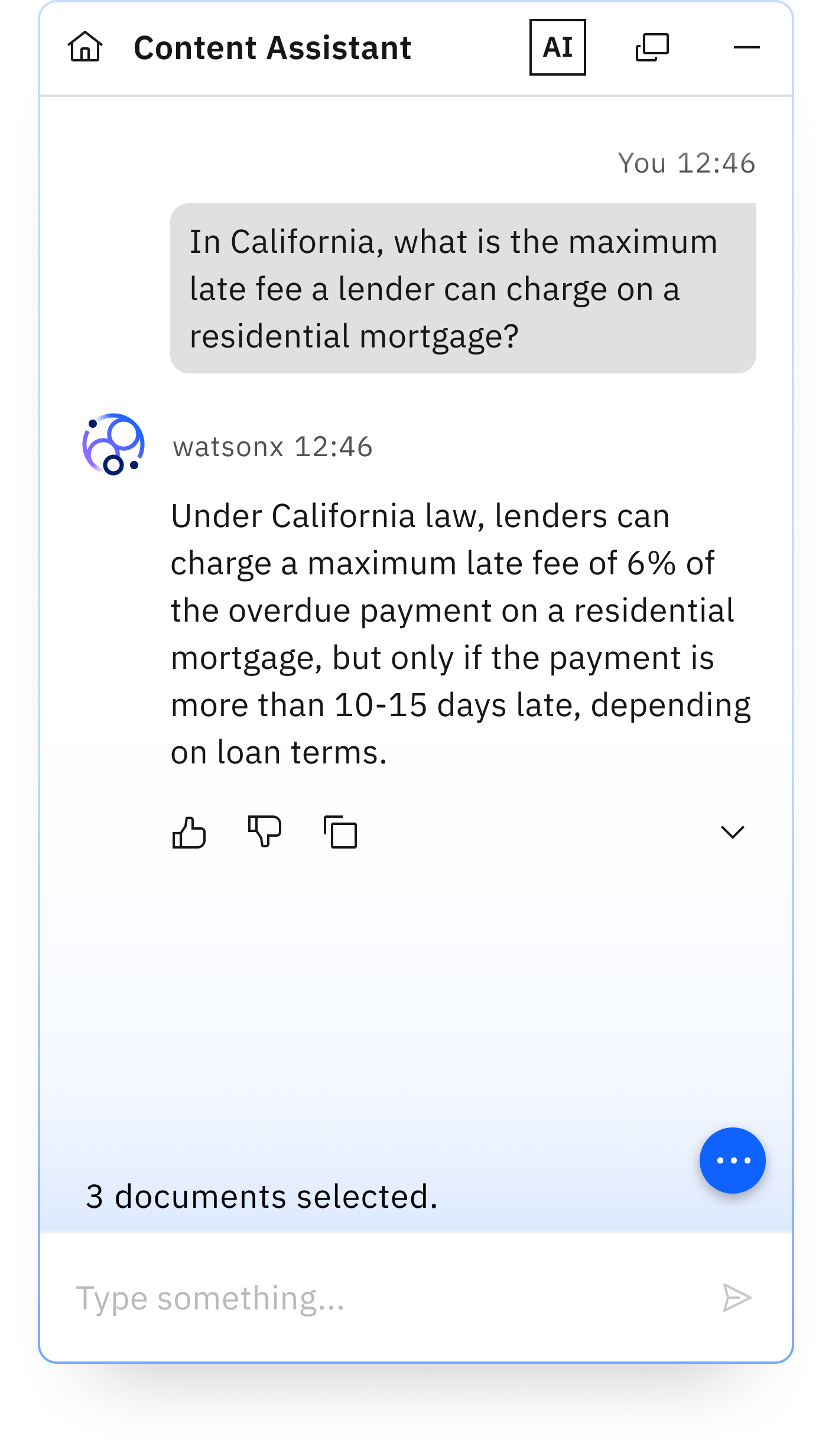
The scope of the Content Assistant response is based on the three documents that the caseworker selected before they asked the question. The response helps the caseworker to quickly find mortgage late fee information for a specific geography.
- Asking questions about content across a repository
You can ask questions about document content across a repository. This feature is useful when you are not able to locate a document but you know that the document belongs to the repository. This feature saves time and avoids manual search across multiple terabytes of data in your repository.
Consider a scenario where an employee in your organization wants to understand whether the travel policy allows making travel expenses by using a corporate card only. The employee wants to understand whether the policy also allows the usage of a personal card that can be reimbursed later. The employee can use the ask your repository feature to ask questions across all travel policy-related documents that are within the HR repository.
The scope of the Content Assistant response to the employee question is based on all document content within the HR repository. The response helps the employee find travel policy information that is spread across multiple documents and understand whether the travel policy allows usage of a personal card. It also helps the employee understand the difference in reimbursement processing between using a corporate card versus a personal card.