Logging On to Your IBMid Account
With your IBMid account, you can access multiple IBM applications and services using a single ID. When you are logged on to your IBMid account, IBMid can provide your account identity to various IBM applications and services you may access, as shown below:
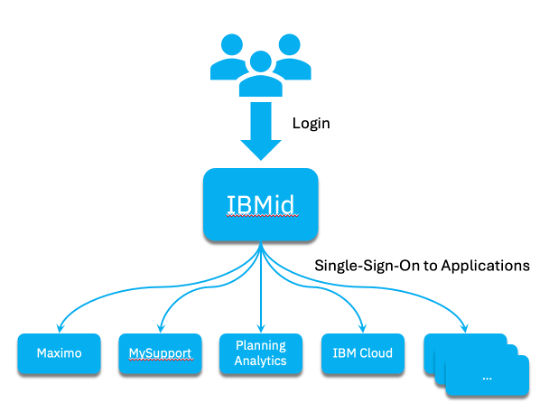
Depending on whether your IBMid account is federated with your organization’s authentication (logon) service, your logon experience will differ.
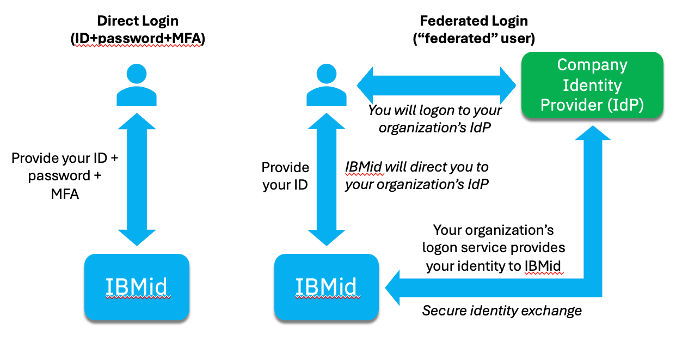
In an unfederated login, you would directly provide your logon credentials to IBMid just as you would for many non-IBM websites. Your credentials would include your username, password, and other credential information as required (such as a one time code, for example).
For a federated login flow, IBMid sends you to your organization’s logon service, where you will enter your credentials there. Then your user identity information will be securely sent to IBMid by your organization’s logon service.
Below illustrates the differences between a federated and unfederated logon flow.
Logon to IBMid is required when accessing a “protected” page or application which requires your IBMid account identity. A typical experience would be for you to first access an application, which will then send you to IBMid, and you will complete your IBMid logon. Then IBMid will send you back to the application which will create a user application “session” for you. IBMid does not control your specific application privileges, and your further access will then depend on what privileges you have been granted.
Let’s walk through both a federated and unfederated login experience, using MyIBM as an example.
When you access an application, it might display an unprotected “landing” page which offers an option to logon to the application. Or it may immediately direct you to IBMid without displaying anything first. For the MyIBM application, if you do not have an active application session, your browser will be immediately redirected to IBMid. If you are already logged on to IBMid, your account identity information will be provided to MyIBM, which will use it to create a MyIBM application session for you. If you do are not logged on to IBMid, you will be required to complete the logon process before IBMid will provide your account identity to MyIBM.
The URL for MyIBM is https://myibm.ibm.com. If you go to that URL, MyIBM will send you to IBMid logon, where you will enter your IBMid account username, as shown below:
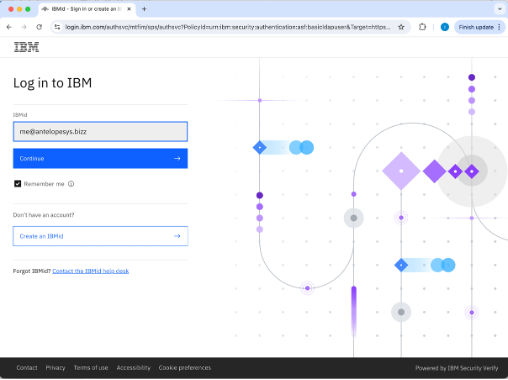
When you click on “Continue”, IBMid looks at the username you provided to determine whether you are to provide your logon credentials locally (unfederated) or to your organization’s logon service. To do this, it examines your username against a set of patterns associated with various organization providers. If a match is found, your IBMid account is federated with the matching provider, and you must complete your logon process there.
When your IBMid account is unfederated, you will next be presented with a screen asking you to enter your password, as shown below:
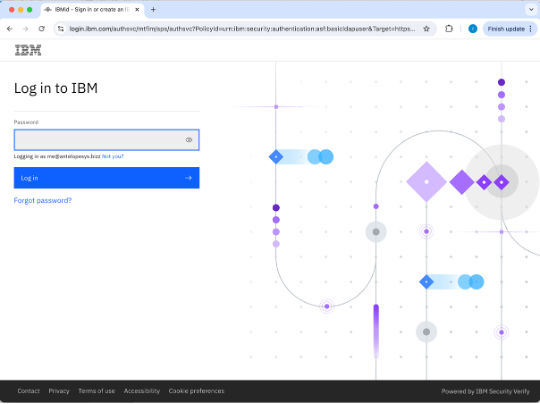
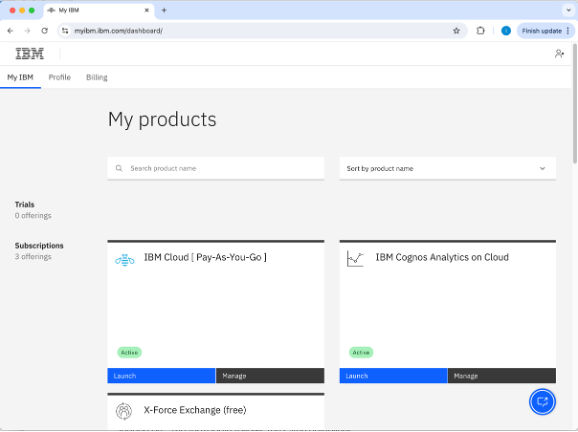
After you enter your password, you may be further challenged for an additional login factor, such as a one-time code or other factor. This is referred to as “multi-factor authentication” or MFA. Once your logon to IBMid is completed, you will be directed back to the application you started with, in this example, MyIBM (example MyIBM dashboard page shown below).
If, however, your IBMid account is determined to be federated, instead of displaying the password entry page, IBMid will direct you to your organization’s logon service, where you are expected to provide your credentials, as illustrated in the below example:

Once you complete logon to your organization’s logon service, your organization will securely provide your identity information to IBMid, and for the MyIBM example, you will then be sent to the MyIBM Dashboard page as shown previously.