Custom CI matching
By default, the Turbonomic Actions application assumes the ServiceNow instance uses its Discovery plug-in to get VM details from AWS, Azure, Hyper-V, and vCenter environments. It uses those details to create Configuration Items (CIs). On the Settings UI page, the CI Matching Details for Virtual Machines section lists the VM table names and columns that ServiceNow uses for matching. This matching is based on the vendor IDs already discovered in Turbonomic for those virtual machines.
However, you must implement custom CI matching if the following apply:
-
The ServiceNow instance is configured to use a different discovery mechanism (such as Dynatrace, BMC) to get the virtual machine details.
-
The ServiceNow administrator wants to generate CRs for other types of configuration items (for example, Window Servers, ESX Hosts)
Creating custom CI matching business rules
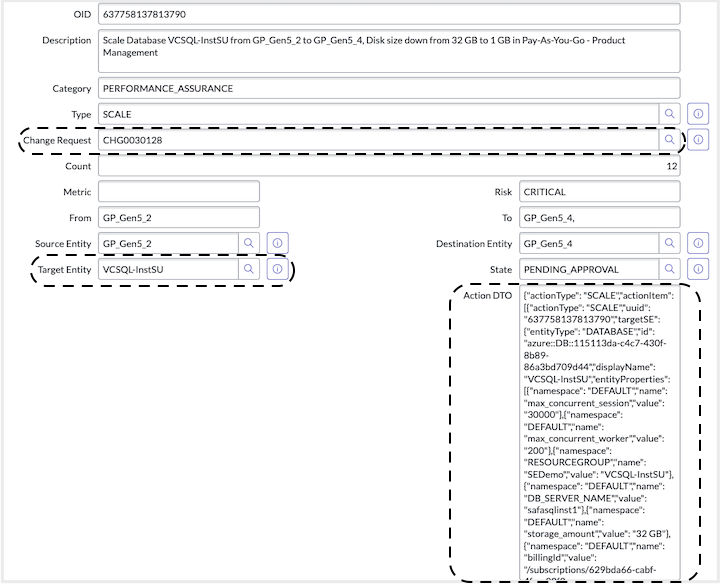
Each action approval in ServiceNow that matches a valid Turbonomic action has a corresponding Change Request (CR) and Target Entity reference. Also, more action details are stored in the Action DTO field:
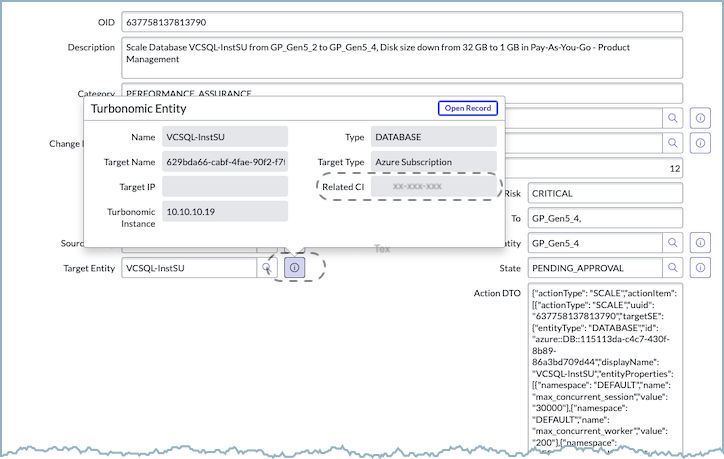
If ServiceNow contains a valid configuration item for the Turbonomic action, the Target Entity stores its reference in the Related CI field.
If the Related CI is missing or is not the wanted match, you can implement a custom business rule in ServiceNow. Click System Definition > Business Rules and create a rule that selects the correct CI for the Turbonomic action approval. Create this advanced business rule for the Turbonomic Action Approval table. This rule triggers after every insert operation.
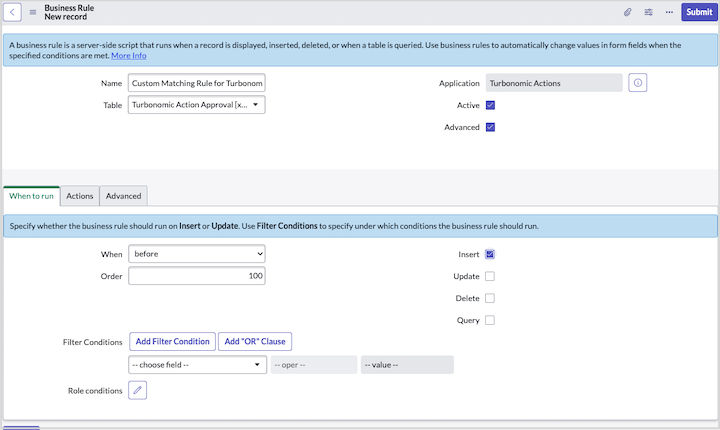
You implement the logic for CI matching in JavaScript,
in the Advanced section of the new rule. For example, assume that you want to match the ESX
host in ServiceNow, based on the id value of the hostedBySE
element in the following Action DTO.
{
  "actionType": "RIGHT_SIZE",
  "actionItem": [
    {
      "actionType": "RIGHT_SIZE",
      "uuid": "636783681382171",
      "targetSE": {
        "entityType": "VIRTUAL_MACHINE",
        "id": "421d6fe0-7a60-3547-e706-c8dab7e0a3d7",
        "displayName": "appinsights-nodejs-pt",
        "entityProperties": [
          ...
        ],
        "powerState": "POWERED_ON",
        ...
      },
      "hostedBySE": {
        "entityType": "PHYSICAL_MACHINE",
        "id": "34313836-3333-5553-4537-33394e43424e",
        "displayName": "dc17-host-02.eng.vmturbo.com",
        "commoditiesSold": [
          ...
        ],
        "commoditiesBought": [
          ...
        ],
        "entityProperties": [
          ...
        ],
        "powerState": "POWERED_ON",
        ...
    }
  ],
  "actionOid": 636783681382171,
  "explanation": "Resize down VMem for Virtual Machine appinsights-nodejs-pt from 2 GB to 1 GB",
  "actionState": "PENDING_ACCEPT",
  "createTime": 1616622476370
}
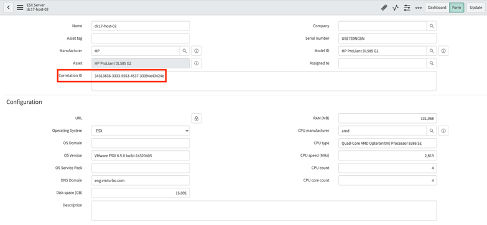
Further, assume that the physical machine details are already stored in the
cmdb_ci_esx_server table, and its ID is correctly set in the Correlation ID
(correlation_id) column:
Given this information, the custom CI script might be similar to the following example.
(function executeRule(current, previous /*null when async*/) {
  if (current.action_dto) {
    var actionDTO = current.getValue('action_dto');
    var actionItemList = JSON.parse(actionDTO).actionItem;
    if (actionItemList && actionItemList.length > 0) {
      var actionItem = actionItemList[0];
      var host = actionItem.hostedBySE;
      if (host) {
        var hostID = host.id;
        var esxHost = new GlideRecordSecure('cmdb_ci_esx_server');
        esxHost.addQuery('correlation_id', hostID);
        esxHost.query();

        if (esxHost.next()) {
          var targetEntityID = current.getValue('target_entity_id');
          if (targetEntityID) {
            var turbonomicEntity = new       GlideRecordSecure('x_turbo_turbonomic_x_turbonomic_entity');
            turbonomicEntity.addQuery('sys_id', targetEntityID);
            turbonomicEntity.query();

            if (turbonomicEntity.next()) {
              turbonomicEntity.setValue('sn_entity_id', esxHost.sys_id);
              turbonomicEntity.update();
              gs.info("Successfully set the Related CI for the Turbonomic Entity");
            }
          } else {
            gs.warn("The target entity is invalid for the action approval");
          }

          var changeRequestID = current.getValue('change_request_id');
          if (changeRequestID) {
            var changeRequest = new GlideRecordSecure('change_request');
            changeRequest.addQuery('sys_id', changeRequestID);
            changeRequest.query();

            if (changeRequest.next()) {
              changeRequest.setValue("cmdb_ci", esxHost.sys_id);
              changeRequest.update();
              gs.info("Successfully set the CI for the change request: " + changeRequest.getValue('number'));
            }
          } else {
            gs.warn("No valid CR has been found for the action approval");
          }
        } else {
          gs.warn("Cannot find the ESX host in the cmdb_ci_esx_server table");
        }
      } else {
        gs.warn("The Host element is missing in the Action DTO");
      }
    } else {
      gs.warn("The Action Item list is missing or empty, in the Action DTO");
    }
  } else {
    gs.warn("The Action DTO is invalid for the Turbonomic action");
  }
})(current, previous);
The business rule sets a custom CI for the Turbonomic action. It also updates the configuration item reference for the matching change request that was created for that action approval.