Collaboration diagram
This diagram illustrates the main components of Turbonomic Actions and the component interactions:
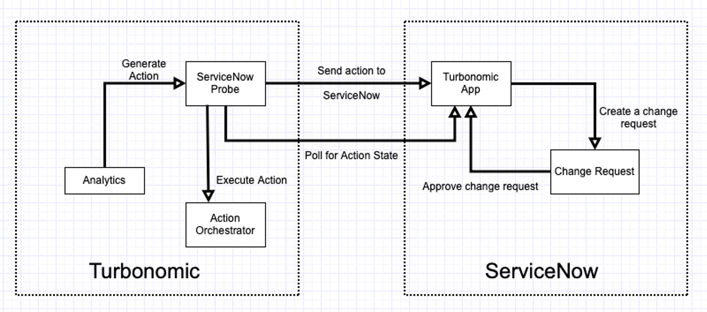
Turbonomic configures the ServiceNow target and then configures automation policies to send specific actions to ServiceNow for approval. For any actions that are configured for approval, the default action approval workflow is:
-
The ServiceNow probe periodically uses REST API calls to send actions for approval to the Turbonomic Actions application (running on ServiceNow).
-
The Turbonomic Actions application creates action approvals for each Turbonomic action. By default, it creates corresponding Change Requests (CRs) for the ServiceNow administrator to approve:
-
If a change request is approved for a future date, time, or both (Planned Start Date and Planned End Date), the action runs in Turbonomic according to that CR schedule.
-
If the change request is approved right away, the action returns to Turbonomic immediately for execution. If an execution schedule does not exist in Turbonomic for that action, it runs immediately. If an execution schedule exists in Turbonomic, the action runs according to that schedule.
-
For a rejected change request, the corresponding actions do not run. In addition, for one week (by default), Turbonomic does not request new approvals for the same action.
-
If an action is no longer recommended by Turbonomic, the approval is marked as missed in ServiceNow after a 24-hour period.
-
-
The ServiceNow probe periodically polls for action approvals states. If it discovers any approved actions, Turbonomic schedules them for execution.
-
After an action completes its execution, the ServiceNow probe updates the approval state as
SUCCEEDEDorFAILEDin ServiceNow. In addition, it directs ServiceNow to close the corresponding change request as successful or unsuccessful.
If you use custom business rules, the integration does not create CRs in ServiceNow. Create the
CRs in your business rules, and the CRs must refer to the proper action approvals. When a CR is
approved or rejected, the rules must set the action approval state to APPROVED or
REJECTED. After Turbonomic runs the action and sets the approval
state to SUCCEEDED or FAILED, your custom business rules must
close the give CR as successful or unsuccessful.