Overview of on-premises connection methods
There are several possible ways of connecting a cloud queue manager to an existing or new on-premises queue manager. The right choice for you depends on your network topology and security requirements.
The two methods explained here are:
- Direct connection initiated by the on-premises queue manager
- Connection via the IBM Cloud Satellite Connector
A third method using passthru is described here:
Direct connection initiated by the on-premises queue manager
This configuration works in the case where the on-premises queue manager can make calls out to the cloud queue manager but has no publicly-visible IP address and cannot be directly addressed by incoming internet applications attempting to make a connection.
This is the simplest option to configure. For on-premise to cloud communication it uses a simple sender/receiver channel pair and for cloud to on-premise communication it uses a requester/server channel pair to establish the connection from the on-premises queue manager to the cloud queue manager.
Because the cloud queue manager cannot initiate the connection in this configuration, it is the on-premises queue manager which reaches out to the cloud queue manager to establish the connection. This method establishes a pair of channels and enables bi-directional flow of messages over the pair of channels.
See Direct connection to an on-premises queue manager for help with implementing this solution.

Connection via the IBM Cloud Satellite Connector
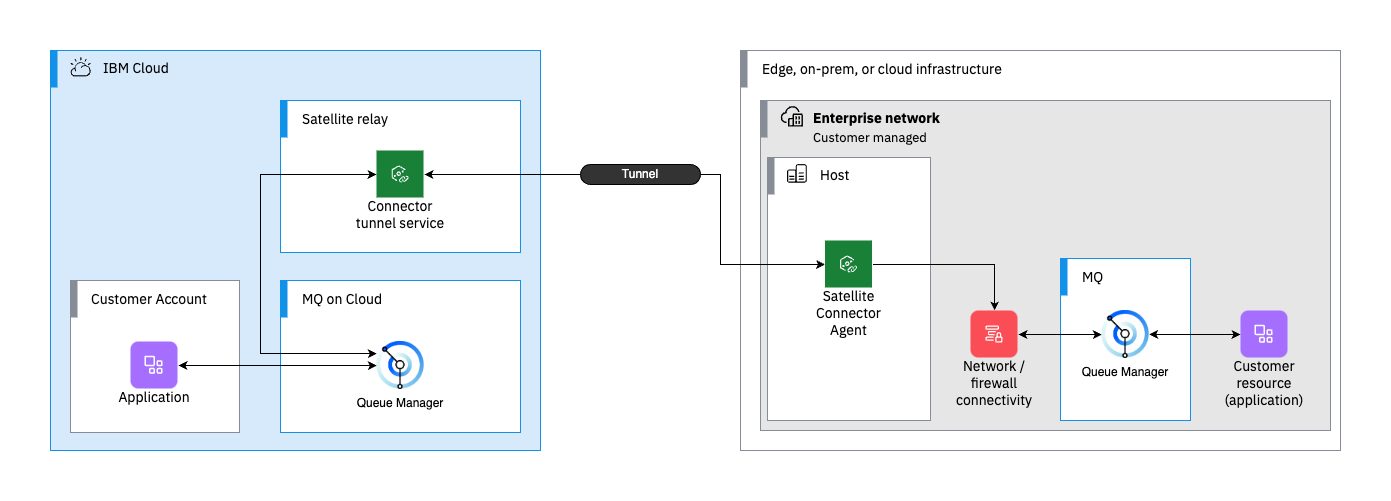
The IBM Cloud® Satellite Connector provides secure TLS tunnelling between application that need to communicate in hybrid and multi-cloud environments.
The Satellite Connector is particularly useful in configurations where the on-premises queue manager is in a part of the network which has no direct outbound connectivity. The Satellite Connector agent is installed in a customer network location which does have outbound IP traffic access. The agent then carries traffic securely from the on-premises queue manager via the Satellite Connector endpoint which connects to your cloud queue manager.
Similar to direct connection, this solution supports end-to-end TLS sessions between the on-premises queue manager and cloud-based queue manager.
The Connecting to an on-premises queue manager by using IBM Cloud Satellite Connector tutorial helps you implement this solution.
Connection via IBM MQ Internet Pass-thru
Existing users of IBM MQ Internet Pass-Thru will be familiar with this method of connectivity using HTTPS ( and particularly HTTPS tunnelling). A detailed overview of this approach is available at MQ IPT Knowledge Base.
This method might be most suitable for communication which must pass through a standard firewall configuration, and HTTP/HTTPS traffic is the most appropriate.