Adding an SQL Command action to a test
Before you begin
Ensure that the database resource is properly configured in the Architecture School perspective. For more information about configuring a database resource, see Database resources, connections, and bindings.
You must have a test. For more information about creating tests, see Test Factory. Tests include steps and actions. For more information about test steps and actions, see Test actions.
Selecting a test
Procedure
Adding SQL statements
About this task
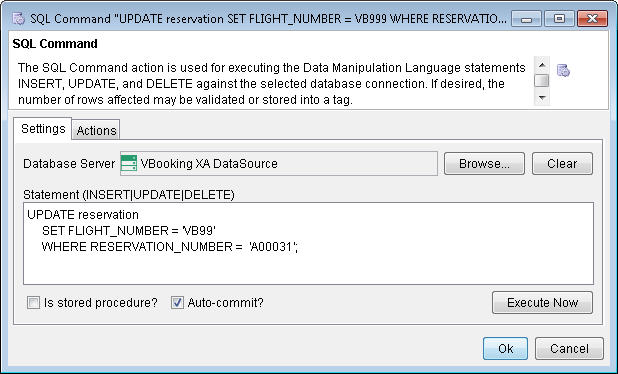
To insert, update, or delete rows against the selected database, add SQL statements.
Procedure
- Enter a statement (INSERT, UPDATE,
or DELETE) in the Statement field. You can add multiple SQL statements and separate them by a semi-colon
(;).
Testing the SQL statements
About this task
Before you run the SQL statements against a selected database, it might be a good idea to test the SQL statements.
Procedure

Validating return values
About this task
To specify a condition that relates to the return value, such as validating the number of rows that are affected by the command, use the Validate tab under the Actions tab.
Procedure
- Click the Actions tab.

In the example above, the return value is validated by the condition that it equals zero. Hence, this test step fails if any rows are updated by the specified command.
Storing the return value in to a tag
About this task
To store the number of database rows that are affected into a tag for later use, use the Store tab under the Actions tab. For example, you might want to insert a record into a database, by using tags instead of hardcoding the values to be inserted into the database. With tags, you gain flexibility to provide different values in the test and to reuse the test.
Procedure
- Click the Actions tab.
