Work Profile or Profile Owner (PO) mode
Set up a work profile on personal devices (BYOD) to store work apps and data in a separate container.
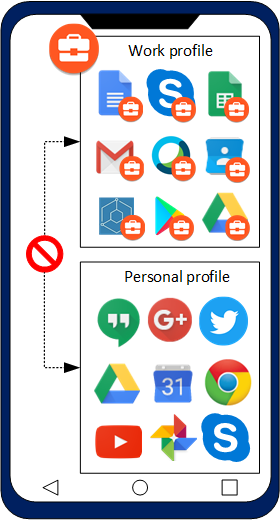
The Profile Owner (PO) deployment method is recommended for personally-owned devices (BYOD) that are also used for work. After a device is enrolled, a separate work profile is created on the device for corporate apps and data. IBM® MaaS360® has complete management control over the work profile, but does not have visibility and control over personal apps, data, and activities.
Sending a device enrollment request from the MaaS360 Portal
Follow the steps to send an enrollment request to devices.
- From the IBM MaaS360 Portal home page, select . The Device Inventory page is displayed.
- Click Add Device. The Add Device window is displayed.
- Select Enroll using Android Enterprise.
- Enter other enrollment details. For more information about enrollment request, see Adding devices in the MaaS360 Portal.
- Click Send Request.