To remove a disk drive
or solid-state drive (SSD) from a system with the Linux
operating system or Linux logical partition that controls
the drive location powered on, complete the steps in this
procedure.
- Ensure
that you have the electrostatic discharge (ESD) wrist strap attached.
If not, attach it now.
- Choose from the following options:
- If you are removing a disk drive or SSD in locations Un-P4-D2
through Un-P4-D9 in an 8408-44E or 8408-E8E system,
continue with step 3.
- If you are removing a 1.8-inch SSD in locations Un-P4-D10 through
Un-P4-D13 in an 8408-44E or 8408-E8E system,
continue with step 7.
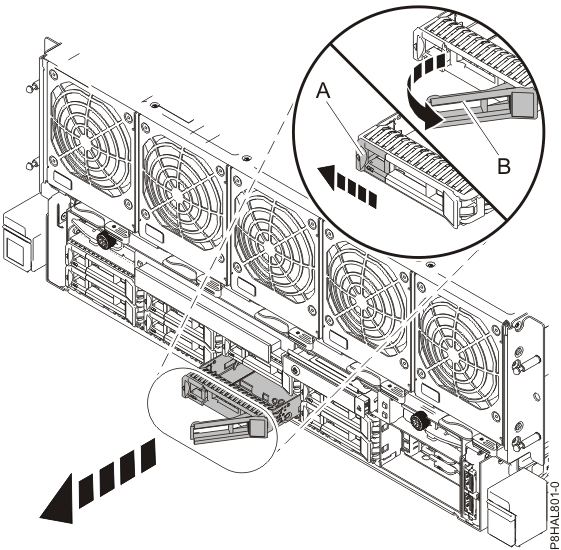
- When the identify LED flashes, unlock the drive bay
handle (B) by pressing the handle latch (A) and
pulling it out toward you, as shown in Figure 1. If the handle is not all the way out, the solid-state drive cannot
slide out of the system.
Figure 1. Removing a disk drive from the 8408-44E or 8408-E8E
system
- Support the bottom of the drive as you slide it out of the system. Hold the drive by its sides.
- If you are removing more than one drive, repeat the steps in this procedure until all drives
are removed.
- Proceed to the procedure for replacing a disk drive. For
instructions, see Replacing a disk drive or SSD in the 8408-44E or 8408-E8E system with the power turned on in Linux.
- To remove a 1.8-inch SSD in locations Un-P4-D10
through Un-P4-D13 in an 8408-44E or 8408-E8E system,
continue with the next step.
- Remove the front cover. For instructions,
see Removing the front cover.
(L007)CAUTION:
A hot surface nearby. (L007)
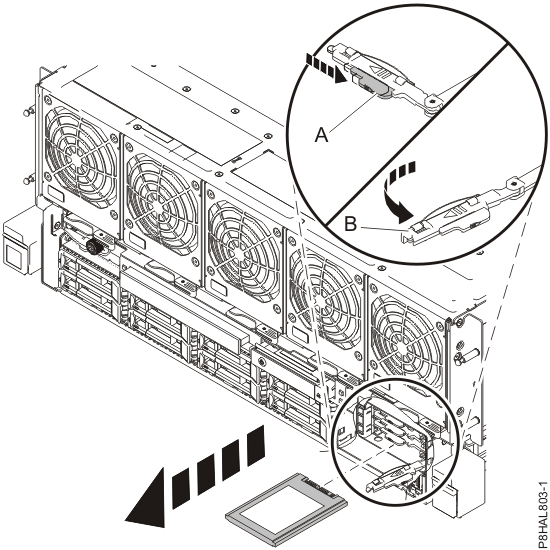
- When the identify LED turns on solid, unlock the drive bay
handle (B) by pushing the handle latch (A) in the
direction that is shown and pulling the drive bay handle (B) out toward you,
as shown in Figure 2. If the handle is not all the way out, the solid-state drive cannot
slide out of the system.
Figure 2. Removing an SSD from an 8408-44E or 8408-E8E system
- Support the bottom of the drive as you slide it out of the system. Hold the drive by its sides.
- If you are not installing a replacement drive immediately, lock the drive bay handle
(B) by rotating it inwards toward the system.
- If you are removing more than one drive, repeat the steps in this procedure until all drives
are removed.
 CAUTION:A hot surface nearby. (L007)