MSIF transfer service options
Most of the options used by the MSIF transfer services can be specified either in a request or by means of an option-set CO. However, some options can be specified only in a request, and others can be specified only by means of an option-set CO.
Figure 1 shows the COs used by the MSIF transfer services, and their relationships with one another.
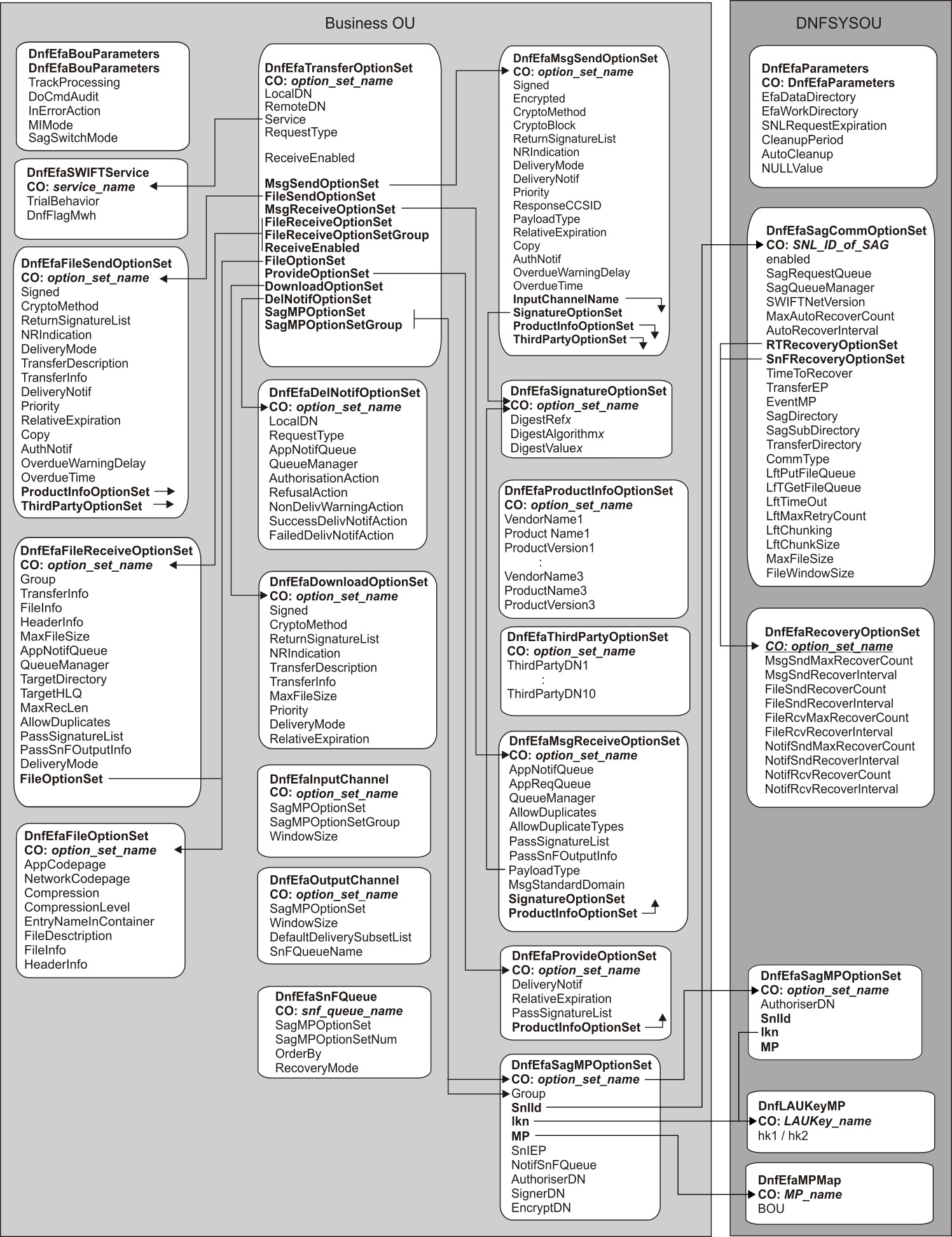
Lists of options
- The default value of the option
- Whether the option can be specified in a SendMsg, SendFile, ProvideFileForDownload, or DownloadFile request (does not apply to MsgReceived, FileReceived, or NotifReceived scenarios, which do not have requests)
- Whether the option can be specified in an option-set CO
- Whether the option can be specified in a default option-set CO
- The system default (if any) that is used when the option is not specified in a request or by means of an option-set CO
- For each scenario, whether the option is mandatory (M), optional (O), or not applicable (empty)
Transfer options
- A transfer option-set CO (that is, a CO of type DnfEfaTransferOptionSet)
- The <TransferOptions> folder of a request
| Transfer option | Can be specified in… | System default | Scenario | ||||||||
|---|---|---|---|---|---|---|---|---|---|---|---|
| request | option-set CO | default option-set CO | SendMsg | MsgReceived | SendFile | FileReceived | ProvideFileForDownload | DownloadFile | NotifReceived | ||
| LocalDN | ✓ | ✓ | ✓ | (none) | M | M | M | M | M | M | M8 |
| RemoteDN | ✓ | ✓ | ✓ | (none) | M | M | M | M | M | M | M8 |
| Service | ✓ | ✓ | ✓ | (none) | M | M | M | M | M | M | M8 |
| RequestType | ✓ | ✓ | ✓ | (none) | O | M | M | M | M | M | M8 |
| ReceiveEnabled | ✓ | ✓2 | (pseudo) | M | M | M | |||||
| MsgSendOptionSet (SendOptionSet)4 | ✓ | ✓ | ✓ | (none) | O | ||||||
| MsgReceiveOptionSet | ✓ | ✓ | (none) | O1 | |||||||
| FileSendOptionSet (SendOptionSet)4 | ✓ | ✓ | ✓ | (none) | O | ||||||
| FileReceiveOptionSet | ✓ | ✓ | (none) | O1 | |||||||
| FileReceiveOptionSetGroup | ✓ | ✓ | (none) | O1 | |||||||
| ProvideOptionSet | ✓ | ✓ | ✓ | (none) | O | ||||||
| DownloadOptionSet | ✓ | ✓ | ✓ | (none) | O | ||||||
| DelNotifOptionSet | ✓ | ✓ | ✓ | (none) | O3 | O | O | ||||
| FileOptionSet | ✓ | ✓ | ✓ | (none) | O | O | O | O | |||
| SagMPOptionSet | ✓ | ✓ | ✓ | (none) | M6 | M7 | M8 | M7 | M8 | M5 | M7 |
| SagMPOptionSetGroup | ✓ | ✓ | ✓ | (none) | M6 | M7 | M8 | M7 | M8 | M7 | |
- 1
- If both an option set and an option set group are specified, the option set group is used and the option set is ignored.
- 2
- This option is ignored if specified for the default transfer option-set CO. The options specified by the default transfer option-set CO apply regardless of the setting of the ReceiveEnabled option.
- 3
- This option applies to SnF only.
- 4
- For this option, the name of the CO attribute is different from the name of the message folder. The name shown in parentheses is the name of the message folder.
- 5
- This option is mandatory only if a default SAG MP option set (that is, a CO of type SagMPOptionSet with the name default) was not configured.
- 6
- Whether this option is forbidden or mandatory depends on whether
an SnF input channel is to be used:
- If so, this option cannot be specified.
- If not, unless a default SAG MP option set (that is, a CO of type SagMPOptionSet with the name default) was configured, either the SagMPOptionSet or SagMPOptionSetGroup option is mandatory. If both are specified, the SagMPOptionSetGroup option is used and the SagMPOptionSet option is ignored.
- 7
- Whether this option is mandatory depends on whether an SnF session
is to be used:
- If so, the SagMPOptionSet and SagMPOptionSetGroup options are ignored, and the SagMPOptionSet CO specified for the output channel or SnF queue are used.
- If not, and if a default SAG MP option set (that is, a CO of type SagMPOptionSet with the name default) was not configured, either the SagMPOptionSet or SagMPOptionSetGroup option is mandatory. If both are specified, the SagMPOptionSetGroup option is used and the SagMPOptionSet option is ignored.
- 8
- If a default SAG MP option set (that is, a CO of type SagMPOptionSet with the name default) was not configured, either the SagMPOptionSet or SagMPOptionSetGroup option is mandatory. If both are specified, the SagMPOptionSetGroup option is used and the SagMPOptionSet option is ignored.
Message send options
- A message-send option-set CO (that is, a CO of type DnfEfaMsgSendOptionSet)
- The <SendOptions> folder of a SendMsg request
| Message send option | Can be specified in… | System default | Scenario | ||||||||
|---|---|---|---|---|---|---|---|---|---|---|---|
| request | option-set CO | default option-set CO | SendMsg | MsgReceived | SendFile | FileReceived | ProvideFileForDownload | DownloadFile | NotifReceived | ||
| Signed | ✓ | ✓ | ✓ | False | O | ||||||
| Encrypted | ✓ | ✓ | ✓ | False | O | ||||||
| CryptoMethod | ✓ | ✓ | ✓ | CryptoBlock | O | ||||||
| ReturnSignatureList | ✓ | ✓ | ✓ | False | O1 | ||||||
| NRIndication | ✓ | ✓ | ✓ | (none) | O1 | ||||||
| DeliveryMode | ✓ | ✓ | ✓ | RT | O | ||||||
| SnFReturnBusMsg | ✓ | ✓ | ✓ | Error | O | ||||||
| DeliveryNotif | ✓ | ✓ | ✓ | False | O | ||||||
| Priority | ✓ | ✓ | ✓ | Normal | O | ||||||
| PayloadType | ✓ | ✓ | ✓ | (none) | O | ||||||
| RelativeExpiration | ✓ | ✓ | ✓ | (none) | O | ||||||
| ResponseCCSID | ✓ | ✓ | ✓ | 1208 | O | ||||||
| OverdueWarningDelay | ✓ | ✓ | ✓ | (none) | O2 | ||||||
| OverdueTime | ✓ | (none) | O2 | ||||||||
| Copy | ✓ | ✓ | ✓ | (none) | O | ||||||
| AuthNotif | ✓ | ✓ | ✓ | (none) | O | ||||||
| InputChannelName | ✓ | ✓ | ✓ | (none) | O1 | ||||||
| SignatureOptionSet | ✓ | ✓ | ✓ | (none) | O | ||||||
| ProductInfoOptionSet | ✓ | ✓ | ✓ | (none) | O | ||||||
| ThirdPartyOptionSet | ✓ | ✓ | ✓ | (none) | O | ||||||
- 1
- Whether this option can be specified and the value it can have depends on the setting of at least one other option. For information about the nature of this dependency, see the option description.
- 2
- This option and another option are mutually exclusive. For more information, see the option description.
Message receive options
Message receive options can be specified in a message-receive option set (that is, a CO of type DnfEfaMsgReceiveOptionSet). They cannot be specified in a request, and are described in Message receive options: MsgReceiveOptions.
| Message receive option | Can be specified in… | System default | Scenario | ||||||||
|---|---|---|---|---|---|---|---|---|---|---|---|
| request | option-set CO | default option-set CO | SendMsg | MsgReceived | SendFile | FileReceived | ProvideFileForDownload | DownloadFile | NotifReceived | ||
| AppReqQueue | ✓ | ✓ | (none) | O3 | |||||||
| AppNotifQueue | ✓ | ✓ | (none) | O2 | |||||||
| QueueManager | ✓ | ✓ | queue manager of the broker in which DNF_O_FT runs | O | |||||||
| AllowDuplicates | ✓ | ✓ | (pseudo) | O | |||||||
| AllowDuplicateTypes | ✓ | ✓ | PDE | O | |||||||
| PassSignatureList | ✓ | ✓ | False | O | |||||||
| PassSnFOutputInfo | ✓ | ✓ | False | O | |||||||
| PayloadType | ✓ | ✓ | (none) | O | |||||||
| MsgStandardDomain | ✓ | ✓ | (none) | O | |||||||
| SignatureOptionSet | ✓ | ✓ | (none) | O | |||||||
| ProductInfoOptionSet | ✓ | ✓ | (none) | O | |||||||
- 1
- Whether this option can be specified and the value it can have depends on the setting of at least one other option. For information about the nature of this dependency, see the option description.
- 2
- This option is mandatory only for SnF delivery mode; it is optional for RT delivery mode.
- 3
- This option applies only to RT delivery mode; it is ignored for SnF delivery mode.
File send options
- A file-send option-set CO (that is, a CO of type DnfEfaFileSendOptionSet)
- The <SendOptions> folder of a SendFile request
| File send option | Can be specified in… | System default | Scenario | ||||||||
|---|---|---|---|---|---|---|---|---|---|---|---|
| request | option-set CO | default option-set CO | SendMsg | MsgReceived | SendFile | FileReceived | ProvideFileForDownload | DownloadFile | NotifReceived | ||
| Signed | ✓ | ✓ | ✓ | False | O | ||||||
| CryptoMethod | ✓ | ✓ | ✓ | CryptoBlock | O | ||||||
| ReturnSignatureList | ✓ | ✓ | ✓ | False | O | ||||||
| NRIndication | ✓ | ✓ | ✓ | (none) | O | ||||||
| DeliveryMode | ✓ | ✓ | ✓ | RT | O | ||||||
| TransferDescription | ✓ | ✓ | ✓ | (none) | O | ||||||
| TransferInfo | ✓ | ✓ | ✓ | (none) | O | ||||||
| DeliveryNotif | ✓ | ✓ | ✓ | False | O | ||||||
| Priority | ✓ | ✓ | ✓ | Normal | O | ||||||
| RelativeExpiration | ✓ | ✓ | ✓ | (none) | O | ||||||
| Copy | ✓ | ✓ | ✓ | (none) | O | ||||||
| AuthNotif | ✓ | ✓ | ✓ | (none) | O | ||||||
| OverdueWarningDelay | ✓ | ✓ | ✓ | (none) | O1 | ||||||
| OverdueTime | ✓ | (none) | O1 | ||||||||
| ProductInfoOptionSet | ✓ | ✓ | ✓ | (none) | O | ||||||
| ThirdPartyOptionSet | ✓ | ✓ | ✓ | (none) | O | ||||||
- 1
- This option and another option are mutually exclusive. For more information, see the option description.
File receive options
File receive options can be specified in a file-receive option-set CO (that is, a CO of type DnfEfaFileReceiveOptionSet). They cannot be specified in a request, and are described in File receive options: FileReceiveOptions.
| File receive option | Can be specified in… | System default | Scenario | ||||||||
|---|---|---|---|---|---|---|---|---|---|---|---|
| request | option-set CO | default option-set CO | SendMsg | MsgReceived | SendFile | FileReceived | ProvideFileForDownload | DownloadFile | NotifReceived | ||
| Group | ✓ | (none) | O | ||||||||
| TransferInfo | ✓ | ✓ | (none) | O | |||||||
| FileInfo | ✓ | ✓ | (none) | O | |||||||
| HeaderInfo | ✓ | ✓ | (none) | O | |||||||
| MaxFileSize | ✓ | ✓ | (depends on CommType)5 | O | |||||||
| AppNotifQueue | ✓ | ✓ | (none) | M | |||||||
| QueueManager | ✓ | ✓ | queue manager of the broker in which DNF_O_FT runs | O | |||||||
| TargetDirectory | ✓ | ✓ | (none) | O1 | |||||||
| TargetHLQ | ✓ | ✓ | (none) | O1 | |||||||
| MaxRecLen | ✓ | ✓ | (none) | O2 | |||||||
| AllowDuplicates | ✓ | ✓ | (pseudo) | O | |||||||
| PassSignatureList | ✓ | ✓ | (none) | O | |||||||
| PassSnFOutputInfo | ✓ | ✓ | False | O | |||||||
| FileOptionSet | ✓ | ✓ | (configured) | O | |||||||
- 1
- This option and another option are mutually exclusive. For more information, see the option description.
- 2
- Whether this option can be specified and the value it can have depends on the setting of at least one other option. For information about the nature of this dependency, see the option description.
Provide options
- A provide option-set CO (that is, a CO of type DnfEfaProvideOptionSet)
- The <ProvideOptions> folder of a request
| Provide option | Can be specified in… | System default | Scenario | ||||||||
|---|---|---|---|---|---|---|---|---|---|---|---|
| request | option-set CO | default option-set CO | SendMsg | MsgReceived | SendFile | FileReceived | ProvideFileForDownload | DownloadFile | NotifReceived | ||
| DeliveryNotif | ✓ | ✓ | ✓ | False | O | ||||||
| RelativeExpiration | ✓ | ✓ | ✓ | (none) | O | ||||||
| PassSignatureList | ✓ | ✓ | ✓ | False | O | ||||||
| ProductInfoOptionSet | ✓ | ✓ | ✓ | (none) | O | ||||||
Download options
- A download option-set CO (that is, a CO of type DnfEfaDownloadOptionSet)
- The <DownloadOptions> folder of a request
| Download option | Can be specified in… | System default | Scenario | ||||||||
|---|---|---|---|---|---|---|---|---|---|---|---|
| request | option-set CO | default option-set CO | SendMsg | MsgReceived | SendFile | FileReceived | ProvideFileForDownload | DownloadFile | NotifReceived | ||
| Signed | ✓ | ✓ | ✓ | False | O | ||||||
| CryptoMethod | ✓ | ✓ | ✓ | CryptoBlock | O | ||||||
| ReturnSignatureList | ✓ | ✓ | ✓ | False | O | ||||||
| NRIndication | ✓ | ✓ | ✓ | (none) | O | ||||||
| TransferDescription | ✓ | ✓ | ✓ | (none) | O | ||||||
| TransferInfo | ✓ | ✓ | ✓ | (none) | O | ||||||
| MaxFileSize | ✓ | ✓ | ✓ | (depends on CommType and LftChunking)1 | O | ||||||
| Priority | ✓ | ✓ | ✓ | Normal | O | ||||||
| RelativeExpiration | ✓ | ✓ | ✓ | (none) | O | ||||||
- 1
- The default depends on the setting of the CommType and LftChunking
SAG communication options:
- If CommType=MQHA and LftChunking is not set, the file is passed via a single IBM® MQ message, and the default is 104857600 (100 MB).
- If CommType=MQHA and LftChunking is set, the file is passed via several IBM MQ messages, and the default is 2147483647 (2 GB).
- If CommType=LOCAL, the file is passed via an NFS, and the default is 2147483647 (2 GB).
Signature options
- A signature option-set CO (that is, a CO of type DnfEfaSignatureOptionSet)
- The <SignatureOptions> folder of a request
| Signature option | Can be specified in… | System default | Scenario | ||||||||
|---|---|---|---|---|---|---|---|---|---|---|---|
| request | option-set CO | default option-set CO | SendMsg | MsgReceived | SendFile | FileReceived | ProvideFileForDownload | DownloadFile | NotifReceived | ||
| DigestRefx | ✓ | ✓ | (none) | M1 | M1 | ||||||
| DigestAlgorithmx | ✓ | ✓ | SHA-256 | M1 | M1 | ||||||
| DigestValuex | ✓ | (none) | M2 | M2 | |||||||
- 1
- This option is mandatory only if a signature list is to be used (that is, when both Signed=True and CryptoMethod=SignatureList).
- 2
- This option is mandatory only if a corresponding digest reference is specified and that digest reference is unable to be processed by the SNL.
Product information options
- A product information option-set CO (that is, a CO of type DnfEfaProductInfoOptionSet)
- The <ProductInfoOptions> folder of a request
| Product information option | Can be specified in… | System default | Scenario | ||||||||
|---|---|---|---|---|---|---|---|---|---|---|---|
| request | option-set CO | default option-set CO | SendMsg | MsgReceived | SendFile | FileReceived | ProvideFileForDownload | DownloadFile | NotifReceived | ||
| VendorNamex | ✓ | ✓ | ✓ | (none) | O1 | O1 | O1 | O1 | O1 | ||
| ProductNamex | ✓ | ✓ | ✓ | (none) | O1 | O1 | O1 | O1 | O1 | ||
| ProductVersionx | ✓ | ✓ | ✓ | (none) | O2 | O2 | O2 | O2 | O2 | ||
- 1
- This option is mandatory if another option is also specified. For information about the nature of this dependency, see the option description.
- 2
- Whether this option can be specified depends on the setting of at least one other option. For information about the nature of this dependency, see the option description.
Third-party options
- A third-party option-set CO (that is, a CO of type DnfEfaThirdPartyOptionSet)
- The <ThirdPartyOptions> folder of a request
| Third party option | Can be specified in… | System default | Scenario | ||||||||
|---|---|---|---|---|---|---|---|---|---|---|---|
| request | option-set CO | default option-set CO | SendMsg | MsgReceived | SendFile | FileReceived | ProvideFileForDownload | DownloadFile | NotifReceived | ||
| ThirdPartyDNx | ✓ | ✓ | ✓ | (none) | O | O | |||||
Delivery notification options
- A delivery notification option-set CO (that is, a CO of type DnfEfaDelNotifOptionSet)
- The <DelNotifOptions> folder of a request
| Delivery notification option | Can be specified in… | System default | Scenario | ||||||||
|---|---|---|---|---|---|---|---|---|---|---|---|
| request | option-set CO | default option-set CO | SendMsg | MsgReceived | SendFile | FileReceived | ProvideFileForDownload | DownloadFile | NotifReceived | ||
| LocalDN | ✓ | ✓ | ✓ | LocalDN of transfer options | O | O | |||||
| RequestType | ✓ | ✓ | ✓ | xsys.xxx.delnotif | O | O | |||||
| AppNotifQueue | ✓ | ✓ | ✓ | Reply-to queue of SendFile, ProvideFile, or SendMsg request | O1 | O | |||||
| QueueManager | ✓ | ✓ | ✓ | Determined by IBM MQ configuration | O1 | O | |||||
| AuthorisationAction | ✓ | ✓ | ✓ | App | O1 | O | |||||
| RefusalAction | ✓ | ✓ | ✓ | App | O1 | O | |||||
| SuccessDelivNotifAction | ✓ | ✓ | ✓ | App | O1 | O | O | ||||
| FailedDelivNotifAction | ✓ | ✓ | ✓ | App | O1 | O | O | ||||
| NonDelivWarningAction | ✓ | ✓ | ✓ | App | O1 | O | |||||
- 1
- Applies to SnF transfers only.
File options
- A file option-set CO (that is, a CO of type DnfEfaFileOptionSet)
- The <FileOptions> folder of a request
| File option | Can be specified in… | System default | Scenario | ||||||||
|---|---|---|---|---|---|---|---|---|---|---|---|
| request | option-set CO | default option-set CO | SendMsg | MsgReceived | SendFile | FileReceived | ProvideFileForDownload | DownloadFile | NotifReceived | ||
| AppCodepage | ✓ | ✓ | ✓ | (no conversion) | O1 | O1 | O1 | O1 | |||
| NetworkCodepage | ✓ | ✓ | ✓ | (no conversion) | O1 | O1 | O1 | O1 | |||
| Compression | ✓ | ✓ | ✓ | None | O1 | O1 | O1 | O1 | |||
| CompressionLevel | ✓ | ✓ | ✓ | DefaultCompression | O1 | O1 | |||||
| EntryNameInContainer | ✓ | ✓ | ✓ | (see option description) | O1 | O1 | |||||
| FileDescription | ✓ | ✓ | ✓ | (none) | O | O | |||||
| FileInfo | ✓ | ✓ | ✓ | (none) | O | O | |||||
| HeaderInfo | ✓ | ✓ | ✓ | (none) | O | O | |||||
- 1
- Whether this option can be specified and the value it can have depends on the setting of at least one other option. For information about the nature of this dependency, see the option description.
SAG message partner options
SAG message partner options can be specified in an SAG MP option set (that is, a CO of type DnfEfaSagMPOptionSet). They cannot be specified in a request, and are described in SAG message partner options: SagMPOptions.
| SAG message partner option | Can be specified in… | System default | Scenario | ||||||||
|---|---|---|---|---|---|---|---|---|---|---|---|
| request | option-set CO | default option-set CO | SendMsg | MsgReceived | SendFile | FileReceived | ProvideFileForDownload | DownloadFile | NotifReceived | ||
| Group | ✓ | ✓ | ✓6 | (none) | O | O | O | O | O | O | |
| SnlId | ✓ | ✓ | (none) | M | M | M | M | M | M | M | |
| MP | ✓ | ✓ | (none) | M | M5 | M | M5 | M | M | M5 | |
| SnlEP | ✓ | ✓ | (none) | M1 | M1 | M1 | |||||
| NotifSnFQueue | ✓ | ✓ | (none) | M1 | M1 | ||||||
| AuthoriserDN | ✓ | ✓ | (none) | M | M | M | M | M | M | M | |
| SignerDN | ✓ | ✓ | (none) | M4 | M4 | M2 | M2 | M2 | M2 | M2 | |
| EncryptDN4 | ✓ | ✓ | (none) | M3 | M3 | M3 | |||||
- 1
- Applies to SnF only.
- 2
- This option is mandatory only if a signature list is to be used; otherwise, it is ignored. For a SendFile scenario, this means that both Signed=True and CryptoMethod=SignatureList.
- 3
- This option is mandatory only if a cryptographic block is to be used; otherwise, it is ignored. For a SendMsg scenario, this means that the MsgSend option Encrypted=True.
- 4
- This option is mandatory only for a message that is signed; otherwise, it is ignored. For a SendMsg scenario, this means that its MsgSend option Signed=True.
- 5
- This option is mandatory only if the Group option is specified; otherwise, it is ignored.
- 6
- If this option is specified for the default SAG MP option set,
it is ignored. Consequently:
- The default SAG MP option set cannot be a member of a group.
- This option is used only if it was specified in a request or by means of an SAG MP option set other than the default option set.
SAG communication options
SAG communication options can be specified in a message-receive option-set CO (that is, a CO of type DnfEfaSagCommOptionSet). They cannot be specified in a request, and are described in SAG communication options: SagCommOptions.
| SAG communication option | Can be specified in… | System default | Scenario | ||||||||
|---|---|---|---|---|---|---|---|---|---|---|---|
| request | option-set CO | default option-set CO | SendMsg | MsgReceived | SendFile | FileReceived | ProvideFileForDownload | DownloadFile | NotifReceived | ||
| enabled | ✓ | (pseudo) | M | M | M | M | M | M | M | ||
| SagRequestQueue | ✓ | (none) | M | M | M | M | M | M | M | ||
| SagQueueManager | ✓ | queue manager of the broker in which DNF_O_FT runs | O | O | O | O | O | O | O | ||
| SWIFTNetVersion | ✓ | 70 | O | O | O | O | O | O | O | ||
| MaxAutoRecoverCount | ✓ | 0 | O | O | O | O | |||||
| AutoRecoverInterval | ✓ | 120 | O | O | O | O | |||||
| TimeToRecover | ✓ | P1DT0H0M (one day) | O | O | |||||||
| RTRecoveryOptionSet | ✓ | (none) | O | O | O | O | |||||
| SnFRecoveryOptionSet | ✓ | (none) | O | O | O | O | |||||
| TransferEP | ✓ | (none) | O | O | O | O | |||||
| EventMP | ✓ | (none) | M4 | M4 | M | M | M | M | |||
| SagDirectory | ✓ | (none) | M | M | M | M | |||||
| SagSubDirectory | ✓ | (none) | O | O | O | O | |||||
| TransferDirectory | ✓ | (none) | M | M | M | M | |||||
| CommType | ✓ | LOCAL | O | O | O | O | |||||
| LftPutFileQueue | ✓ | (none) | M2 | M2 | |||||||
| LftGetFileQueue | ✓ | (none) | M2 | M2 | |||||||
| LftTimeOut | ✓ | 90 seconds | O1 | O1 | O1 | O1 | |||||
| LftMaxRetryCount | ✓ | 2 | O | O | O | O | |||||
| LftChunking | ✓ | (pseudo) | O | O | O | O | |||||
| LftChunkSize | ✓ | 4 | O1 | O1 | |||||||
| MaxFileSize | ✓ | (depends on CommType and LftChunking)3 | O | O | O | O | |||||
| FileWindowSize | ✓ | 0 | O | O | O | ||||||
- 1
- Whether this option can be specified and the value it can have depends on the setting of at least one other option. For information about the nature of this dependency, see the option description.
- 2
- This option is mandatory only if CommType is set to MQHA.
- 3
- The default depends on the setting of the CommType and LftChunking
SAG communication options:
- If CommType=MQHA and LftChunking is not set, the file is passed via a single IBM MQ message, and the default is 104857600 (100 MB).
- If CommType=MQHA and LftChunking is set, the file is passed via several IBM MQ messages, and the default is 2147483647 (2 GB).
- If CommType=LOCAL, the file is passed via an NFS, and the default is 2147483647 (2 GB).
- 4
- This option is mandatory for InterAct SnF traffic.
Recovery options
Recovery options can be specified by means of a CO of type DnfEfaRecoveryOptionSet, and cannot be specified in a request. They are described in Recovery options: RecoveryOptions.
| Recovery option | Can be specified in… | System default | Scenario | ||||||||
|---|---|---|---|---|---|---|---|---|---|---|---|
| request | option-set CO | default option-set CO | SendMsg | MsgReceived | SendFile | FileReceived | ProvideFileForDownload | DownloadFile | NotifReceived | ||
| MsgSndMaxRecoverCount | ✓ | note1 | O | ||||||||
| FileSndMaxRecoverCount | ✓ | O | |||||||||
| FileRcvMaxRecoverCount | ✓ | O | |||||||||
| NotifSndMaxRecoverCount | ✓ | O | |||||||||
| NotifRcvMaxRecoverCount | ✓ | O | |||||||||
| MsgSndRecoverInterval | ✓ | note2 | O | ||||||||
| FileSndRecoverInterval | ✓ | O | |||||||||
| FileRcvRecoverInterval | ✓ | note3 | O | ||||||||
| NotifSndRecoverInterval | ✓ | note2 | O | ||||||||
| NotifRcvRecoverInterval | ✓ | O | |||||||||
- 1
- The default is the value of the MaxAutoRecoverCount option of the SAG communications option set that is used by the scenario.
- 2
- The default is the value of the AutoRecoverInterval option of the SAG communications option set that is used by the scenario.
- 3
- The default is the value of the SNLRequestExpiration global parameter.
Input channel options
Input channel options can be specified by means of a CO of type DnfEfaInputChannel, and cannot be specified in a request. They are described in Input channel options: InputChannelOptions.
| Input channel option | Can be specified in… | System default | Scenario | ||||||||
|---|---|---|---|---|---|---|---|---|---|---|---|
| request | option-set CO | default option-set CO | SendMsg | MsgReceived | SendFile | FileReceived | ProvideFileForDownload | DownloadFile | NotifReceived | ||
| SagMPOptionSet | ✓ | (none) | M1 | ||||||||
| SagMPOptionSetGroup | ✓ | (none) | M1 | ||||||||
| WindowSize | ✓ | 12 | O | ||||||||
- 1
- Either the SagMPOptionSet or SagMPOptionSetGroup option is mandatory. If both are specified, the SagMPOptionSetGroup option is used and the SagMPOptionSet option is ignored.
Output channel options
Output channel options can be specified by means of a CO of type DnfEfaOutputChannel, and cannot be specified in a request. They are described in Output channel options: OutputChannelOptions.
| Output channel option | Can be specified in… | System default | Scenario | ||||||||
|---|---|---|---|---|---|---|---|---|---|---|---|
| request | option-set CO | default option-set CO | SendMsg | MsgReceived | SendFile | FileReceived | ProvideFileForDownload | DownloadFile | NotifReceived | ||
| SagMPOptionSet | ✓ | (none) | M | M | |||||||
| WindowSize | ✓ | 10 | O | O | |||||||
| DefaultDeliverySubsetList | ✓ | all types of primitives are received in FIFO order | O | O | |||||||
| SnFQueueName | ✓ | (none) | O | O | |||||||
SnF queue options
SnF queue options can be specified by means of a CO of type DnfEfaSnFQueue, and cannot be specified in a request. They are described in SnF queue options: SnfQueueOptions.
| SnF queue option | Can be specified in… | System default | Scenario | ||||||||
|---|---|---|---|---|---|---|---|---|---|---|---|
| request | option-set CO | default option-set CO | SendMsg | MsgReceived | SendFile | FileReceived | ProvideFileForDownload | DownloadFile | NotifReceived | ||
| SagMPOptionSet | ✓ | (none) | M1 | M1 | |||||||
| SagMPOptionSetGroup | ✓ | (none) | M1 | M1 | |||||||
| OrderBy | ✓ | fifo | O | O | |||||||
| RecoveryMode | ✓ | false | O | O | |||||||
- 1
- Either the SagMPOptionSet or SagMPOptionSetGroup option is mandatory. If both are specified, the SagMPOptionSetGroup option is used and the SagMPOptionSet option is ignored.
SWIFT service options
SWIFT service options can be specified by means of a CO of type DnfEfaSWIFTService, and cannot be specified in a request. They are described in SWIFT service options: SwiftServiceOptions.
| SWIFT service option | Can be specified in… | System default | Scenario | ||||||||
|---|---|---|---|---|---|---|---|---|---|---|---|
| request | option-set CO | default option-set CO | SendMsg | MsgReceived | SendFile | FileReceived | ProvideFileForDownload | DownloadFile | NotifReceived | ||
| TrialBehavior | ✓ | Pass | O | O | O | O | |||||
| DnfFlagMwh | ✓ | (none)1 | O | O | O | O | |||||
- 1
- There is no default; if this attribute is not set, the setting of the DnfFlagMwh attribute of a CO of type DnfEfaOptionsMwh determines whether message warehouse data is recorded.
Source options
Source options can be specified in the <SourceOptions> folder of a request, and cannot be specified by means of an option-set CO. They are described in Source options: SourceOptions.
| Source option | Can be specified in… | System default | Scenario | ||||||||
|---|---|---|---|---|---|---|---|---|---|---|---|
| request | option-set CO | default option-set CO | SendMsg | MsgReceived | SendFile | FileReceived | ProvideFileForDownload | DownloadFile | NotifReceived | ||
| FileName | ✓ | (none) | O1 | O1 | |||||||
| DatasetName | ✓ | (none) | O1 | O1 | |||||||
- 1
- This option and another option are mutually exclusive. For more information, see the option description.
Application header options
Application header options can be specified in the <AppHdr> folder of a request, and cannot be specified by means of an option-set CO. They are described in Application header options: AppHdrOptions.
| Application header option | Can be specified in… | System default | Scenario | ||||||||
|---|---|---|---|---|---|---|---|---|---|---|---|
| request | option-set CO | default option-set CO | SendMsg | MsgReceived | SendFile | FileReceived | ProvideFileForDownload | DownloadFile | NotifReceived | ||
| Hdr1 | ✓ | (none) | O | O | |||||||
| From1 | ✓ | (none) | O | O | |||||||
| To1 | ✓ | (none) | O | O | |||||||
| SvcName1 | ✓ | (none) | O | O | |||||||
| MsgName1 | ✓ | (none) | O | O | |||||||
| MsgRef1 | ✓ | (none) | M2 | M2 | |||||||
| CrDate1 | ✓ | (none) | O | O | |||||||
| Dup1 | ✓ | (none) | O | O | |||||||
- 1
- This option and another option are mutually exclusive. For more information, see the option description.
- 2
- This option is mandatory only if the AppHdr folder is specified and the Hdr folder is not used.
Application information options
Application information options can be specified in the <ApplicationInformation> folder of a request, and cannot be specified by means of an option-set CO. They are described in Application information options: ApplicationInformationOptions.
| Application information option | Can be specified in… | System default | Scenario | ||||||||
|---|---|---|---|---|---|---|---|---|---|---|---|
| request | option-set CO | default option-set CO | SendMsg | MsgReceived | SendFile | FileReceived | ProvideFileForDownload | DownloadFile | NotifReceived | ||
| Application | ✓ | (none) | O | O | O | O | |||||
| User | ✓ | (none) | O | O | O | O | |||||
| UserDefined1 | ✓ | (none) | O | O | O | O | |||||
| UserDefined2 | ✓ | (none) | O | O | O | O | |||||
| UserDefined3 | ✓ | (none) | O | O | O | O | |||||
Target options
Target options can be specified in the <TargetOption> folder of a request, and cannot be specified by means of an option-set CO. They are described in Target options: TargetOptions.
| SAG communication option | Can be specified in… | System default | Scenario | ||||||||
|---|---|---|---|---|---|---|---|---|---|---|---|
| request | option-set CO | default option-set CO | SendMsg | MsgReceived | SendFile | FileReceived | ProvideFileForDownload | DownloadFile | NotifReceived | ||
| FileName | ✓ | (none) | O1 | ||||||||
| DatasetName | ✓ | (none) | O1 | ||||||||
| Disposition | ✓ | (none) | O2 | ||||||||
| MaxRecLen | ✓ | (none) | O2 | ||||||||
- 1
- This option and another option are mutually exclusive. For more information, see the option description.
- 2
- Whether this option can be specified and the value it can have depends on the setting of at least one other option. For information about the nature of this dependency, see the option description.
Transfer options: TransferOptions
| Name of the folder that contains the fields that specify these options in a request: | TransferOptions |
| Type of CO used to create an option set that specifies these options: | DnfEfaTransferOptionSet |
| Script containing the template for creating options sets of this type: | <ou>_dnfcocto.cli |
- Information about a particular message or file transfer, such as the DNs of the parties participating in the transfer scenario
- The option-set COs that are to be used when corresponding option sets are not specified explicitly in a request
- ReceiveEnabled
-
- Pseudo attribute
- This pseudo attribute determines whether this option-set CO is active for MsgReceived, FileReceived, and NotifReceived scenarios. If it is not set, this option-set CO is ignored when processing a request to receive a message or file. This option cannot be specified for the default transfer option-set CO (that is, the CO of type DnfEfaTransferOptionSet with the name default).
- LocalDN
-
- string, 1…100 characters
- This option specifies the distinguished name of the local application
that participates in the transfer:
- For a SendMsg scenario:
- This option is the RequestorDN of the outbound request that is to be passed to the SAG.
- This DN must belong to the same organisation (that is, it must have the same values for its first two levels) as the AuthoriserDN specified in the SAG MP option set that is used for the message transfer.
- For a MsgReceived scenario:
- This option is compared with the ResponderDN specified in the inbound request that was received from the SAG. This option is used to determine which transfer option-set CO is to be used.
- This DN must belong to the same organisation (that is, it must have the same values for its first two levels) as the AuthoriserDN specified in the SAG MP option set that is used for the message transfer.
- For a SendFile scenario:
- This option is the RequestorDN of the outbound request that is to be passed to the SAG.
- This DN must belong to the same organisation (that is, it must have the same values for its first two levels) as the AuthoriserDN specified in the SAG MP option set that is used for the file transfer.
- For a FileReceived scenario:
- This option is compared with the ResponderDN specified in the inbound request that was received from the SAG. This option is used to determine which transfer option-set CO is to be used.
- This DN must belong to the same organisation (that is, it must have the same values for its first two levels) as the AuthoriserDN specified in the SAG MP option set that is used for the file transfer.
- For a DownloadFile scenario:
- This option is the RequestorDN of the outbound request that is to be passed to the SAG.
- This DN must belong to the same organisation (that is, it must have the same values for its first two levels) as the AuthoriserDN specified in the SAG MP option set that is used for the file transfer.
- For a ProvideFileForDownload scenario:
- This option is compared with the ResponderDN specified in the inbound request that was received from the SAG. This option is used to determine which transfer option-set CO is to be used.
- For a NotifReceived scenario:
- If a delivery notification is requested and no LocalDN Delivery Notification option is specified, this is the ResponderDN of the delivery notification.
Notes:- A transfer option-set CO that is used for a MsgReceived, FileReceived,
ProvideFileForDownload, or NotifReceived scenario can specify
a % character as a leading wildcard for its LocalDN option.
This allows a LocalDN specification to match more than one ResponderDN.
For example:
- %,o=xxxxdeff,o=swift
- All ResponderDNs that end with ,o=xxxxdeff,o=swift result in a match.
- %deff,o=swift
- All ResponderDNs that end with deff,o=swift result in a match.
- %
- All ResponderDNs result in a match.
- If a SendMsg, SendFile, or DownloadFile scenario uses the LocalDN specified by its transfer option-set CO, that LocalDN cannot contain a wildcard character.
- For a SendMsg scenario:
- RemoteDN
-
- string, 1…100 characters
- This option specifies the distinguished name of the remote application
participating in the transfer:
- For a SendMsg, SendFile, or DownloadFile scenario, this is the ResponderDN of the outbound request that is to be passed to the SAG.
- For a MsgReceived, FileReceived, ProvideFileForDownload, or NotifReceived scenario, this is the RequestorDN specified in the inbound request that was received from the SAG. This option is used to determine which transfer option-set CO is to be used.
Notes:- A transfer option-set CO that is used for a MsgReceived, FileReceived,
ProvideFileForDownload, or NotifReceived scenario can specify
a % character as a leading wildcard for its RemoteDN option.
This allows a RemoteDN specification to match more than one RequestorDN.
For example:
- %,o=xxxxdeff,o=swift
- All RequestorDNs that end with ,o=xxxxdeff,o=swift result in a match.
- %deff,o=swift
- All RequestorDNs that end with deff,o=swift result in a match.
- %
- All RequestorDNs result in a match.
- If a SendMsg, SendFile, or DownloadFile scenario uses the RemoteDN specified by its transfer option-set CO, that RemoteDN cannot contain a wildcard character.
- Service
-
- string, 1…30 characters
- This option specifies the name of the business service for which
the transfer is conducted. This name is defined by the service administrator
and must be approved by SWIFT. For example, the generic FileAct service
provided by SWIFT for test purposes has the name swift.generic.fa!p.
For more information about this type of service, see SWIFTNet Messaging Operations Guide. Notes:
- A transfer option-set CO that is used for a MsgReceived, FileReceived, ProvideFileForDownload, or NotifReceived scenario can specify a % character as a wildcard for its Service option to indicate that, when determining which transfer option-set CO is to be used, all services are to result in a match. The wildcard character cannot be combined with other characters. For example, you cannot specify a% to represent all services that begin with the letter a.
- If a SendMsg, SendFile, or DownloadFile scenario uses the Service option specified by its transfer option-set CO, that option cannot contain a wildcard character.
- RequestType
-
- string, 1…30 characters
- This option specifies the request type used for the transfer.
It is defined by the service administrator. This request type does
not apply to delivery notifications, which use the request type described
in Delivery notification options: DelNotifOptions. Notes:
- A transfer option-set CO that is used for a MsgReceived, FileReceived, ProvideFileForDownload, or NotifReceived scenario can specify a % character as a wildcard for its RequestType option to indicate that, when determining which transfer option-set CO is to be used, all request types are to result in a match. The wildcard character cannot be combined with other characters. For example, you cannot specify a% to represent all request types that begin with the letter a.
- If a SendMsg, SendFile, or DownloadFile scenario uses the RequestType option specified by its transfer option-set CO, that option cannot contain a wildcard character.
- MsgSendOptionSet (SendOptionSet for a SendMsg request)
-
- string, 1…30 characters
- This option specifies the name of the message send option-set CO that is to be used if none is specified in a SendMsg request.
- MsgReceiveOptionSet
-
- string, 1…30 characters
- This option specifies the name of the message receive option-set CO that is to be used.
- FileSendOptionSet (SendOptionSet for a SendFile request)
-
- string, 1…30 characters
- This option specifies the name of the file send option-set CO that is to be used if none is specified in a SendFile request.
- FileReceiveOptionSet
-
- string, 1…30 characters
- This option specifies the name of the file receive option-set CO that is to be used if none is specified in a FileReceived request. This option can be specified only if the FileReceiveOptionSetGroup option is not specified.
- FileReceiveOptionSetGroup
-
- string, 1…30 characters
- This option specifies the name of the group that contains the
file receive option-set CO that is to be used. This option can be
specified only if the FileReceiveOptionSet option is not specified.
The Group option of a file receive option-set CO determines the name
of the group to which that CO belongs, if any.
Which of the receive option sets in a group is used depends on the values of their FileInfo, TransferInfo, and HeaderInfo options and on the contents of the Sw:FileInfo, Sw:TransferInfo, and Sw:HeaderInfo fields of the inbound primitive. For more information about receive option-set CO groups, see File-receive option-set groups.
- ProvideOptionSet
-
- string, 1…30 characters
- This option specifies the name of the provide option-set CO that is to be used if none is specified in a ProvideFileForDownload request.
- DownloadOptionSet
-
- string, 1…30 characters
- This option specifies the name of the download option-set CO that is to be used if none is specified in a DownloadFile request.
- DelNotifOptionSet
-
- string, 1…30 characters
- This option specifies the name of the delivery notification option set that is to be used if none is specified in a SendMsg, SendFile, or ProvideFileForDownload request.
- FileOptionSet
-
- string, 1…30 characters
- This option specifies the name of the file option-set CO that is to be used if none is specified in a request.
- SagMPOptionSet
-
- string, 1…30 characters
- This option specifies the name of the SAG MP option set that is
to be used. Notes:
- This option is ignored if an SagMPOptionSetGroup is also specified.
- This option cannot be specified for a SendMsg scenario that uses an input channel. For such a scenario, the SAG MP option set or SAG MP option set group that is specified by the CO of type DnfEfaInputChannel that corresponds to the input channel is used.
- This option is ignored for a FileReceived or MsgReceived scenario that uses SnF mode. For such a scenario, the SAG MP option set CO that is specified for the output channel or SnF queue is used.
- SagMPOptionSetGroup
-
- string, 1…30 characters
- The Group option of an SAG MP option set determines the name of
the group to which that CO belongs, if any:
- For a SendMsg or SendFile scenario, the SAG MP option-set group is used when a scenario needs to switch among several SAG MP option sets.
- For a MsgReceived, FileReceived, or RespondDownload scenario, the SAG MP option-set group is used for traffic distribution.
Notes:- If both an SagMPOptionSetGroup and SagMPOptionSet option are specified, the SagMPOptionSetGroup option is used and the SagMPOptionSet option is ignored.
- This option cannot be specified for a SendMsg scenario that uses an input channel. For such a scenario, the SAG MP option set or SAG MP option set group that is specified by the CO of type DnfEfaInputChannel that corresponds to the input channel is used.
- This option is ignored for a FileReceived or MsgReceived scenario that uses SnF mode. For such a scenario, the SAG MP option set CO that is specified for the output channel or SnF queue is used.
Message send options: MsgSendOptions
| Name of the folder that contains the fields that specify these options in a request: | SendOptions (in a SendMsg request) |
| Type of CO used to create an option set that specifies these options: | DnfEfaMsgSendOptionSet |
| Script containing the template for creating options sets of this type: | <ou>_dnfcocms.cli |
- Signed
- string, enumerated
- This option indicates whether the SAG is to sign the request digests:
- True
- The digests are to be signed using the SignerDN configured in the SAG MP option set.
- False
- The digests are not to be signed. This is the default.
- Encrypted
- string, enumerated
- This option indicates whether the request is to be encrypted by
the SAG:
- True
- The request is to be encrypted using the EncryptDN configured in the SAG MP option set. This value can be set only when CryptoMethod=CryptoBlock and NRIndication=False.
- False
- The request is not encrypted. This is the default.
- CryptoMethod
- string, enumerated
- This option indicates which cryptographic method is to be used
to sign the request digests (if Signed=True) or to encrypt the contents
of the message (if Encrypted=True):
- CryptoBlock
- Use SWIFT CryptoBlock capability. This is the default.
- SignatureList
- Use SWIFT SignatureList capability. The SignerDN that is specified in the SAG MP option set is used to create the signature list (see SAG message partner options: SagMPOptions). This value can be set only when Encrypted=False.
Table 1 shows the valid combinations of the values of the Sign, Encrypt, and CryptoMethod options for messages that are to be sent. The combination of these options determines:- Whether non-repudiation processing is possible, that is, whether the NRIndication option can be set to True
- Which DNs are used to authorize, sign, and encrypt a message before it is sent
Table 1. Valid combinations of Sign, Encrypt, and CryptoMethod options for messages Combination 1 Combination 2 Combination 3 Combination 4 Combination 5 Signed False True True False True Encrypted False False False True True CryptoMethod (ignored) CryptoBlock SignatureList CryptoBlock CryptoBlock ↓ ↓ ↓ ↓ ↓ Non-repudiation processing possible no yes yes no no DN used to authorize AuthoriserDN AuthoriserDN AuthoriserDN AuthoriserDN AuthoriserDN DN used to sign - SignerDN SignerDN - SignerDN DN used to encrypt - - - EncryptDN EncryptDN - ReturnSignatureList
- string, enumerated
- This option specifies whether the signature list that was calculated
by the sending SAG and was inserted into the InterAct primitive is
to be returned to the sending application in the RequestSignatureList
field of the response:
- True
- The signature is to be returned. This value can be set only if Signed=True and CryptoMethod=SignatureList.
- False
- The signature is not to be returned. This is the default.
- NRIndication
- string, enumerated
- The ASP of a service specifies whether non-repudiation processing
for that service is mandatory, optional, or not allowed. When non-repudiation
processing is optional, the NRIndication option specifies whether
the SIPN is to perform non-repudiation processing:
- True
- Non-repudiation processing is performed. Specify this value only if Signed=True.
- False
- Non-repudiation processing is not performed.
ASP specifies that non-repudiation processing is… Setting of the NRIndication option True False (not specified) Mandatory The SIPN performs non-repudiation processing. The request is rejected as being invalid. The SIPN performs non-repudiation processing. Optional The SIPN performs non-repudiation processing. The SIPN does not perform non-repudiation processing. The SIPN does not perform non-repudiation processing. Not allowed The request is rejected as being invalid. The SIPN does not perform non-repudiation processing. The SIPN does not perform non-repudiation processing.
- DeliveryMode
- string, enumerated
- This option specifies the delivery mode:
- SNF
- Store-and-forward
- RT
- Real-time. This is the default.
- SnFReturnBusMsg
- string, enumerated
- This option specifies whether, for a message sent in SnF delivery
mode, the body of the response that is passed to the application is
to contain the business message of the corresponding request:
- Yes
- It is, regardless of whether an error occurs.
- Error
- It is, but only if there was an error that prevented the request from being delivered to the SnF queue. This is the default.
Note: This option applies only to messages sent in SnF delivery mode. If specified for a message sent in real-time mode:- If specified by means of a message-send option-set CO, it is ignored.
- If specified explicitly in the SendMsg request, the MSIF transfer service issues a validation error.
- DeliveryNotif
- string, enumerated
- This option specifies whether the SIPN is to send a successful-delivery
notification after the counterpart receives and acknowledges a message
that was sent in SnF mode:
- True
- The SIPN is to send a delivery notification. Specify this value only when DeliveryMode=SNF.
- False
- The SIPN is not to send a delivery notification. This is the default.
Notes:- This option does not apply to messages sent in real-time mode.
- If the receiver indicated to the SIPN that the message transfer was unsuccessful, or if the message was not delivered within 15 days, the SIPN creates a failed-delivery notification and sends it to the sender, regardless of the value of this option.
- Priority
- string, enumerated
- This option specifies the priority of the request:
- Normal
- Normal priority. This is the default.
- Urgent
- Urgent priority
- PayloadType
- string, 1…254 characters
- This option specifies the type of the request payload. Possible values are defined by the SWIFTNet service that is to be used.
- RelativeExpiration
- duration
- This option specifies the amount of time that is available for
the corresponding SendMsg scenario:
- For a scenario that uses real-time delivery mode, or that uses SnF delivery mode and a queue session, the scenario must reach the Complete state before the end of the expiration period.
- For a scenario that uses SnF delivery mode and a channel session, the scenario must reach the Initiated state at least once before the end of the expiration period. (Such a scenario might return to the Requested state due to resynchronization.)
The value must have the form:
where:PdDThHmMd- The number of days
h- The number of hours (0 - 23)
m- The number of minutes (0 - 59)
P0DT7H12M
- ResponseCCSID
- string
- This specifies the coded character set (CCSID) in which the payload
of the response from the SAG is to be encoded:
- 1208
- The response payload is to be encoded using CCSID 1208, which
corresponds to code page UTF-8. The Format field in the MQRFH2 of
the request must contain one of the following values:
- MQFMT_STRING
- The CodedCharSetId field in the MQRFH2 must match the encoding of the payload.
- MQFMT_NONE
- The payload must be encoded using CCSID 1208, and the CodedCharSetId field in the MQRFH2 is ignored.
- request
- The same CCSID that was used for the request payload is to be used for the response payload. The value of the Format field in the MQRFH2 of the request must be MQFMT_STRING, and the value of the CodedCharSetId field in the MQRFH2 must match the encoding of the payload.
- OverdueWarningDelay
- int, 5…1440
- The number of minutes after which, if the message was not delivered to or acknowleged by the counterpart, the SIPN is to consider the message to be overdue and send a non-delivery warning to the sender. The OverdueWarningDelay and OverdueTime options are mutually exclusive. There is no default; if OverdueWarningDelay and OverdueTime are both not specified, the SIPN does not send a non-delivery warning.
- OverdueTime
- dateTime
- The date and time at which, if the message was not delivered to or acknowleged by the counterpart, the SIPN is to consider the message to be overdue and send a non-delivery warning to the sender. The OverdueWarningDelay and OverdueTime options are mutually exclusive. There is no default; if OverdueWarningDelay and OverdueTime are both not specified, the SIPN does not send a non-delivery warning. The OverdueTime option can be specified only in a request, not by means of an option-set CO.
- Copy
- string, enumerated
- The ASP of a service specifies whether the use of Y-Copy or T-Copy
mode for that service is mandatory, optional, or not allowed. When
the use of a copy mode is optional, the Copy option specifies whether
that copy mode is to be used:
- True
- The copy mode is to be used.Note: Because Y-Copy or T-Copy can be used only for SnF transfers, this value is not allowed when the DeliveryMode option is set to RT.
- False
- The copy mode is not to be used.
ASP specifies that use of a SWIFTNet Copy feature is… Setting of the Copy option True False (not specified) Mandatory The copy mode is used. The request is not processed. The copy mode is used. Optional The copy mode is used. The copy mode is not used. The copy mode is not used. Not allowed The request is not processed. The copy mode is not used. The copy mode is not used.
- AuthNotif
- string, enumerated
- The ASP of a service specifies whether that service uses Y-Copy
mode and, if so, whether sending an authorisation notification to
the sender is mandatory, optional, or not allowed. If it is optional,
the AuthNotif option specifies what is to be done after a third party
authorizes or refuses a request:
- True
- The SIPN is to send an authorisation notification to the sender.
This value is allowed only if:
- SWIFTNet Y-Copy is used.
- The ASP specifies that the service is allowed to send authorisation notifications.
- False
- The SIPN is not to send an authorisation notification to the sender.
ASP specifies that sending an authorisation notification is… Setting of the AuthNotif option True False (not specified) Mandatory The SIPN sends an authorisation notification. The request is rejected as being invalid. The SIPN sends an authorisation notification. Optional The SIPN sends an authorisation notification. The SIPN does not send an authorisation notification. The SIPN does not send an authorisation notification. Not allowed The request is rejected as being invalid. The SIPN does not send an authorisation notification. The SIPN does not send an authorisation notification.
- InputChannelName
- string, 1…30 characters
- This option specifies that the InterAct message that corresponds to this SendMsg request is to be sent via an input channel session, and the name of the channel. The channel must already be created, and a corresponding CO of type DnfEfaInputChannel must already be configured. This option can be specified only if the SendMsg request also specifies that SnF delivery mode is to be used (that is, if DeliveryMode is set to SNF). If no input channel name is specified, the message is not sent via an input channel session.
- SignatureOptionSet
- string, 1…30 characters
- This is the name of the signature option-set CO that is to be used for a SendMsg request (see Signature options: SignatureOptions). Specify this option only when a signature list is to be used, that is, when both Signed=True and CryptoMethod=SignatureList. When a signature list is to be used, a SignerDN must be specified in the SAG MP option set (see SAG message partner options: SagMPOptions).
- ProductInfoOptionSet
- string, 1…30 characters
- This is the name of the product information option-set CO that is to be used for a SendMsg request (see Product information options: ProductInfoOptions).
- ThirdPartyOptionSet
- string, 1…30 characters
- This is the name of the third-party information option-set CO that is to be used for the SendMsg request (see Third-party options: ThirdPartyOptions).
Message receive options: MsgReceiveOptions
| Name of the folder that contains the fields that specify these options in a request: | (not applicable) |
| Type of CO used to create an option set that specifies these options: | DnfEfaMsgReceiveOptionSet |
| Script containing the template for creating options sets of this type: | <ou>_dnfcocmr.cli |
The receive options determine how to process a message that was sent by a counterpart:
- AppReqQueue
-
- string, 1…48 characters
- For messages delivered in real-time delivery mode, this option
determines which response mode (flexible or automatic) is to be used,
and, if flexible response mode is to be used, the name of the application
request queue into which the receiving MSIF transfer service is to
place the corresponding MsgReceived requests:
- If the AppReqQueue attribute is specified, the receiving MSIF
transfer service is to use flexible response mode. The receiving
MSIF transfer service:
- Creates a MsgReceived request and puts it into the application request queue.
- Awaits the corresponding MsgReceived response from the receiving application.
- Sends a corresponding SNL primitive back to the sender.
- If the AppReqQueue attribute is not specified, the receiving MSIF
transfer service is to use automatic response mode. The receiving
MSIF transfer service:
- Creates a response primitive for the request and sends it to the sender.
- Creates a MsgReceived notification message and puts it into the application notification queue, which is specified by the AppNotifQueue attribute.
- If the AppReqQueue attribute is specified, the receiving MSIF
transfer service is to use flexible response mode. The receiving
MSIF transfer service:
- AppNotifQueue
-
- string, 1…48 characters
- This option specifies the name of the application notification
queue for MsgReceived scenarios. This is the queue into which the
MSIF transfer service puts the MsgReceived notification that it creates
when it receives an InterAct request primitive. Note: Delivery notifications and SWIFTNet system messages that affect the notification state of a MsgReceived scenario are not put into this queue, but instead are put into the queue specified for the AppNotifQueue option described in Delivery notification options: DelNotifOptions.
- QueueManager
-
- string, 1…48 characters
- This option specifies the queue manager of the application request
queue defined by the option AppNotifQueue. It can be specified only
if one or both of the following options are specified:
- AppNotifQueue
- AppReqQueue
- AllowDuplicates
-
- Pseudo attribute
- When the MSIF transfer service receives an InterAct request primitive
that is flagged as being a possible duplicate, it checks whether the
request is indeed a duplicate of an earlier request:
- If so, the AllowDuplicates option specifies how the MSIF transfer
service is to process the request:
- AllowDuplicates is specified
- If the corresponding duplicate type is specified with the AllowDuplicateTypes option, then the MSIF transfer service passes the request in a MsgReceived request or MsgReceived notification to the receiving application, and includes a reason message with the ID DNFO2612E. Otherwise the MSIF transfer service does not pass the request to the receiving application.
- AllowDuplicates is not specified
- The MSIF transfer service rejects the request, sets the state of the scenario to Duplicate, sets the condition of the scenario to finished, and issues event DNFO2611I.
- If not, regardless of whether the AllowDuplicates option is specified, the MSIF transfer service passes the request in a MsgReceived request or MsgReceived notification to the receiving application, and includes a reason message with the ID DNFO2625I.
- If so, the AllowDuplicates option specifies how the MSIF transfer
service is to process the request:
- AllowDuplicateTypes
-
- comma-separated list, enumerated
- This specifies which types of real duplicates are to be passed
to the receiving application in the MsgReceived notification:
- PDE
- If specified, then PDE messages that are real duplicates are to be passed to the receiving application. A possible duplicate emission (PDE) is a message that a counterpart resent with a PDE indication in the end-to-end control fields.
- PDM
- If specified, then PDM messages that are real duplicates are to be passed to the receiving application. A possible duplicate message (PDM) is a request primitive for an SnF transfer that SWIFT resent with a PDM history indication.
- Examples:
- If all types of real duplicates are to be passed to the receiving application then add the AllowDuplicates options and set the AllowDuplicateTypes option to PDE,PDM.
- If real PDE duplicates are to be passed to the receiving application then add the AllowDuplicates options and set the AllowDuplicateTypes option to PDE. This is the default.
- If real PDM duplicates are to be passed to the receiving application then add the AllowDuplicates options and set the AllowDuplicateTypes option to PDM.
- If no types of real duplicates are to be passed to the receiving application then remove the AllowDuplicates option.
- PassSignatureList
-
- string, enumerated
- This specifies whether the signature list of a received InterAct
primitive is to be passed to the receiving application in the MsgReceived
notification:
- True
- The signature list is to be passed.
- False
- The signature list is not to be passed. This is the default.
- PassSnFOutputInfo
-
- string, enumerated
- This specifies whether the SnF output information of a received
InterAct primitive is to be passed to the receiving application in
the MsgReceived notification:
- True
- The SnF output information is to be passed.
- False
- The SnF output information is not to be passed. This is the default.
- PayloadType
-
- string
- Whether this option is used depends on the response mode is used:
- When flexible response mode is used (that is, when the receiving application is to generate a MsgReceived response to a received InterAct request primitive), this option specifies the type of the response payload. Possible values are defined by the SWIFT service to which the response is to be sent. The value swift.emptyresponse indicates that there is no response payload.
- When automatic response mode is used (that is, when the MSIF transfer service automatically generates the InterAct response primitive before passing a MsgReceived notification to the receiving application), the MSIF transfer service ignores the value of this option and sets the value of the corresponding field in the InterAct response primitive to swift.emptyresponse. Messages delivered in SnF delivery mode are always processed using automatic response mode.
- MsgStandardDomain
-
- string, enumerated
- This option specifies the message standard domain to which the
received business message belongs. The MSIF transfer service enriches
the message with this information. Specify this option if information
about the message standard domain is required by an application or
service that processes the corresponding MsgReceived request (in flexible
response mode) or MsgReceived notification (in automatic response
mode). For example, a routing flow might require information about
the message standard domain. Notes:
- For more information about message standards, see Message standards, message definitions, and message domains.
- DNQ_O_SMX - Routing flow for MX messages describes a sample routing flow.
- SignatureOptionSet
-
- string, 1…30 characters
- This option specifies the name of the signature option-set CO that is to be used to set the signature options of the MsgReceived response that corresponds to a received InterAct request primitive that contained a signature list. These options are described in Signature options: SignatureOptions. When responding to a request that does not contain a signature list, this option is ignored.
- ProductInfoOptionSet
-
- string, 1…30 characters
- This is the name of the product information option-set CO that is to be used to set the product information options of the MsgReceived response (see Product information options: ProductInfoOptions).
File send options: FileSendOptions
| Name of the folder that contains the fields that specify these options in a request: | SendOptions (in a SendFile request) |
| Type of CO used to create an option set that specifies these options: | DnfEfaFileSendOptionSet |
| Script containing the template for creating options sets of this type: | <ou>_dnfcocso.cli |
- Signed
-
- string, enumerated
- This indicates whether the SAG is to sign the request digests:
- True
- The digests are to be signed using the SignerDN configured in the SAG MP option set.
- False
- The digests are not to be signed. This is the default.
- CryptoMethod
-
- string, enumerated
- This indicates which cryptographic method is to be used to sign
the request digests (if Signed=True):
- CryptoBlock
- Use SWIFT CryptoBlock capability. This is the default.
- SignatureList
- Use SWIFT SignatureList capability. The SignerDN that is specified in the SAG MP option set is used to create the signature list (see SAG message partner options: SagMPOptions).
Table 2 shows the valid combinations of the values of the Sign and CryptoMethod options for file-transfer requests. The combination of these options determines:- Whether non-repudiation processing is possible
- Which DNs are used to authorize and sign a file-transfer request before it is sent
Table 2. Valid combinations of Sign and CryptoMethod options for file-transfers Combination 1 Combination 2 Combination 3 Signed False True True CryptoMethod (ignored) CryptoBlock SignatureList ↓ ↓ ↓ Non-repudiation processing possible no yes yes DN used to authorize AuthoriserDN AuthoriserDN AuthoriserDN DN used to sign - AuthoriserDN SignerDN - ReturnSignatureList
-
- string, enumerated
- This option specifies whether the signature list that was calculated
by the sending SAG and was inserted into the FileAct primitive is
to be returned to the sending application in the RequestSignatureList
field of the response:
- True
- The signature is to be returned. This value can be set only if Signed=True and CryptoMethod=SignatureList.
- False
- The signature is not to be returned. This is the default.
- NRIndication
-
- string, enumerated
- The ASP of a service specifies whether non-repudiation processing
for that service is mandatory, optional, or not allowed. When non-repudiation
processing is optional, the NRIndication option specifies whether
the SIPN is to perform non-repudiation processing:
- True
- Non-repudiation processing is performed. Specify this value only if Signed=True.
- False
- Non-repudiation processing is not performed.
ASP specifies that non-repudiation processing is… Setting of the NRIndication option True False (not specified) Mandatory The SIPN performs non-repudiation processing. The request is rejected as being invalid. The SIPN performs non-repudiation processing. Optional The SIPN performs non-repudiation processing. The SIPN does not perform non-repudiation processing. The SIPN does not perform non-repudiation processing. Not allowed The request is rejected as being invalid. The SIPN does not perform non-repudiation processing. The SIPN does not perform non-repudiation processing.
- DeliveryMode
-
- string, enumerated
- This specifies the delivery mode:
- SNF
- Store-and-forward
- RT
- Real-time. This is the default.
- TransferDescription
-
- string, 0…256 characters (in message) or 254 characters (in option-set CO)
- This is a textual description of the file transfer and is not intended for automatic processing. The MSIF transfer service does not evaluate or alter the value of this option.
- TransferInfo
-
- string, 0…256 characters (in message) or 254 characters (in option-set CO)
- This is structured information, in Backus-Naur form, about the
file transfer to be conducted:
- A list of entries of the form key=value separated by semicolons.
- Keys are arbitrary. SWIFT recommends that distinct values be used.
- DeliveryNotif
-
- string, enumerated
- This specifies whether the SIPN is to send a delivery notification
after the counterpart has received the file and acknowledged that
the file transfer was successful:
- True
- The SIPN is to send a delivery notification
- False
- The SIPN is not to send a delivery notification. This is the default.
Note: If the receiver indicated to the SIPN that the file transfer was unsuccessful, or if file was transferred in SnF mode and was not delivered within 15 days, the SIPN creates a failed-delivery notification and sends it to the sender, regardless of the value of this option.
- Priority
-
- string, enumerated
- Specifies the priority of the request:
- Normal (this is the default)
- Urgent
- RelativeExpiration
-
- duration
- This option specifies the amount of time that is available for
the corresponding SendFile scenario. The scenario must reach the Complete
state before the end of the expiration period. If the scenario exceeds
its expiration period, the MSIF transfer service issues an error event
and issues a response to the originating application. If this option
is not specified, there is no limit to the amount of time available
for the scenario. The value must have the form:
where:PdDThHmMd- The number of days
h- The number of hours (0 - 23)
m- The number of minutes (0 - 59)
P0DT7H12M
- Copy
-
- string, enumerated
- The ASP of a service specifies whether the use of Y-Copy or T-Copy
mode for that service is mandatory, optional, or not allowed. When
the use of a copy mode is optional, the Copy option specifies whether
that copy mode is to be used:
- True
- The copy mode is to be used. Note: Because Y-Copy or T-Copy can be used only for SnF transfers, this value is not allowed when the DeliveryMode option is set to RT.
- False
- The copy mode is not to be used.
ASP specifies that use of a SWIFTNet Copy feature is… Setting of the Copy option True False (not specified) Mandatory The copy mode is used. The request is not processed. The copy mode is used. Optional The copy mode is used. The copy mode is not used. The copy mode is not used. Not allowed The request is not processed. The copy mode is not used. The copy mode is not used.
- AuthNotif
-
- string, enumerated
- The ASP of a service specifies whether that service uses Y-Copy
mode and, if so, whether sending an authorisation notification to
the sender is mandatory, optional, or not allowed. If it is optional,
the AuthNotif option specifies what is to be done after a third party
authorizes or refuses a request:
- True
- The SIPN is to send an authorisation notification to the sender.
This value is allowed only if:
- SWIFTNet Y-Copy is used.
- The ASP specifies that the service is allowed to send authorisation notifications.
- False
- The SIPN is not to send an authorisation notification to the sender.
ASP specifies that sending an authorisation notification is… Setting of the AuthNotif option True False (not specified) Mandatory The SIPN sends an authorisation notification. The request is rejected as being invalid. The SIPN sends an authorisation notification. Optional The SIPN sends an authorisation notification. The SIPN does not send an authorisation notification. The SIPN does not send an authorisation notification. Not allowed The request is rejected as being invalid. The SIPN does not send an authorisation notification. The SIPN does not send an authorisation notification.
- OverdueWarningDelay
-
- int, 5…1440
- The number of minutes after which, if the file was not delivered to or acknowleged by the counterpart, the SIPN is to consider the file to be overdue and send a non-delivery warning to the sender. The OverdueWarningDelay and OverdueTime options are mutually exclusive. There is no default; if OverdueWarningDelay and OverdueTime are both not specified, the SIPN does not send a non-delivery warning.
- OverdueTime
-
- dateTime
- The date and time at which, if the file was not delivered to or acknowleged by the counterpart, the SIPN is to consider the file to be overdue and send a non-delivery warning to the sender. The OverdueWarningDelay and OverdueTime options are mutually exclusive. There is no default; if OverdueWarningDelay and OverdueTime are both not specified, the SIPN does not send a non-delivery warning. The OverdueTime option can be specified only in a request, not by means of an option-set CO.
- ProductInfoOptionSet
-
- string, 1…30 characters
- This is the name of the product information option-set CO that is to be used for the SendFile request (see Product information options: ProductInfoOptions).
- ThirdPartyOptionSet
-
- string, 1…30 characters
- This is the name of the third-party information option-set CO that is to be used for the SendFile request (see Third-party options: ThirdPartyOptions).
File receive options: FileReceiveOptions
| Name of the folder that contains the fields that specify these options in a request: | (not applicable) |
| Type of CO used to create an option set that specifies these options: | DnfEfaFileReceiveOptionSet |
| Script containing the template for creating options sets of this type: | <ou>_dnfcocro.cli |
The receive options determine how to process a file that was sent by a counterpart:
- Group
-
- string, 1…30 characters
- This is the name of the file receive option-set CO group to which
this file receive option-set CO belongs, if any. All file receive
option sets with the same value for this option belong to the same
group. For example, you can create a file-receive option-set CO group
that causes one of several compression algorithms to be used depending
on the value of the SwCompression field in the FileInfo string of
a received FileAct primitive. How to do this is described in File-receive option-set groups.
If no value is specified for this option, the file receive option-set CO is not a member of any group. This option is ignored for the default file receive option-set CO (that is, the CO of type DnfEfaFileReceiveOptionSet with the name default).
- TransferInfo
-
- string, 0…254 characters
- This is structured information written in XML Path Language (XPath),
for example:
- /TransferInfo/key1
- /TransferInfo/key2[text()="value2"]
- FileInfo
-
- string, 0…254 characters
- This is structured information written in XML Path Language (XPath),
for example:
- /FileInfo/key1
- /FileInfo/key2[text()="value2"]
- HeaderInfo
-
- string, 0…254 characters
- This is structured information written in XML Path Language (XPath),
for example:
- /HeaderInfo/key1
- /HeaderInfo/key2[text()="value2"]
- MaxFileSize
-
- int, 0…2147483647
- This is one of two options that specify the maximum size, in bytes,
that the file that is to be received must not exceed. The other option
is the MaxFileSize option specified in the SAG communications option
set (see SAG communication options: SagCommOptions).
An attempt to receive a file that exceeds the smaller of these two
MaxFileSize values is rejected. For compressed files, this option
applies to the size of the file before decompression. Note: Restrictions imposed by applications and other system components might affect the value you specify for this option, for example:The default values are:
- If the SAG is to pass the received file to the MSIF transfer service by means of IBM MQ messages, and if such files are not to be divided into chunks (see the description of the LftChunking option in SAG communication options: SagCommOptions), the size of the file before decompression must be less than 104857600 bytes (100 MB).
- If the MSIF transfer service is to pass the received file to the application by means of IBM MQ messages, the size of the file after decompression must be less than 104857600 bytes (100 MB).
- If TargetDirectory and TargetHLQ are both not specified: 104857600 bytes (100 MB)
- If either TargetDirectory or TargetHLQ is specified: 2147483647 bytes (2 GB)
- AppNotifQueue
-
- string, 1…48 characters
- This option specifies the name of the application notification
queue for FileReceived and RespondDownload scenarios. This is the
queue into which the MSIF transfer service puts the corresponding
FileReceived and FileDownloaded notifications. Note: Delivery notifications and SWIFTNet system messages that affect the notification state of a FileReceived scenario are not put into this queue, but instead are put into the queue specified for the AppNotifQueue option described in Delivery notification options: DelNotifOptions.
- QueueManager
-
- string, 1…48 characters
- This is the queue manager of the AppNotifQueue. It can be specified only if the AppNotifQueue option is specified. The default is determined by your IBM MQ configuration.
- TargetDirectory
-
- string, 1…996 characters (in message) or 254 characters (in option-set CO)
- This specifies the target directory in which the received file
is to be stored. If this option is specified, you
cannot specify the TargetHLQ option. If the
TargetHLQ and TargetDirectory options are both not specified,
the contents of the received file are delivered in the payload of
the FileReceived notification.
There can be any number of target directories. Applications that access received files must have the appropriate access rights.
- TargetHLQ
-
- string, 1…19 characters
- This specifies the qualifier or qualifiers that are to precede
the name of the data set in which the MSIF transfer service is to
store the received file. If this option is specified:
- You cannot specify a value for the TargetDirectory option
- You must specify a value for the MaxRecLen option
A data set name can contain at most 44 characters. Because the data set name constructed by the MSIF transfer service contains 24 characters, and because a delimiter is required between the qualifiers and the data set name, the value of the TargetHLQ option can contain at most 19 characters.
- MaxRecLen
-
- int, 5…32756
- This specifies the maximum record length of a new data set in bytes. This option must be specified when the TargetHLQ option is specified. For optimal performance, set this value to 32756.
- AllowDuplicates
-
- Pseudo attribute
- This option specifies how the receiving MSIF transfer service
is to process a file-transfer request that was flagged by the sender
as being a possible duplicate:
- AllowDuplicates is specified
- The MSIF transfer service:
- Does not check whether the request is a duplicate of an earlier request
- Passes the request in a FileReceived notification to the receiving application, and includes a reason message with the ID DNFO1210I
- Sets the scenario state to DelivWarning, and sets the scenario condition to finished
- AllowDuplicates is not specified
- The MSIF transfer service checks whether the request is a duplicate
of an earlier request:
- If so, the MSIF transfer service:
- Rejects the request
- Sets the scenario state to Duplicate and the scenario condition to finished
- Issues event DNFO1227I (if the original file transfer completed) or DNFO1228I (if the original file transfer is still running)
- If not, the MSIF transfer service:
- Passes the request in a FileReceived notification to the receiving application, and includes a reason message with the ID DNFO1210I
- Sets the scenario state to DelivWarning, and sets the scenario condition to finished
- If so, the MSIF transfer service:
- PassSignatureList
-
- string, enumerated
- This specifies whether the signature list of a received file-transfer
request is to be passed to the receiving application in the FileReceived
notification:
- True
- The signature list is to be passed.
- False
- The signature list is not to be passed. This is the default.
- PassSnFOutputInfo
-
- string, enumerated
- This specifies whether the SnF output information of a received
file-transfer request is to be passed to the receiving application
in the FileReceived notification:
- True
- The SnF output information is to be passed.
- False
- The SnF output information is not to be passed. This is the default.
- FileOptionSet
-
- string, 1…30 characters
- This specifies the name of the file option-set CO that is to be used. This overrides the file receive option-set CO that is specified by the transfer option-set CO.
- DeliveryMode
-
- string, enumerated
- This option specifies how a file that was received from a counterpart
is delivered to a business application. It can be specified whether
a file is copied or moved from an internal MSIF data directory to
the specified target directory. The value Move is faster, especially
for large files, because no data must be copied. This option is only
valid if the MSIF and target directories use the same file system. It is only applied if the target file is a HFS file
and no data set.
- Copy
- A file is copied into the target directory. This is the default.
- Move
- If the file is a HFS file then it is moved into the target directory, otherwise it is copied.
Provide options: ProvideOptions
| Name of the folder that contains the fields that specify these options in a request: | ProvideOptions |
| Type of CO used to create an option set that specifies these options: | DnfEfaProvideOptionSet |
| Script containing the template for creating options sets of this type: | <ou>_dnfcocpo.cli |
- DeliveryNotif
-
- string, enumerated
- This specifies whether each counterpart that downloads the file
is to send a successful-delivery notification after the download is
complete:
- True
- The counterpart is to send a successful-delivery notification.
- False
- The counterpart is not to send a successful-delivery notification.
- RelativeExpiration
-
- duration
- This option specifies the amount of time that is available for
the corresponding ProvideFileForDownload scenario. The scenario must
reach the Complete state before the end of the expiration period.
If the scenario exceeds its expiration period, the MSIF transfer service
issues an error event and issues a response to the originating application.
If this option is not specified, there is no limit to the amount of
time available for the scenario. The value must have the form:
where:PdDThHmMd- The number of days
h- The number of hours (0 - 23)
m- The number of minutes (0 - 59)
P0DT7H12M
- PassSignatureList
-
- string, enumerated
- This specifies whether the signature list of each request to download
the file is to be passed to the application that provided the file
for downloading:
- True
- The signature list is to be passed.
- False
- The signature list is not to be passed. This is the default.
- ProductInfoOptionSet
-
- string, 1…30 characters
- This is the name of the product information option-set CO that is to be used to send information about the application that provides the file for download (see Product information options: ProductInfoOptions).
Download options: DownloadOptions
| Name of the folder that contains the fields that specify these options in a request: | DownloadOptions |
| Type of CO used to create an option set that specifies these options: | DnfEfaDownloadOptionSet |
| Script containing the template for creating options sets of this type: | <ou>_dnfcocdo.cli |
- Signed
-
- string, enumerated
- This indicates whether the SAG is to sign the request digests:
- True
- The digests are to be signed using the SignerDN configured in the SAG MP option set.
- False
- The digests are not to be signed. This is the default.
- CryptoMethod
-
- string, enumerated
- This indicates which cryptographic method is to be used to sign
the request digests (if Signed=True):
- CryptoBlock
- Use SWIFT CryptoBlock capability. This is the default.
- SignatureList
- Use SWIFT SignatureList capability. The SignerDN that is specified in the SAG MP option set is used to create the signature list (see SAG message partner options: SagMPOptions).
Table 3 shows the valid combinations of the values of the Sign and CryptoMethod options for file-download requests. The combination of these options determines:- Whether non-repudiation processing is possible
- Which DNs are used to authorize and sign a file-download request before it is sent
Table 3. Valid combinations of Sign and CryptoMethod options for file-download requests Combination 1 Combination 2 Combination 3 Sign False True True CryptoMethod (ignored) CryptoBlock SignatureList ↓ ↓ ↓ Non-repudiation processing possible no yes yes DN used to authorize AuthoriserDN AuthoriserDN AuthoriserDN DN used to sign - AuthoriserDN SignerDN - ReturnSignatureList
-
- string, enumerated
- This option specifies whether the signature list that was calculated
by the sending SAG and was inserted into the FileAct primitive is
to be returned to the sending application in the RequestSignatureList
field of the response:
- True
- The signature is to be returned. This value can be set only if Signed=True and CryptoMethod=SignatureList.
- False
- The signature is not to be returned. This is the default.
- NRIndication
-
- string, enumerated
- The ASP of a service specifies whether non-repudiation processing
for that service is mandatory, optional, or not allowed. When non-repudiation
processing is optional, the NRIndication option specifies whether
the SIPN is to perform non-repudiation processing:
- True
- Non-repudiation processing is performed. Specify this value only if Signed=True.
- False
- Non-repudiation processing is not performed.
ASP specifies that non-repudiation processing is… Setting of the NRIndication option True False (not specified) Mandatory The SIPN performs non-repudiation processing. The request is rejected as being invalid. The SIPN performs non-repudiation processing. Optional The SIPN performs non-repudiation processing. The SIPN does not perform non-repudiation processing. The SIPN does not perform non-repudiation processing. Not allowed The request is rejected as being invalid. The SIPN does not perform non-repudiation processing. The SIPN does not perform non-repudiation processing.
- TransferDescription
-
- string, 0…256 characters (in message) or 254 characters (in option-set CO)
- This is a textual description of the file transfer and is not intended for automatic processing. The MSIF transfer service does not evaluate or alter the value of this option.
- TransferInfo
-
- string, 0…256 characters (in message) or 254 characters (in option-set CO)
- This is structured information, in Backus-Naur form, about the
file transfer to be conducted:
- A list of entries of the form key=value separated by semicolons.
- Keys are arbitrary. SWIFT recommends that distinct values be used.
- MaxFileSize
-
- int, 0…2147483647
- This is one of two options that specify the maximum size, in bytes,
that the file that is to be received must not exceed. The other is
the MaxFileSize option specified in the SAG communications option
set, which are described in SAG communication options: SagCommOptions. An attempt
to download a file that exceeds the smaller of these two MaxFileSize
settings is rejected. For compressed files, this option applies to
the size of the file before decompression. Note: Restrictions imposed by applications and other system components might affect the value you specify for this option, for example:The default values are:
- If the SAG is to pass the downloaded file to the MSIF transfer service by means of IBM MQ messages, and if such files are not to be divided into chunks (see the description of the LftChunking option in SAG communication options: SagCommOptions), the size of the file before decompression must be less than 104857600 bytes (100 MB).
- If the MSIF transfer service is to pass the downloaded file to the application by means of IBM MQ messages, the size of the file after decompression must be less than 104857600 bytes (100 MB).
- If TargetDirectory and TargetHLQ are both not specified: 104857600 (100 MB)
- If either TargetDirectory or TargetHLQ is specified: 2147483647 bytes (2 GB)
- Priority
-
- string, enumerated
- This specifies the priority of the request:
- Normal (this is the default)
- Urgent
- RelativeExpiration
-
- duration
- This option specifies the amount of time that is available for
the corresponding DownloadFile scenario. The scenario must reach the
Complete state before the end of the expiration period. If the scenario
exceeds its expiration period, the MSIF transfer service issues an
error event and issues a response to the originating application.
If this option is not specified, there is no limit to the amount of
time available for the scenario. The value must have the form:
where:PdDThHmMd- The number of days
h- The number of hours (0 - 23)
m- The number of minutes (0 - 59)
P0DT7H12M
- ProductInfoOptionSet
-
- string, 1…30 characters
- This is the name of the product information option-set CO that is to be used to send information about the application that downloads a file for download (see Product information options: ProductInfoOptions).
- DeliveryMode
-
- string, enumerated
- This option specifies how a file that was downloaded from a counterpart
is delivered to a business application. It can be specified whether
a file is copied or moved from an internal MSIF data directory to
the specified target directory. The value Move is faster, especially
for large files, because no data must be copied. This option is only
valid if the MSIF and target directories use the file system. It is only applied if the target file is a HFS file
and no data set.
- Copy
- A file is copied into the target directory. This is the default.
- Move
- If the file is a HFS file then it is moved into the target directory, otherwise it is copied.
Signature options: SignatureOptions
| Name of the folder that contains the fields that specify these options in a request: | SignatureOptions |
| Type of CO used to create an option set that specifies these options: | DnfEfaSignatureOptionSet |
| Script containing the template for creating options sets of this type: | <ou>_dnfcocsi.cli |
The signature options specify how digest values were or are to be calculated. You can specify up to 8 sets of signature options for each request or response. The x in the option names shown here represents a number from 1 to 8 that indicates which options correspond to each other. For example, the signature options DigestRef3, DigestAlgorithm3, and DigestValue3 all correspond to each other.
Specify signature options, either in a request or by means of a signature option-set CO, only when a signature list is to be used, that is, when both Signed=True and CryptoMethod=SignatureList.
- DigestRefx
-
- string, 1…128 characters
- A reference that describes the data that was used or is to be
used to calculate a digest value. Each digest reference is of one
of the following types:
- SNL-processable
- If a digest reference begins with Sw., it is said to be SNL-processable, and identifies the elements in the SNL primitive that the SAG is to use to calculate the corresponding digest value. The request cannot specify a corresponding digest value.
- Non-SNL-processable
- If a digest reference does not begin with Sw., it is said to be non-SNL-processable, and refers to the data that was used to calculate the corresponding digest value specified in the request. A request that specifies a non-SNL-processable digest reference must specify a corresponding digest value.
- DigestAlgorithmx
-
- string, 1…20 characters
- The algorithm that was used or is to be used to calculate the digest. A digest algorithm (DigestAlgorithmx option) can be specified only if the corresponding digest reference (DigestRefx option) is also specified. The default is SHA-256. If an SNL-processable digest reference is used, the digest algorithm must be SHA-256.
- DigestValuex
-
- string, 1…50 characters
- The value, encoded in base64, of the digest that was calculated based on the data referred to by the corresponding digest reference. A digest value can be specified only for a non-SNL-processable digest reference. It can be specified only in a request; it cannot be specified by means of a signature option-set CO. If a request specifies a digest value, a corresponding non-SNL-processable digest reference must also be specified, either in the request or by means of a signature option set.
Product information options: ProductInfoOptions
| Name of the folder that contains the fields that specify these options in a request: | ProductInfoOptions |
| Type of CO used to create an option set that specifies these options: | DnfEfaProductInfoOptionSet |
| Script containing the template for creating options sets of this type: | <ou>_dnfcocpi.cli |
The product information options specify vendor names, product names, and product versions that are passed to SWIFT. This information identifies the software products that processed the message. You can specify up to three products for each request. The x in the option names shown here represents a number from 1 to 3 that indicates which options correspond to each other. For example, the product information options VendorName2, ProductName2, and ProductVersion2 all correspond to each other and identify the second software product.
- Vendor name: PTSADEJJ
- Product name: FTMSWIFT
- Product version: 3.0.0
- VendorNamex
-
- string, 1…8 characters
- The name of the vendor who is responsible for the software product that processed the message. If ProductNamex is specified, this option is mandatory.
- ProductNamex
-
- string, 1…8 characters
- The name of the software product that processed the message. If VendorNamex is specified, this option is mandatory.
- ProductVersionx
-
- string, 1…8 characters
- The version of the software product that processed the message. Specify this option only if the VendorNamex and ProductNamex options are also specified.
Third-party options: ThirdPartyOptions
| Name of the folder that contains the fields that specify these options in a request: | ThirdPartyOptions |
| Type of CO used to create an option set that specifies these options: | DnfEfaThirdPartyOptionSet |
| Script containing the template for creating options sets of this type: | <ou>_dnfcoctp.cli |
- When a Y-copy service is used, at most one third party DN can be specified.
- When a T-copy service is used, up to 10 third party DNs can be specified.
Each third-party option has a name of the form ThirdPartyDNx, where x represents a number from 1 to 10, and can be used to specify the DN of one third party. Each DN is a string of up to 100 characters.
Delivery notification options: DelNotifOptions
| Name of the folder that contains the fields that specify these options in a request: | DelNotifOptions |
| Type of CO used to create an option set that specifies these options: | DnfEfaDelNotifOptionSet |
| Script containing the template for creating options sets of this type: | <ou>_dnfcocno.cli |
The delivery notification options specify information that is used to process SWIFTNet notifications (Y-Copy authorisation notifications, non-delivery warnings, and delivery notifications):
- LocalDN
-
- string, 1…100 characters
- For a real-time file transfer, this is the distinguished name (DN) of the local application that participates in the message or file transfer. For a SendMsg, SendFile, or ProvideFileForDownload scenario, it is the ResponderDN to which a counterpart sends a delivery notification. The default is the LocalDN specified for the transfer options.
- RequestType
-
- string, 1…30 characters
- For a real-time file transfer, this is the request type of the delivery notification. It is defined by the service administrator. The system default is xsys.xxx.delnotif. For more information, see SWIFTNet Messaging Operations Guide.
- AppNotifQueue
-
- string, 1…48 characters
- This is the name of the queue into which delivery notifications and SWIFTNet system messages that affect the notification state of a scenario (for example, authorisations, refusals, and delivery notifications) are to be put. The default is the reply-to queue specified by the SendFile, ProvideFile, or SendMsg request.
- QueueManager
-
- string, 1…48 characters
- This is the queue manager of the AppNotifQueue. It can be specified only if the AppNotifQueue option is specified. The default is determined by your IBM MQ configuration if the initial API request did not specify a reply2qmgr.
- AuthorisationAction
-
- string, enumerated
- This option determines the notification action taken by the MSIF
transfer service when it receives a system message that contains a
Y-Copy notification of authorisation:
- App
- The MSIF transfer service creates a DeliveryAck notification for the authorisation and puts it into the application notification queue specified by the delivery notification options for the scenario. This is the default.
- None
- The MSIF transfer service does not create a DeliveryAck notification, does not put anything into the application notification queue, and does not issue an event.
- RefusalAction
-
- string, enumerated
- This option determines the notification action taken by the MSIF
transfer service when it receives a system message that contains a
Y-Copy notification of refusal:
- App
- The MSIF transfer service creates a DeliveryAck notification for the refusal and puts it into the application notification queue specified by the delivery notification options for the scenario. This is the default.
- Event
- The MSIF transfer service does not create a DeliveryAck notification, but issues event DNFO1077E. To monitor such events, register to receive them as described in Monitoring FTM SWIFT services.
- NonDelivWarningAction
-
- string, enumerated
- This option determines the notification action taken by the MSIF
transfer service when it receives a system message that contains a
non-delivery warning:
- App
- The MSIF transfer service creates a DeliveryAck notification for the non-delivery warning and puts it into the application notification queue specified by the delivery notification options for the scenario. This is the default.
- Event
- The MSIF transfer service does not create a DeliveryAck notification, but issues event DNFO2001I. To monitor such events, register to receive them as described in Monitoring FTM SWIFT services.
- SuccessDelivNotifAction
-
- string, enumerated
- This option specifies the action that the MSIF transfer service
is to take when it receives a delivery notification that indicates
that a transfer was successful (a successful-delivery notification):
- App
- The MSIF transfer service creates a DeliveryAck notification for the successful-delivery notification and puts it into the application notification queue specified by the delivery notification options for the scenario. For a transfer that uses SnF delivery mode, the MSIF transfer service uses the SnF reference (that is, the value of the SnfRef field) to correlate the delivery notification with the corresponding scenario and update its notification status. This value is the default.
- None
- The MSIF transfer service does not create a DeliveryAck notification, does not put anything into the application notification queue, and does not issue an event.
- FailedDelivNotifAction
-
- string, enumerated
- This option specifies the action that the MSIF transfer service
is to take when it receives a delivery notification that indicates
that a transfer was not successful (a failed-delivery notification):
- App
- The MSIF transfer service creates a DeliveryAck notification for the failed-delivery notification and puts it into the application notification queue specified by the delivery notification options for the scenario. The MSIF transfer service uses the SnF reference (that is, the value of the SnfRef field) to correlate the delivery notification with the corresponding scenario and update its notification status. This is the default.
- Event
- The MSIF transfer service does not create a DeliveryAck notification, but issues event DNFO1009E. To monitor such events, register to receive them as described in Monitoring FTM SWIFT services.
File options: FileOptions
| Name of the folder that contains the fields that specify these options in a request: | FileOptions |
| Type of CO used to create an option set that specifies these options: | DnfEfaFileOptionSet |
| Script containing the template for creating options sets of this type: | <ou>_dnfcocfo.cli |
- AppCodepage
-
- string, 1…40 characters
- This is the name of the code page in which the contents of a file, data set or MQ message that is passed between an application and the MSIF transfer service is encoded. This option can be specified only if NetworkCodepage is also specified. The value must be the name of a code page supported by your Java™ virtual machine. To obtain a list of these code page names, run the dniclcs.sh shell script, which is described in Listing character set names. If this option is not specified, no code page conversion is performed when data is passed between an application and the MSIF transfer service.
- NetworkCodepage
-
- string, 1…40 characters
- This is the name of the code page in which the contents of a file that is passed between the MSIF transfer service and the SIPN is encoded. This option can be specified only if AppCodepage is also specified. The value must be the name of a code page supported by your Java virtual machine. To obtain a list of these code page names, run the dniclcs.sh shell script, which is described in Listing character set names. If this option is not specified, no code page conversion is performed when data is passed between the MSIF transfer service and the SIPN.
- Compression
-
- string, enumerated
- This is the method used to compress a file to be sent, or to decompress a file that was
received:
- None
- The file is not compressed or decompressed. This is the default.
- Zip
- The file to be compressed or decompressed employs the Zip file format:
- A file that is to be sent is compressed using the Deflate algorithm as implemented by the IBM Java virtual machine, and is converted into a Zip archive that contains exactly one file.
- A file that was received is a Zip archive that contains exactly one file and was compressed using the Deflate algorithm.
- Gzip
- The file to be compressed or decompressed employs the Gzip file format. For a SendFile or ProvideFileForDownload request, you can also specify the CompressionLevel option.
- CompressionLevel
-
- string, enumerated
- This specifies the level of compression to be used by the compression
algorithm specified by the Compression option:
- DefaultCompression
- The default compression level. This is the default.
- BestCompression
- The compression level for maximum size reduction.
- BestSpeed
- The compression level for fastest compression.
- EntryNameInContainer
-
- string, 1…1023 characters (in message) or 254 characters (in option-set CO)
- This is the name of the compressed file within a Zip archive.
It is valid only if the Compression option was set to Zip. You can
specify any file name without its directory information. If no value
is specified, the following applies:
- If the source file is an HFS file, the name of the compressed file is the HFS file name.
- If the source file is a data set, the name of the compressed file is the data set name.
- If the source file is contained in the body of a SendFile, ProvideFileForDownload, or DownloadFile request, the name of the compressed file is specified by the Response.Reference field of that request.
- FileDescription
-
- string, 0…256 characters (in message) or 254 characters (in option-set CO)
- This is a textual description of the file to be processed and is not intended for automatic processing. The MSIF transfer service does not evaluate or alter the value of this option.
- FileInfo
-
- string, 0…256 characters (in message) or 254 characters (in option-set CO)
- This is structured information, in Backus-Naur form, about the
file to be processed. For more information, see SWIFTNet
Link: Interface Specification. For files that are to be sent to a counterpart, the MSIF transfer service checks this option to determine how to handle file compression:
- If the file transfer request specifies the Compression option:
- If the FileInfo option contains a SwCompression= tag, it must be at the first position in the String, and its value must match the value specified for the Compression option; otherwise, the request is rejected.
- If the FileInfo option does not contain a SwCompression= tag, one is added at the first position in the String, and its value is set to the value of the Compression option.
- If the file transfer request does not specify the Compression
option:
- If the FileInfo option contains a SwCompression= tag, it must be at the first position in the String. Its value is ignored.
- If SwCompression= tag is missing, the MSIF transfer service adds this tag to the first position in the String and sets value to none.
- If the file transfer request specifies the Compression option:
- HeaderInfo
-
- XML subtree, 0…51200 characters (in message) or 254 characters (in option-set CO)
- This is structured information written in XML, for example:
It corresponds to the Sw:Headerinfo field of a primitive. Subfolders, fields, and their possible values are defined by SWIFT. For more information, see SWIFTNet FileAct: Using the Enhanced Header.<ApplSpcfc xmlns="urn:swift:xsd:ApplSpcfc.TxsCntr.01"> <TxsCntr> <TtlNbOfTxs>335</TtlNbOfTxs> </TxsCntr> </ApplSpcfc>
SAG message partner options: SagMPOptions
| Name of the folder that contains the fields that specify these options in a request: | (not applicable) |
| Type of CO used to create an option set that specifies these options: | DnfEfaSagMPOptionSet |
| Script containing the template for creating options sets of this type: | ou_dnfcocsm.cli for each business
OU dnfcocgy.cli for DNFSYSOU |
- For a SendMsg, SendFile, or DownloadFile scenario, information about the SAG message partner and endpoints involved in the transfer
- For a ProvideFileForDownload scenario, the SAG that is to handle download requests
- For an input-channel, output-channel, or SnF queue, information about the SAG message partner and endpoints that its sessions are to use
- The authoriser DN that is to be used for the response or delivery notification
- The local authentication (LAU) key name that is to be used to authenticate messages that are transferred between the MSIF transfer services and an SAG
- Group
-
- string, 1…30 characters
- This is the name of the SAG MP option-set group to which this
SAG MP option set belongs, if any. All SAG MP option sets with the
same value for this option belong to the same group. If no value is
specified for this option, the SAG MP option set is not a member of
any group. Notes:
- Each SAG MP option set specifies the SNL ID of an SAG. The SAGs specified by the members of an SAG MP option-set group must all have the same SWIFTNet release level. The SWIFTNet release level is specified by the SWIFTNetVersion SAG communication option (see SAG communication options: SagCommOptions).
- This option is ignored for the default SAG MP option set (that is, the CO of type DnfEfaSagMPOptionSet with the name default).
- SnlId
-
- string, 1…8 characters
- This specifies, in lowercase characters, the ID of the SNL that is to be used for the transfer. This SNL ID is identical to the name of the SAG communication option-set CO that is to be used (see SAG communication options: SagCommOptions).
- MP
-
- string, 1…20 characters
- This specifies the message partner that is to send a request or response.
- SnlEP
-
- string, 1…15 characters
- This specifies the name of the SNL endpoint to which messages are to be routed if they are received via an SnF session that was acquired for an SnF queue using that SagMPOptionSet.
- AuthoriserDN
-
- string, 1…100 characters
- This distinguished name (DN) is used to:
- Authorize a request message for a SendMsg scenario as described in Table 1
- Authorize the response to a request message that was received during a MsgReceived scenario
- Authorize or sign (or both) a request message as described in Table 2 (for a SendFile scenario) or Table 3 (for a DownloadFile scenario)
- Authorize the response to a request message that was received during a FileReceived or RespondDownload scenario
- Authorize a delivery notification that was created for a FileReceived or RespondDownload scenario
- Authorize the messages (including delivery notifications) and files received from an SnF queue after an output channel to that queue is opened or after the queue is acquired
- Authorize the sending of responses to delivery notifications
- SignerDN
- EncryptDN
-
- string, 1…100 characters
- This distinguished name (DN) is used to encrypt a message transfer for a SendMsg scenario as described in Table 1.
- NotifSnFQueue
-
- string, 1…30 characters
- This specifies the name of the store-and-forward (SnF) queue in which the MSIF transfer service expects to find the delivery notification that results from a SendMsg or SendFile request in which the DeliveryMode option was set to SnF.
- lkn
-
- string, characters
- The name of the local authentication key. This specifies the name of the configuration object (CO) of type DnfLAUKeyMP that contains the LAU key value.
SAG communication options: SagCommOptions
| Name of the folder that contains the fields that specify these options in a request: | (not applicable) |
| Type of CO used to create an option set that specifies these options: | DnfEfaSagCommOptionSet |
| Script containing the template for creating options sets of this type: | dnfcocsy.cli |
SAG communication options determine how the MSIF transfer service communicates with an SAG. You must create one SAG communication option-set CO for each SAG, and its name must be the same as the SNL ID of the SAG, with all letters in lowercase.
- enabled
- This pseudo attribute indicates whether the SAG is enabled for use with the MSIF transfer service. To prepare an SAG communication option-set CO but keep it inactive until it is ready to be used, configure all its attributes except this one. If this attribute is not configured, any attempt by the MSIF transfer service to use the SAG is rejected. If this attribute is configured and then removed, scenarios that are in progress and that already use the SAG are allowed to run to completion, but any attempt to initiate a new scenario that uses the SAG, or to switch to the SAG as a result of SAG MP option set switching, is rejected.
- SagRequestQueue
- string, 1…48 characters
- This is the name of the specific client request queue of the SAG, that is, the queue from which the SAG is to retrieve requests.
- SagQueueManager
- string, 1…48 characters
- This is the name of the queue manager used by the SAG. The default is the queue manager of the message broker on which the MSIF transfer service runs.
- SWIFTNetVersion
- string, 2 characters
- This option indicates the SWIFTNet release level that is to be
used for a transfer.
- 70
- SWIFTNet Release 7
- MaxAutoRecoverCount
- int, 0…100
- This option specifies:
- The default for the following recovery options (see Recovery options: RecoveryOptions):
- MsgSndMaxRecoverCount
- FileSndMaxRecoverCount
- FileRcvMaxRecoverCount
- NotifSndMaxRecoverCount
- NotifRcvMaxRecoverCount
- The maximum number of times that the MSIF transfer service is to automatically attempt to recover a DownloadFile scenario that encountered a recoverable error while sending a delivery notification
- The default for the following recovery options (see Recovery options: RecoveryOptions):
- AutoRecoverInterval
- int, 0…3600
- If automatic recovery is to be used (that is, if the automatic
recovery count is greater than 0), and if a DownloadFile scenario
encounters a recoverable error while sending a delivery notification,
this option specifies the number of seconds that the MSIF transfer
service is to wait before attempting to automatically recover the
scenario. This option also specifies the default for the following
recovery options (see Recovery options: RecoveryOptions):
- FileSndRecoverInterval
- FileRcvRecoverInterval
- MsgSndRecoverInterval
- NotifSndRecoverInterval
- NotifRcvRecoverInterval
Note: Because the MSIF transfer service checks for errors only every 180 seconds, the interval between the error occurring and the automatic recovery attempt can be up to 180 seconds longer that the specified value.
- TimeToRecover
- duration
- This option specifies the amount of time available to the MSIF
transfer service to reprocess an SnF MsgReceived or FileReceived scenario
for which processing was interrupted due to a recoverable error. If
the scenario is not reprocessed within this amount of time, the MSIF
transfer service changes the transfer condition of the scenario from running to finished and
issues an error event. Table 4 shows
the transfer state of the scenario before and after reprocessing begins.
Table 4. Transfer states of recoverable SnF MsgReceived or FileReceived scenarios Scenario type Transfer state Before reprocessing begins After reprocessing begins MsgReceived Error Initial FileReceived Error Responded Failed Accepted The MSIF transfer service begins reprocessing such a scenario when it receives a request primitive that contains a PDMHistory indicator. This can happen when:Table 5 lists the situations for which a PDM can be received, and the actions that the MSIF transfer service takes in response.- The original session was interrupted before transfer could be completed. This applies to both MsgReceived and FileReceived scenarios.
- The original session was interrupted before the acknowledgment (ACK) for it could be sent. This applies only to FileReceived scenarios.
- A protocol error occurred, for example, an error due to an invalid response primitive. This applies to both MsgReceived and FileReceived scenarios.
Table 5. Situations for which a PDM can be received Situation Scenario MsgReceived FileReceived PDM for an unrecognized request primitive The MSIF transfer service changes the transfer status of the scenario to Accepted. When the scenario completes, it delivers a MsgReceived notification to the receiving application. The MSIF transfer service changes the transfer status of the scenario to Accepted. When the scenario completes, it delivers a FileReceived notification to the receiving application. PDM for a request primitive for which the previous transfer attempt failed PDM for a request primitive for which the previous transfer attempt succeeded The MSIF transfer service responds to the SIPN and flags the transfer as a duplicate. It does not deliver a second MsgReceived notification to the receiving application. The MSIF transfer service responds to the SIPN and flags the transfer as a duplicate. It does not deliver a second FileReceived notification to the receiving application. PDM for a request primitive for which the time to recover has expired The MSIF transfer service sends a server error indication to the SIPN via the SAG. The MSIF transfer service sends a server error indication to the SIPN via the SAG. The value of the TimeToRecover option must have the form:
where:PdDThHmMd- The number of days.
h- The number of hours (0 - 23).
m- The number of minutes (0 - 59).
The default is P1DT0H0M (one day).P0DT7H12M
- RTRecoveryOptionSet
- The name of a CO of type DnfEfaRecoveryOptionSet that specifies the recovery options that are to be used for real-time transfers (see Recovery options: RecoveryOptions).
- SnFRecoveryOptionSet
- The name of a CO of type DnfEfaRecoveryOptionSet that specifies the recovery options that are to be used for SnF transfers (see Recovery options: RecoveryOptions).
- EventMP
- string, one of two formats:
- SAG message partner name, 1...20 characters
- An SAG message partner name only.For example:
FT_SRVEVT - list of MSIF transfer service names and the corresponding SAG message partner name, 1...122 characters
- A comma separated list of MSIF transfer service names and the corresponding SAG message partner
name to be used by this service. White spaces are not allowed. Each entry is of the form:
where:service_name=message_partner- service_name
- The name of the MSIF transfer service. An MSIF transfer service name can be specified only once.
Possible values are:
- DNF_O_FT
- DNF_O_FT1
- DNF_O_FT2
- DNF_O_FT3
- message_partner
- The name of the SAG message partner, each name can be specified only once, 1...20 characters.
For example:DNF_O_FT=FT_SRVEVT,DNF_O_FT1=FT1SRVEVT
- This specifies one or more SAG message partners that are to receive events associated with file transfers or InterAct SnF traffic. These message partners must be configured so that messages do not expire. They are not used to receive SAG requests and responses: those are received by the message partner specified by the MP option of the SAG MP option.
- If only the name of one SAG message partner name is specified, the MSIF transfer service DNF_O_FT uses this SAG message partner to subscribe for SNL events. Only DNF_O_FT can process file transfers.
- If a list of services and SAG message partner names is specified, the MSIF transfer services listed subscribe to receive SNL events via the corresponding SAG message partners. Only the listed MSIF transfer services can process file transfers.
- To support local authentication for events that are received from an SAG, create in DNFSYSOU for each message partner a configuration object (CO) of type DnfEfaSagMPOptionSet where the name of the LAU key is specified.
- string, one of two formats:
- TransferEP
- string, 1…30 characters
- If a remote file handler (RFH) is used, this specifies the SAG endpoint assigned to that RFH.
- SagDirectory
- string, 1…254 characters
- This is the directory used by the SAG or RFH workstation that
contains the SAG subdirectory (SagSubDirectory). The SAG subdirectory
contains files to be transferred. Notes:
- The sum of the lengths of the name of the SAG directory (SagDirectory) and SAG subdirectory (SagSubDirectory) must not exceed 204 characters.
- If LFT is used (that is, if CommType is set to MQHA), this directory must correspond to the setting of the MQHA FileDirectory parameter.
- If the SAG MP option set is a member of a group, and if the group is to be used for SendFile scenarios, the SAG directory (SagDirectory) and SAG subdirectory (SagSubDirectory) must be identical for all of the COs in the group. This assures that the fully qualified name of the file is the same for all of the SAGs that might be called upon to send it.
- SagSubDirectory
- string, 1…254 characters
- This is the subdirectory of the SAG directory that contains files
to be transferred:
- If LFT is used (that is, if CommType is set to MQHA), this is a physical directory on the SAG workstation.
- If NFS is used (that is, if CommType is set to LOCAL), this is the name of the logical directory that resulted when the transfer directory was mounted from the SAG or RFH workstation.
Notes:- The sum of the lengths of the name of the SAG directory (SagDirectory) and SAG subdirectory (SagSubDirectory) must not exceed 204 characters.
- Do not specify a leading slash or backslash for this subdirectory.
- If an SAG MP option set is a member of a group, and if the group is to be used for SendFile scenarios, the SAG directory (SagDirectory) and SAG subdirectory (SagSubDirectory) must be identical for all of the COs in the group. This assures that the fully qualified name of the file is the same for all of the SAGs that might be called upon to send it.
- TransferDirectory
- string, 1…254 characters
- The directory on the host that contains files to be transferred.
This directory:
- Is a subdirectory of the MSIF data directory, which is specified by the EfaDataDirectory attribute of the DnfEfaParameters CO (see Setting global parameters and mapping message partners)
- Corresponds to the SAG subdirectory specified by the SagSubDirectory option of this SAG communications option-set CO
Note: If an SAG MP option set is a member of a group, and if the group is to be used for SendFile scenarios, the transfer directories must be identical for all of the SAGs used by the group. This assures that the file is available to all of the SAGs that might be called upon to send it.
- CommType
- string, enumerated
- This specifies how files are passed between the SAG or RFH and
the host system:
- LOCAL
- The file is stored in an NFS directory that is shared by both the SAG or RFH and the host. This is the default.
- MQHA
- The file data is exchanged between the host and the SAG by means of IBM MQ messages (local file transfer, or LFT).
- LftPutFileQueue
- string, 0…48 characters
- This specifies the name of the queue used to transfer files from the host to the SAG when the CommType option is set to MQHA. The queue manager of this queue is the queue manager specified by the SagQueueManager option. If the CommType option is set to LOCAL, this option is ignored.
- LftGetFileQueue
- string, 0…48 characters
- This specifies the name of the queue used to transfer files from the SAG to the host when the CommType option is set to MQHA. The queue manager of this queue is the queue manager specified by the SagQueueManager option. If the CommType option is set to LOCAL, this option is ignored.
- LftTimeOut
- int, 1…n
- This is a positive integer that specifies:
- The number of seconds that a local file transfer (LFT) message containing a file remains in the LftPutFileQueue or LftGetFileQueue before it expires
- The number of seconds that an LFT request remains in the SagRequestQueue before it expires
- If the LftMaxRetryCount option is set to 2 or more, the number of seconds the MSIF transfer service waits between attempts to copy a file to the SAG or retrieve a file from the SAG
- LftMaxRetryCount
- int, 1…1276
- If the CommType option is set to MQHA, the LftMaxRetryCount option
specifies the maximum number of times that the MSIF transfer service
is to issue an LFT PUT command (to copy a file to the SAG) or an LFT
GET command (to retrieve a file from the SAG) if a recoverable
error occurs. For example, setting this option to 1 causes only
one initial attempt and no subsequent retry attempts to be made. The
default is 2 (one initial attempt and, if needed, one retry).
If the MSIF transfer service and the SAG use different queue managers, it can happen that the SAG attempts to process an LFT PUT command or to respond to an LFT GET command before the corresponding file data is in position. The larger the file, the more pronounced this effect. To ensure that such commands can be successfully processed, increase the value of the LftMaxRetryCount option. This increases the amount of time available to process the command.
- LftChunking
- If CommType=MQHA, this pseudo attribute determines whether files are to be divided into chunks before being passed between the MSIF transfer service and the SAG. This allows files that are larger than 104857600 bytes (100 MB) to be passed. If the LftChunking attribute is not set, attempts to transfer such files are rejected. The size of the chunks is determined by the LftChunkSize option.
- LftChunkSize
- int, 1…100
- If
CommType=MQHA and the LftChunking option was set, this specifies the
size, in MB, of the chunks into which a file is divided before it
is passed to or from the SAG by means of LFT. The LFT chunk size must
be less than or equal to the value of both the following parameters:
- The maximum LFT message size, which is set by the SAG configuration parameter MaxLFTMessageSize
- The maximum message length of the MQ channel, which is set by the IBM MQ parameter MAXMSGL
- MaxFileSize
- int, 0…2147483648
- This is the maximum size, in bytes, that a file to be sent, provided
for downloading, received, or downloaded can have:
- For a SendFile or ProvideFileForDownload scenario, an attempt to send or provide for downloading a file that, after compression, exceeds this size is rejected.
- For a FileReceived or DownloadFile scenario, this option complements the MaxFileSize receive or download option. An attempt to receive or download a file the size of which, before decompression, exceeds the smaller of these two MaxFileSize values is rejected.
Note: Restrictions imposed by applications and other system components might affect the value you specify for this option, for example:The default values are:- If an SAG 70 is to pass a file to or from the MSIF transfer service, the size of the file after compression or before decompression must be less than 262144000 bytes (250 MB).
- If the SAG is to pass a file to or from the MSIF transfer service by means of IBM MQ messages, and if such files are not to be divided into chunks (see the description of the LftChunking option in SAG communication options: SagCommOptions), the size of the file after compression or before decompression must be less than 104857600 bytes (100 MB).
- If the MSIF transfer service is to pass a file to or from an application by means of IBM MQ messages, the size of the file after decompression or before compression must be less than 104857600 bytes (100 MB).
- If CommType=MQHA and file chunking is not used (that is, LftChunking is not specified), the default is 104857600 (100 MB).
- If CommType=LOCAL, or if CommType=MQHA and file chunking is used (that is, LftChunking is specified), the default is 2147483647 bytes (2 GB).
- FileWindowSize
- int, 0…n
- The size of the file transfer window. This window limits the maximum number of requests or delivery notifications that are associated with file transfers and for which a response can be outstanding at any one time. If this limit is reached, the MSIF transfer service buffers new requests and delivery notifications until the number for which a response is outstanding drops back below the window size, at which time it passes the buffered requests and delivery notifications to the SAG. If this option is set to 0, the window size is unlimited and no requests or delivery notifications are buffered. This is the default. The recommended window size is five times the number of FileAct client processes on the SAG. The transfer window is described in Flow control for file transfers.
Recovery options: RecoveryOptions
| Name of the folder that contains the fields that specify these options in a request: | (not applicable) |
| Type of CO used to create an option set that specifies these options: | DnfEfaRecoveryOptionSet |
| Script containing the template for creating options sets of this type: | dnfcocry.cli |
- A SendMsg scenario encounters a recoverable error while sending a message.
- A SendFile scenario encounters a recoverable error while sending a file.
- A FileReceived scenario encounters a recoverable error while receiving a file, or encounters a recoverable error while sending a delivery notification.
- A NotifReceived scenario encounters a recoverable error while receiving a delivery notification for a file transfer.
The name of each recovery option indicates for which scenario it applies. For example, the MsgSndMaxRecoverCount option applies only to SendMsg scenarios.
- MaxRecoverCount options
- A MaxRecoverCount option
specifies the maximum number of times that the MSIF transfer service
is to automatically attempt to recover a scenario when it encounter
a recoverable error:
- MsgSndMaxRecoverCount
- For a SendMsg scenario that encounters a recoverable error while sending a message.
- FileSndMaxRecoverCount
- For a SendFile scenario that encounters a recoverable error while sending a file.
- FileRcvMaxRecoverCount
- For a FileReceived scenario that encounters a recoverable error while receiving a file.
- NotifSndMaxRecoverCount
- For a FileReceived scenario that encounters a recoverable error while sending a delivery notification.
- NotifRcvMaxRecoverCount
- For a NotifReceived scenario that encounters a recoverable error while receiving a delivery notification for a file transfer.
- RecoverInterval options
- If the value of a MaxRecoverCount
option is greater than 0, the corresponding RecoverInterval option
specifies the number of seconds that the MSIF transfer service is
to wait before attempting to automatically recover the scenario:
- MsgSndRecoverInterval
- For a SendMsg scenario that encounters a recoverable error while sending a message. For SendMsg scenarios that use the SnF delivery mode and an input channel, this applies only to the second and later recovery attempts; the first recovery attempt is made immediately.
- FileSndRecoverInterval
- For a SendFile scenario that encounters a recoverable error while sending a file.
- FileRcvRecoverInterval
- For a FileReceived scenario that encounters a recoverable error while receiving a file.
- NotifSndRecoverInterval
- For a FileReceived scenario that encounters a recoverable error while sending a delivery notification.
- NotifRcvRecoverInterval
- For a NotifReceived scenario that encounters a recoverable error while receiving a delivery notification for a file transfer.
- RTRecoveryOptionSet
- For scenarios that use real-time delivery mode.
- SnFRecoveryOptionSet
- For scenarios that use SnF delivery mode.
Input channel options: InputChannelOptions
| Name of the folder that contains the fields that specify these options in a request: | (not applicable) |
| Type of CO used to create an option set that specifies these options: | DnfEfaInputChannel |
| Script containing the template for creating options sets of this type: | <ou>_dnfcocic.cli |
Using an SnF input channel provides certain advantages over sending a message in SnF delivery mode directly. For more information about input channels, see SnF sessions.
- One live input channel with a name of the form bic8_generic,
for example:
xxxxdeff_generic - One pilot input channel with a name of the form bic8_generic!p,
for example:
xxxxdeff_generic!p
- bic8_name
- bic8_name!p
- bic8
- The BIC8, which must comprise only lowercase letters and numbers.
- name
- Either the string generic, or the name that was (or will
be) specified when the channel was (or will be) created. This name
must comprise only lowercase letters, numbers, or the following characters:
!"#$%&'()*+,-./:;<=>?@[\]^_`{|}~
- SagMPOptionSet or SagMPOptionSetGroup
- Opening
and using an SnF input channel requires message partner options. These
options are specified by an SAG MP option set, and are described in SAG message partner options: SagMPOptions. All transfers
that use this channel use the SAG message partner options specified
by this option set.
- If a channel is always to use a particular set of SAG MP options, specify the name of the corresponding SAG MP option set CO as the value of the SagMPOptionSet attribute.
- If a channel is to be able to use several SAG MP option sets and automatically switch in case of errors, specify the name of the SAG MP option-set group that is to be used as the value of the SagMPOptionSetGroup attribute. For more information about SAG MP option-set groups, see Option-set groups.
- WindowSize
- An integer from 1 to 100 that specifies the channel window size proposed by the MSIF transfer service when the input channel is opened. The default value is 12.
Output channel options: OutputChannelOptions
| Name of the folder that contains the fields that specify these options in a request: | (not applicable) |
| Type of CO used to create an option set that specifies these options: | DnfEfaOutputChannel |
| Script containing the template for creating options sets of this type: | <ou>_dnfcococ.cli |
Using an SnF output channel provides certain advantages over acquiring an SnF queue. For more information about output channels, see SnF sessions.
- bic8_name
- bic8_name!p
- bic8
- The BIC8, which must comprise only lowercase letters and numbers.
- name
- Either the string generic, or the name that was (or will
be) specified when the channel was (or will be) created. This name
must comprise only lowercase letters, numbers, or the following characters:
!"#$%&'()*+,-./:;<=>?@[\]^_`{|}~
- SagMPOptionSet
- Opening
and using an SnF output channel requires message partner options.
These options are specified by an SAG MP option set CO (see SAG message partner options: SagMPOptions). All transfers
that are conducted via the output-channel session that is established
when the output channel is opened use the SAG message partner options
specified by this CO.
When using an output channel, the SNL ID specified by the SAG MP option set that is used must correspond to an SAG at release level 7.0 or higher.
- WindowSize
- An integer from 1 to 100 that specifies the channel window size proposed by the MSIF transfer service when the output channel is opened. The default value is 10.
- DefaultDeliverySubsetList
- A list of one
or more delivery subsets, separated from each other by a comma (,).
The listed delivery subsets determine which of the primitives on the
SnF queue to which the output channel is connected are to be received
via the output channel, and in what order. The default is that all
types of primitives are received in "first in, first out" order, that
is, in the same order in which they were added to the queue. A list
of delivery subsets must conform to the following rules:
- Rule 1
- A list of delivery subsets can contain only the following values,
each separated from its neighbors (if any) by a comma (,):
Value Description FileAct FileAct primitives, regardless of their priority (Urgent or Normal) InterAct InterAct primitives, regardless of their priority (Urgent or Normal) System System messages, regardless of their priority (Urgent or Normal) Normal Messages with normal priority, regardless of whether they are FileAct, InterAct, or System messages Urgent Messages with urgent priority, regardless of whether they are FileAct, InterAct, or System messages FileAct_Normal FileAct primitives with normal priority FileAct_Urgent FileAct primitives with urgent priority InterAct_Normal InterAct primitives with normal priority InterAct_Urgent InterAct primitives with urgent priority System_Normal System messages with normal priority System_Urgent System messages with urgent priority - Rule 2
- A list cannot contain more than six subsets.
- Rule 3
- A list cannot specify the same subset more than once. For example,
the following subset list is not valid:
System,InterAct_Urgent,FileAct_Urgent,InterAct_Urgent - Rule 4
- A list cannot specify a subset that specifies both a priority
and a service after a subset that specifies a service only. For example,
the following subset list is not valid:
InterAct,InterAct_Normal - Rule 5
- A list cannot specify a subset that specifies both a priority
and a service after a subset that specifies a priority only. For example,
the following subset list is not valid:
Urgent,InterAct_Urgent - Rule 6
- A list cannot specify all three subsets for a particular service.
For example, the following subset list is not valid:
InterAct_Urgent,InterAct_Normal,InterAct
- SnFQueueName
- If more than one output channel is to connect to a particular SnF queue, use this attribute to specify the name of the SnF queue to which this output channel is to connect. Specify this attribute only if the name of the output channel is different from the name of the SnF queue to which it is to connect.
SnF queue options: SnfQueueOptions
| Name of the folder that contains the fields that specify these options in a request: | (not applicable) |
| Type of CO used to create an option set that specifies these options: | DnfEfaSnFQueue |
| Script containing the template for creating options sets of this type: | <ou>_dnfcocsq.cli |
If you plan to use a queue session to receive messages or files from an SnF queue, you must first configure that queue. If you plan to use only channel sessions to access an SnF queue, you do not have to configure that queue. For more information about types of SnF sessions, see SnF sessions.
- bic8_name
- bic8_name!p
- bic8
- The BIC8, which must comprise only lowercase letters and numbers.
- name
- A name determined by the service provider, for example:
- For the SWIFT service swift.fin, this name is fin.
- For the SWIFTNet service swift.rma, this name is rma.
- xxxxusny_rma
- The SnF queue in the Live network that the destination XXXXUSNY uses to exchange relationships with other destinations.
- xxxxusny_rma!p
- The pilot SnF queue in the Live network that the destination XXXXUSNY uses to exchange relationships with other destinations.
- SagMPOptionSet
- The SAG MP option-set CO that specifies the message partner options that are to be used by the queue session that is established when the SnF queue is acquired. All transfers that are conducted via the queue session use the SAG message partner options specified by this CO (see SAG message partner options: SagMPOptions).
- OrderBy
- The default of the -order parameter
of the acquire command when that command is issued for this
queue:
- fifo
- The messages are retrieved from the queue in "first in, first out" (FIFO) order, that is, in the same order in which they were added to the queue. This is the default.
- urgent
- Messages with urgent priority are retrieved from the queue in FIFO order. Only after all urgent messages were processed are messages with normal priority retrieved from the queue, also in FIFO order.
- fileact
- FileAct messages are retrieved from the queue in FIFO order. Only after all FileAct messages were processed are InterAct messages retrieved from the queue, also in FIFO order.
- interact
- InterAct messages are retrieved from the queue in FIFO order. Only after all InterAct messages were processed are FileAct messages retrieved from the queue, also in FIFO order.
- RecoveryMode
- The default (true or false) of the -rm parameter of the acquire command when that command is issued for this queue. If true, the session is opened in recovery mode. In recovery mode, messages that already have an output sequence number are sent first, regardless of the selected ordering.
SWIFT service options: SwiftServiceOptions
| Name of the folder that contains the fields that specify these options in a request: | (not applicable) |
| Type of CO used to create an option set that specifies these options: | DnfEfaSWIFTService |
| Script containing the template for creating options sets of this type: | <ou>_dnfcocsv.cli |
swift.generic.fa- TrialBehavior
- This attribute specifies how
the MSIF transfer service is to behave when it encounters, during
the trial stage of RMA deployment for the SWIFT service, a request
that is not authorized, that is, for which there is not a corresponding
authorisation in the RM data store. Such a request would not be sent
or received during the mandatory usage stage. Possible values are:
- Pass
- The MSIF transfer service is to continue processing the scenario. This is the default.
- Block
- The MSIF transfer service is to reject the request.
- DnfFlagMwh
- This attribute specifies whether message warehouse data is to be recorded for the SWIFT service. Its setting (Yes or No) overrides the setting of the DnfFlagMwh attribute of a CO of type DnfEfaOptionsMwh, as described in Recording data in the message warehouse. There is no default; if this attribute is not set, the setting of the DnfFlagMwh attribute of a CO of type DnfEfaOptionsMwh determines whether message warehouse data is recorded.
Source options: SourceOptions
| Name of the folder that contains the elements that specify these options in a request: | SourceOptions |
- DatasetName
-
- string, 1…44 characters
- Fully qualified name of the data set to be sent or provided for downloading.
- FileName
-
- string, 1…1023 characters
- The fully qualified name of a UNIX file to be sent or provided for downloading.
If the DatasetName and FileName elements are both not specified, the MSIF transfer service assumes that the payload of the request contains the file contents. If the payload is empty, the file that is sent or provided for downloading has a size of 0 bytes.
Application header options: AppHdrOptions
| Name of the folder that contains the elements that specify these options in a request: | AppHdr |
- ISO 20022 business application header
- InterAct application header
- For a SendMsg scenario
- The SWIFT service determines which type of application header
can or must be used. The MSIF transfer service uses options specified
in the AppHdr folder of the request to create an application header
of the appropriate type and insert it into the payload of the resulting
InterAct primitive (these options can be specified only in a request,
not by means of an option set):
- To generate an ISO 20022 business application header
- Specify the application header as an XML structure within an Hdr
folder. The first element of this XML structure must be a second AppHdr
folder, and there must be no other elements in the first AppHdr folder
besides the Hdr folder and the elements that the Hdr folder contains.
For example:
: <AppHdr> [this is the beginning of the first AppHdr folder] <Hdr> <AppHdr xmlns="urn:iso:std:iso:20022:tech:xsd:head.001.001.01"...> [the line above is the beginning of the second AppHdr folder] <CharSet>value</CharSet> <Fr>value</Fr> <To>value</To> <BizMsgIdr>value</BizMsgIdr> <PssblDplct>true</PssblDplct> : </AppHdr> [end of the second AppHdr folder] </Hdr> </AppHdr> [end of the first AppHdr folder] : - To generate an InterAct application header
- Specify an InterAct application header in either of the following
ways:
- Specify the application header as an XML structure within an Hdr
folder. The first element of this XML structure must be a second AppHdr
folder, and there must be no elements in the first AppHdr folder except
the Hdr folder and the elements that the Hdr folder contains. For
example:
: <AppHdr> [this is the beginning of the first AppHdr folder] <Hdr> <AppHdr xmlns="urn:swift:xsd:$ahV10"> [the line above is the beginning of the second AppHdr folder] <MsgRef>Ref123</MsgRef> <CrDate>2011-08-24T09:00:00</CrDate> <From> <Type>DN</Type> <Id>o=ptsadejj,o=swift</Id> </From> <To> <Type>DN</Type> <Id>o=ptsadejj,o=swift</Id> </To> <Dup> <Ref>value</Ref> <Info>value</Info> </Dup> </AppHdr> [end of the second AppHdr folder] </Hdr> </AppHdr> [end of the first AppHdr folder] : - Specify one or more of the following elements:
- From (folder)
- To (folder)
- SvcName (field)
- MsgName (field)
- MsgRef (field)
- CrDate (field)
- Dup (folder)
- Specify the application header as an XML structure within an Hdr
folder. The first element of this XML structure must be a second AppHdr
folder, and there must be no elements in the first AppHdr folder except
the Hdr folder and the elements that the Hdr folder contains. For
example:
- For a MsgReceived scenario
- The MSIF transfer service removes all application headers from the payload of the received InterAct primitive and puts each of them, unaltered and unvalidated, into a separate AppHdr folder in the ReceiveDetails.AppHdr.Hdr folder of a MsgReceived notification (if automatic response mode is used) or MsgReceived request (if flexible response mode is used). For an InterAct application header, it also includes the elements described in Application header options for an InterAct application header. It then passes the notification or request to the receiving application.
Application header options for an InterAct application header
- From
-
- rep. 0…1
- A folder that identifies the sending application. It can contain following elements:
- Type (field)
- Id (field)
- To
-
- rep. 0…1
- A folder that identifies the application that must receive the message. It can contain following elements:
- Type (field)
- Id (field)
- Type
-
- string, 0…4 characters, rep. 0…1
- The type of business entity that the Id element identifies, for example:
- DN
- Distinguished name
- BIC
- Bank Identifier Code
- NAME
- Name of a business entity
- Id
-
- string, 0…30 characters, rep. 0…1
- A name that identifies the business entity.
- SvcName
-
- string, 0…30 characters, rep. 0…1
- Identifies the SWIFTNet service to which the business message belongs.
- MsgName
-
- string, 1…30 characters, rep. 0…1
- A name that uniquely identifies the business message.
- MsgRef
-
- string, 0…30 characters, rep. 1
- An ID specified by an application and used to uniquely identify a business message. Sending and receiving applications can use this value to correlate messages.
- CrDate
-
- dateTime, rep. 0…1
- Date and time (UTC) when the message was created. If this element is not specified, the MSIF transfer service uses the date and time when the message is sent to the SAG.
- Dup
-
- rep. 0…1
- A folder that specifies elements used to process duplicate emissions. It can contain the following elements:
- Ref (field)
- Info (field)
- Ref
-
- string, 0…30 characters, rep. 0…1
- The original MsgRef of a message that is being resent. The receiving application can compare this value with the MsgRefs of earlier messages to determine whether the resent message is a duplicate, that is, whether it has already been successfully received.
- Info
-
- string, 0…140 characters, rep. 0…1
- Additional information relating to a duplicate message. This element can be specified only if the Ref element is also specified.
Application information options: ApplicationInformationOptions
| Name of the folder that contains the elements that specify these options in a request: | ApplicationInformation |
Application information elements specify information, stored in the message warehouse, that pertains to the application that initiated a SendMsg, SendFile, ProvideFileForDownload, or DownloadFile scenario. They can be specified only in a request, not by means of an option-set CO. These elements are:
- Application
-
- string, 0…100, characters
- This is the name of the application that initiated the SendMsg, SendFile, ProvideFileForDownload, or DownloadFile scenario.
- User
-
- string, 1…100 characters
- This is the user ID of the application that initiated the SendMsg, SendFile, ProvideFileForDownload, or DownloadFile scenario.
- UserDefined1, UserDefined2, UserDefined3
-
- string, 1…128 characters
- These elements contain data as defined by the application that initiated the SendMsg, SendFile, ProvideFileForDownload, or DownloadFile scenario.
Target options: TargetOptions
| Name of the folder that contains the elements that specify these options in a request: | TargetOptions |
The target options can be specified only in a request, not by means of an option-set CO. They specify information about the target file of a DownloadFile scenario:
- DatasetName
-
- string, 1…44 characters
- This specifies the fully qualified name of a data set in which
the contents of the downloaded file are to be stored.
If the DatasetName and FileName elements are both not specified, the MSIF transfer service places the contents of the downloaded file in the payload of the response.
- FileName
-
- string, 1…1023 characters
- This specifies the fully qualified name of a UNIX file in which the contents of the downloaded
file are to be stored.
IIf the DatasetName and FileName elements are both not specified, the MSIF transfer service places the contents of the downloaded file in the payload of the response.
- Disposition
-
- string, enumerated
- This specifies the disposition of the data set specified by the
DatasetName element:
- NEW
- A new data set is created with the following allocation parameters:
For a FileReceived notification, NEW is the only possible value. If Disposition is set to NEW, the MaxRecLen element must also be specified.Disposition=(NEW,CATLG,DELETE) RECFM=VB BLKSIZE=<MaxRecLen>+4 - OLD
- An existing data set is overwritten. This is the default.
- MaxRecLen
-
- int, 5…32756
- This specifies the maximum record length, in bytes, of a new data set. This element can be specified only if the Disposition element is set to NEW. For optimal performance, set this value to 32756.