Web Services Addressing example
This example provides a high-level overview of the process that takes place when a customer places an order with a company that uses Web Services Addressing to send messages.
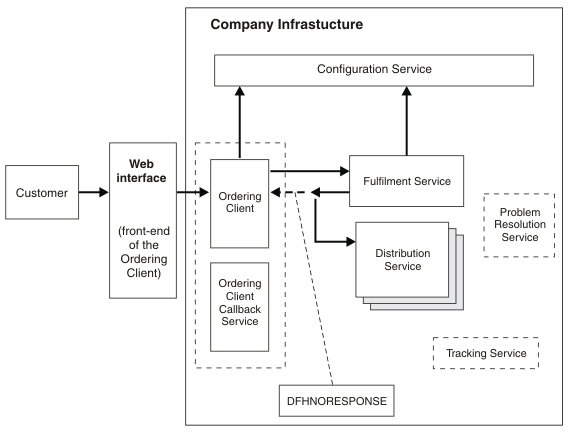
An international company that sells electronic components uses Web Services Addressing in its business. The infrastructure of this company consists of an Ordering Client, a group of Distribution Services, a Fulfilment Service, and a Configuration Service.
- WS-Addressing provides a transport-independent mechanism for transferring messages, this encourages interoperability between web services running on different platforms. In this example, the distribution services owned by the company are running on a variety of platforms; WS-Addressing makes interoperability between different platforms straightforward because the web service requesters and providers do not need to be aware of the platform on which the service that they are exchanging messages with is running.
- WS-Addressing can be used to change the destination of the reply message by updating the EPR in the <wsa:ReplyTo> MAP. In this example, the Fulfilment Service modifies the destination of the response message when it selects the Distribution Service to which the message is diverted.
The company has several distribution centers in a number of different countries; each of the distribution centers is represented in this example by a Distribution Service and is registered with the Configuration Service.
The Fulfilment Service selects which Distribution service is the most appropriate to process the order based on a variety of factors, which might include the availability of items requested and the distance of the Distribution Center from the customer.
Addressing information is passed to and from the Configuration Service. The Configuration Service stores the addresses of the available services in the form of Endpoint References. New services register with the Configuration Service by creating an EPR using the WSAEPR CREATE command and sending the EPR to the Configuration Service. The Configuration Service requires the EPR as a block of XML, so the WSADDR-EPR-ANY parameter on DFHWS2LS must be set to TRUE. The WSADDR-EPR-ANY=TRUE option is used to instruct CICS® to treat the EPR as an <xsd:any> element; CICS must place it in a container instead of transforming it into a language structure at run time.
- A Tracking Service, which can be updated by each of the other services with the status of the order.
- A Problem Resolution service to handle any fault messages that arise.
- An Ordering Client callback service to handle any reply messages directed at the Ordering Client.
- A customer places an order with the company.
- The customer places the order on the company website, which is the front end for the Ordering Client.
- The Ordering Client takes the customer's contact details as part of the order.
- The Ordering Client returns a confirmation and a unique order reference to the customer through the web interface.
- The Ordering Client sends the order request to the Fulfilment
Service.
- If the Ordering Client does not already know the EPR for the Fulfilment Service, it requests it from the Configuration Service. The process involved when the Ordering Client requests the EPR of the Fulfilment Service from the Configuration service is detailed in the Example of <wsa:To> section.
- The Ordering Client issues the INVOKE SERVICE command for the Fulfilment Service. WS-Addressing routes the message to the address specified by the To EPR in the request addressing context.
- The Fulfilment Service selects a Distribution Service to process
the order and redirects the response message to that service.
- The Fulfilment Service uses a WSACONTEXT GET command to extract the order reference and other addressing properties from the addressing context.
- The Fulfilment Service selects the most appropriate Distribution Service from the Configuration Service.
- The <wsa:ReplyTo> EPR is added to the addressing context:
The Fulfilment Service uses the WSACONTEXT BUILD command to add the ReplyTo EPR of the chosen Distribution Service to the request addressing context.<wsa:EndpointReference xmlns:wsa="http://www.w3.org/2005/08/addressing"> <wsa:Address>http://www.example.ibm.com/DistributionService</wsa:Address> </wsa:EndpointReference> - The Fulfilment Service uses the WSACONTEXT BUILD command repeatedly to add the order reference and other information to the request addressing context.
- A DFHNORESPONSE container is added to the Ordering Client pipeline to indicate to the Ordering Client that it will not receive a response and the response message is redirected in the form of a request message to the Distribution Service.
- The Distribution Service receives the redirected response message
and processes the order.
- The Distribution Service uses a WSACONTEXT GET command to extract the order reference and addressing details from the request addressing context.
- The Distribution Service process the order.
Example of <wsa:To>
- The Ordering Client requests the EPR of the service that it wants to send a message to from the Configuration Service. In this example, the Ordering Client requests the EPR of the Fulfilment Service.
- The Configuration Service creates and sends a response message:
- The Configuration Service creates the requested <wsa:To> EPR
for the Fulfilment Service using the WSAEPR CREATE API command:
EXEC CICS WSAEPR CREATE. - The Configuration Service writes the output from the WSAEPR CREATE command to a container:
EXEC CICS
PUT CONTAINER(work-cont)
. - The Configuration Service copies the container name into the
myEpr-xml-contelement:MOVE work-cont TO myEpr-xml-cont. - The Configuration Service sends a response message to the Ordering
Client, this message contains the contents of the container named
by the
myEpr-xml-contcontainer. In this example, the contents of thework-contcontainer is sent to the Ordering Client inside the<wsa:myEpr>element:<env:Envelope xmlns:env="http://www.w3.org/2003/05/soap-envelope"> ... <env:Body> <wsa:myEpr> <wsa:EndpointReference> <wsa:Address> Fulfilment_Service_EPR_XML </wsa:Address> </wsa:EndpointReference> </wsa:myEpr> </env:Body> ... </env:Envelope>
Figure 2 shows the request-response message exchange between the Ordering Client and the Configuration Service. This message exchange involves two typical web services pipelines.Figure 2. Request-response message exchange between the Ordering Client and the Configuration Service 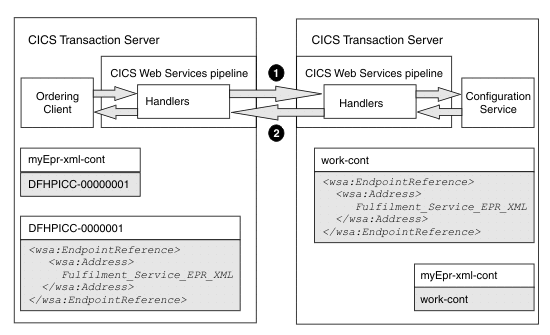
- The Configuration Service creates the requested <wsa:To> EPR
for the Fulfilment Service using the WSAEPR CREATE API command:
- The Ordering Client receives the response message, builds the
<wsa:To> EPR, and sends a request to the Fulfilment Service:
- The Ordering Client extracts the <wsa:To> EPR data from the response message.
- CICS populates a unique
container, in this example the
DFHPICC-00000001container, with the <wsa:To> EPR data. - CICS copies the name of
the container, in this example
DFHPICC-00000001, into themyEpr-xml-contelement. - The Ordering Client reads the contents of the container specified
by the
myEpr-xml-contelement and provides it as input to the WSACONTEXT BUILD API command. The WSACONTEXT BUILD command uses this input to build the <wsa:To> EPR for the Fulfilment Service. - The Ordering Client issues an INVOKE SERVICE command which initiates the pipeline processing.
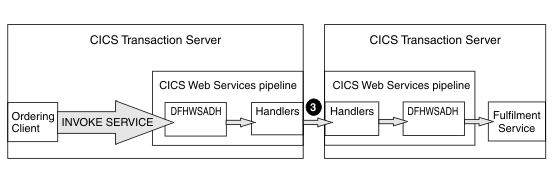
- The CICS web services addressing handler, DFHWSADH, on the outbound
pipeline converts the <wsa:To> EPR into an address and an optional
set of reference parameters which it puts into the header of the SOAP
request message that is being sent to the Fulfilment Service:
   <env:Header>
     <wsa:To>http://example.ibm.com/Fulfilment_Service</wsa:To>
   </env:Header>
Figure 3 shows the request from the Ordering Client to the Fulfilment service. This request involves a web services pipeline that includes the CICS web services addressing handler, DFHWSADH.Figure 3. Request from the Ordering Client to the Fulfilment Service