Now that InfoSphere® DataStage® and the STAGEDB
database are able to connect, you can drill down to the table level
and import the column definitions and other metadata for the PRODUCT_CCD
and INVENTORY_CCD tables into the Information Server repository, where
it will be used by the four parallel jobs (and for any future jobs
that you might design).
This lesson assumes that you are still logged onto the QualityStage™ and DataStage Designer after creating
a data connection. If not, open the Designer.
Procedure
- In the Designer, click .
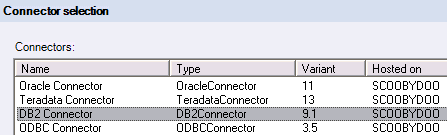
- On the Connector selection page of the wizard, choose the DB2® Connector and click Next.
Figure 1. DB2 Connector selected
- On the Connection details page, click Load. This action populates the wizard fields with connection information
from the data connection that you created in the previous lesson.
Figure 2. Load link on Connection details page
- On the same page, click Test connection to
prompt DataStage to attempt
a connection to the STAGEDB database. You will see a message
if the connection was successful.
Figure 3. Connection successful
message
- On the Data source location page, make sure that the Host
name where database resides and Database name fields
are correctly populated, and click Next.
- On the Schema page, enter the schema of the Apply control
tables (ASN), or verify that the ASN schema is pre-populated into
the schema field and click Next.
The
Selection page of the wizard now shows a list of the tables or views
that are defined in the ASN schema on the STAGEDB database.
Figure 4. Selection page with IBMSNAP_FEEDETL selected
- The first table from which we need to import metadata is
IBMSNAP_FEEDETL, an Apply control table. This table stores the synchronization
points that enable DataStage to
keep track of which rows it has fetched from the CCD tables. Select
IBMSNAP_FEEDETL and Next.
- On the final page of the wizard, click Import,
and then in the Open window click Open. This completes the import of the IBMSNAP_FEEDETL table definition.
- You will need to repeat Steps 1-8 two more times to import
the definitions for the PRODUCT_CCD table and then the INVENTORY_CCD
table.
Note: Make sure to change the schemas from ASN to
the schema under which PRODUCT_CCD and INVENTORY_CCD were created.
This schema is typically the user ID for connecting to the STAGEDB
database, for example DB2ADMIN.
Lesson checkpoint
DataStage now has all the information that
it needs to connect to the SQL Replication target database, fetch
rows as they are added to the CCD tables, and maintain a record of
its progress in the IBMSNAP_FEEDETL table. In the next lesson, you
will add some finishing touches to the five DataStage jobs.
 SQL Replication