

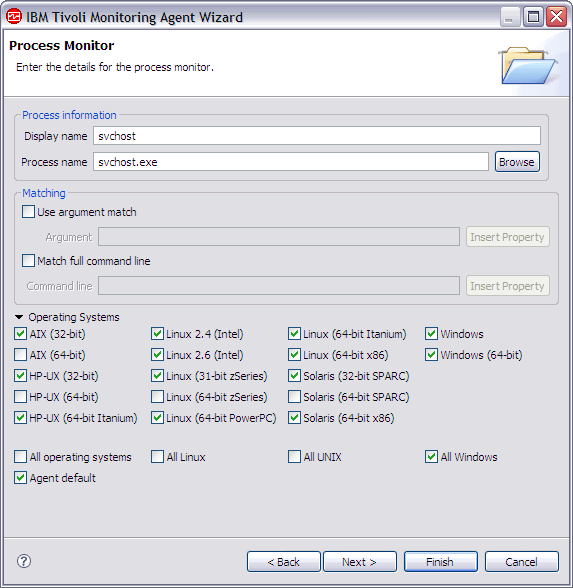
Table 10 contains information about the fields on the Process Monitor page.
| Field name | Description | Acceptable values |
|---|---|---|
| Display name | Descriptive name for the component of the application implemented by the process as it is displayed in the Tivoli Enterprise Portal | Descriptive string |
| Process name | Name of the process that is being monitored | Valid executable file name |
| Use argument match | Select if you want to match on the process arguments | On or Off |
| Argument | Arguments on which to match | String |
| Match full command line | Specify the entire name of the executable file that might include the path | On or Off |
| Command line | Matches the full command line used to start the process | String |
| Operating systems | Select the operating systems on which this process runs | Any selection |
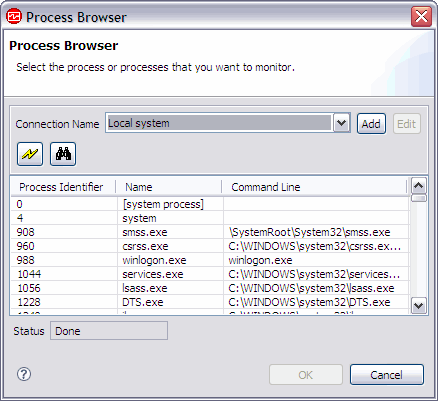
- To sort the list of processes, click the column heading.
- To refresh the information in the window, click the Refresh (lightening bolt) icon.
- To search for specific processes, click the Search (binoculars) icon (Figure 63).
- To view processes on a different system, select a previously defined system from the Connection Name list or click Add to enter the system information for a new system. See Defining connections for process browsing for more information. You can load processes from more than one system at a time, and switch between connections while processes are loading for one or more connections.

In the following example, after you select svchost.exe, it is displayed in the Process name field on the Process Monitor page (Figure 64).
Note:
If the process you described
in this monitor is applicable to only some of the operating systems
that your application runs on, you might want to create one or more
additional process monitors with the same display name to cover the
other operating systems. Add the process monitors one at a time,
ensuring that the display name is the same for each monitor, but that
the process name can be found on the operating systems that are checked.
- If you are using the New Agent Wizard, click Next.
--OR--
- Click Finish to save the data source and open the Agent Editor.