Removing a PCIe adapter from the 8408-44E or 8408-E8E system with the power turned on in Linux
To remove the Peripheral Component Interconnect (PCI) Express (PCIe) adapters from a Linux system or a Linux logical partition with the system power turned on, complete the steps in this procedure.
Procedure
- Remove the PCIe adapter. Attention:
- Left and right I/O retention brackets must be opened before you can access the rear slots.
- You only need to open the I/O retention bracket for the side you are accessing.
- A pin on the tailstock of the adapter resembles a removable screw. Do not remove this pin. It is required for correct alignment and seating.
Figure 1. Removing a PCIe adapter from the 8408-44E or 8408-E8E system
- Choose your next action from the following options:
- If you are removing a PCIe adapter as part of another procedure, return to that procedure.
- If you are replacing the failed adapter with a new adapter, go to the procedure for replacing a PCIe adapter.
- If you are not replacing the PCIe adapter with a new one, you must install a PCIe tailstock
filler in the empty slot. To install a PCIe tailstock filler, complete the following steps:
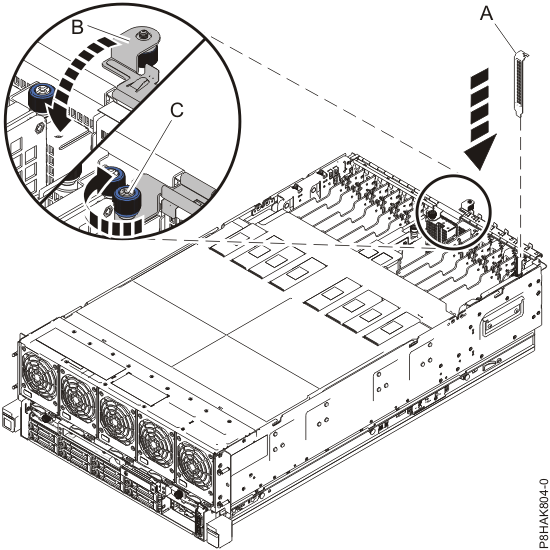
- Carefully grasp the filler tailstock and align the filler with the slot and its connector on the system backplane, see (A) in Figure 2.
- Press the filler tailstock firmly into the slot.
- Close the I/O retention bracket by rotating it down towards the system (B). See Figure 2.
- Screw the I/O retention bracket captive thumbscrew clockwise (C), as shown in Figure 2.
Figure 2. Installing a filler in a PCIe adapter slot in a 8408-44E or 8408-E8E system