Troubleshooting
Problem
NOTE: This document contains information for the out-of-support product IBM i Access for Windows.
This document explains the options that are available for the Workstation ID parameter of the Configure PC5250 emulator window of IBM Access for Windows.
Resolving The Problem
In the screen below is the IBM Access for Windows PC5250 Emulator Configure panel, refer to the Workstation ID section for the options available.
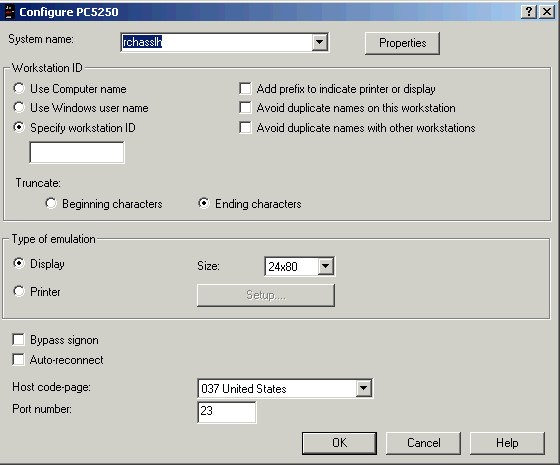
Workstation ID Options
Workstation ID Options
| o | The Use computer name option uses the name of the computer as it is specified within Network Neighborhood. |
| o | The Use windows user name option uses the name of the user that is logged onto Microsoft Windows. |
| o | The Specify workstation id option has a box where a unique name can be specified for a session. |
| o | The Add prefix to indicate printer or display option adds to the beginning a p for printer and an s for display session to the workstation id specified name. |
| o | The Avoid duplicate names on this workstation option appends an a, b, c, d, and so on, to the end of the workstation id. |
| o | The Avoid duplicate names with other workstations option appends 1-9 and then a-z if the workstation ID name is already in use. |
[{"Type":"MASTER","Line of Business":{"code":"LOB68","label":"Power HW"},"Business Unit":{"code":"BU070","label":"IBM Infrastructure"},"Product":{"code":"SWG60","label":"IBM i"},"ARM Category":[{"code":"a8m0z0000000CU9AAM","label":"IBM i Access-\u003EAccess for Windows"}],"ARM Case Number":"","Platform":[{"code":"PF012","label":"IBM i"}],"Version":"7.1.0"}]
Historical Number
348536286
Was this topic helpful?
Document Information
Modified date:
24 November 2024
UID
nas8N1015964