Troubleshooting
Problem
With WebSphere Process Server, you might encounter a database connection error when you set the data source configuration for the DButility.jacl script as described in APAR IZ98936. The script then fails. In addition, you might see WASX7357I and WASX7303I messages.
Symptom
To see the instructions in the APAR, see IZ98936.
The output from running the script shows the following messages:
Executing ./wsadmin.sh -conntype NONE -f
/opt/IBM/WebSphere/WPS/ProcessChoreographer/admin/dbUtility.py -dbUser wpsbpedb -dbPassword XXXXX -cluster wasatc0a -testConnection
.........................................
WASX7357I: By request, this scripting client is not connected to any server process. Certain configuration and application operations will be available in local mode.
WASX7303I: The following options are passed to the scripting environment and are available as arguments that are stored in the argv
variable: "Ý-dbUser, wpsbpedb, -dbPassword, XXXXXX, -cluster, wasatc0a,-testConnection¨"
Using configured schema qualifier 'wpsbpedb'.
File /opt/was/lib/ojdbc6.jar exists, adding it to the classpath.
............................................
dbUtility.py finished with the following results:
------------------------------------------------------------------------
Connection failed with the following exception:
The Network Adapter could not establish the connection
The Network Adapter could not establish the connection
Connection refused
Cause
To run the DButility.py script, Oracle databases require some custom properties to be set within the BPC data source configuration, which are not the default configuration.
Environment
Resolving The Problem
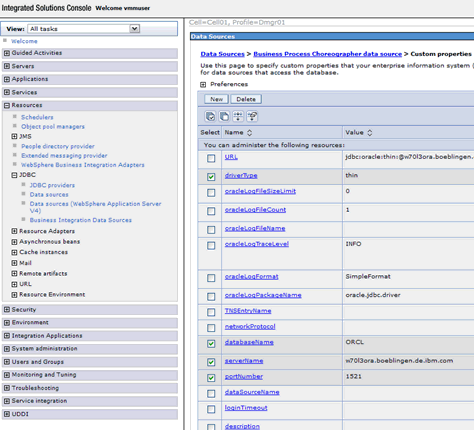
You can set custom properties in the administrative console so that the DButility script runs properly. To set the custom properties, complete the following steps:
- Expand Resources > JDBC.
- Click Data sources > Business Process Choreographer data source.
- Under Additional Properties, click Custom Properties.
The most common properties needed to be set are: driverType, databaseName, serverName, portNumber
The following screen shot shows an example:
Product Synonym
WPS
Was this topic helpful?
Document Information
Modified date:
15 June 2018
UID
swg21572779