Troubleshooting
Problem
Provides screen captures of the WebSphere console to set up native JDBC tracing.
Resolving The Problem
This document provides screen captures of the WebSphere console with the JVM properties for native JDBC tracing specified. For more details on the trace properties available for the native JDBC driver, refer to the following technote: Enabling Trace Options for IBM i Developer Kit for Java JDBC Applications
In most cases, the following JVM property string will be sufficient to gather required traces:
WebSphere 8.x
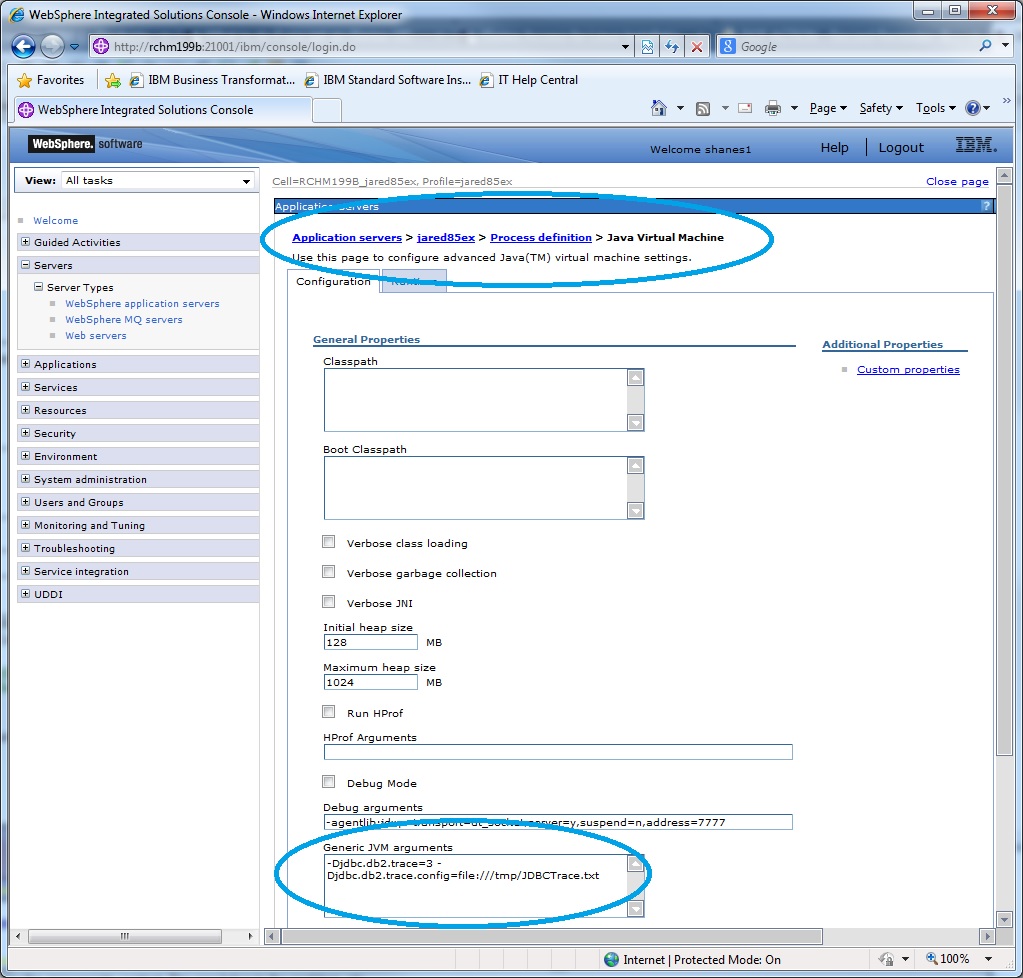
In most cases, the following JVM property string will be sufficient to gather required traces:
-Djdbc.db2.trace=3 -Djdbc.db2.trace.config=file:///tmp/JDBCTrace.txtWebSphere 8.x
WebSphere 7.x

[{"Business Unit":{"code":"BU070","label":"IBM Infrastructure"},"Product":{"code":"SWG60","label":"IBM i"},"Component":"Data Access","Platform":[{"code":"PF012","label":"IBM i"}],"Version":"All Versions","Edition":"","Line of Business":{"code":"LOB68","label":"Power HW"}}]
Historical Number
548877714
Was this topic helpful?
Document Information
Modified date:
08 July 2025
UID
nas8N1012541