Troubleshooting
Problem
After changing LDAP root password, following error is received at WAS start up: Error: The WebSphere Application Server user name or password cannot be validated. Verify and try again.
Symptom
WAS is not able to start and because of this TPM/TSAM functionality is not available.
Cause
Following steps were used to change the LDAP root PW:
1. Stop LDAP Sever instance:
# cd /opt/ibm/ldap/V6.2/sbin
# ./idsslapd -I idsccmdb -k
2. Change pw for cn=root:
# /opt/ibm/ldap/V6.2/sbin/idsdnpw -u cn=root -p {new password here} -I
idsccmdb
3. Then start LDAP Server:
# /opt/ibm/ldap/V6.2/sbin/idsslapd -I idsccmdb
now - you can run idsdirctl like this:
./ibmdirctl ?D cn=root ?w {new pw for cn=root} status
Resolving The Problem
To resolve this problem, WAS binding PW also needs to be changed. Here are the steps that should be followed to complete the LDAP root PW change successfully:
1.) Disable security in WAS. From WAS Admin Console (logon was wasadmin) --> Security --> Secure administration, applications, and infrastructure:
NOTE: Be sure to note down the check boxes you currently have enabled.
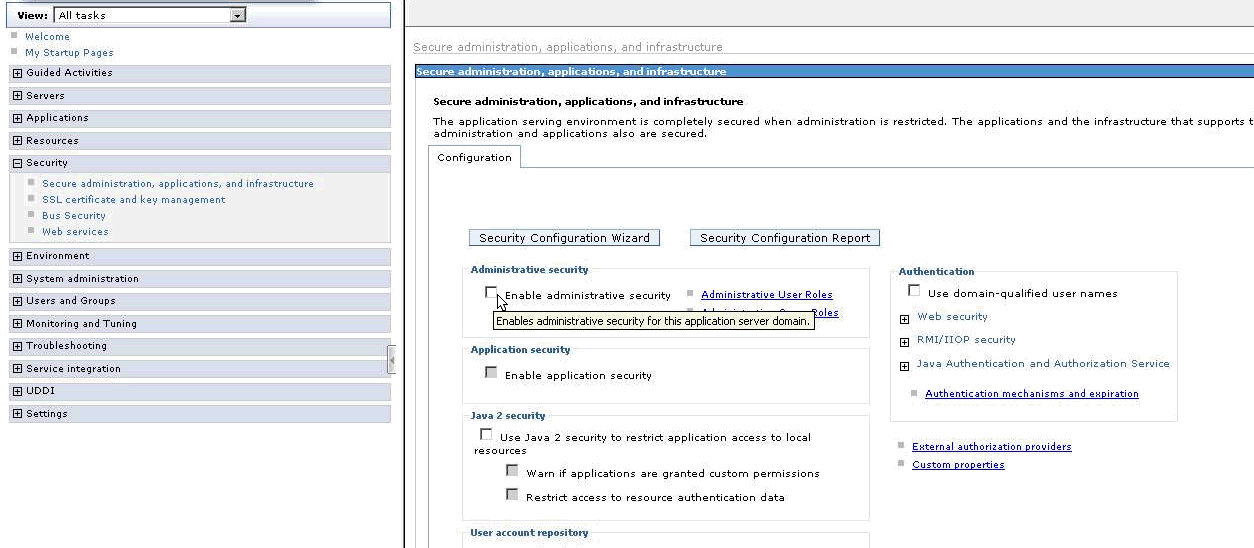
2.) Click Apply. Than change the WAS bind password. From WAS Admin Console (logon was wasadmin) --> Security --> Secure administration, applications, and infrastructure --> Federated repositories --> ISMITDS:

3.) Apply and Save.
4.) Now you can proceed with changing the LDAP root password as follows:
- Following steps were used to change the LDAP root PW:
1. Stop LDAP Sever instance:
# cd /opt/ibm/ldap/V6.2/sbin
# ./idsslapd -I idsccmdb -k
2. Change pw for cn=root:
# /opt/ibm/ldap/V6.2/sbin/idsdnpw -u cn=root -p {new password here} -I
idsccmdb
3. Then start LDAP Server:
# /opt/ibm/ldap/V6.2/sbin/idsslapd -I idsccmdb
now - you can run idsdirctl like this:
./ibmdirctl ?D cn=root ?w {new pw for cn=root} status

6.) Apply and Save. NOTE: If you did not have Java 2 security enabled, please do not select this box.
7.) Bring down WAS and run tio.sh (as tioadmin user) to start WAS along with TSAM/TPM components.
Was this topic helpful?
Document Information
Modified date:
17 June 2018
UID
swg21627203