Troubleshooting
Problem
This document discusses how VPN remote works in an effort to eliminate security concerns that customers may have.
Resolving The Problem
Remote Support VPN Security Information.
Current Implementation of IBM Remote Support VPN to a Client HMC or iSeries Partition
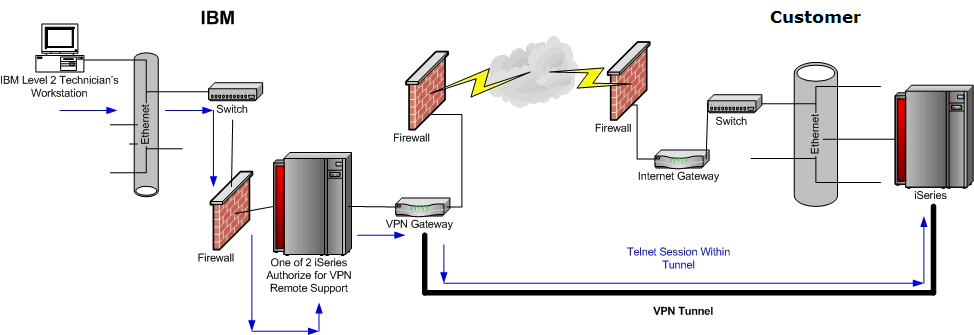
To implement an IBM Remote Support VPN to a Client HMC or iSeries Partition, do the following:
| 1 | A user with the appropriate authority runs the STRRMTSPT *VPN command. |
| 2 | One of two IBM VPN profiles (must be already created by an administrator or system operator during the initial system setup for Electronic Customer Support and Electronic Service Agent) gets activated. Note: There are two IBM VPN profiles. Each VPN profile will contain one of two TCP/IP addresses : 207.25.252.196 and 129.42.160.16. One serves as a primary connection and the other serves as a backup connection. |
| 3 | VPN negotiation: a Phase 1 IKE (Internet Key Exchange) - Using Triple DES, this key lasts for one day. b Phase 2 Data Policy (this is the one that protects the contents of the data) - this gets negotiated again every 900 seconds. |
| 4 | For the connection to be successfully established, there is a Challenge Handshake Authentication Protocol (CHAP) that does the following: a A challenge message, this is encrypted inside the VPN tunnel established in Step 3. b Peer responds with one-way hash function. c Authenticator (IBM) checks the response against its own calculation of the expected hash value. |
| 5 | After the tunnel is establish from Step 4, the remote support code on the client side issues another key called a Remote Support Session Key. This key is used to allow an IBM support specialist the access required for the specific client system. o We have only two iSeries systems that handle VPN connectivity based on the IP address listed in Step 2. o Based on what IBM VPN profile that was actually started, the IBM representative will access that iSeries system. o The client must to give the IBM representative the Remote Support Session Key or the machine type and serial number of the system. o Once the IBM representative gets the key and it is authenticated, the IBM representative signs on the user's system. o Remote Support code on the iSeries system on the IBM side will then lock out all users to this tunnel. o If an IBM developer or another IBM representative needs to get on, the original IBM representative must grant authority for the IBM Developer to gain access. |
| 6 | For data transmission such as job traces, system dumps, joblogs, and so on, data can be FTPed over this tunnel. All data transmission are encrypted. In addition, the user has the option to upload data using SSL FTP or HTTP to IBM. Additional information is available at the following site: https://testcase.boulder.ibm.com |
| 7 | The two iSeries systems for VPN remote support are journaled for many items; for example: o The user who access the VPN tunnel to the client o What was the PMR number or problem ticket number that this connection was used for o What type of access; for example, FTP, Operations Navigator, and so on o Time/date of connection establishment o What other users were granted to the session such as developers or other Level 2 technicians |
Following is information that is specific to the HMC:
| 1 | The HMC Internet VPN connection is initiated only by a HMC user with appropriate authority. |
| 2 | The HMC remote can be terminated at any time from the HMC. Note: Once the VPN connection is enabled, a screen similar to the following is shown. If this window is closed for any reason, the remote will be dropped. This eliminates the possibility that someone will accidentally leave a connection open. |

| 3 | Levels of access by IBM Support are decided by the HMC user. Access can be limited to the HMC itself, to any partition(s), to the Hypervisor, to the Service Processor(s), or any combination thereof. |
| 4 | The user can limit the firewall to allow only communications between the HMC and designated IBM Support systems on the following specific ports: o Open ports 500 UDP and 4500 UDP for the intranet IP address for the HMC with access only to the following IBM VPN Gateway TCP/IP addresses: 207.25.252.196 (Boulder) and 129.42.160.16 (Rochester) o Ports described in DCF document Message HSCF0004 Server Firmware Licensed Internal Code Update Fails. To link to document New immediately, click here . |
| 5 | Only authorized IBM Support personnel will be able to complete the connection on IBM Certified remote support systems. |
| 6 | The authorized IBM Support personnel cannot complete the connection without the Machine Type and Serial Number of the HMC. |
| 7 | Once the connection is established, standard access controls will be active: HMC signon requiring user ID and password, Partition signon(s) requiring user ID and password, Service Processor interface requiring user ID and password, and so on. |
The highlights of IBM VPN remote support include:
| o | Highspeed of the Internet. |
| o | A VPN tunnel is established between client HMC or partition, and the data is encrypted. |
| o | Only two iSeries systems in IBM handle VPN remotes to client systems which assists with controlling how IBM representatives connect to client systems. |
| o | The iSeries systems are audited according to IBM corporate security guidelines and must pass the audit to be a Remote Support system. |
| o | A user must be on the system to enable/disable remote support for IBM. This means that the client must initiate Remote Support VPN, IBM cannot initiate to the user's system without a user on the client side enabling it. |
| o | A user must give IBM the Remote Support session key. |
| o | Only the first IBM representative who initializes the connection has authority to the user's system, and he or she must give authority to other IBM representatives to access user''s system. |
| o | Only a subset of IBM Level 2 technicians have access to our iSeries systems used for VPN remote support. |
Additional Information


[{"Product":{"code":"SWG60","label":"IBM i"},"Business Unit":{"code":"BU058","label":"IBM Infrastructure w\/TPS"},"Component":"Remote Support","Platform":[{"code":"PF012","label":"IBM i"}],"Version":"Version Independent","Edition":"","Line of Business":{"code":"LOB57","label":"Power"}}]
Historical Number
457629473
Was this topic helpful?
Document Information
Modified date:
18 December 2019
UID
nas8N1018859