Troubleshooting
Problem
This document explains how to find out the status of a
RGZPFM.The Reorganize Physical File Member (
RGZPFM) command removes deleted records from a member of a physical file in the database and it optionally reorganizes that member.RGZPFM has several options that affect the run time and ending result.The parameters you want depend on the result you need.
See
TechNote RGZPFM options and comparisonResolving The Problem
This document explains how to find out the status of a
Many customers want to know the status of a
There is function in
This support is using a status file that is maintained by the system in the
RGZPFM using IBM i Access Client Solutions.Many customers want to know the status of a
RGZPFM if it has been running for a long time.There is function in
IBM i Access Client Solution that will provide information of the RGZPFM.This support is using a status file that is maintained by the system in the
QRECOVERY library.This status file is named
QDBRGZ_LLLLLLLLLL_FFFFFFFFFF_MMMMMMMMMM where LLLLLLLLLL is the library name, FFFFFFFFFF is the file name, and MMMMMMMMMM is the member name of the member being reorganized.Note that under system naming conventions, these files are named
QDBRGZxxxxx where xxxxx is a unique numeric identifier.From ACS select Schemas from the Database section. Expand the system the RGZPFM is running on and expand Database Maintenance.
Expanding Database Maintenance will reveal Table Reorganizations:
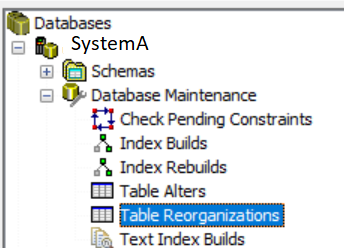
This will show all the
RGZPFMs that have a status file in QRECOVERY. The RGZPFM could be active or complete. The system may delete the status file after the RGZPFM is complete or the system can choose to keep the status file. Any status file that is currently not being used can be deleted.For an active

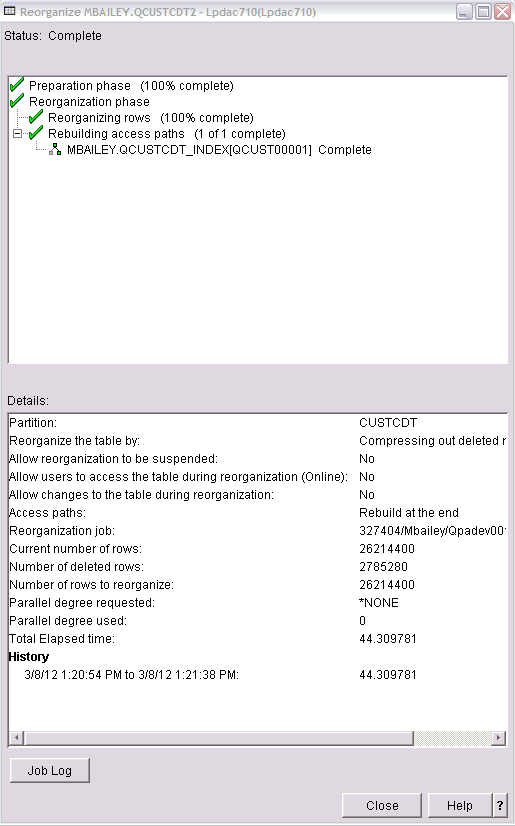
This will bring up a status window that is refreshed automatically with the status of the
Finally, you can also use SQL to query the
Each record in the status file consists of a numeric field (STEP) and a character field (DATA).
The meaning of the DATA for each of the STEP values is as follows:
RGZPFM you can right click the RGZPFM and select Show Details:This will bring up a status window that is refreshed automatically with the status of the
RGZPFM:Finally, you can also use SQL to query the
RGZPFM status file.Each record in the status file consists of a numeric field (STEP) and a character field (DATA).
The meaning of the DATA for each of the STEP values is as follows:
| 0 | Reorganize started. It contains the command string. |
| 1 | Reorganize resumed from previous canceled request. |
| 2 | The Job name that is performing the reorganize. |
| 3 | Data movement row - yet to be processed. |
| 4 | Data movement row - process complete. |
| 5 | Index rebuild row - synchronous (yet to rebuild or rebuild in progress). |
| 6 | Index rebuild - synchronous (rebuild complete). |
| 7 | Index rebuild - asynchronous. |
| 8 | Index maintained. |
| 10 | Analyze preprocess started. |
| 21 22 99 |
Indicates the user inserted new rows while the reorganize was running and we are processing them. Indicates we are returning storage to the system (i.e. truncating space off the end of the file) Reorganize canceled or ended. |
| 999 | Done populating status file. |
select *

  from QRECOVERY.QDBRGZ_MYLIBRARY_MYFILE_MYMEMBER

 where STEP IN (0,2,8,5,6,7) ;
The sample results for this query follow:
STEP   DATA


  0   RGZPFM FILE(MYLIBRARY/MYFILE) MBR(MYMEMBER) KEYFILE(*RPLDLTRCD)

       RBDACCPTH(*YES) ALWCANCEL(*YES) LOCK(*SHRUPD)

  2   JOB         115900    JOEUSER   RGZGLPCA

  8   PRIMARY KEY MYLIBRARY "INDEX1"

  8   INDEX       MYLIBRARY "INDEX2" "INDEX2"

  5   INDEX       MYLIBRARY INDEX3    INDEX3

  5   INDEX       MYLIBRARY "INDEX4" "INDEX4"

  5   INDEX       MYLIBRARY "INDEX5" "INDEX5"

  5   INDEX       MYLIBRARY "INDEX6" "INDEX6"
The following query will help match up the short file name to the long name:
SELECT DBXLIB, DBXFIL, DBXLFI

  FROM QADBXREF

 WHERE DBXLIB = 'QRECOVERY'

   AND DBXLFI like 'QDBRGZ%'
The sample results for this query follow:
QRECOVERY QDBRG56457 QDBRGZ_KTRISKO_HUGEFILE_SMALLPART

QRECOVERY QDBRG11916 QDBRGZ_MBAILEY_BIGFILE_CUSTCDT
[{"Business Unit":{"code":"BU070","label":"IBM Infrastructure"},"Product":{"code":"SWG60","label":"IBM i"},"ARM Category":[{"code":"a8m0z0000001hrpAAA","label":"IBM i Db2-\u003ERGZPFM - Reorganize Physical File"}],"ARM Case Number":"","Platform":[{"code":"PF012","label":"IBM i"}],"Version":"All Version(s)","Line of Business":{"code":"LOB68","label":"Power HW"}}]
Historical Number
N1011091
Was this topic helpful?
Document Information
Modified date:
01 July 2024
UID
nas8N1011091