Troubleshooting
Problem
When trying to run a Batch Import or Batch Export using the iBase Scheduler, the following error is encountered:
"Cannot open database "DATABASE_NAME" requested by the login. The Login failed."

Opening the i2 iBase 8 Scheduler Configuration application allows us to view the log file. In the Log Viewer, we see the following:
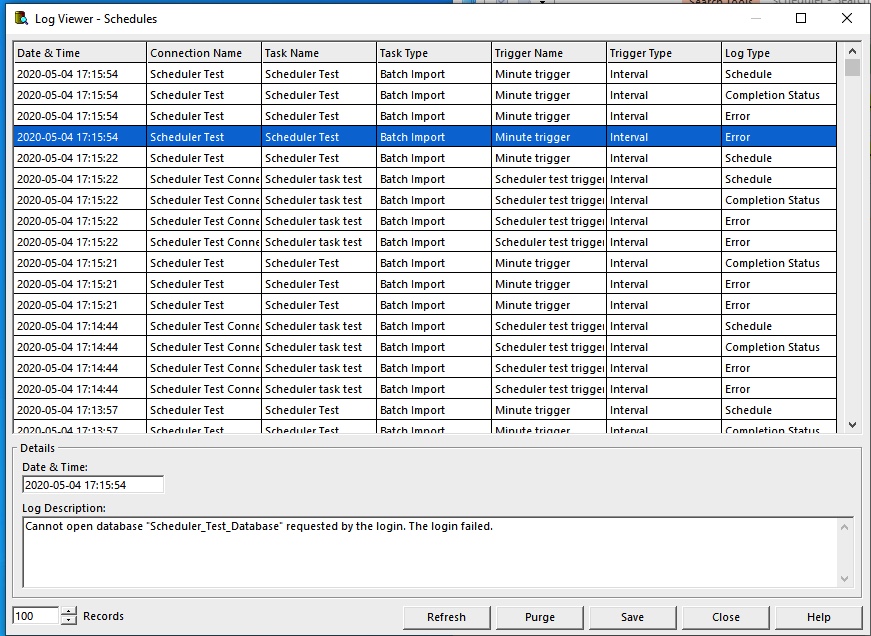
However, when we test the Connection in i2 iBase 8 Scheduler Configuration, we see that we are able to successfully connect to the database. In i2 iBase 8 Scheduler Configuration, edit the connection you are using and then select "Test Connection".


Cause
This error message is being caused because the account used to run the scheduler has a missing permission.
Environment
iBase 8
Resolving The Problem
1. First, close out of iBase Scheduler Configuration. Next, open up Windows Services on your machine.

2. Find the i2 iBase 8 Scheduler service

3. Right click on the service and open up the Properties dialog. Next, navigate to the Log On tab. By default, the "Local System Account" is used:

Change this to "This Account" and input your credentials:

4. Apply the changes and RESTART the i2 iBase 8 Scheduler service.
5. Once the service has restarted, open up the iBase Scheduler Configuration and retry the import/export. Once the trigger is hit, the task should execute and the log should display a "Completion Status" with Log Description of "Task execution successful". The left-hand side will display the timestamps of each action.

Document Location
Worldwide
[{"Business Unit":{"code":"BU059","label":"IBM Software w\/o TPS"},"Product":{"code":"SSXW43","label":"i2 iBase"},"ARM Category":[{"code":"a8m0z000000bpUzAAI","label":"i2 iBase and i2 Analyst's WorkStation->Import\/Export->bulk import"}],"ARM Case Number":"","Platform":[{"code":"PF033","label":"Windows"}],"Version":"All Version(s)","Line of Business":{"code":"LOB24","label":"Security Software"}}]
Was this topic helpful?
Document Information
Modified date:
05 May 2020
UID
ibm16205937