Troubleshooting
Problem
Attempts to use the Add User button with various User Administration activities such as creating users, creating groups, or editing groups results in a MasterdataObject error in IBM Rational ClearQuest.
Symptom
Steps to reproduce:
- Create a user with the Add User button instead of clicking the OK button.
You will see the message, "<new user> is added."
image

- Click the Cancel button to dismiss the Add User windows
The user you created should be in the list, but it is not. - Click OK
- Click Yes when prompted the save the changes
- Close the Rational ClearQuest User Administration tool
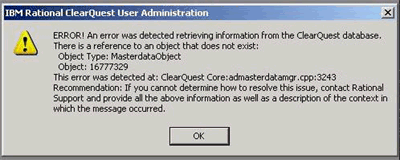
- When you reopen the Rational ClearQuest User Administration tool, the following error occurs:
There is a reference to an object that does not exist: Object Type: MasterdataObject
Object: <master_dbid>
This error was detected at: ClearQuest Core:admasterdatamgr.cpp:3243
image
[{"Product":{"code":"SSSH5A","label":"Rational ClearQuest"},"Business Unit":{"code":"BU048","label":"IBM Software"},"Component":"User Administration","Platform":[{"code":"PF033","label":"Windows"}],"Version":"7.0.0.2;7.0.0.3;7.0.0.4;7.0.0.5;7.0.0.6;7.0.0.7;7.0.0.8;7.0.0.9;7.0.1;7.0.1.1;7.0.1.2;7.0.1.3;7.0.1.4;7.0.1.5;7.0.1.6;7.0.1.7;7.1;7.1.0.1;7.1.0.2","Edition":"","Line of Business":{"code":"LOB77","label":"Automation Platform"}}]
Log InLog in to view more of this document
This document has the abstract of a technical article that is available to authorized users once you have logged on. Please use Log in button above to access the full document. After log in, if you do not have the right authorization for this document, there will be instructions on what to do next.
Was this topic helpful?
Document Information
Modified date:
16 June 2018
UID
swg21397820