Troubleshooting
Problem
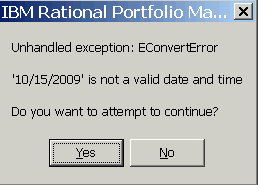
Attempt to run certain reports results in the appearance of a "EConvertError - 'MM/DD/YYYY' is not a valid date and time" error message in IBM Rational Portfolio Manager.
Symptom
This error occurs for the following reports:
- Portfolio Health(FT) report
- Portfolio Health(WBS) report
- Project Details (WBS) report
- Project Health(WBS) report
- Project Detail(FT) report
- Project Health(FT) report.
Steps to reproduce:
- Set your computer's date format to 'MM/DD/YYYY'
- Log in to Rational Portfolio Manager repository
- Create a proposal
- Create a task underneath the proposal
- Select the task, go to Staffing view, and assign Work (8 hours) to a resource
- Select the proposal and do Copy Proposal to Plan
- Baseline the project
- Select the project and go to Portfolio view > Reports > All
- Run the Portfolio Health(FT) report, Portfolio Health(WBS) report, Project Details (WBS) report, Project Health(WBS) report, Project Detail(FT) report or Project Health(FT) report
- Confirm that you receive a "Unhandled exception EConvertError- 'MM/DD/YYYY'(i.e. 10/15/2009) is not a valid date and time" error message. The error will occur whenever the project/task has a baseline
Cause
This issue has been identified as a product defect under APAR PK98743. It is a caused by a problem in the Delphi code.
Resolving The Problem
This issue has been resolved in iFix009 for Rational Portfolio Manager version 7.1.1.2.
You can also use the following workaround if you haven't deployed iFix009 yet.
WORKAROUND:
Set your computer date format as 'YYYY-MM-DD' before running the reports in question. Execute the following steps:
- Close Rational Portfolio Manager
- From the Start menu on your Windows taskbar, select Control Panel
- Double-click on Regional and Language Options
- Click on the Customize... button in the Regional Options tab. The Customize Regional Options window appears on the screen
- Select the Date tab
- In the Short date format section of this window, select or type the yyyy-MM-dd date style
- Click OK
- Now log in to Rational Portfolio Manager and re-run the report(s)
[{"Product":{"code":"SSRR2G","label":"Rational Portfolio Manager"},"Business Unit":{"code":"BU053","label":"Cloud & Data Platform"},"Component":"Pivots & Reports","Platform":[{"code":"PF002","label":"AIX"},{"code":"PF010","label":"HP-UX"},{"code":"PF016","label":"Linux"},{"code":"PF027","label":"Solaris"},{"code":"PF033","label":"Windows"}],"Version":"7.1.1.2","Edition":"","Line of Business":{"code":"LOB45","label":"Automation"}}]
Was this topic helpful?
Document Information
Modified date:
23 June 2018
UID
swg21408957