Question & Answer
Question
Unable to Import Process App or Create a New Process App from Process Center
Answer
On Demand Consulting
Author: Lily Peng
Overview
This article describes a solution to if your Process Center does not show the option to import or create new process apps.
Intended Audience
Any user attempting to import or create a new process app from Process Center but is unable to do so due to improper permissions.
For example, below is a BPM on Cloud screenshot of Process Center not showing the Create New Process App or Import Process App?options:
Procedure
You must be a member of the tw_authors group.This can be done in any of the following ways:
- Process Admin Console > User Management > Group Management > Add user to tw_authors group
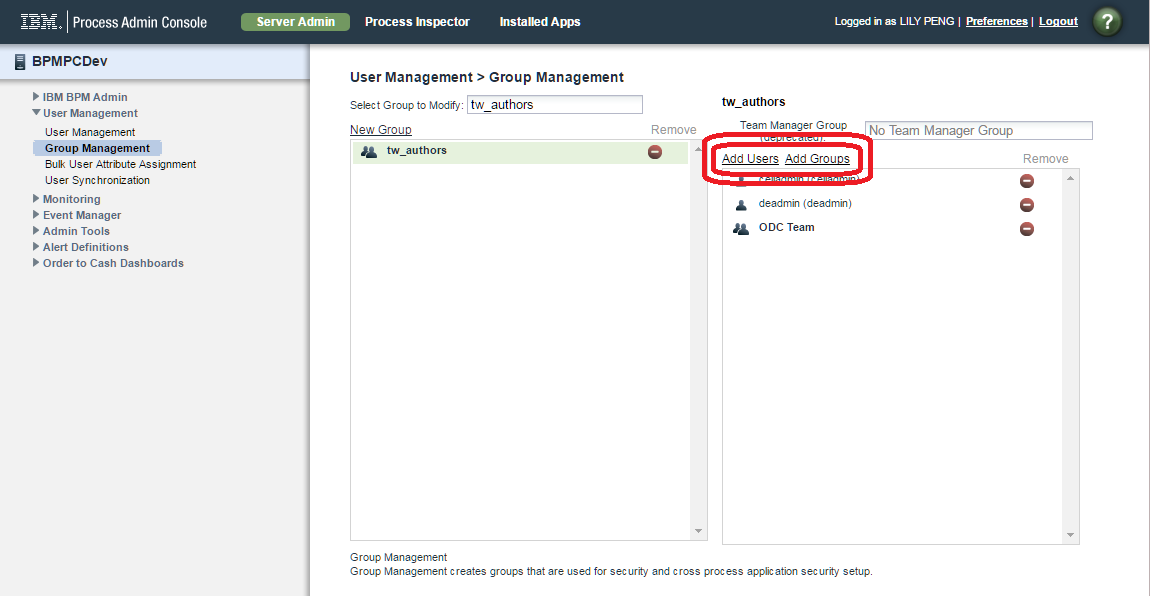
- BPM on Cloud Web Portal > User Management > Click user name link > Check tw_authors?box in Development

You will need to log out and log back in again after making the change.
BPM on Cloud screenshot of Process Center now showing the Create New Process App and Import Process App?options:

?
[{"Business Unit":{"code":"BU053","label":"Cloud & Data Platform"},"Product":{"code":"SSQTW3","label":"IBM On Demand Consulting for Hybrid Cloud"},"Component":"","Platform":[{"code":"PF025","label":"Platform Independent"}],"Version":"All Versions","Edition":"","Line of Business":{"code":"","label":""}}]
Was this topic helpful?
Document Information
Modified date:
16 March 2019
UID
ibm10771857