Troubleshooting
Problem
This IBM WebSphere Transformation Extender (WTX) / IBM Transformation Extender (ITX) document describes a simple load library test tool that you can use to collect diagnostic information when your system experiences an issue loading a WTX / ITX adapter on a Windows platform.
Symptom
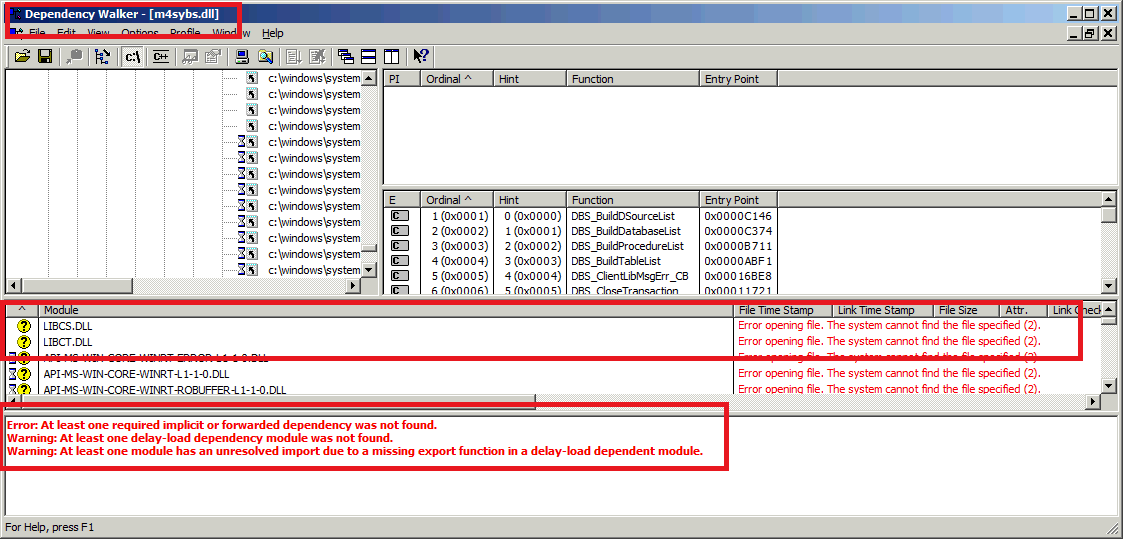
In the following screen shot, you can see that I have purposely loaded the WTX / ITX m4sybs.dll library into the Dependancy Walker utility on a computer that does not have the relevant Sybase client library loaded.
The tool clearly indicates that the required client libraries are missing.
Resolving The Problem
Dependency Walker or depends.exe is a free program for Microsoft Windows used to list the imported and exported functions of a portable executable file (EXE) or Dynamic Link Library file (DLL). It also displays a recursive tree of all the dependencies of the executable/library file (all the files it requires to run). If it fails to open a required library, it reports the error code. This can be exported as a .DWI file and provided to IBM Technical Support for further analysis. Open a problem record (PMR) before submitting results.
http://www.dependencywalker.com
Related Information
Was this topic helpful?
Document Information
Modified date:
29 September 2018
UID
swg21993518